Freedom251 › Contact Management Software

OfficeClip Contact Manager
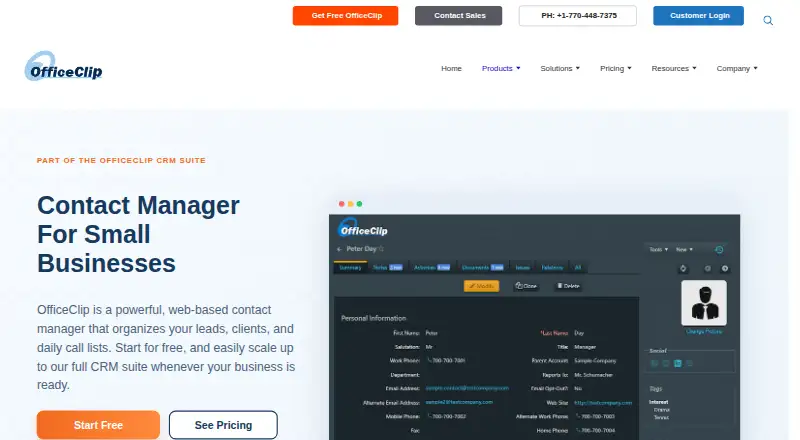
What OfficeClip Contact Manager is
OfficeClip Contact Manager is a web-based system for organizing leads, clients, companies, communications, call lists, and customer history. It combines contact records with notes, activity history, calls, follow-ups, tasks, calendars, documents, reports, permissions, and a customer portal. Search, filters, hierarchical tags, drip marketing, campaigns, invoices, and lead capture support contact-related workflows. The free web edition includes unlimited users and contacts, document management, and campaign creation. OfficeClip can run as a hosted cloud service or be installed on an organization's servers or private cloud. It lists integrations with Google Forms, Zapier, Amazon SES, Mailjet, and SocketLabs, along with Google and Outlook synchronization. The Outlook add-in can sync contacts, notes, calendar events, and tasks in one or both directions. Security controls include record- and feature-level permissions, custom roles, two-factor authentication, encryption, backups, and audit trails. Standard Edition is free; Professional Edition is $5 a month, and Enterprise Edition is $18 a month. Installed editions cost $36, paid once for Professional and $144, paid once for Enterprise.
Who it suits
It suits small businesses, service firms, recruiting teams, and sales teams that need shared contact records and follow-up workflows. Organizations can choose hosted service or installation on their own servers or private cloud.
What it does well
- Free edition has unlimited users and contacts.
- Includes calls, follow-ups, tasks, and calendars.
- Supports Google and Outlook synchronization.
- Offers hosted and self-hosted deployment.
- Provides record-level permissions and audit trails.
What to know first
- Installed editions require one-time payments.
- Professional and Enterprise hosted plans are billed per user-month.
Limits
The free web Standard Edition includes unlimited users and contacts, document management, and campaign creation. Hosted Professional Edition costs $5 a month per user and Enterprise Edition costs $18 a month per user; both include a 30-day free trial with no credit card required.
Plans
| Plan | Billed and limits | Price |
|---|---|---|
| Standard Edition | free forever · no user or time limit · unlimited upgrades · unlimited file uploads · mobile access · customer portal | Free |
| Enterprise Edition (Installed) | one-time per user · installed on computer or private cloud · operates behind firewall | $144, paid once |
| Enterprise Edition | per user-month · 30-day free trial · no credit card · unlimited file uploads · yearly payment 10% discount | $18 a month |
| Professional Edition (Installed) | one-time per user · installed on computer or private cloud · operates behind firewall | $36, paid once |
| Professional Edition | per user-month · 30-day free trial · no credit card · unlimited file uploads · yearly payment 10% discount | $5 a month |
As officeclip.com lists them, read 1 Oct 2026. The maker's own page has the final word.
Getting started
- Visit the OfficeClip Contact Manager website.
- Choose the hosted cloud service or an installed deployment on your organization's servers or private cloud.
- Start with the free Standard Edition, or select a paid hosted or installed edition.
- Import contacts from CSV, Google Contacts, or Outlook.
- Connect listed integrations or configure Google or Outlook synchronization as needed.
Verdict
OfficeClip brings contact records, follow-ups, communications, and customer history into one system, with a free web edition and self-hosted options. Its listed paid plans range from per-user monthly subscriptions to one-time installed editions.
Questions
Is there a free plan?
Yes. Standard Edition is free, with no user or time limit. It includes unlimited users and contacts, document management, and campaign creation.
What do the hosted paid plans cost?
Professional Edition is $5 a month per user, and Enterprise Edition is $18 a month per user. Both offer a 30-day free trial with no credit card required.
Are installed editions available?
Yes. Professional Edition (Installed) costs $36, paid once per user, and Enterprise Edition (Installed) costs $144, paid once per user.
Which platforms are listed?
The listed platforms are Android, API, extension, iOS, self-hosted, web, and Windows.
Can it synchronize with Outlook?
Yes. The Outlook Add-in syncs contacts, notes, calendar events, and tasks, with one-way or two-way synchronization options.
What integrations are listed?
OfficeClip lists Google Forms, Zapier, Amazon SES, Mailjet, and SocketLabs, as well as synchronization with Google and Outlook.
Facts from OfficeClip Contact Manager's own pages
- Advanced features
- Listed Contact Manager features include search and filters, drip marketing, hierarchical tags, campaigns, invoices, customer portal, lead capture, daily call lists and smartphone access. · officeclip.com, 1 Oct 2026
- API
- OfficeClip provides a developer API with documentation for its business, data-access and utility layers plus source-code walkthroughs. · officeclip.com, 1 Oct 2026
- Core features
- The product includes contacts and companies, notes and activity history, calls and follow-ups, tasks and calendar, documents and customer portal, reports and permissions. · officeclip.com, 1 Oct 2026
- Deployment
- OfficeClip can be used as a hosted cloud service or installed on an organization's own servers or private cloud. · officeclip.com, 1 Oct 2026
- Free edition
- The free web Contact Manager provides unlimited users, unlimited contacts, document management and campaign creation. · officeclip.com, 1 Oct 2026
- Hosted security
- OfficeClip states that its hosted data center is in the United States and certified to ISO27001, HIPAA, ISO 90001, PCI-DSS and SOC2-Type2 standards. · officeclip.com, 1 Oct 2026
- Integrations
- OfficeClip lists integrations with Google Forms, Zapier, Amazon SES, Mailjet and SocketLabs, and synchronization with Google and Outlook. · officeclip.com, 1 Oct 2026
- Outlook sync
- The Outlook Add-in synchronizes contacts, notes, calendar events and tasks between OfficeClip and Microsoft Outlook, with one-way or two-way synchronization options. · officeclip.com, 1 Oct 2026
- Purpose
- OfficeClip Contact Manager is a web-based contact manager for organizing leads, clients, companies, call lists, communications and customer history. · officeclip.com, 1 Oct 2026
- Security controls
- Contact Manager provides feature-level and record-level permissions, custom roles, ownership-based visibility, 256-bit SSL encryption, daily multi-location backups, two-factor authentication and audit trails. · officeclip.com, 1 Oct 2026
- Support
- OfficeClip says it provides phone support during business hours, 24/7 email support and chat support. · officeclip.com, 1 Oct 2026
- Target users
- The Contact Manager is presented for small businesses, service firms, recruiting teams and sales teams. · officeclip.com, 1 Oct 2026
Where OfficeClip Contact Manager stands on Freedom251
- Contact Management Software#16 of 39