Freedom251 › Accounts Payable Software
OCTA AP Automation
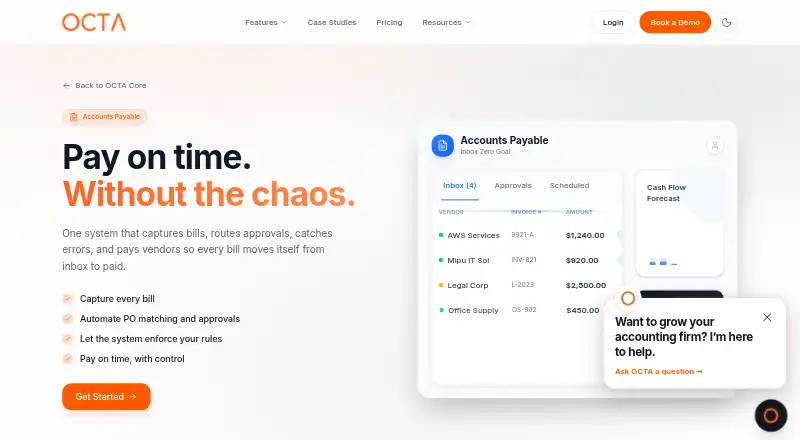
What OCTA AP Automation is
OCTA AP Automation is the accounts-payable offering within OCTA Core, a finance workflow platform for SMEs and enterprises that also covers accounts receivable and bank reconciliation. It captures invoices from email, compares purchase orders, receipts, and invoices, and flags mismatches. Visual rules can route approvals by amount, vendor, entity, category, or custom criteria; users can approve hundreds of invoices in one click. Payment methods include ACH, wire transfer, card payments, and checks, while recurring bills can be scheduled automatically. For reconciliation, OCTA matches cleared payments to invoices, handles partial payments and overpayments, and syncs balances with accounting systems. The platform supports multiple entities and currencies and lists more than 30 integrations, including Xero, QuickBooks Online, Zoho Books, Oracle Fusion, and NetSuite. OCTA says connections use encrypted OAuth or API keys and generally require no engineering work or data migration. It states that it holds SOC 2 Type II and ISO 27001 certifications. Most businesses go live within 5–10 business days using guided setup. Pricing is on request; OCTA offers a personalized demo and says an expert will respond within one business day.
Who it suits
OCTA AP Automation suits SME and enterprise finance teams seeking invoice approvals, payment handling, and reconciliation in a multi-entity workflow. It may also fit teams using one of the listed accounting integrations.
What it does well
- Routes invoices using visual approval rules
- Supports ACH, wire, cards, and checks
- Handles partial payments and overpayments
- Supports multiple entities and currencies
What to know first
- Pricing is available on request
- Listed platforms are web and API
- Most businesses go live within 5–10 business days
Plans
| Plan | Billed and limits | Price |
|---|---|---|
| OCTA Core AP Automation | Ask OCTA about Core pricing for finance teams | On request |
As weareocta.com lists them, read 3 Oct 2026. The maker's own page has the final word.
Getting started
- Visit the OCTA AP Automation website.
- Request a personalized demo and ask about Core pricing.
- Use OCTA's guided setup wizard to configure the system.
- Connect accounting or other listed services using OAuth or API keys.
Verdict
OCTA brings invoice capture, approval, payment, and reconciliation tasks into a broader finance workflow platform. Pricing requires a request, and the stated guided implementation timeline is 5–10 business days for most businesses.
Questions
How much does OCTA AP Automation cost?
Pricing is available on request. OCTA invites finance teams to ask about Core pricing.
Which platforms does it support?
OCTA AP Automation is available on web and through an API.
How does it capture invoices?
Invoice capture is through email.
Which accounting integrations are listed?
They include Xero, QuickBooks Online, Zoho Books, Wafeq, FreshBooks, Oracle Fusion Cloud, NetSuite, Microsoft Dynamics 365 Business Central and Odoo.
Which payment methods does it support?
Supported methods include ACH, wire transfer, card payments and checks. Listed payment processors include Stripe, Tap Payments, Mamo Pay, Paymob, Hyperpay, STC Pay, Telr, Noon Payments, Mada and SADAD.
How long does implementation take?
OCTA says most businesses go live within 5–10 business days using a guided setup wizard, without custom code.
Facts from OCTA AP Automation's own pages
- Approvals
- Visual approval workflows can route invoices by amount, vendor, entity, category, or custom rules. · weareocta.com, 3 Oct 2026
- Approval workflows
- Yes · weareocta.com, 22 Sept 2026
- Batch approval
- Users can review and approve hundreds of invoices in one click. · weareocta.com, 3 Oct 2026
- Credential handling
- OCTA says it does not store third-party banking or accounting credentials. · weareocta.com, 3 Oct 2026
- Founded
- 2024 · weareocta.com, 28 Sept 2026
- Headquarters
- San Francisco, United States · weareocta.com, 28 Sept 2026
- Implementation
- OCTA says most businesses go live within 5–10 business days using a guided setup wizard, without custom code. · weareocta.com, 3 Oct 2026
- Integrations
- OCTA lists 30+ integrations, including Xero, QuickBooks Online, Zoho Books, Wafeq, Oracle Fusion, NetSuite, Gmail, and Slack. · weareocta.com, 3 Oct 2026
- Integration setup
- OCTA says connections use encrypted OAuth or API keys and generally require no engineering work or data migration. · weareocta.com, 3 Oct 2026
- Invoice capture
- AP invoices can be captured from Gmail, Outlook, the supplier portal, and an accounting system. · weareocta.com, 3 Oct 2026
- Matching
- Three-way matching compares purchase orders, receipts, and invoices, and flags mismatches. · weareocta.com, 3 Oct 2026
- Multi-entity support
- Yes · weareocta.com, 22 Sept 2026
- Payment execution
- Yes · weareocta.com, 22 Sept 2026
- Payments
- Supported payment methods include ACH, wire transfer, card payments, and checks; recurring bills can be auto-scheduled. · weareocta.com, 3 Oct 2026
- PO matching
- Yes · weareocta.com, 22 Sept 2026
- Purpose
- OCTA Core automates finance workflows for SMEs and enterprises, including accounts payable, accounts receivable, and bank reconciliation. · weareocta.com, 3 Oct 2026
- Reconciliation
- OCTA matches cleared payments to invoices, handles partial payments and overpayments, and syncs balances to the accounting system. · weareocta.com, 3 Oct 2026
- Security
- OCTA states it has SOC 2 Type II and ISO 27001 certifications and uses TLS/SSL in transit, AES-256 at rest, multi-factor authentication, role-based access, and audit logging. · weareocta.com, 3 Oct 2026
- Support and sales
- OCTA invites finance teams to request a personalized demo and ask about Core pricing; it says an expert will respond within one business day. · weareocta.com, 3 Oct 2026
Where OCTA AP Automation stands on Freedom251
- Accounts Payable Software#69 of 97