Freedom251 › AI Whiteboard Software
Nuxoboard
What Nuxoboard is
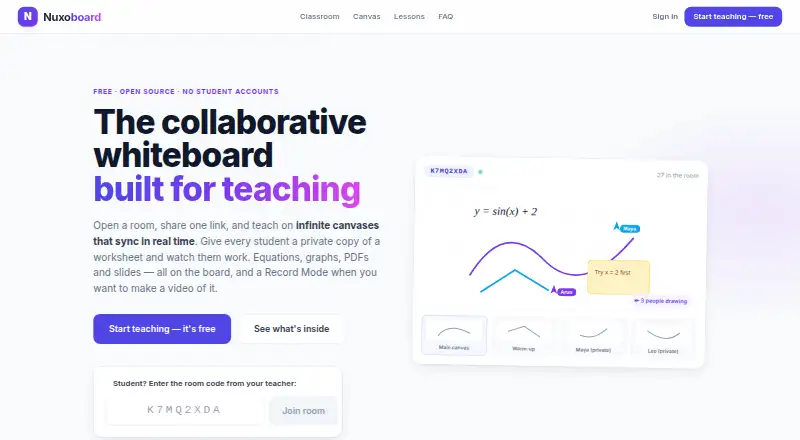
Nuxoboard is a free collaborative whiteboard for teaching, with shared rooms and canvases that update in real time. Students can enter through a room link or eight-character code, provide a name and start without an account or installation. Teachers can assign private canvas copies, follow student work as it changes and annotate it. Classroom controls include a lobby, read-only rooms, per-student tool restrictions and participant removal. The board provides LaTeX equations, function graphs, a scientific calculator, a unit converter, and ruler and protractor overlays. Teaching tools include breakout groups, presentations to student screens, room chat, private teacher–student messages, hand raising and reactions. Users can import PDFs, images, Word, PowerPoint, Excel and OpenDocument files, and embed YouTube, Vimeo and web pages with synchronized playback. Canvases export as PNG or multi-page PDF; rooms can be exported as ZIP files. Optional AI helpers suggest worksheet drafts, grading ideas and session summaries for teacher confirmation. Nuxoboard is MIT-licensed and can be self-hosted on a school's server.
Who it suits
Nuxoboard is suited to teachers and students in live classes, tutoring sessions, recorded lectures and self-paced worksheet activities. Its account-free student access and classroom controls support shared and individual work.
What it does well
- Free plan with no per-seat pricing
- Students join without accounts or installation
- Private canvases with live teacher review
- PNG, PDF and ZIP exports
- Can be self-hosted under MIT license
What to know first
- AI diagram creation is not supported
- Teachers sign up with email
Limits
The Free plan is free forever and has no per-seat pricing. Optional AI helpers can suggest worksheet drafts, grading suggestions, and session summaries, but AI diagram creation is not available.
Plans
| Plan | Billed and limits | Price |
|---|---|---|
| Free | Free forever · No per-seat pricing · Teachers sign up with email; students need no account | Free |
As nuxoboard.com lists them, read 2 Oct 2026. The maker's own page has the final word.
Getting started
- Visit the Nuxoboard website.
- Teachers sign up with email.
- Create a room and share its link or eight-character code with students.
- Students enter a name to join without an account or installation.
- Use the web app, or self-host the MIT-licensed software.
Verdict
Nuxoboard combines teaching-oriented whiteboard tools with classroom management, file import and export, and optional AI helpers. Its free plan and self-hosting option may suit schools that want control over classroom data.
Questions
Is Nuxoboard free?
Yes. Its Free plan is free forever and has no per-seat pricing.
Do students need an account?
No. Students join using a room link or eight-character code, enter a name, and need no account or installation.
Which platforms does Nuxoboard support?
Nuxoboard supports the web. It can also be self-hosted.
Is Nuxoboard open source?
Yes. It is MIT-licensed and can be self-hosted.
What can users export?
Canvases can be exported as PNG or multi-page PDF, and a whole room can be exported as a ZIP.
What AI features are available?
Optional AI helpers suggest worksheet drafts, grading suggestions, and session summaries for the user to confirm. AI diagram creation is not available.
Facts from Nuxoboard's own pages
- AI helpers
- Optional AI helpers propose worksheet drafts, grading suggestions, and session summaries for the user to confirm. · nuxoboard.com, 2 Oct 2026
- Classroom controls
- Teachers can use a lobby, set a room to read-only, disable a tool for one student, or remove a participant. · nuxoboard.com, 2 Oct 2026
- Exports
- Users can export a canvas as PNG or multi-page PDF, or export the whole room as a ZIP. · nuxoboard.com, 2 Oct 2026
- File support
- Users can import PDFs, images, Word, PowerPoint, and Excel files, and the FAQ also names OpenDocument files for automatic server conversion. · nuxoboard.com, 2 Oct 2026
- Intended users
- The product is presented for teachers and students, including live classes, tutoring sessions, recorded lectures, and self-paced worksheets. · nuxoboard.com, 2 Oct 2026
- Math tools
- The board includes LaTeX equations, function graphs, a scientific calculator, a unit converter, and ruler and protractor overlays. · nuxoboard.com, 2 Oct 2026
- Media embeds
- Users can embed YouTube, Vimeo, and web pages on the canvas, with playback synchronized for everyone. · nuxoboard.com, 2 Oct 2026
- Open source and hosting
- Nuxoboard is MIT-licensed and can be self-hosted so classroom data stays on the school's own server. · nuxoboard.com, 2 Oct 2026
- Privacy claim
- The site says Nuxoboard has no student tracking and students do not need accounts. · nuxoboard.com, 2 Oct 2026
- Private student work
- Teachers can give each student a private canvas copy and view or annotate it while it updates live. · nuxoboard.com, 2 Oct 2026
- Product
- Nuxoboard is a collaborative whiteboard built for teaching, with shared rooms and canvases that sync in real time. · nuxoboard.com, 2 Oct 2026
- Recording
- Record Mode hides panels and displays the canvas fullscreen with a minimal toolbar for use with any screen recorder. · nuxoboard.com, 2 Oct 2026
- Student access
- Students join by room link or 8-character code, enter a name, and do not need an account or installation. · nuxoboard.com, 2 Oct 2026
- Teaching features
- Rooms support breakout groups, presentations to student screens, room chat, private teacher–student messages, hand raising, and reactions. · nuxoboard.com, 2 Oct 2026
Where Nuxoboard stands on Freedom251
- AI Whiteboard Software#23 of 27