Freedom251 › AI Whiteboard Software
OpenServe Whiteboard
What OpenServe Whiteboard is
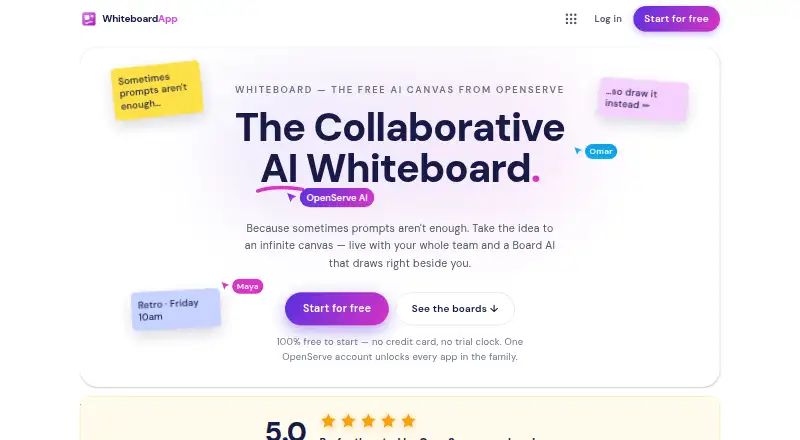
OpenServe Whiteboard is a web-based collaborative canvas for teams creating diagrams, flows, and plans. Multiple people can work on a board at once, with real-time cursors, shapes, and notes. Board AI can turn a written description into canvas elements as they appear. Connectors remain attached to their shapes when people rearrange the board, and tools include a pen, highlighter, sticky notes, text, images, and snap-to-align guides. Ready-made boards cover retrospectives, brainstorms, flowcharts, planning grids, kanban, SWOT, and journey maps. Boards are stored in OpenServe Drive, with version history, sharing links, live co-editing, and PNG export. Companies can create a workspace with their name, logo, and colors, invite teammates by email, and use one subscription for every seat. The free plan costs nothing and includes unlimited boards, collaboration, templates, sharing, and PNG export; Pro is available for heavier AI use. OpenServe says customer content, including prompts and files, is not used to train its own or third-party AI models.
Who it suits
It suits teams that want to collaborate visually on diagrams, plans, and brainstorming boards in a browser. The listed audiences include founders, marketers, analysts, consultants, operations teams, students, researchers, and creators.
What it does well
- Supports real-time co-editing.
- Board AI turns descriptions into canvas elements.
- Includes templates for planning and brainstorming.
- Boards have version history and PNG export.
- Free plan includes unlimited boards.
What to know first
- Available on web only.
- PNG is the listed export format.
- Pro is available for heavier AI use.
Limits
The Free plan costs nothing and includes unlimited boards, collaboration, templates, sharing, and PNG export. Pro is available for heavier AI use.
Plans
| Plan | Billed and limits | Price |
|---|---|---|
| Free | Unlimited boards · real-time collaboration · templates · sharing · PNG export · Pro is available for heavier AI use | Free |
As openserve.com lists them, read 3 Oct 2026. The maker's own page has the final word.
Getting started
- Open the OpenServe Whiteboard website
- Sign in or create an OpenServe account
- Create a board or choose a ready-made template
- Invite teammates by email for shared editing
- Describe a diagram, flow, or plan to Board AI
- Share the board link or export it as PNG
- Create a branded workspace with your name, logo, and colors
Verdict
OpenServe Whiteboard combines live team editing, templates, and AI-assisted canvas creation. Its free plan covers core board work, while heavier AI use is positioned for Pro.
Questions
Is OpenServe Whiteboard free?
Yes. The Free plan is listed as free and includes unlimited boards, real-time collaboration, templates, sharing, and PNG export.
What platforms does it support?
OpenServe Whiteboard is available on the web.
What can Board AI create?
You can describe a diagram, flow, or plan, and Board AI streams the elements onto the canvas.
Can teams collaborate on one board?
Yes. Multiple people can work on a board at once with real-time cursors, shapes, and notes.
How can boards be exported?
Boards can be exported as PNG files. They are also stored in OpenServe Drive with version history and share links.
Is customer content used to train AI models?
OpenServe says customer content, including prompts and files, is not used to train its own or third-party AI models.
Facts from OpenServe Whiteboard's own pages
- Account and integrations
- One OpenServe account unlocks the apps in the OpenServe family, and Whiteboard boards live in OpenServe Drive; the page does not name third-party integrations. · openserve.com, 3 Oct 2026
- Board AI
- Users can describe a diagram, flow, or plan and Board AI streams the elements onto the canvas. · openserve.com, 3 Oct 2026
- Company
- OpenServe Holdings says it was founded in 2026; its CEO is listed in Sarasota, Florida, but the page does not state a company headquarters. · openserve.com, 3 Oct 2026
- Connected shapes
- Connectors stay attached to the shapes they join as users rearrange the board. · openserve.com, 3 Oct 2026
- Drawing tools
- The canvas includes pen, highlighter, sticky notes, text, images, and snap-to-align guides. · openserve.com, 3 Oct 2026
- Intended users
- The product page lists founders, marketers, analysts and finance professionals, consultants, sales, operations, students and researchers, and creators as audiences. · openserve.com, 3 Oct 2026
- Live collaboration
- Multiple people can work on a board at once with real-time cursors, shapes, and notes. · openserve.com, 3 Oct 2026
- Privacy
- OpenServe's privacy notice says customer content, including prompts and files, is not used to train its own or third-party AI models. · openserve.com, 3 Oct 2026
- Product
- OpenServe Whiteboard is a collaborative AI canvas for teams to draw together and create diagrams, flows, and plans. · openserve.com, 3 Oct 2026
- Saving and export
- Boards are stored in Drive with version history, share links, live co-editing, and PNG export. · openserve.com, 3 Oct 2026
- Security
- OpenServe says it uses TLS in transit, AES-256-GCM encryption for connected-account credentials, role-based administrative access with audit logging, and automated security testing; it lists SOC 2 alignment as in progress. · openserve.com, 3 Oct 2026
- Support
- OpenServe lists [email protected] for general inquiries and says a dedicated support inbox is being set up. · openserve.com, 3 Oct 2026
- Team workspace
- Companies can create a workspace with their name, logo, and colors, invite teammates by email, and use one subscription for every seat. · openserve.com, 3 Oct 2026
- Templates
- The page offers ready-made boards for retrospectives, brainstorms, flowcharts, planning grids, kanban, SWOT, and journey maps. · openserve.com, 3 Oct 2026
Where OpenServe Whiteboard stands on Freedom251
- AI Whiteboard Software#24 of 27