napp-it
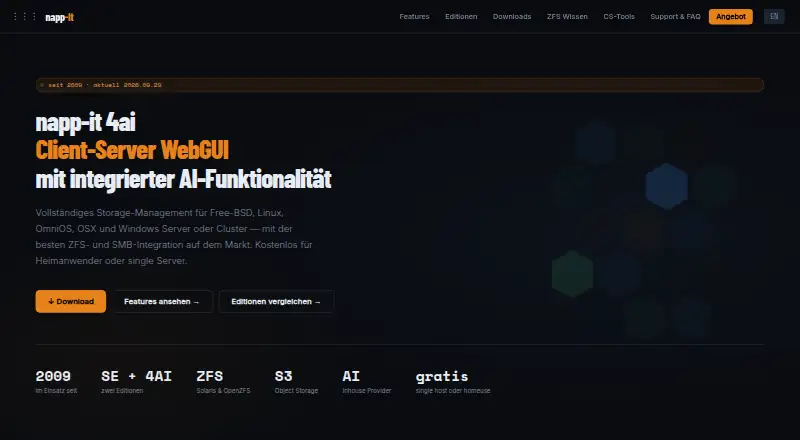
What napp-it is
napp-it is a web-based client-server interface for managing storage on individual machines or across server fleets. It supports in-house storage servers and clusters, S3 cloud servers, and AI providers. Its central interface can manage one server or many without an agent or extra virtual machine. The GUI runs on FreeBSD, Illumos, Linux, macOS, Solaris, and Windows, and sharing protocols include SMB, NFS, S3, iSCSI, and Fibre Channel. ZFS features include AES-256-GCM encryption, end-to-end checksums, snapshots, automatic healing, and optional real-time deduplication. Replication is incremental, can link arbitrary servers, and can be encrypted in transit. The S3-compatible endpoint works with Nextcloud, rclone, backup tools, and MinIO clients. Monitoring covers performance, S.M.A.R.T. disk health, JBOD enclosure maps, and network virtualization. CS Home costs nothing for noncommercial home use, up to three servers, with no support. SE Free costs nothing for home or commercial use, without individual support or Pro features. New installations include a 30-day evaluation of Pro features.
Who it suits
napp-it suits home users and commercial teams managing storage servers or clusters. Resellers can also use it to build branded NAS interfaces.
What it does well
- Central interface manages server fleets without an agent.
- Supports SMB, NFS, S3, iSCSI, and Fibre Channel.
- Incremental replication can be encrypted in transit.
- Includes snapshots and automatic ZFS healing.
What to know first
- CS Home is limited to three servers.
- CS Home includes no support.
- SE Free excludes Pro features and individual support.
Plans
| Plan | Billed and limits | Price |
|---|---|---|
| CS Home | noncommercial home use · max. 3 servers · no capacity limit · no support | Free |
| SE Free | commercial and home use · no capacity limit · no individual support · no Pro features | Free |
| Pro | commercial use · individual support · bugfix updates · latest-version updates | On request |
| Reseller / Bundling | redistribution · bundling · customer setup · service-provider terms | On request |
As napp-it.org lists them, read 2 Oct 2026. The maker's own page has the final word.
napp-it is a client-server web GUI for managing storage on individual machines or server fleets. It is best suited to operators running in-house storage, S3 or AI infrastructure who want centralized management across multiple protocols. Its broad ZFS toolkit is compelling, but the free editions impose important commercial-use, feature and support trade-offs.
Overview
A central web interface can manage one machine or an entire server fleet without an agent or extra VM. napp-it targets in-house storage servers and clusters, S3 cloud servers and AI providers. That scope favors administrators building or maintaining infrastructure over buyers looking for a narrow, turnkey file-sharing appliance.
The feature set includes storage pools, user management, snapshots, containers, virtual machines and cloud sync. Sharing protocols span SMB, NFS, S3, iSCSI and Fibre Channel, giving operators options for different workloads within one management interface. The breadth is useful in mixed environments, but the product is best matched to people prepared to manage storage infrastructure.
Key features
ZFS brings native AES-256-GCM encryption, end-to-end checksums, snapshots and automatic healing. Optional real-time deduplication adds another storage-management option, though its value depends on the workload. Incremental replication can move data between arbitrary servers and encrypt it during transfer, a useful combination for distributed deployments.
The S3-compatible object-storage endpoint works with Nextcloud, rclone, backup tools and MinIO clients. Solaris Edition adds Active Directory integration and stores Windows SIDs as native ZFS attributes, making it the edition to consider when that identity integration matters. Monitoring covers real-time performance, disk health through S.M.A.R.T., JBOD enclosure maps and network virtualization. The CS backend service uses approximately 60KB of RAM per remote server, a modest per-server footprint for remote management.
Pricing
napp-it uses a freemium model, with two free plans serving different needs. CS Home costs nothing for noncommercial home use, allows up to three servers with no capacity limit, and includes no support. It suits a home operator managing a small server setup; the server cap and noncommercial restriction rule it out for commercial deployments.
SE Free costs nothing for commercial or home use, with no capacity limit. It provides no individual support and excludes Pro features, so it is the free option for commercial users willing to work without those benefits. Pro has custom pricing and includes commercial use, individual support, bugfix updates and latest-version updates. That is the relevant choice for organizations that need support and continuing updates, but its cost must be weighed against the deployment budget.
Reseller / Bundling also has custom pricing. It covers redistribution, bundling, customer setup and service-provider terms, making it the plan to pursue for resellers building branded NAS offerings. A new installation includes a 30-day evaluation of Pro features; that trial gives prospective users a time-limited way to assess those capabilities before choosing an edition.
Platforms
The GUI runs on FreeBSD, Illumos, Linux, macOS, Solaris and Windows. The product is also categorized for API, web and self-hosted use, which fits deployments where the management interface belongs alongside infrastructure the operator runs.
Who it's for
napp-it is aimed at home users, commercial deployments, storage servers, server clusters and resellers. Home users can choose CS Home if they stay within three servers and use it noncommercially; commercial operators can start with SE Free if they can forgo individual support and Pro features. Teams that need supported updates should consider Pro, while resellers have a dedicated redistribution and bundling plan.
Pros and cons
- Pros: One central interface manages a machine or fleet without an agent or extra VM, which avoids adding a separate management layer on each server.
- Pros: ZFS protection and replication cover encryption, checksums, snapshots, healing and encrypted incremental transfers, giving storage operators a substantial set of built-in capabilities.
- Pros: Multiple sharing protocols and an S3-compatible endpoint support varied storage clients and workloads.
- Cons: CS Home is limited to three servers and noncommercial use, so it is not a free route for business deployments.
- Cons: SE Free excludes Pro features and individual support, while CS Home has no support; users needing either should account for custom-priced Pro.
- Cons: The infrastructure-oriented scope is a poor fit for buyers who only need a simple file-sharing appliance.
Alternatives
For a different NAS option, browse NAS Software. Consider ZimaOS if its free plan’s Core features, mobile and PC client, Thunderbolt support and Developer Mode suit your requirements. TrueNAS is an alternative for users seeking a free Community Edition download for any x86 hardware with community support.
NovaNAS is a free alternative that requires Debian 13 and at least 2GB RAM, a 1-core CPU and a 20GB system drive plus data drives. OSNEXUS QuantaStor may suit non-commercial, educational or testing use within its Community Edition limits of 80TB raw capacity and four servers per storage grid. DPlaneOS offers a free AGPLv3 Community Edition for use, modification and distribution on hardware you own.
OpenNAS is another free, self-hosted option. PetaSAN offers a free open-source platform on a self-support basis, while ZetaNAS has a free self-hosted community edition.
Verdict
Choose napp-it if you need centralized management for ZFS storage across servers and value its protocol coverage, replication and monitoring in one interface. Its strongest case is for operators who can match their use to CS Home or SE Free, or who need Pro support and updates enough to pursue custom pricing. Look elsewhere if you want a simpler appliance experience or cannot accept the free editions’ server, commercial-use, feature or support limits.
Verdict
napp-it brings storage management, ZFS capabilities, and several sharing protocols into one interface. Check the plan limits and support terms against your deployment before choosing a free option.
Facts from napp-it's own pages
- Central management
- A central web interface can manage one machine or an entire server fleet without an agent or extra VM. · napp-it.org, 2 Oct 2026
- Founded
- 2009 · napp-it.org, 28 Sept 2026
- Identity integration
- The Solaris Edition provides Active Directory integration and stores Windows SIDs as native ZFS attributes. · napp-it.org, 2 Oct 2026
- Monitoring
- Monitoring includes real-time performance, disk health through S.M.A.R.T., JBOD enclosure maps and network virtualization. · napp-it.org, 2 Oct 2026
- Operating systems
- The GUI runs on FreeBSD, Illumos, Linux, macOS, Solaris and Windows. · napp-it.org, 2 Oct 2026
- Product type
- napp-it is a client-server web GUI for complete storage management. · napp-it.org, 2 Oct 2026
- Remote backend
- The CS backend service uses approximately 60KB of RAM per remote server. · napp-it.org, 2 Oct 2026
- Replication
- ZFS replication is incremental, can run between arbitrary servers and can be encrypted during transfer. · napp-it.org, 2 Oct 2026
- S3 integrations
- The S3-compatible object-storage endpoint is compatible with Nextcloud, rclone, backup tools and MinIO clients. · napp-it.org, 2 Oct 2026
- Storage protocols
- Supported sharing protocols include SMB, NFS, S3, iSCSI and Fibre Channel. · napp-it.org, 2 Oct 2026
- Support
- Pro licenses include support, bugfixes and updates, while the CS Home plan explicitly includes no support. · napp-it.org, 2 Oct 2026
- Target users
- The product is positioned for home users, commercial deployments, storage servers, server clusters and resellers building branded NAS interfaces. · napp-it.org, 2 Oct 2026
- Trial
- The official napp-in-One guide states that a new installation includes a 30-day evaluation of Pro features. · napp-it.org, 2 Oct 2026
- Use cases
- The product supports in-house storage servers or clusters, in-house S3 cloud servers or clusters, and in-house AI providers or clusters. · napp-it.org, 2 Oct 2026
- ZFS security
- ZFS features native AES-256-GCM encryption, end-to-end checksums, snapshots, automatic healing and optional real-time deduplication. · napp-it.org, 2 Oct 2026
Where napp-it stands on Freedom251
- NAS Software#3 of 21