DPlaneOS
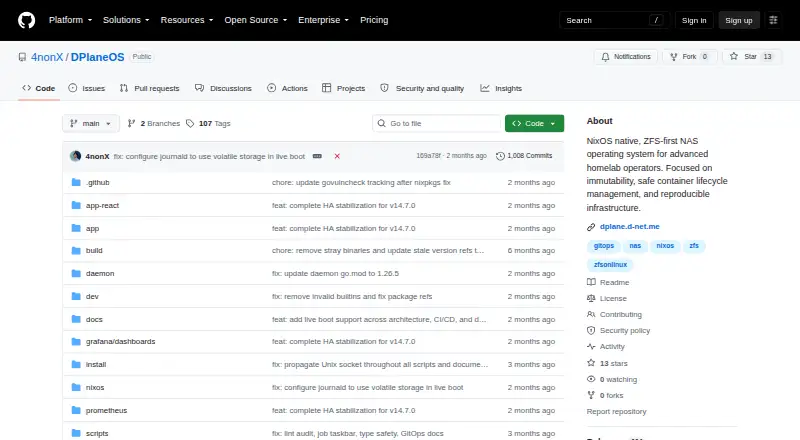
What DPlaneOS is
DPlaneOS is a free, ZFS-first storage operating system for homelab and small-office NAS deployments. It brings together a Go daemon, PostgreSQL state, a React interface and a NixOS appliance. Storage tools cover pools, datasets, snapshots, replication, encryption, quotas, S.M.A.R.T. and POSIX ACLs. It supports SMB with Time Machine, NFS, iSCSI and NVMe-oF sharing, and can manage Docker and Compose stacks, ZFS-clone sandboxes, atomic updates with rollback and an in-browser terminal. Identity options include local accounts, LDAP or Active Directory, OIDC SSO, TOTP 2FA and API tokens. Cloud synchronization supports S3, Backblaze B2, Google Drive, Azure, Dropbox and rclone-supported targets. Prometheus/OpenMetrics exposes storage, replication, HA and BMC sensor metrics. Installation supports x86_64 and aarch64, including Raspberry Pi 5, with offline ISOs. Minimum hardware is a 64-bit CPU and 8 GB RAM; 16 GB is recommended. HA is optional and disabled by default. The Community Edition costs nothing under AGPLv3. Several HA configurations and NVMe-oF over TCP are experimental; the project is maintained by one person and has no vendor support.
Who it suits
DPlaneOS suits homelab and small-office NAS operators seeking ZFS storage, file sharing and container management. It requires a 64-bit CPU and at least 8 GB RAM, and vendor support is not provided.
What it does well
- Free Community Edition under AGPLv3
- Supports SMB, NFS, iSCSI and NVMe-oF sharing
- Manages Docker and Compose stacks
- Offline ISOs support x86_64 and aarch64
- Cloud sync supports several services and rclone targets
What to know first
- Minimum hardware is 8 GB RAM
- HA is optional and off by default
- Several HA configurations are experimental
- No vendor support or phone number
Plans
| Plan | Billed and limits | Price |
|---|---|---|
| Community Edition | AGPLv3 · free to use, modify and distribute · any hardware you own | Free |
As github.com lists them, read 1 Oct 2026. The maker's own page has the final word.
Getting started
- Open the DPlaneOS GitHub website.
- Check that the hardware has a 64-bit CPU and at least 8 GB RAM.
- Choose an installer for x86_64 or aarch64; offline installation ISOs are available.
- Install the NixOS appliance and use the web interface.
DPlaneOS is a ZFS-centered operating system for self-hosted NAS setups, combining storage, file sharing and containers. It is best suited to technically capable homelab operators and small offices running their own hardware. The broad free feature set is attractive, but solo maintenance and immature HA components argue against relying on it for workloads that require accountable commercial support.
Overview
DPlaneOS packages a Go daemon, PostgreSQL state, React interface and NixOS appliance into one administration platform. Its GitOps workflow uses state.yaml to declare pools, datasets, shares, users and application stacks, with drift detection and blocking of destructive operations. That is a meaningful advantage for repeatable configuration, provided the administrator is comfortable owning the underlying system.
The project is maintained by one person and has no vendor support or phone number. That makes troubleshooting and lifecycle planning the user's responsibility, even though the Community Edition costs nothing. Several advanced capabilities are experimental, so the platform is more convincing for owner-operated infrastructure than for a business seeking a supported storage product.
Key features
Storage and sharing
ZFS pools and datasets, snapshots, replication, native encryption and quotas cover the essential storage lifecycle. S.M.A.R.T. monitoring and POSIX ACLs help with drive health and granular permissions. SMB includes Time Machine support, while NFS, iSCSI and NVMe-oF provide options for clients ranging from ordinary file shares to block and high-performance storage access.
Applications and identity
Docker and Compose stack management, ZFS-clone sandboxes, atomic updates with rollback and an in-browser terminal make the NAS an application host as well as a file server. Local accounts can be combined with LDAP or Active Directory through Winbind NSS, OIDC single sign-on, TOTP two-factor authentication, SCRAM-SHA-512 and API tokens. RBAC, an HMAC audit chain, CSRF protection, firewall and TLS controls are useful safeguards, while allowlist-validated execution and govulncheck in continuous integration address operational risk.
Cloud, monitoring and HA
Synchronization targets include S3, Backblaze B2, Google Drive, Azure, Dropbox and any rclone-supported destination, giving administrators broad backup and data-movement choices. Prometheus/OpenMetrics exposes ZFS health, dataset usage, scrub progress, replication state, HA peer health and BMC sensors for external monitoring. Optional shared-SAS and replicated-ZFS HA topologies exist, but HA is off by default and PostgreSQL HA, replicated-topology HA, shared-SAS HA and NVMe-oF over TCP are experimental. Those labels make them unsuitable as the foundation of an unproven failover design.
Pricing
Community Edition — free (AGPLv3; free to use, modify and distribute on any hardware you own). It includes storage pools, user management, snapshots, container support and cloud synchronization. There are no paid tiers or published seat and capacity charges. This is the natural choice for homelabs, experimentation and small offices willing to self-support; organizations needing vendor accountability should budget for a different product rather than infer support from the zero price.
Platforms
DPlaneOS provides an API, Linux and web interfaces in a self-hosted deployment. The installer supports x86_64 and aarch64, including Raspberry Pi 5, and offers offline installation ISOs. A 64-bit CPU and 8 GB RAM are the minimum; 16 GB is recommended, and ECC RAM is strongly recommended for ZFS. Those requirements should be checked before repurposing small hardware.
Who it's for
Choose DPlaneOS when you want one appliance to administer ZFS storage, network shares, cloud copies and containerized services, and you are prepared to maintain it yourself. GitOps and the broad identity and monitoring integrations particularly suit operators managing several machines or repeatable environments. Look elsewhere if you need a vendor escalation path, a staffed support organization or mature, proven HA for critical production data.
Pros and cons
- Pros: ZFS-first design with snapshots, replication, encryption and quotas; SMB, NFS, iSCSI and NVMe-oF sharing; Docker and Compose management with rollback; extensive identity, security and monitoring integrations; broad cloud-sync target support; free AGPLv3 use on owned hardware.
- Cons: One-person maintenance and no vendor support increase operational risk; multiple HA and NVMe-oF components are experimental; ZFS benefits from substantial memory and preferably ECC hardware; the operator remains responsible for deployment, updates and recovery.
Alternatives
For a wider shortlist, browse NAS Software.
- ZimaOS is a freemium option spanning mobile, desktop and self-hosted platforms, with a free plan that includes its client apps, Thunderbolt support and Developer Mode.
- TrueNAS is the better fit when you want a free Community Edition for any x86 hardware with community support.
- napp-it suits noncommercial home users who value a free, capacity-unlimited plan for up to three servers.
- NovaNAS is another free open-source NAS operating system, requiring Debian 13 and at least 2 GB RAM.
- OSNEXUS QuantaStor offers a free Community Edition capped at 80 TB raw capacity and four servers per grid for noncommercial, educational or testing use.
- OpenNAS provides a free, open-source x86_64 beta installer.
- PetaSAN is a free open-source storage platform using a self-support model.
- TurnKey File Server is a free Debian-based ready-to-use file-server image.
Verdict
DPlaneOS is a strong choice for skilled homelab owners and small offices that want ZFS, sharing, containers and synchronization in one free appliance. Its main reason to choose it is breadth without licensing cost; its main reason to look elsewhere is the combination of one-person maintenance, no vendor support and experimental HA features.
Verdict
DPlaneOS combines ZFS storage, sharing, container management and cloud synchronization in a free Community Edition. Check the hardware minimum and experimental status of some HA options, and note that vendor support is unavailable.
Questions
How much does DPlaneOS cost?
The Community Edition is free.
Is DPlaneOS open source?
The Community Edition is licensed under AGPLv3, which permits use, modification and distribution.
What platforms does it support?
Its listed platforms are API, Linux, self-hosted and web. The installer supports x86_64 and aarch64, including Raspberry Pi 5.
What hardware does it require?
The minimum is a 64-bit CPU and 8 GB RAM. 16 GB is recommended, and ECC RAM is strongly recommended for ZFS.
Does it offer high availability?
High availability is optional and off by default, with shared-SAS and replicated-ZFS topologies. Shared-SAS HA and replicated-topology HA are marked experimental.
Who maintains DPlaneOS, and is vendor support available?
The project is built and maintained by one person. It does not provide vendor support or a phone number.
Facts from DPlaneOS's own pages
- Architecture
- It uses a single Go daemon, PostgreSQL state, a React UI and a NixOS appliance. · github.com, 1 Oct 2026
- Containers
- It manages Docker and Compose stacks, ZFS-clone sandboxes, atomic updates with rollback and an in-browser terminal. · github.com, 1 Oct 2026
- File sharing
- The system supports SMB with Time Machine support, NFS, iSCSI and NVMe-oF sharing. · github.com, 1 Oct 2026
- GitOps
- GitOps uses state.yaml for declarative pools, datasets, shares, users and stacks, with drift detection and destructive-operation blocking. · github.com, 1 Oct 2026
- Hardware requirements
- Minimum hardware is a 64-bit CPU and 8 GB RAM, with 16 GB recommended and ECC RAM strongly recommended for ZFS. · github.com, 1 Oct 2026
- High availability
- HA is optional and off by default, with shared-SAS and replicated-ZFS topologies. · github.com, 1 Oct 2026
- Identity
- Identity features include local users, LDAP or Active Directory with Winbind NSS, OIDC SSO, TOTP 2FA, SCRAM-SHA-512 and API tokens. · github.com, 1 Oct 2026
- Installation
- The installer supports x86_64 and aarch64, including Raspberry Pi 5, and provides offline installation ISOs. · github.com, 1 Oct 2026
- Integrations
- Cloud synchronization supports S3, Backblaze B2, Google Drive, Azure, Dropbox and any rclone-supported target. · github.com, 1 Oct 2026
- Monitoring
- Prometheus/OpenMetrics exposes ZFS health, dataset usage, scrub progress, HA peer health, replication status and BMC sensor metrics. · github.com, 1 Oct 2026
- Project status
- PostgreSQL HA, replicated-topology HA, shared-SAS HA and NVMe-oF over TCP are marked experimental. · github.com, 1 Oct 2026
- Purpose
- DPlaneOS is a ZFS-first storage operating system for homelab and small-office NAS deployments. · github.com, 1 Oct 2026
- Security
- Security controls include RBAC, an HMAC audit chain, CSRF protection, firewall, TLS, allowlist-validated execution and govulncheck in CI. · github.com, 1 Oct 2026
- Storage
- Storage features include ZFS pools, datasets, snapshots, replication, native encryption, quotas, S.M.A.R.T. and POSIX ACLs. · github.com, 1 Oct 2026
- Support and maturity
- The project is built and maintained by one person and does not provide vendor support or a phone number. · github.com, 1 Oct 2026
Where DPlaneOS stands on Freedom251
- NAS Software#2 of 21