Freedom251 › Study Planner Apps
MyHomeworkSpace
What MyHomeworkSpace is
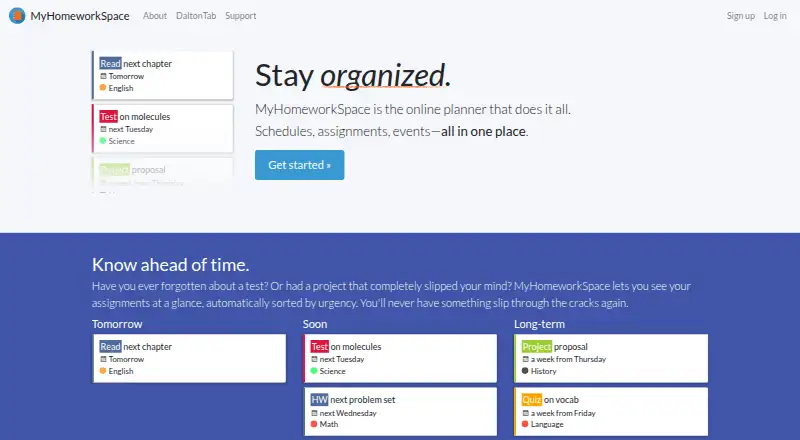
MyHomeworkSpace is a free online planner for students to organize homework, tests, quizzes, schedules, and events. Assignments are shown at a glance and sorted by urgency. Quick Add accepts plain-English assignment descriptions and parses details such as due dates and classes. Dashboard, Planner, and Calendar views stay synchronized. Users can create classes, connect homework to them, and choose class colors. The Calendar tab can connect a schedule when a user enters the password used to log into classes; the maker says it does not store a user's Dalton password. The product also provides a public API for programmatic account access, with sign-in and authorization from the user. Developers must request a Client ID by email or in-app feedback, as API access is not automated. MyHomeworkSpace is open source under the MIT License, and its site links to DaltonTab extensions for Chrome and Firefox. The maker describes the planner as made by students, for students. Teacher names currently appear only in Classes view and have no other functionality.
Who it suits
It suits students who want a free web planner for assignments, exams, schedules, and classes. Developers may also find its public API useful if they can request a Client ID.
What it does well
- Assignments are sorted automatically by urgency.
- Quick Add parses plain-English assignment details.
- Dashboard, Planner, and Calendar views stay in sync.
- Users can organize homework by class and color.
- Open source under the MIT License.
What to know first
- API access requires a requested Client ID.
- Teacher names only display in Classes view.
- Connecting a schedule requires a class login password.
Limits
The free plan is listed as free, with no other limits stated. Teacher names currently display only in Classes and have no other functionality.
Plans
| Plan | Billed and limits | Price |
|---|---|---|
| Free | Free sign-up; no other limits stated | Free |
As myhomework.space lists them, read 8 Oct 2026. The maker's own page has the final word.
Getting started
- Visit https://myhomework.space/ and sign up for the free plan.
- Open the planner on the web or use a linked DaltonTab extension for Chrome or Firefox.
- Add classes, choose class colors, and associate homework with each class.
- Add assignments with Quick Add or use the Dashboard, Planner, and Calendar views.
- Connect a schedule through the Calendar tab using the password you use to log into classes.
- For API access, request a Client ID by email or in-app feedback.
Verdict
MyHomeworkSpace brings assignment planning, class organization, and synchronized calendar views together for students. Its free plan and open-source license are notable, while schedule connection and API access involve additional steps.
Questions
Is MyHomeworkSpace free?
Yes. Its Free plan is listed as free.
Which platforms does it support?
The listed platforms are web, extension, and API. The website links to DaltonTab extensions for Chrome and Firefox.
Is MyHomeworkSpace open source?
Yes. It says its software is open source and licensed under the MIT License.
Does it have an API?
Yes. Its public API provides programmatic account access after user sign-in and authorization. Developers must request a Client ID by email or in-app feedback.
Can I connect my class schedule?
Yes. Use the Calendar tab to connect a schedule by entering the password used to log into classes. The maker says it will not store a user's Dalton password.
Facts from MyHomeworkSpace's own pages
- API access
- API access is not automated; developers must request a Client ID by email or through in-app feedback. · support.myhomework.space, 8 Oct 2026
- Audience
- The maker describes MyHomeworkSpace as an online planner made by students, for students. · myhomework.space, 8 Oct 2026
- Browser add-ons
- The official site links to DaltonTab extensions for Chrome and Firefox. · myhomework.space, 8 Oct 2026
- Class organization
- Users can add classes, associate homework with a class, and choose class colors. · support.myhomework.space, 8 Oct 2026
- Notable limitation
- The getting-started guide says teacher names currently only display in Classes view and have no other functionality. · support.myhomework.space, 8 Oct 2026
- Open source
- MyHomeworkSpace says its software is open source and licensed under the MIT License. · myhomework.space, 8 Oct 2026
- Password handling
- The maker says it will never store a user's Dalton password used to connect a schedule. · support.myhomework.space, 8 Oct 2026
- Product
- MyHomeworkSpace is an online planner for organizing homework, tests, quizzes, schedules, and events. · myhomework.space, 8 Oct 2026
- Public API
- A public API provides programmatic account access, with user approval through a sign-in and authorization flow. · support.myhomework.space, 8 Oct 2026
- Quick Add
- Quick Add accepts assignments typed in plain English and parses details such as due date and class. · support.myhomework.space, 8 Oct 2026
- Schedule import
- Users can connect their schedule through the Calendar tab by entering the password they use to log into classes. · support.myhomework.space, 8 Oct 2026
- Support
- Users can contact the team by email or use feedback buttons in MyHomeworkSpace. · support.myhomework.space, 8 Oct 2026
- Urgency sorting
- Assignments are displayed at a glance and automatically sorted by urgency. · myhomework.space, 8 Oct 2026
- Views
- The product has Dashboard, Planner, and Calendar views that stay in sync. · myhomework.space, 8 Oct 2026
Where MyHomeworkSpace stands on Freedom251
- Study Planner Apps#11 of 38