Freedom251 › Media Player Software
Music Player Daemon
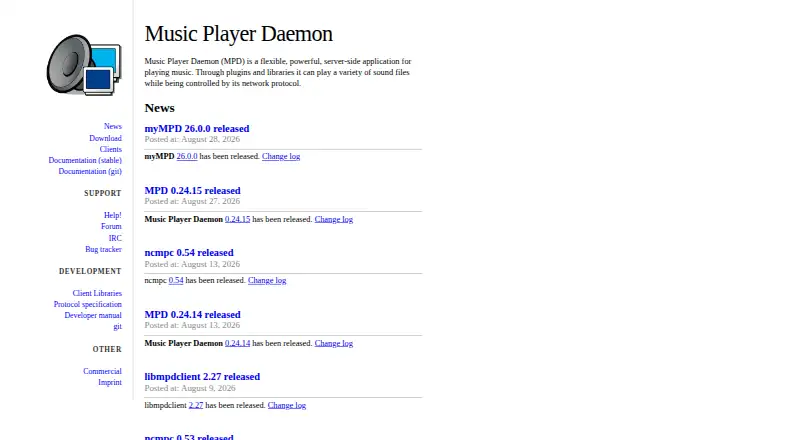
What Music Player Daemon is
Music Player Daemon (MPD) is a free, server-side music player that plays sound files through plugins and libraries. Users control it over a network protocol, so MPD needs a separately installed client or interface. The project lists command-line, console, web, graphical, Android, iOS, and voice clients, including an Alexa skill. Supported platforms include Linux, Windows, macOS, and Android; the project provides a Windows x64 binary and links to an Android APK on F-Droid. MPD plays WAV, AIFF, AAC, FLAC, DSDIFF, DSF, MP3, and other codecs supported by FFmpeg. It can access remote file servers through storage plugins such as SMB/CIFS and NFS, and combine multiple storages into one virtual music directory. Playback can be shaped with decoder, encoder, filter, and playlist plugins, as well as ReplayGain and cross-fading settings. MPD requires at least one configured audio output, though it tries to detect one automatically. The software is free under the GPL. Vendors may include it in commercial products if they meet the GPL’s source-code and modification requirements. Network access needs care: clients have full permissions without authentication by default, and passwords travel in clear text.
Who it suits
MPD suits listeners who want a free music server with network control and a separately chosen client interface. It can also suit people who need to combine local and remote music storage or configure playback with plugins and settings.
What it does well
- Free software distributed under the GPL.
- Plays WAV, AIFF, AAC, FLAC, DSDIFF, DSF, MP3, and FFmpeg codecs.
- Storage plugins can combine remote servers into a virtual music directory.
- Offers command-line, web, graphical, mobile, and voice clients.
- Supports configurable playback plugins, ReplayGain, and cross-fading.
What to know first
- Requires a separate client or interface for control.
- Clients have full permissions without authentication by default.
- The project describes its Android build as experimental.
- Official Debian packages are labeled outdated and unsupported.
Limits
MPD is free software distributed under the GPL, with no paid plan stated. Its documented defaults include a maximum of 100 simultaneous client connections and a maximum playlist length of 16,384 songs; both are configurable safeguards.
Plans
| Plan | Billed and limits | Price |
|---|---|---|
| Music Player Daemon | Free software distributed under the GPL | Free |
As musicpd.org lists them, read 11 Oct 2026. The maker's own page has the final word.
Getting started
- Visit the Music Player Daemon website.
- Install MPD on a supported platform: Linux, Windows, macOS, or Android.
- Configure at least one audio output device.
- Install a separate client or interface to control playback.
- Set permissions and password options to restrict network access if needed.
Overview
Music Player Daemon (MPD) is free, GPL-licensed server software for playing music through configurable audio outputs. It is best suited to people who want network-controlled playback and are comfortable choosing a separate client and configuring the server. Its flexibility is substantial, but setup and network access need deliberate attention.
MPD separates playback from control: the daemon runs as a server, and users operate it through a separately installed client or interface. That makes it a strong fit for a dedicated playback system or a setup managed remotely. It is a weaker choice for anyone who wants one ready-to-use app with playback and controls in the same place.
Network playback and a wide range of client types give users room to choose their control layer. The project lists command-line, console, web, graphical, Android, iOS, and voice clients, including an Alexa skill. That variety is useful, but selecting and installing a client is part of adopting MPD.
Key features
Configurable playback and storage
MPD supports WAV, AIFF, AAC, FLAC, DSDIFF, DSF, MP3, and codecs supported by FFmpeg. Configurable decoder, encoder, filter, and playlist plugins, plus ReplayGain and cross-fading settings, let administrators shape playback around their needs. This depth suits people who want control over the playback chain; it asks more of them than a conventional standalone player.
Audio output devices are configurable, and MPD requires at least one output. It attempts to detect one when none is configured, which can ease initial setup, though the output still needs to be available for playback.
Storage plugins can access remote file servers, including SMB/CIFS and NFS, and combine multiple storage sources into one virtual music directory. That is useful for collections spread across network shares, especially when playback runs on a machine separate from the files.
Network access and safeguards
By default, clients are unauthenticated and have full permissions. Administrators can restrict access with permissions and passwords, but MPD warns that passwords travel in clear text and do not authenticate the server. The default is a poor fit for an exposed or shared network unless access is deliberately configured.
MPD documents safeguards against denial of service, including a default cap of 100 simultaneous client connections and a maximum playlist length of 16,384 songs. These limits help bound resource use, though they do not replace access controls.
Pricing
MPD is free software distributed under the GPL. The Music Player Daemon plan costs free; there is no paid tier or free trial. The free plan is the whole product, so readers get its server, plugin-based configuration, and network playback without a subscription, while taking responsibility for setup and client selection.
Vendors may sell products that include MPD, but GPL terms require them to provide source code for GPL components and MPD modifications. That makes MPD usable in commercial products under those obligations, rather than proprietary software that can be redistributed without them.
Platforms
MPD supports Linux, Windows, macOS, and Android, with an API and self-hosted deployment also part of its platform reach. The project provides a Windows x64 binary and documents building it for Windows, though that build process may feel awkward to Windows users.
Android is a more qualified option: the download page links to an APK on F-Droid, while the Android build is described as experimental. Local playback uses OpenSL ES because ALSA is unavailable there. Linux users should also note that the project's official Debian packages are labeled outdated and unsupported.
The project lists a help page, forum, IRC, and bug tracker for support. Release tarballs and Git tags are signed with GPG key C6DB4512, a useful verification option for users who manage their own installation.
Who it's for
MPD fits technically comfortable listeners and administrators who want playback on a server, remote control through a client of their choosing, and access to network storage. Its configurable plugins and broad codec support also suit users who want to shape the playback pipeline.
It is less suitable for listeners who want a polished, self-contained desktop player, or for anyone unwilling to manage client installation, audio output configuration, and network permissions. Windows and Android users should weigh the documented build and experimental-status caveats before making MPD the center of their setup.
Pros and cons
Pros
- Free GPL software: there is no subscription cost or trial period to manage.
- Flexible playback chain: decoder, encoder, filter, and playlist plugins plus ReplayGain and cross-fading settings let users configure how music is handled.
- Remote storage support: SMB/CIFS and NFS sources can be combined into one music directory.
- Many control options: clients span command-line, web, graphical, mobile, and voice interfaces.
Cons
- Separate client required: MPD provides the server, so users must choose and install a control interface.
- Risky defaults on shared networks: clients initially have full permissions without authentication, and password protection has security limitations.
- Platform caveats: Windows builds can be awkward, Android is experimental, and official Debian packages are outdated and unsupported.
- Configuration is part of the job: MPD needs an audio output and benefits from deliberate setup of storage, plugins, and access controls.
Alternatives
foobar2000 is another free option, with listed platforms spanning Android, iOS, Linux, macOS, and Windows. Quod Libet is free GPL software for Linux, macOS, and Windows. AIMP is free for Android, Linux, and Windows, with use allowed at home or by organizations under its “AS IS” terms. Audacious is a free open-source audio player for Linux, macOS, and Windows.
BBC Sounds is free on Android, iOS, and the web, but is available exclusively to UK listeners; UK residents can use it abroad for around a month. Winamp for Artists has a free Essential plan for one artist profile and an Ultra plan at €12.99 a month, billed 155,88€ annually, for one artist profile and web features. Audirvāna is a paid option with a free trial; Studio Classic costs $7.99 a month on a monthly subscription and includes Studio features and an integrated streaming content service. fooyin is another free option for Linux, macOS, and Windows.
For broader browsing, see Audio Player Software and Media Player Software.
Verdict
Choose MPD if you want a free, configurable music server that can play from remote storage and be controlled by a separate network client. Its plugin-based playback and broad client ecosystem reward users who want to assemble their own setup. Look elsewhere if you expect one straightforward listening app, or if you cannot take responsibility for its client/server configuration and default network permissions.
Verdict
Choose MPD if you want a free, configurable music server that can be controlled by a separate network client and work with remote storage. Consider its client/server setup and default network permissions when deciding whether it fits your environment.
Questions
How much does Music Player Daemon cost?
The listed plan is free. MPD is distributed as free software under the GPL.
Which platforms does it support?
The listed platforms are Linux, Windows, macOS, and Android. The project also provides an API and self-hosted options.
Which audio formats does MPD play?
It supports WAV, AIFF, AAC, FLAC, DSDIFF, DSF, MP3, and codecs supported by FFmpeg.
Does MPD include a control interface?
MPD acts as the server and requires a separately installed client or interface. The project lists command-line, console, web, graphical, Android, iOS, and voice clients.
Can vendors sell products that include MPD?
Yes. Vendors may sell products containing MPD if they comply with the GPL, including its source-code requirements for GPL components and MPD modifications.
What network security settings should users know about?
By default, clients are unauthenticated and have full permissions. Password settings can restrict access, but passwords travel in clear text and do not authenticate the server.
Facts from Music Player Daemon's own pages
- Android availability
- The download page links to an MPD Android APK on F-Droid, while the manual describes the Android build as experimental and says local playback uses OpenSL ES because ALSA is unavailable. · musicpd.org, 11 Oct 2026
- Audio outputs
- MPD supports configurable audio output devices, and requires at least one output, though it attempts to autodetect one if none is configured. · mpd.readthedocs.io, 11 Oct 2026
- Client integrations
- The project lists command-line, console, web, graphical, Android, iOS, and voice clients, including an Alexa skill. · musicpd.org, 11 Oct 2026
- Client/server design
- MPD acts as the server and requires a separately installed client or interface for users to control it. · musicpd.org, 11 Oct 2026
- Commercial use
- Vendors may sell products containing MPD, but must comply with the GPL, including providing source code for GPL components and MPD modifications. · musicpd.org, 11 Oct 2026
- Format support
- WAV,AIFF,AAC,FLAC,DSDIFF,DSF,MP3,FFmpeg-supported codecs · musicpd.org, 21 Sept 2026
- Free plan
- Yes · musicpd.org, 21 Sept 2026
- License model
- free · musicpd.org, 21 Sept 2026
- Linux package caveat
- The project labels its official Debian packages outdated and unsupported by the project. · musicpd.org, 11 Oct 2026
- Network playback
- Yes · musicpd.org, 21 Sept 2026
- Network security
- By default, clients are unauthenticated and have full permissions; access can be restricted with permission and password settings, but MPD warns that passwords travel in clear text and do not authenticate the server. · mpd.readthedocs.io, 11 Oct 2026
- Supported platforms
- Linux,Windows,macOS,Android · musicpd.org, 21 Sept 2026
- Playback configuration
- MPD supports configurable decoder, encoder, filter, and playlist plugins, along with settings such as ReplayGain and cross-fading. · mpd.readthedocs.io, 11 Oct 2026
- Release signing
- The project says release tarballs and Git tags are signed with GPG key C6DB4512. · musicpd.org, 11 Oct 2026
- Remote storage
- Storage plugins can access remote file servers, including SMB/CIFS and NFS, and multiple storages can be combined into a virtual music directory. · mpd.readthedocs.io, 11 Oct 2026
- Resource limits
- MPD documents configurable denial-of-service safeguards, including a default maximum of 100 simultaneous client connections and a default maximum playlist length of 16,384 songs. · mpd.readthedocs.io, 11 Oct 2026
- Support
- The project lists a help page, forum, IRC, and bug tracker as support channels. · musicpd.org, 11 Oct 2026
- What it does
- MPD is a server-side application for playing music, using plugins and libraries to play sound files and a network protocol for control. · musicpd.org, 11 Oct 2026
- Windows availability
- The project provides a Windows x64 binary and documents compiling MPD for Windows; its build process may feel awkward to Windows users. · musicpd.org, 11 Oct 2026
Where Music Player Daemon stands on Freedom251
- Media Player Software#11 of 76
- Audio Player Software#5 of 18