Freedom251 › Audio Player Software
Audacious
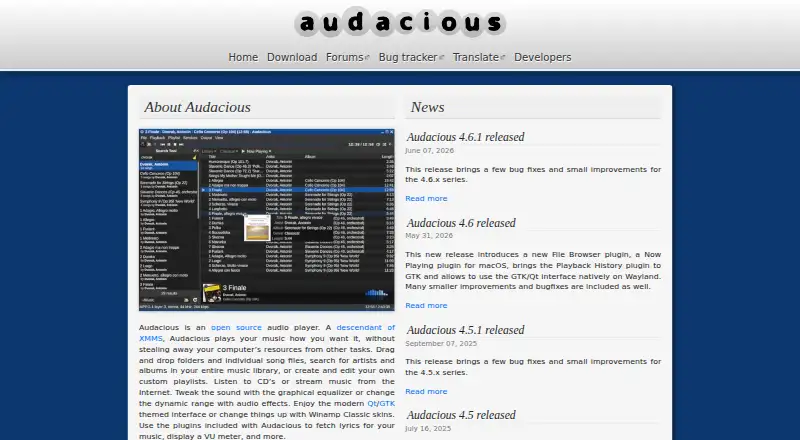
What Audacious is
Audacious is a free audio player for Linux, BSD derivatives, macOS, and Windows. It supports network playback and a wide range of audio formats. Its listed formats include MP3, FLAC, Ogg Vorbis, Opus, AAC, M4A, WAV, and WavPack, covering several common compressed and lossless audio types. It also supports Audio CD and MIDI, along with Ad-lib chiptunes, Nintendo DS 2SF, PlayStation Audio PSF, MOD, and XM. Formats supported by FFmpeg are included as well. This range may suit listeners whose libraries include music files alongside disc audio, tracker formats, or game audio. Audacious is listed as free both in its pricing model and license model, and its pricing note identifies a free plan. The project website is https://audacious-media-player.org/. Its listed platforms cover desktop systems: Linux, BSD derivatives, macOS, and Windows. Network playback is supported in addition to the listed file and audio formats.
Who it suits
Audacious suits listeners on Linux, BSD derivatives, macOS, or Windows who want a free audio player. Its format range may be useful for libraries that include common music files, Audio CD, MIDI, tracker formats, chiptunes, or game audio.
What it does well
- Free pricing and license models.
- Available for Linux, BSD derivatives, macOS, and Windows.
- Supports network playback.
- Handles common formats including MP3, FLAC, AAC, and WAV.
- Also supports Audio CD, MIDI, tracker, and game-audio formats.
What to know first
- Its listed platforms are Linux, BSD derivatives, macOS, and Windows.
- No mobile platform is included in the listed platforms.
Plans
| Plan | Billed and limits | Price |
|---|---|---|
| Audacious | Open source audio player | Free |
As audacious-media-player.org lists them, read 11 Oct 2026. The maker's own page has the final word.
Audacious is a free, open-source desktop audio player built around music playback and playlist management. It is best for listeners who want to play a varied local collection alongside CDs and internet streams, with controls to shape sound. Its breadth of format support is a strong reason to choose it; limited developer support and packaging choices matter for users who need a particular distribution channel or prompt assistance.
Overview
Audacious concentrates on audio rather than trying to serve as an all-purpose media hub. It plays files, CDs, and internet streams, while library search and editable playlists help organize listening. A graphical equalizer and dynamic-range effects add useful sound adjustment without changing that focused role. For someone managing a music collection, this is a practical combination; listeners looking for broader media features should consider a different kind of player.
Format coverage is a notable strength. Audacious handles familiar formats such as MP3, FLAC, Ogg Vorbis, AAC, M4A, and WAV, along with Opus, WavPack, MIDI, audio CDs, chiptunes, module formats, and audio formats supported by FFmpeg. It also supports Nintendo DS 2SF and PlayStation Audio PSF. That range makes it a sensible choice for collections gathered from different sources, including game and tracker music, without requiring a single standard format.
Key features
Playback and library tools
Audacious combines local playback with CD and internet-stream support. Searching the library and creating or editing playlists cover the core tasks of finding and arranging music. Those tools suit listeners who want a dedicated player; the emphasis is on playback and playlists, not a wider media-center experience.
Sound controls and interfaces
The graphical equalizer and effects for changing dynamic range give listeners some control over how music sounds. Qt and GTK interfaces offer a choice of desktop toolkit, and Winamp Classic skin support allows a familiar visual style. The build can also omit both toolkits to run as a headless player daemon, a useful option for users who want playback without a graphical interface.
Plugins and lyrics
Included plugins can fetch lyrics and show a VU meter. Audacious added support for fetching lyrics from lrclib.net in version 4.5, and version 4.6 added a file browser plugin and a macOS Now Playing plugin. These additions extend the player’s convenience, though its central appeal remains straightforward audio playback rather than a large suite of connected services.
Pricing
Audacious is free and open source. Its free plan costs nothing and includes the audio player; there is no paid tier to weigh against feature restrictions. For listeners seeking a no-cost desktop player, the price is straightforward. The trade-off is that help comes through community forums, and the developers are volunteers with limited time.
Platforms
Audacious runs on Linux, BSD derivatives, macOS, and Windows. Windows users need 64-bit Windows 10 or later for version 4.4 and newer; version 4.3.1 is available for 32-bit systems and older Windows versions back to Windows 7. The project does not provide or support Flatpak or Snap packages, so users of those package formats must turn to their communities for installation help. Builds use Qt 6 by default, with GTK 3 or optionally GTK 2 as alternatives.
Who it's for
Choose Audacious if you want a focused desktop player that can handle an eclectic audio library, internet streams, and CDs, with playlist tools and basic sound shaping at no cost. It is less suitable if you depend on Flatpak or Snap support from the project, or expect fast, dedicated developer assistance. Windows users on older or 32-bit systems should use version 4.3.1 rather than newer releases.
Pros and cons
- Pros: Broad format support, including game audio, modules, MIDI, and FFmpeg-supported formats, reduces format-related friction for mixed collections.
- Pros: Library search, editable playlists, CD and network playback, equalizer, and dynamic-range effects cover the main needs of a desktop music player.
- Pros: Qt and GTK interfaces, Winamp Classic skins, and a headless build accommodate different desktop preferences and use cases.
- Cons: The project does not provide or support Flatpak or Snap packages, which can complicate installation and support for users who rely on them.
- Cons: Volunteer developers have limited time, so users who need dependable, prompt assistance may prefer software with a more formal support model.
- Cons: Current Windows releases require 64-bit Windows 10 or later; older and 32-bit Windows users are limited to version 4.3.1.
Alternatives
foobar2000 is another free player, and its listed platform choices include Android and iOS as well as Linux, macOS, and Windows; choose it if mobile availability matters alongside desktop use.
Music Player Daemon is free software distributed under the GPL and lists Android, API, self-hosted, and desktop platform choices; it may fit better when those deployment options are a priority.
Quod Libet is free software under GNU GPL version 2 or later for Linux, macOS, and Windows, making it another free desktop option on those systems.
AIMP is freeware for Android, Linux, and Windows, and may be the better fit if Android support is important.
BBC Sounds is free on Android, iOS, and web, but is available exclusively to UK listeners; UK residents can use it abroad for around a month.
Winamp for Artists offers a free plan and paid options, and is listed for Android, iOS, and web rather than desktop operating systems.
Audirvāna is a paid player with a free trial, listed for Android, iOS, Linux, macOS, and Windows; its Studio Classic plan costs $7.99 a month on a monthly subscription and includes Studio features and an integrated streaming content service.
fooyin is another free option for Linux, macOS, and Windows.
Browse more options in Audio Player Software and Media Player Software.
Verdict
Audacious is a strong fit for listeners who want a free desktop audio player with wide format coverage, stream and CD playback, playlists, and useful sound controls. Its clearest advantage is handling a diverse music collection without charging for the player. Look elsewhere if you need project-backed Flatpak or Snap packages, quicker formal support, or a player designed for mobile use.
Verdict
Choose Audacious if you want a free desktop audio player with network playback and support for a broad range of formats. Its listed platform choices are Linux, BSD derivatives, macOS, and Windows.
Questions
Is Audacious free?
Yes. Its pricing model and license model are both free, and a free plan is listed.
Which platforms can run Audacious?
Audacious supports Linux, BSD derivatives, macOS, and Windows.
Does Audacious support network playback?
Yes, network playback is listed as supported.
Which audio formats does it support?
Its format list includes MP3, FLAC, Ogg Vorbis, Opus, AAC, M4A, WAV, WavPack, Audio CD, MIDI, Ad-lib chiptunes, Nintendo DS 2SF, PlayStation Audio PSF, MOD, XM, and formats supported by FFmpeg.
Who makes Audacious?
The provided facts do not identify a maker.
Facts from Audacious's own pages
- Build options
- Audacious uses Qt 6 by default, with GTK 3 or optionally GTK 2 as fallback, and can also be built without either toolkit as a headless player daemon. · audacious-media-player.org, 11 Oct 2026
- Format support
- MP3,FLAC,Ogg Vorbis,Opus,AAC,M4A,WAV,WavPack,Ad-lib chiptunes,Audio CD,MIDI,Nintendo DS 2SF,PlayStation Audio PSF,MOD,XM,FFmpeg-supported formats · audacious-media-player.org, 21 Sept 2026
- Free plan
- Yes · audacious-media-player.org, 21 Sept 2026
- Interfaces
- It offers Qt and GTK interfaces and supports Winamp Classic skins. · audacious-media-player.org, 11 Oct 2026
- Library and playlists
- Users can search their music library and create or edit custom playlists. · audacious-media-player.org, 11 Oct 2026
- License model
- free · audacious-media-player.org, 21 Sept 2026
- Lyrics integration
- Version 4.5 added support for fetching lyrics from lrclib.net. · audacious-media-player.org, 11 Oct 2026
- Network playback
- Yes · audacious-media-player.org, 21 Sept 2026
- Packaging limit
- The project does not provide or support Flatpak or Snap packages and directs users to those packages’ communities for help. · audacious-media-player.org, 11 Oct 2026
- Supported platforms
- Linux,BSD derivatives,macOS,Windows · audacious-media-player.org, 21 Sept 2026
- Playback
- It plays music files, CDs, and streams from the Internet. · audacious-media-player.org, 11 Oct 2026
- Plugins
- Included plugins can fetch lyrics and display a VU meter; version 4.6 added a file browser plugin and a macOS Now Playing plugin. · audacious-media-player.org, 11 Oct 2026
- Sound controls
- It includes a graphical equalizer and audio effects for changing dynamic range. · audacious-media-player.org, 11 Oct 2026
- Support
- Users can ask for installation or runtime help in the forums, and the project notes that its developers are volunteers with limited time. · audacious-media-player.org, 11 Oct 2026
- Supported systems
- The project says Audacious runs on Linux, BSD derivatives, macOS, and Windows. · audacious-media-player.org, 11 Oct 2026
- What it does
- Audacious is an open source audio player descended from XMMS. · audacious-media-player.org, 11 Oct 2026
- Windows requirement
- Since version 4.4, Audacious requires 64-bit Windows 10 or later; version 4.3.1 is available for 32-bit or older Windows versions back to Windows 7. · audacious-media-player.org, 11 Oct 2026
Where Audacious stands on Freedom251
- Audio Player Software#2 of 18
- Media Player Software#23 of 76