Freedom251 › API Mocking Tools
Mockttp
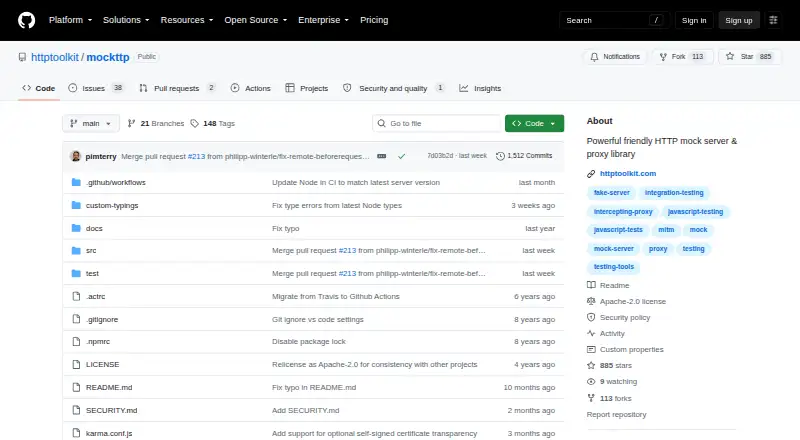
What Mockttp is
Mockttp is a free, open-source JavaScript library for intercepting, transforming, and testing HTTP requests and responses. It supports HTTP integration tests in Node.js and browsers, including transparent proxying and HTTPS. Its tools can stub responses, verify requests, generate self-signed certificates for HTTPS mocking, and mock traffic inside or outside the process. It can also serve as the basis for custom proxies that capture, inspect, or rewrite traffic. Parallel tests can use automatically configured ports, mock URLs, and proxy settings. Mockttp works with promise-capable testing tools and HTTP clients; Mocha, Chai, and Superagent appear in an example but are optional. Browser tests require an admin server started outside the browser, since browsers cannot start an HTTP server or proxy themselves. The setup guide warns against trusting a test certificate authority system-wide or sharing its private key, because either could let an attacker impersonate secure connections. The latest published version is actively supported, and the previous major version receives security fixes for six months after the next major release. Vulnerabilities can be reported privately through GitHub; confirmed issues are to be fixed and published as advisories within 90 days.
Who it suits
Mockttp suits JavaScript developers building HTTP integration tests or custom proxies. Browser test users need to run an admin server outside the browser.
What it does well
- Supports HTTP tests in Node.js and browsers.
- Can stub responses and verify requests.
- Parallel tests can configure ports and proxy settings automatically.
- Works with promise-capable testing tools and HTTP clients.
- Private vulnerability reporting is available through GitHub.
What to know first
- Browser tests require an admin server outside the browser.
- The setup guide warns against system-wide trust of test CAs.
- Previous major versions receive security fixes for six months after the next major release.
Plans
| Plan | Billed and limits | Price |
|---|---|---|
| Hobbyist | Free · basic traffic viewing and rewriting · manual breakpoints · built-in HTTP client | Free |
| Professional | per month · automated mocking and rewriting · import/export · advanced debugging and configuration | On request |
| Team | per user, per month · team licensing · centralized billing · team workspaces coming soon · additional options on request | On request |
As github.com lists them, read 4 Oct 2026. The maker's own page has the final word.
Getting started
- Open the Mockttp project on GitHub.
- Use it as a JavaScript library in a Node.js or browser testing setup.
- Choose a promise-capable testing tool and HTTP client; the README example uses Mocha, Chai, and Superagent.
- For browser tests, start an admin server outside the browser.
- Configure parallel tests to use Mockttp's automatic ports, mock URLs, and proxy settings.
Mockttp is for JavaScript developers who want programmable HTTP mocks inside integration tests or custom proxies. It is a strong fit when tests need traffic interception, HTTPS, or parallel runs; browser administration and careful certificate handling make it less turnkey than a standalone mock service.
Overview
Mockttp intercepts, transforms, and tests HTTP requests and responses. It can stub replies, verify requests, and capture, inspect, or rewrite traffic through a custom proxy, with mocking both inside and outside its own process. Dynamic responses and support for HTTP, HTTPS, WebSocket, and JSON-RPC broaden its use beyond fixed HTTP fixtures.
As a free, open-source JavaScript library with local deployment, Mockttp suits teams that want to keep mocking in their own code and test environment. It is not the same offering as HTTP Toolkit’s Professional product, which includes automated HTTP mocking and rewriting; Mockttp is the library those capabilities can be built around.
Key features
Integration testing and proxying
Mockttp supports HTTP integration tests in Node.js and browsers, including transparent proxying and HTTPS. It can also serve as the basis for a custom proxy that captures or rewrites real traffic. This flexibility helps when a test must exercise requests as they pass through a proxy, but requires developers to own the setup rather than rely on a ready-made hosted workflow.
Parallel runs and integrations
Automatically configured ports, mock URLs, and proxy settings let parallel tests use separate mocks without manually coordinating those values. The README demonstrates Mocha, Chai, and Superagent, but these are optional: Mockttp can work with other promise-capable test tools and HTTP clients. That makes it adaptable to an existing JavaScript stack instead of tying it to one test framework.
Browser and HTTPS setup
Browser tests need an admin server running outside the browser, since browsers cannot start an HTTP server or proxy themselves. That requirement is a real infrastructure consideration for browser suites. HTTPS mocking uses generated self-signed certificates, and the setup guidance warns against trusting a test CA system-wide or sharing its private key; mishandling either can let an attacker impersonate secure connections.
The latest published version is actively supported, while the preceding major version receives security fixes for six months after the next major release. Vulnerabilities can be reported privately through GitHub, with confirmed issues to be fixed and published as advisories within 90 days. These policies provide a defined security process, though teams still need to manage certificate trust safely in their own environments.
Pricing
Mockttp itself is free and open source, with no paid library tiers or usage caps described. Its commercial relation, HTTP Toolkit, has separate plans:
- Hobbyist: free, billed Free. Includes basic traffic viewing and rewriting, manual breakpoints, and a built-in HTTP client. It is the no-cost option for individual traffic inspection and manual work; it does not include the automated mocking and rewriting in Professional.
- Professional: custom pricing, billed per month. Includes automated mocking and rewriting, import/export, and advanced debugging and configuration. It fits users who want those HTTP Toolkit features without building around the library.
- Team: custom pricing, billed per user, per month. Includes team licensing and centralized billing; team workspaces are coming soon, and additional options are available on request. It suits organizations that need shared licensing and billing, with per-user billing to account for.
Platforms
Mockttp supports Linux, macOS, and Windows, as well as web and self-hosted use. The library can be deployed locally. HTTP Toolkit separately provides desktop installation packages for Windows, Mac, and Linux. Its operator, Toolshed Labs SLU, is based in Barcelona, Spain, and says HTTP request and response contents are never collected and remain stored locally on the user’s machine.
Who it's for
Mockttp is best for JavaScript developers building integration tests, parallel test suites, or custom proxies who want direct control over HTTP traffic. It is less suitable for teams expecting browser tests to configure themselves, or for users who want a managed mock service instead of a library and its infrastructure responsibilities.
Pros and cons
- Pro: Traffic can be stubbed, verified, captured, inspected, or rewritten, including outside the process under test; that suits both integration testing and proxy workflows.
- Pro: Parallel tests get automatically configured ports, mock URLs, and proxy settings, reducing coordination work across simultaneous runs.
- Pro: It is a free, open-source library that supports multiple protocols and can work with different promise-capable test tools and HTTP clients.
- Con: Browser tests require an external admin server, adding infrastructure and setup to browser-based suites.
- Con: Self-signed HTTPS certificates require careful trust management; system-wide trust or shared private keys can expose secure connections to impersonation.
Alternatives
API Mocking Tools is a broader category list for readers comparing approaches rather than choosing one direct substitute.
- Microcks is another free, open-source option, with support across API, extension, web, and self-hosted platforms; choose it if that wider platform mix matters more than Mockttp’s JavaScript-library focus.
- Mockzilla has a free tier capped at 1K requests per month, 5 requests per second, one simulation, and 10 MB of data transfer. Choose it if a defined request allowance and simulation limit suit your needs.
- Beeceptor offers an Individual plan at $10 a month, with 15,000 requests per month per endpoint, up to 50 mock rules, private endpoints, and 100 CRUD objects. It is worth considering if those endpoint quotas and private endpoints fit your workflow.
- MockServer is free and open source, self-hosted, and requires no SaaS account; choose it if avoiding a SaaS account is the priority.
- WireMock has a free tier with 1,000 calls per month, one user, three mock APIs, and a 10-request-per-second limit. It suits readers who want a hosted-style free allowance with explicit call and user caps.
- Mockfly has a free Starter plan with 500 requests per day, one project, four endpoints, and two responses per endpoint. Consider it if those project and daily-request limits match your needs.
- Knockout API offers a free plan for 30 images per month; it is a narrower alternative for that image-specific allowance.
- MockAPI gives its free plan one project and two resources, while its $5 a month plan includes 20 projects and 50 resources. Choose it if project and resource counts are the main constraint.
Verdict
Choose Mockttp if you are building JavaScript integration tests or custom proxies and want free, programmable control over traffic, especially across parallel runs. Its main advantage is that breadth within a local library; look elsewhere if browser test administration or HTTPS certificate responsibilities outweigh that control.
Verdict
Mockttp offers HTTP mocking and proxy capabilities as a JavaScript library, with support for parallel testing. Its browser setup requirement and certificate-handling cautions matter when planning test infrastructure.
Questions
Is Mockttp free?
Yes. Mockttp is listed as free and open source.
Which platforms does Mockttp support?
The listed platforms are Linux, macOS, Windows, web, and self-hosted use.
What traffic can it work with?
Mockttp supports HTTP, HTTPS, WebSocket, and JSON-RPC.
Does Mockttp work with Mocha, Chai, and Superagent?
They appear in a README example, but are optional. Mockttp can work with other promise-capable testing tools and HTTP clients.
What is required for browser tests?
An admin server must be started outside the browser because browsers cannot start an HTTP server or proxy themselves.
How are security vulnerabilities handled?
Vulnerabilities can be reported through GitHub's private security reporting channels. Confirmed vulnerabilities are to be fixed and published as advisories within 90 days.
Facts from Mockttp's own pages
- Browser setup
- Browser tests require an admin server started outside the browser because browsers cannot start an HTTP server or proxy themselves. · github.com, 4 Oct 2026
- Commercial product distinction
- HTTP Toolkit lists automated HTTP mocking and rewriting among Professional plan features, while Mockttp itself is published as a JavaScript library in a public GitHub repository. · httptoolkit.com, 4 Oct 2026
- Desktop platforms
- HTTP Toolkit provides installation packages for Windows, Mac, and Linux. · httptoolkit.com, 4 Oct 2026
- HTTPS certificate caution
- The setup guide warns against trusting a test CA system-wide or sharing its private key, because doing so could let an attacker impersonate secure connections. · github.com, 4 Oct 2026
- HTTP Toolkit privacy
- HTTP Toolkit says HTTP request and response contents are never collected and are stored only locally on the user’s machine. · httptoolkit.com, 4 Oct 2026
- Integrations
- The README example uses Mocha, Chai, and Superagent, while noting that these tools are optional and Mockttp can work with other promise-capable testing tools and HTTP clients. · github.com, 4 Oct 2026
- Maker and location
- The HTTP Toolkit privacy policy identifies Toolshed Labs SLU as the operator and gives its address in Barcelona, Spain. · httptoolkit.com, 4 Oct 2026
- Mocking features
- The library can stub responses, verify requests, mock HTTPS with generated self-signed certificates, and mock traffic inside or outside its process. · github.com, 4 Oct 2026
- Parallel testing
- Mockttp supports parallel mocking with automatically configured ports, mock URLs, and proxy settings. · github.com, 4 Oct 2026
- Proxy use
- Mockttp can be used to build custom HTTP proxies that capture, inspect, or rewrite traffic. · github.com, 4 Oct 2026
- Security support
- The latest published Mockttp version is actively supported, and the preceding major version receives security fixes for six months after the next major release. · github.com, 4 Oct 2026
- Testing use
- Mockttp supports HTTP integration tests that can run in Node.js and browsers, including transparent proxying and HTTPS. · github.com, 4 Oct 2026
- Vulnerability reporting
- Mockttp vulnerabilities can be reported through GitHub’s private security reporting channels, and confirmed vulnerabilities are to be fixed and published as advisories within 90 days. · github.com, 4 Oct 2026
- What Mockttp does
- Mockttp intercepts, transforms, or tests HTTP requests and responses in JavaScript. · github.com, 4 Oct 2026
Where Mockttp stands on Freedom251
- API Mocking Tools#11 of 26