Freedom251 › No-Code Database Software
MobiDB Database
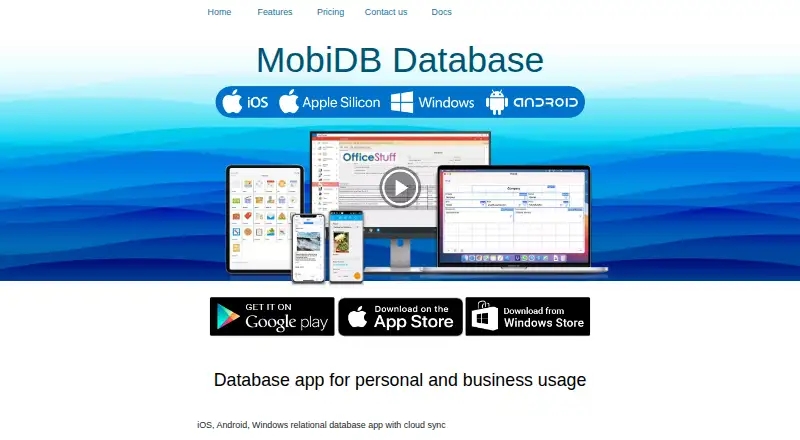
What MobiDB Database is
MobiDB Database is a no-code database app for personal, business, work, and hobby projects. A visual designer lets users build custom databases, forms, and fields using more than 20 field types. Multiple tables can be linked with one-to-many, many-to-one, or many-to-many relationships, and calculated values are supported. Records can be viewed in customizable tables or cards, sorted and filtered, or placed on a map when they include GPS coordinates. The app includes 21 editable preset templates and four chart types. It supports CSV import and export and PDF export or printing; Excel export is included with Premium Unlimited. MobiDB can sync databases across Android, iOS, and Windows and share them through Dropbox, Google Drive, or OneDrive, with user changes synchronized. The maker describes uses such as field work, geology, archaeology, inventory, CRM, orders, invoices, and project management. A new account receives a fully functional Premium trial for seven days, then moves to the Free version. The Free plan costs nothing and includes unlimited databases and data manipulation. Premium Unlimited lifetime licenses are available for one, 10, or 100 users, with a separate 100+ user option priced through support.
Who it suits
MobiDB suits people who want to create structured databases without coding, from field workers and researchers to teams managing inventory, CRM, orders, invoices, or projects. It is also a fit for users who need related tables, customizable record views, and database access across Android, iOS, and Windows.
What it does well
- Builds custom databases, forms, and fields with more than 20 field types.
- Supports multiple tables, several relationship types, and calculated values.
- Offers customizable table and card views with sorting and filtering.
- Syncs across Android, iOS, and Windows and supports three cloud services.
- A seven-day Premium trial precedes the Free version.
What to know first
- The Free plan does not list synchronization, CSV exchange, PDF export, or charts.
- The app has a 1000-record limit.
- Excel export is listed for Premium Unlimited, not the Free plan.
Limits
The Free plan includes unlimited databases and data manipulation but does not list synchronization, CSV import or export, PDF export or printing, or charts. MobiDB has a 1000-record limit. The Premium trial lasts seven days before the account changes to Free.
Plans
| Plan | Billed and limits | Price |
|---|---|---|
| Free | Free · Windows 10, Android and iOS · unlimited databases and data manipulation · ads-free | Free |
| Premium Unlimited — 10 users | Lifetime license · Windows 10, Android and iOS · unlimited databases and data manipulation · synchronization · CSV import/export · PDF export and printing · Excel export · accumulated balance · charts | $149.99, paid once |
| Premium Unlimited — 1 user | Lifetime license · Windows 10, Android and iOS · unlimited databases and data manipulation · synchronization · CSV import/export · PDF export and printing · Excel export · accumulated balance · charts | $29.99, paid once |
| Premium Unlimited — 100 users | Lifetime license · Windows 10, Android and iOS · unlimited databases and data manipulation · synchronization · CSV import/export · PDF export and printing · Excel export · accumulated balance · charts | $749.99, paid once |
| Premium Unlimited — 100+ users | Contact [email protected] | On request |
As mobidb.mobi lists them, read 11 Oct 2026. The maker's own page has the final word.
Getting started
- Visit https://mobidb.mobi/ and create a new account.
- Use the seven-day fully functional Premium trial, which changes to the Free version afterward.
- Choose the Free plan or a Premium Unlimited lifetime license for one, 10, or 100 users.
- Install MobiDB on Android, iOS, or Windows.
- Use the visual designer to create a database, form, and fields.
Verdict
Choose MobiDB if you want a no-code database builder with relational tables, custom views, and support across mobile and Windows platforms. The Free plan covers database creation and data manipulation; look to Premium Unlimited for synchronization and the listed import, export, and chart features. Check the 1000-record limit against your intended database size.
Questions
Does MobiDB have a free plan?
Yes. Free costs nothing and includes unlimited databases and data manipulation.
How much does Premium Unlimited cost?
Lifetime licenses cost $29.99, paid once for one user, $149.99, paid once for 10 users, and $749.99, paid once for 100 users. Pricing for 100+ users is available by contacting [email protected].
Which platforms does MobiDB support?
MobiDB lists Android, iOS, and Windows.
What does the Premium trial include and how long does it last?
A new account receives a fully functional Premium trial for seven days. Afterward, it changes to the Free version.
Can MobiDB databases sync across devices or services?
The maker says databases can sync across iOS, Android, and Windows and be shared through Dropbox, Google Drive, or OneDrive, with changes from different users synchronized.
What does the Free plan leave out?
The Free plan does not list synchronization, CSV import or export, PDF export or printing, or charts among its included features.
Facts from MobiDB Database's own pages
- Cloud collaboration
- The maker says databases can sync across iOS, Android and Windows and be shared through Dropbox, Google Drive or OneDrive, with changes from different users synchronized. · mobidb.mobi, 11 Oct 2026
- Free tier limits
- The listed Free plan includes unlimited databases and data manipulation but does not list synchronization, CSV import/export, PDF export or charts among its included features. · mobidb.mobi, 11 Oct 2026
- Headquarters
- Küsnacht, Switzerland · mobidb.mobi, 28 Sept 2026
- Import and export
- The app supports CSV import and export and PDF export or printing; the Premium Unlimited plan also lists Excel export. · mobidb.mobi, 11 Oct 2026
- Integrations
- The maker identifies Dropbox, Google Drive and OneDrive for synchronization, and CSV exchange with MS Access, FileMaker and Excel. · mobidb.mobi, 11 Oct 2026
- Intended users
- The maker describes use for field workers, geologists and archaeologists, as well as business tasks such as inventory, CRM, orders, invoices and project management. · mobidb.mobi, 11 Oct 2026
- Purpose
- MobiDB is a no-code database app for personal, business, work and hobby use. · mobidb.mobi, 11 Oct 2026
- Record views
- Records can be viewed in customizable tables and cards, sorted and filtered, or displayed on a map when GPS coordinates are present. · mobidb.mobi, 11 Oct 2026
- Relational data
- It supports multiple tables, one-to-many, many-to-one and many-to-many relations, and calculated values. · mobidb.mobi, 11 Oct 2026
- Security and data handling
- The privacy policy says Google sign-in data includes the user's name, Google ID and email, and says the app accesses only the MobiDB folder in Google Drive for synchronization and backup. · mobidb.mobi, 11 Oct 2026
- Support
- The maker lists [email protected] for subscription pricing inquiries and provides online documentation and articles. · mobidb.mobi, 11 Oct 2026
- Templates and charts
- The feature list includes 21 editable preset database templates and four chart types. · mobidb.mobi, 11 Oct 2026
- Transport security
- The licensing documentation says data transferred between the remote server and MobiDB client is protected with an HTTPS connection and SSL certificate. · docs.mobidb.mobi, 11 Oct 2026
- Trial
- The documentation says a new account receives a fully functional Premium trial for seven days, after which it changes to the Free version. · docs.mobidb.mobi, 11 Oct 2026
- Visual designer
- A visual designer lets users create custom databases, forms and fields, with more than 20 field types. · mobidb.mobi, 11 Oct 2026
Where MobiDB Database stands on Freedom251
- No-Code Database Software#14 of 40