Freedom251 › Peer-to-Peer File Sharing Software
MLDonkey
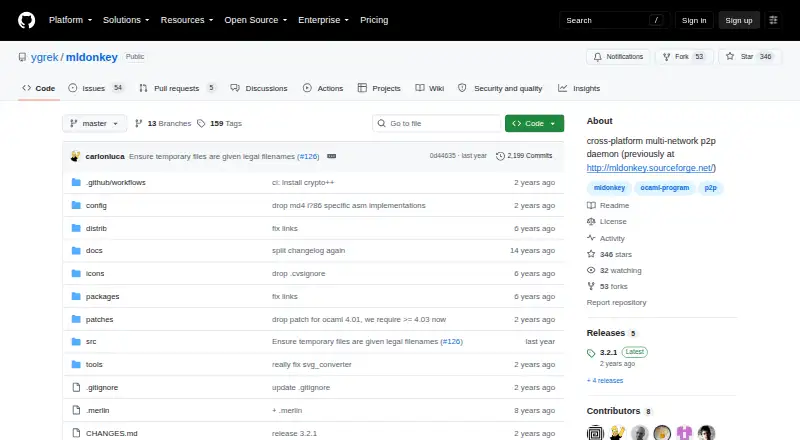
What MLDonkey is
MLDonkey is a free, cross-platform peer-to-peer daemon that connects to multiple file-sharing networks. Supported networks include eDonkey with Overnet and Kad, BitTorrent with DHT, Direct Connect, and HTTP/FTP. The daemon runs in the background and provides telnet, web, and binary protocol interfaces for control, including use by third-party graphical clients. Its web interface is available in a browser at http://localhost:4080 after installation. The installation guide places downloaded files in incoming/ and files offered for sharing in shared/. It says some firewall or router ports need to be opened for full use, with the required ports shown in the web interface's Options tab. The project supports Linux and Windows and is licensed under GPL-2.0-only. An optional GTK2 GUI is described, though the core can build with opam even when that GUI does not. Supported OCaml versions are >= 4.03 and < 5.0, and Windows compilation has a MinGW guide. GitHub Discussions is the replacement community forum.
Who it suits
MLDonkey suits users who want a self-hosted peer-to-peer daemon for the listed networks and are comfortable with its installation and network setup. It also offers web and protocol interfaces for control.
What it does well
- Connects to several peer-to-peer networks.
- Provides web, telnet, and binary control interfaces.
- Includes make_torrent and ed2k_hash utilities.
- Free under GPL-2.0-only.
What to know first
- Full use may require opening firewall or router ports.
- Supported OCaml versions exclude 5.0 and later.
- Third-party control applications vary in stability and functionality.
Limits
The project lists supported OCaml versions as >= 4.03 and < 5.0. Full use may require opening firewall or router ports; the Options tab shows which ports.
Plans
| Plan | Billed and limits | Price |
|---|---|---|
| MLDonkey | GPL-2.0-only · self-hosted daemon | Free |
As github.com lists them, read 9 Oct 2026. The maker's own page has the final word.
Getting started
- Open the project website at https://github.com/ygrek/mldonkey.
- Build the core with opam using a supported OCaml version, from 4.03 to below 5.0.
- For a Windows build, follow the installation guide’s MinGW guide.
- After installation, open http://localhost:4080 in a browser to access the web interface.
- Use the Options tab to see which firewall or router ports need opening.
- Use make utils to compile make_torrent and ed2k_hash if needed.
Verdict
MLDonkey covers several networks through one background daemon and offers multiple control interfaces. Allow for network port configuration and the stated OCaml version range when assessing fit.
Questions
How much does MLDonkey cost?
The plan is free.
Which networks does MLDonkey support?
It supports eDonkey with Overnet and Kad, BitTorrent with DHT, Direct Connect, and HTTP/FTP.
What platforms does it support?
The listed platforms are Linux and Windows. It is also described as self-hosted, with a web interface.
How do I access the web interface?
After installation, open http://localhost:4080 in a browser.
What license does MLDonkey use?
Its license is GPL-2.0-only.
Can I control it with a graphical client?
The daemon provides web and binary protocol interfaces for third-party GUIs, and the project describes an optional GTK2 GUI.
Facts from MLDonkey's own pages
- Build dependency
- The README lists supported OCaml versions as >= 4.03 and < 5.0. · github.com, 9 Oct 2026
- Community support
- The README says GitHub Discussions serves as a replacement forum after the former wiki and forums shut down on August 21, 2023. · github.com, 9 Oct 2026
- Control interfaces
- The background daemon provides telnet, web, and binary protocol interfaces for third-party GUIs. · github.com, 9 Oct 2026
- File locations
- The installation guide says downloaded files go in incoming/ and files to share go in shared/. · github.com, 9 Oct 2026
- GUI option
- The project describes an optional GTK2 GUI, while noting that the core builds fine with opam even when that GUI does not. · github.com, 9 Oct 2026
- License
- The package metadata identifies the license as GPL-2.0-only. · github.com, 9 Oct 2026
- Network setup
- The installation guide says certain firewall or router ports need to be opened for full use and that the web interface's Options tab shows the ports. · github.com, 9 Oct 2026
- Purpose
- MLDonkey is a cross-platform, multi-network peer-to-peer daemon. · github.com, 9 Oct 2026
- Supported networks
- Supported networks include eDonkey with Overnet and Kad, BitTorrent with DHT, Direct Connect, and HTTP/FTP. · github.com, 9 Oct 2026
- Third-party clients
- The installation guide says third-party control applications exist for specific platforms and vary in stability and functionality. · github.com, 9 Oct 2026
- Utilities
- The installation guide names make_torrent and ed2k_hash as included utilities that can be compiled with make utils. · github.com, 9 Oct 2026
- Web UI
- The installation guide says to open http://localhost:4080 in a browser to access the web-based interface. · github.com, 9 Oct 2026
- Windows build
- The installation guide points users to a MinGW guide for compiling on Windows. · github.com, 9 Oct 2026
Where MLDonkey stands on Freedom251
- Peer-to-Peer File Sharing Software#12 of 36