Freedom251 › Peer-to-Peer File Sharing Software
Filetopia
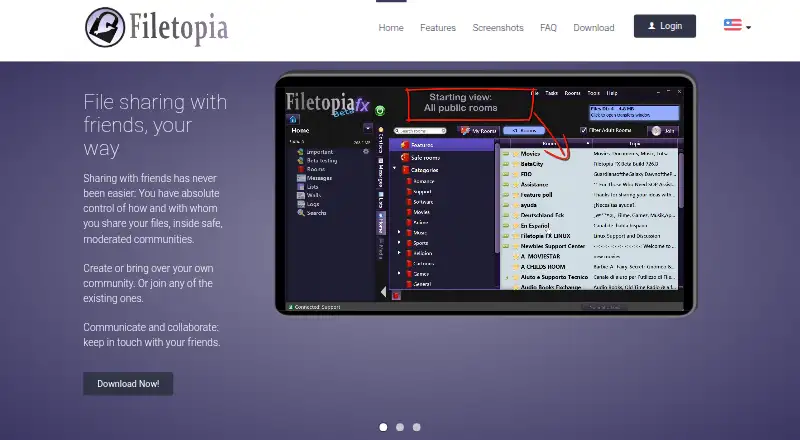
What Filetopia is
Filetopia is a free desktop program for sharing files socially among friends in moderated communities, with built-in communication and collaboration tools. Its instant messenger supports community conversations, while moderation features are intended to keep unwanted visitors from disturbing groups. Users can make lists and share them with everyone or selected rooms, groups, or individuals; permissions can include server slots and bandwidth.
Global file search is not implemented, but users can search rooms, messages, lists, logs, chat, and walls. The interface offers floating windows, movable tabs, nine themes, and more than 25 chat presets, with custom presets also supported. The site lists English, Spanish, German, Italian, Dutch, and Arabic. Filetopia runs on Windows, Linux, and macOS. Windows downloads include 32-bit and 64-bit installers, and the 32-bit version is stated to work from Windows XP onward. Linux installation uses a script run as root. A ZIP can be unpacked for portable use and requires Java 8; the main downloads bundle Java. Users can host rooms on their computers and share access with a special encrypted key.
Who it suits
Filetopia may suit groups of friends who want moderated communities, selective file sharing, and built-in messaging across desktop systems. It is less suited to users who need a global file search.
What it does well
- Free desktop software for Windows, Linux, and macOS.
- Share lists with selected rooms, groups, or users.
- Includes instant messaging and moderation features.
- Supports room and message search, themes, and movable tabs.
- Users can host rooms on their own computers.
What to know first
- Global file search is not implemented.
- Linux installer script must be run as root.
- Portable ZIP requires Java 8.
- Only one public room per user by default.
Limits
The free plan is listed as free. By default, each user can own one public room and any number of private rooms; a system operator can allow more public rooms for justified needs. Posting your own images and emoticons requires system-operator approval.
Plans
| Plan | Billed and limits | Price |
|---|---|---|
| Filetopia | No price listed | Free |
As filetopia.org lists them, read 11 Oct 2026. The maker's own page has the final word.
Getting started
- Visit https://www.filetopia.org/ and choose a Windows, Linux, or macOS download.
- On Windows, choose the 32-bit or 64-bit installer; the 32-bit version is stated to work from Windows XP onward.
- On Linux, run the installer script as root, for example with sudo.
- For portable use, unpack the ZIP download and provide Java 8; the main downloads bundle Java.
- Create or join rooms and share lists with selected rooms, groups, or users.
Verdict
Filetopia combines selective sharing, messaging, and community moderation, with room hosting available on users’ computers. Its lack of global file search and desktop-focused setup are worth considering before choosing it.
Questions
How much does Filetopia cost?
It is free, with a listed plan price of $0.
Which operating systems are supported?
The listed platforms are Windows, Linux, and macOS.
Is there a global file search?
No. Search covers rooms, messages, lists, logs, chat, and walls, but global file search is not implemented.
Can users host their own rooms?
Yes. Users can host rooms on their own computers and share access with a special encrypted key, even without connecting to the Filetopia Network.
What are the room limits?
By default, a user can own one public room and any number of private rooms. A system operator can enable additional public rooms for justified needs.
Who makes Filetopia?
The maker identifies himself as Enrique Martin and says he has developed P2P applications and communication software since 1999.
Facts from Filetopia's own pages
- Founded
- 1998 · filetopia.org, 28 Sept 2026
- Image permissions
- Posting one's own images and emoticons requires approval from a system operator, while copying or capturing posted images and emoticons is available by default. · filetopia.org, 11 Oct 2026
- Interface
- The desktop interface supports floating windows, movable tabs, nine themes, and more than 25 chat presets or custom presets. · filetopia.org, 11 Oct 2026
- Languages
- The site lists English, Spanish, German, Italian, Dutch, and Arabic as supported languages. · filetopia.org, 11 Oct 2026
- Linux download
- The download page offers a Linux installer script that must be run as root, for example with sudo. · filetopia.org, 11 Oct 2026
- Maker
- The maker identifies himself as Enrique Martin and says he has developed P2P applications and communication software since 1999. · filetopia.org, 11 Oct 2026
- Messaging
- The program includes an instant messenger. · filetopia.org, 11 Oct 2026
- Moderation
- The program includes moderation features intended to keep unwanted people from disturbing communities. · filetopia.org, 11 Oct 2026
- Portable version
- The ZIP download can be uncompressed as a portable version, and requires Java 8; the main downloads bundle Java. · filetopia.org, 11 Oct 2026
- Product
- Filetopia describes itself as social file sharing for friends in moderated communities, with tools to communicate and collaborate. · filetopia.org, 11 Oct 2026
- Room hosting
- Users can host rooms on their own computer and share access using a special encrypted key, even without connecting to the Filetopia Network. · filetopia.org, 11 Oct 2026
- Room limit
- By default, a user can own one public room and any number of private rooms; a system operator can enable more public rooms for justified needs. · filetopia.org, 11 Oct 2026
- Search
- Global file search is not implemented; rooms, messages, lists, logs, chat, and walls are searchable. · filetopia.org, 11 Oct 2026
- Selective sharing
- Users can create lists and share them with all or selected rooms, groups, or users, with permissions that can include server slots and bandwidth. · filetopia.org, 11 Oct 2026
- Web version
- The site says a web version for desktop and mobile devices is being developed. · filetopia.org, 11 Oct 2026
- Windows downloads
- The download page offers 32-bit Windows and 64-bit Windows installers, with the 32-bit version stated to work from Windows XP onward. · filetopia.org, 11 Oct 2026
Where Filetopia stands on Freedom251
- Peer-to-Peer File Sharing Software#11 of 36