Freedom251 › Meeting Recording Software
minsMe
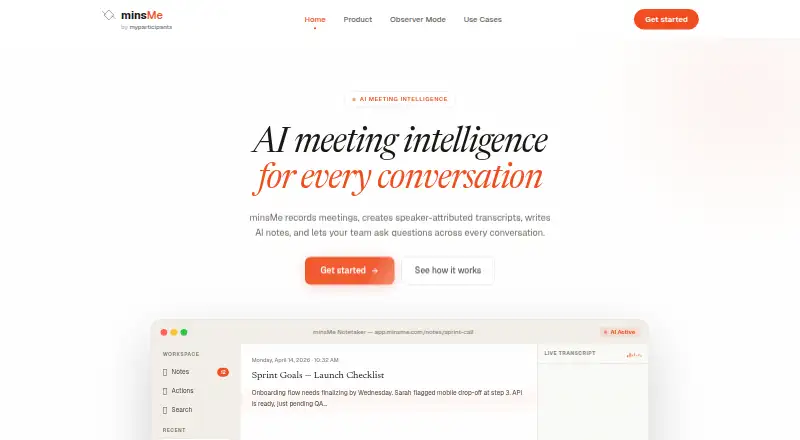
What minsMe is
minsMe records meetings and turns them into speaker-attributed transcripts, AI notes and searchable conversations. Teams can capture meetings through calendar-based auto-capture, send a meeting bot manually, or upload audio and video recordings. The bot can join Google Meet, Zoom and Microsoft Teams, and identifies itself to help notify participants that recording is in progress. Afterward, minsMe can produce summaries and extract action items, decisions and questions. Users can search transcripts or ask questions across conversations, with answers linked to transcript moments. Listed integrations include Slack, Notion, Jira, HubSpot and Linear. Privacy controls include PII redaction, participant masking, data export and deletion, and workspace audit logs; sharing controls are described as advanced governance. The terms say customer content is not used to train AI models and that AI providers are contractually prohibited from doing so. They also caution that transcripts, summaries, action items and chat responses generated by AI may contain errors and should be reviewed. The Free plan costs nothing; features and usage limits vary by plan, with no specific limits stated.
Who it suits
minsMe suits teams that need to capture meetings, review speaker-attributed transcripts and track decisions or action items. The maker describes use cases across engineering, sales, product, HR and recruiting, leadership, and customer success.
What it does well
- Supports calendar capture, bot capture and file uploads.
- Search answers link to transcript moments.
- Includes export, deletion and audit-log controls.
- Free plan costs nothing.
What to know first
- AI-generated content may contain errors.
- Recording bot joins and identifies itself to participants.
Plans
| Plan | Billed and limits | Price |
|---|---|---|
| Free plan | Features and usage limits vary by plan; no specific limits stated | Free |
As minsme.com lists them, read 8 Oct 2026. The maker's own page has the final word.
Getting started
- Visit minsme.com.
- Use the web, extension, or API platform.
- Choose calendar-based auto-capture, send a meeting bot manually, or upload an audio or video recording.
- For bot capture, use Google Meet, Zoom, or Microsoft Teams.
- Start with the Free plan at no cost.
Verdict
minsMe combines meeting capture, notes and cross-conversation search with listed privacy controls and integrations.
Questions
Does minsMe have a free plan?
Yes. Its Free plan is listed as free.
Which platforms does minsMe support?
Its listed platforms are API, extension, and web. Its meeting bot can join Google Meet, Zoom, and Microsoft Teams.
Can minsMe search across meetings?
Yes. Users can search transcripts and ask questions across meetings, with answers linked to transcript moments.
What integrations does minsMe list?
It lists Slack, Notion, Jira, HubSpot, and Linear among the tools it works with.
Does minsMe use customer content to train AI models?
Its terms say customer content is not used to train AI models, and AI providers are contractually prohibited from doing so.
Can AI-generated notes and transcripts be relied on without review?
The terms warn that transcripts, summaries, action items, and chat responses may contain errors and should be reviewed.
Facts from minsMe's own pages
- AI data use
- The terms say minsMe does not use customer content to train AI models and that its AI providers are contractually prohibited from doing so. · app.minsme.com, 8 Oct 2026
- AI limitations
- The terms say AI-generated transcripts, summaries, action items, and chat responses may contain errors and should be reviewed. · app.minsme.com, 8 Oct 2026
- AI notes
- It generates summaries and extracts action items, decisions, and questions from meetings. · minsme.com, 8 Oct 2026
- Integrations
- The site lists Slack, Notion, Jira, HubSpot, and Linear among the tools minsMe works with. · minsme.com, 8 Oct 2026
- Meeting capture
- It supports calendar-based auto-capture, manually sending a meeting bot, and uploading audio or video recordings. · minsme.com, 8 Oct 2026
- Meeting platforms
- The bot can join Google Meet, Zoom, and Microsoft Teams meetings. · minsme.com, 8 Oct 2026
- Privacy controls
- Features include PII redaction, participant masking, data export and deletion, and workspace audit logs. · minsme.com, 8 Oct 2026
- Purpose
- minsMe records meetings, creates speaker-attributed transcripts and AI notes, and lets teams ask questions across conversations. · minsme.com, 8 Oct 2026
- Recording notice
- The bot identifies itself when joining a meeting to help notify participants that recording is in progress. · minsme.com, 8 Oct 2026
- Search
- Users can search meeting transcripts and ask questions across meetings, with answers linked to transcript moments. · minsme.com, 8 Oct 2026
- Support
- The terms direct users to [email protected] if they suspect unauthorized account access. · app.minsme.com, 8 Oct 2026
- Target teams
- The maker describes use cases for engineering, sales, product, HR and recruiting, leadership, and customer success teams. · minsme.com, 8 Oct 2026
Where minsMe stands on Freedom251
- Meeting Recording Software#12 of 34