Freedom251 › Virtual Routers Software
MikroTik RouterOS
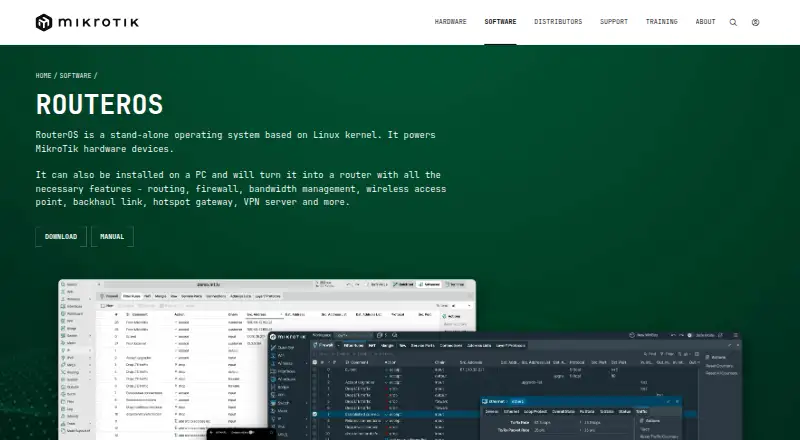
What MikroTik RouterOS is
MikroTik RouterOS is networking software with VPN access, site-to-site networking, audit logs, and advanced administrative controls. It supports WebFig, Windows WinBox, Android, iOS, command-line access, an API, MikroTik hardware, x86 PCs, and virtual machines. The Free Demo costs nothing and provides a 24-hour trial mode before licensing. Paid plans are listed monthly: Level 4 WISP costs $45 a month and allows 200 PPPoE, PPTP, L2TP, and OVPN tunnels each. Level 5 WISP costs $95 a month, with 500 PPPoE, PPTP, and L2TP tunnels and unlimited OVPN tunnels. Level 6 Controller costs $250 a month and allows unlimited tunnels of all four types. MikroTik is headquartered in Riga, Latvia. SSO/SCIM and device posture are listed as unsupported, which may matter when assessing administrative and access requirements.
Who it suits
RouterOS suits network administrators who need VPN and site-to-site networking with advanced controls. The tunnel limits in the paid plans can help distinguish options for different deployments.
What it does well
- Supports site-to-site networking and VPN access.
- Includes audit logs and advanced admin controls.
- Supports hardware, PCs, virtual machines, and multiple interfaces.
- Free Demo offers a 24-hour trial mode.
What to know first
- SSO/SCIM is not supported.
- Device posture is not supported.
Limits
The Free Demo runs in 24-hour trial mode before licensing. Level 4 allows 200 tunnels of each listed type; Level 5 allows 500 PPPoE, PPTP, and L2TP tunnels, while OVPN is unlimited. Level 6 has unlimited allowances for all four types.
Plans
| Plan | Billed and limits | Price |
|---|---|---|
| Free Demo | 24-hour trial mode before licensing | Free |
| Level 4 WISP | 200 PPPoE tunnels · 200 PPTP tunnels · 200 L2TP tunnels · 200 OVPN tunnels | $45 a month |
| Level 5 WISP | 500 PPPoE tunnels · 500 PPTP tunnels · 500 L2TP tunnels · Unlimited OVPN tunnels | $95 a month |
| Level 6 Controller | Unlimited PPPoE tunnels · Unlimited PPTP tunnels · Unlimited L2TP tunnels · Unlimited OVPN tunnels | $250 a month |
| 60-day Trial | 60 days · Trial of P1, P10 or P-Unlimited · MikroTik account required | Free |
| Free CHR | perpetual · 1 Mbps upload per interface · full features otherwise | Free |
| P-Unlimited | perpetual · No enforced speed limit | $250, paid once |
| P1 | perpetual · 1 Gbps upload per interface · full features otherwise | $45, paid once |
The first 8 of 9 plans, as mikrotik.com lists them, read 22 Sept 2026. The maker's own page has the final word. Every plan
Getting started
- Visit the MikroTik software website.
- Choose a supported environment: WebFig, WinBox, Android, iOS, CLI, API, MikroTik hardware, x86 PC, or virtual machine.
- Start with the Free Demo for its 24-hour trial mode before licensing.
- Select a paid monthly plan based on the tunnel allowances you need.
Overview
MikroTik RouterOS is network software for VPN access and site-to-site networking, with management through web, desktop, mobile, command-line and API interfaces. It is best for network administrators and service providers who need advanced controls and can match a license to their tunnel protocols and capacity. The higher tiers provide substantial tunnel allowances, but the demo is brief and identity and device-posture controls are absent.
Key features
RouterOS combines VPN access and site-to-site networking with audit logs and advanced administration. That combination suits operators managing network connectivity directly; it is less suited to teams seeking a lightweight VPN service or requiring identity and endpoint checks, since it does not support SSO, SCIM or device posture.
Administrators can work in WebFig, Windows WinBox, Android or iOS, or use CLI and API workflows. Supported targets include MikroTik hardware, x86 PCs and virtual machines. This breadth offers flexibility across management styles and deployment targets, though advanced controls make it a better fit for experienced network operators than users seeking a basic setup.
Pricing
The Free Demo costs nothing and runs in trial mode for 24 hours before licensing. It allows only a short evaluation, not ongoing use without a paid license.
| Plan | Price | Tunnel limits | Best fit |
|---|---|---|---|
| Level 4 WISP | $45 a month | 200 each for PPPoE, PPTP, L2TP and OVPN | Operators whose needs stay within 200 tunnels per protocol |
| Level 5 WISP | $95, paid once | 500 each for PPPoE, PPTP and L2TP; unlimited OVPN | Networks needing more capacity, especially for OVPN, while keeping the other protocols within 500 |
| Level 6 Controller | $250 a month | Unlimited PPPoE, PPTP, L2TP and OVPN | Operators needing uncapped tunnel capacity across all four protocols |
The choice turns on protocol-specific ceilings, not just overall scale. Level 4 is the lower-cost monthly option but caps every protocol at 200; Level 5 raises three limits and removes the OVPN cap, with a one-time rather than monthly price. Level 6 removes the listed tunnel ceilings but costs $250 a month. Check the price term against your expected deployment and the capacity you actually need.
Platforms
Supported platforms and interfaces include WebFig, Windows WinBox, Android, iOS, CLI, API, MikroTik hardware, x86 PCs and virtual machines. The mix serves administrators who want graphical or programmatic management and a choice of supported hardware or virtual targets.
Who it's for
RouterOS is a strong candidate for service providers and organizations with experienced network administrators who need site-to-site connectivity, audit logs and defined tunnel capacity. It is a weaker fit for buyers who require SSO, SCIM or device-posture checks, or whose needs exceed a lower tier's protocol limits without justifying Level 6's monthly price.
Pros and cons
Pros
- Broad management choices, including GUI, mobile, CLI and API, suit varied administration workflows.
- Level 5 offers unlimited OVPN tunnels and higher limits on three other protocols at a one-time price.
- Level 6 removes the listed tunnel caps across all four protocols.
Cons
- The free demo lasts only 24 hours, so it is not a continuing no-cost option.
- Level 4 and Level 5 cap PPPoE, PPTP and L2TP at 200 or 500 tunnels, respectively.
- No SSO, SCIM or device posture limits its fit for organizations that need those controls.
Alternatives
For configuration management rather than RouterOS's tunnel-focused tiers, ManageEngine Network Configuration Manager has a free edition capped at two devices and a Professional Edition priced at $238 a year. UniFi Network is a license-free choice, with Site Manager or a Network Server that can be self-hosted or run on UniFi hardware. TP-Link Omada SDN offers a free software controller for centralized management of up to 1,500 devices, with capacity dependent on PC or server hardware.
Arista NG Firewall is another alternative with a free plan. Cambium cnMaestro offers a no-subscription Essentials tier for up to 10,000 devices and 10 management users. FRRouting is free and open-source routing software for Linux and self-hosting. Gluware has a renewable one-year Community Edition for up to 20 devices. Domotz offers a per-device option at $1.50 a month, billed per managed device in bundles of 10.
Browse more options in Network Management Software or Business VPN Software.
Verdict
Choose MikroTik RouterOS if your network team needs advanced control, site-to-site connectivity and tunnel allowances that map closely to its four supported protocols. Its flexible interfaces and high-capacity tiers are the draw; the 24-hour demo, paid entry tier and missing SSO, SCIM and posture controls are reasons to choose another product when those needs matter.
Verdict
RouterOS offers several supported interfaces and three paid tiers with differing tunnel limits. Compare the listed limits and unsupported SSO/SCIM and device posture against your requirements.
Questions
Is there a free plan or trial?
Yes. The Free Demo costs nothing and runs in 24-hour trial mode before licensing.
What do the paid plans cost?
Level 4 WISP costs $45 a month, Level 5 WISP costs $95 a month, and Level 6 Controller costs $250 a month.
Which platforms and environments does RouterOS support?
Supported environments include WebFig, Windows WinBox, Android, iOS, CLI, API, MikroTik hardware, x86 PCs, and virtual machines. The listed platform categories are Android, iOS, and Windows.
Does it support SSO/SCIM or device posture?
No. Both are listed as unsupported.
Who makes RouterOS, and where is it based?
The maker is MikroTik RouterOS, headquartered in Riga, Latvia.
Facts from MikroTik RouterOS's own pages
- Access model
- vpn · manual.mikrotik.com, 22 Sept 2026
- Admin control level
- advanced · manual.mikrotik.com, 22 Sept 2026
- API
- The API lets custom programs read information, change configuration and manage routers using syntax closely related to the command line. · manual.mikrotik.com, 15 Oct 2026
- API security
- API-SSL uses TLS on port 8729, REST supports HTTPS and Basic authentication, and the documentation recommends least-privilege users and VPN protection. · manual.mikrotik.com, 15 Oct 2026
- Audit logs
- Yes · manual.mikrotik.com, 22 Sept 2026
- Company distribution
- MikroTik says it has more than 800 distributors and resellers in 130 countries and more than 250 current products. · mikrotik.com, 15 Oct 2026
- Company founding
- MikroTik states that the company was founded in 1996 and develops its products through a full EU-based production cycle. · mikrotik.com, 15 Oct 2026
- Company legal identity
- The maker identifies itself as SIA Mikrotīkls, registration number LV40003286799, with offices and legal address in Riga, Latvia. · mikrotik.com, 15 Oct 2026
- Company size
- LinkedIn lists MikroTik as privately held, headquartered in Riga, founded in 1996 and employing 201–500 people. · linkedin.com, 15 Oct 2026
- Configuration tools
- Administration is available through WinBox, WebFig, Android and iOS apps, terminal, serial console, Telnet, SSH and API. · manual.mikrotik.com, 15 Oct 2026
- Core networking
- The platform combines routing, firewalling, VPN, wireless management, quality of service, automation and monitoring. · manual.mikrotik.com, 15 Oct 2026
- Device posture
- No · manual.mikrotik.com, 22 Sept 2026
- Documentation depth
- The manual covers installation, licensing, diagnostics, switching, wireless, routing, firewall, VPN, AAA, high availability, IoT, storage, containers, scripting and an automatically generated CLI reference. · manual.mikrotik.com, 15 Oct 2026
- Firewall
- Its firewall provides stateful filtering, NAT, address lists, Layer7 matching, IPv6 filtering, packet marks and raw rules. · manual.mikrotik.com, 15 Oct 2026
- Free plan
- No · manual.mikrotik.com, 22 Sept 2026
- Headquarters
- Riga, Latvia · mikrotik.com, 28 Sept 2026
- Latest download
- The x86 download page lists RouterOS long-term release v7.23.8 and packages including container, Dude, GPS, IoT, OpenFlow, storage, TR-069, UPS, User Manager and wireless. · mikrotik.com, 15 Oct 2026
- Licensing model
- RouterOS is proprietary software licensed for use rather than sold; the EULA restricts copying, modification, reverse engineering and multiple installations. · mikrotik.com, 15 Oct 2026
- Limit: documentation and support
- Reviewers report outdated or incomplete wiki material, difficult troubleshooting examples and limited direct support channels. · trustradius.com, 15 Oct 2026
- Limit: learning curve
- Independent reviewers repeatedly describe RouterOS administration and its interface as difficult for beginners or requiring advanced networking knowledge. · trustradius.com, 15 Oct 2026
- Limit: reliability issues
- TrustRadius reviewers report occasional ARM-device reboots or lockups and wireless performance problems in some deployments. · trustradius.com, 15 Oct 2026
- Limit: security-suite gaps
- Reviewers cite the absence of a full unified-threat-management, antivirus or IPS capability and request stronger secure-DNS and VPN features. · g2.com, 15 Oct 2026
- Management integrations
- Official product material lists API, TR-069, customizable client interfaces and automatic email or SMS trigger notifications. · mikrotik.com, 15 Oct 2026
- Mobile-app limitation
- Apple App Store reviewers complain that the iOS app lacks a terminal, bulk hotspot-user deletion and some connected-device information available in the web interface. · apps.apple.com, 15 Oct 2026
Where MikroTik RouterOS stands on Freedom251
- Virtual Routers Software#5 of 25
- Virtual Private Network Software#11 of 54
- Network Management Software#7 of 34
- Business VPN Software#32 of 94