Freedom251 › Two-Way SMS Software
MightyText
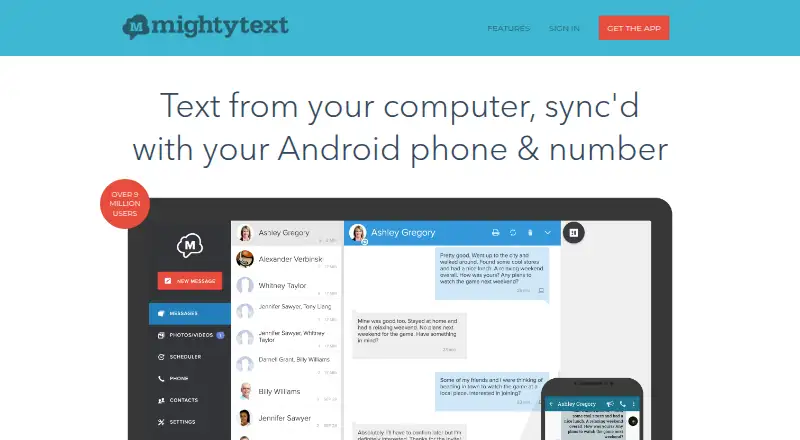
What MightyText is
MightyText lets users send and receive SMS and MMS from a computer or tablet through their current Android phone number. Messages sync with the phone’s SMS inbox. The service can show phone app notifications on a computer, where users can dismiss them, and sync photos and videos from a phone for one-click sharing. Users can schedule messages, and the GText Chrome extension enables SMS through Gmail on a computer using the Android number. Other listed functions include call notifications, battery alerts, sending webpages and files to a phone, templates, and SMS email sync and backup. Pro adds message drafts, labels, contact lists, message restoration to a new phone, and storage without time limits. The Free plan costs nothing and caps usage at 15 messages/month. MightyText Pro costs $7.49 a month, billed at $7.49/month or $89.99 per year; it removes the sending limit, allows bulk SMS to 25 people at a time, and includes 100 GB for photos and videos. Messages are routed through the user’s phone and carrier, which may charge messaging fees.
Who it suits
MightyText is aimed at people who often communicate by SMS and use multiple devices. It suits Android phone users who want to handle messages and phone notifications from a computer or tablet.
What it does well
- Syncs SMS and MMS with the phone inbox.
- Supports scheduled messages and Gmail texting through GText.
- Syncs phone photos and videos to computers or tablets.
- Pro includes message restoration and unlimited-time storage.
- Available on Android, web, extension, Linux, macOS, and Windows.
What to know first
- Free plan is capped at 15 messages/month.
- SMS and MMS go through the phone and carrier, which may charge fees.
- The service advises against relying on it for critical text communications.
Limits
The Free plan caps use at 15 messages/month. Pro costs $7.49 a month, billed at $7.49/month or $89.99 per year; it removes the sending limit, supports bulk SMS to 25 people at a time, and includes 100 GB for photos and videos. SMS and MMS route through the user’s phone and carrier, which may charge messaging fees.
Plans
| Plan | Billed and limits | Price |
|---|---|---|
| Free | 15 messages sent through MightyText per month | Free |
| MightyText Pro | $7.49/month; ($89.99 per year) · No sending limit · send bulk SMS to 25 people at a time · 100 GB photos/videos | $7.49 a month |
| MightyText Pro monthly | $7.49/month · Unlimited messages · ad-free · scheduling · templates · bulk SMS to 25 people · 100 GB photo/video storage | $7.49 a month |
| MightyText Pro annual | $89.99 per year · Unlimited messages · ad-free · scheduling · templates · bulk SMS to 25 people · 100 GB photo/video storage | $89.99 a year |
As mightytext.com lists them, read 15 Oct 2026. The maker's own page has the final word.
Getting started
- Visit https://mightytext.com/.
- Use MightyText with an Android phone and a computer or tablet.
- Choose the Free plan, capped at 15 messages/month, or MightyText Pro at $7.49 a month.
- Use the GText Chrome extension to send or receive SMS through Gmail on a computer.
MightyText is an Android companion for handling SMS, MMS and phone alerts from a computer or tablet. It best suits people who text often and switch between devices. Its broad set of phone-to-computer tools is useful, but the free plan’s 15-message monthly cap is too restrictive for regular texting.
Overview
MightyText sends and receives messages using the Android phone’s existing number and syncs them with the phone’s SMS inbox. That makes it a practical way to keep using a familiar number while working on a computer or tablet. The dependency is also a drawback: messages route through the phone and carrier, which may charge messaging fees. The service advises against relying on it for critical texts.
It also shows phone-app notifications on a computer and lets users dismiss them there. Photos and videos sync from phone to computer or tablet, with one-click photo sharing. These additions make MightyText more than a desktop texting interface, but they remain tied to an Android phone.
Key features
Messages and scheduling
Users can schedule messages for later, and can send and receive SMS from Gmail on a computer through the GText Chrome extension. That suits people who want to manage routine texts without moving to their phone. The carrier-based routing means it is not independent messaging: carrier fees may apply, and the phone remains central to the service.
Phone companion tools
Call notifications, battery alerts, sending webpages and files to a phone, templates, and SMS email sync and backup round out the feature set. These tools can make a computer a more useful window onto an Android phone, though they will matter less to someone seeking only a basic texting app.
Pro storage and organization
Pro adds drafts, labels, contact lists, message restoration to a new phone, and storage without time limits. Those features favor people who organize or retain messages over time; occasional texters may not need them. Pro support says it responds within two hours or less during US business hours.
Pricing
The Free plan costs nothing and allows 15 messages per month. That cap makes it suitable for light use, but not as a full-time texting replacement for anyone who sends messages regularly.
MightyText Pro costs $7.49 a month, billed $7.49/month; ($89.99 per year). It removes the sending limit, permits bulk SMS to 25 people at a time, and includes 100 GB for photos and videos, as well as Pro’s organizational and restoration features. It is the relevant plan for frequent texters or users who want to retain messages, though carrier charges may still apply.
MightyText is freemium, with paid service from $7.49/mo (annual). SMS and MMS are synchronized and stored to provide the service. Its privacy policy says security measures vary with data type and sensitivity, but does not guarantee that communications or stored information will be free from unauthorized access. It says it does not collect or store sensitive cardholder data such as card numbers.
Platforms
MightyText supports Android, browser extension, Linux, macOS, web and Windows, and has a mobile app. Its computer and tablet messaging features depend on an Android phone, so the platform range does not make it a phone-independent option.
Who it's for
MightyText is best for people who communicate frequently by SMS and use multiple devices, especially those who want phone notifications, media syncing or Gmail access alongside texting. It is a weaker fit for users who need a high-volume free plan, phone-independent messaging, or a service suitable for critical communications.
Pros and cons
Pros
- Keeps the existing number and inbox: SMS and MMS use the Android phone’s number and sync with its SMS inbox.
- Useful computer-side extras: Notification dismissal, media syncing, scheduling and Gmail texting extend its use beyond basic message access.
- Pro supports heavier use: No sending limit, bulk messages to 25 people and 100 GB of media storage address regular messaging needs.
Cons
- Free use is sharply capped: 15 messages a month is too little for routine texting.
- Phone and carrier dependence: Messages route through the phone and may incur carrier fees; the service cautions against critical use.
- Stored messages carry a security caveat: MightyText does not guarantee communications or stored information will be free from unauthorized access.
Alternatives
Two-Way SMS Software is a category directory for comparing messaging options.
Choose Chekkit instead if a free plan with one user and CRM sales pipeline, booking, quotes, invoices, Stripe payments and QuickBooks integration is a better match than phone-linked personal texting.
Havari is another freemium option with a free plan and trial, including 20 monthly credits for email, Messenger and Instagram.
Sociocs may suit readers seeking a free multichannel plan: its Free tier includes two channels, one user, 1,000 messages a month and unlimited templates.
Textmagic is a paid alternative with a free trial and destination-dependent prepaid SMS rates; consider it if that pricing model better fits your messaging needs.
Podium Webchat offers a free plan and custom quotes tailored to an industry.
Textedly is a paid alternative with a free trial; its Basic plan includes 500 messages per month billed monthly, or 600 with annual billing.
Artera is a paid option for readers comparing business messaging platforms.
DialPhone Contact Center is a paid contact-center alternative with a Standard plan that includes 20+ channels and a unified agent desktop.
Verdict
MightyText is a sensible pick for Android users who want their existing SMS and MMS conversations, notifications and phone media on a computer or tablet. Pro removes the free plan’s message ceiling and adds useful storage and organization tools. Look elsewhere if you need generous free texting, a phone-independent service, or a channel for critical messages.
Verdict
MightyText extends an Android phone’s messaging to computers and tablets, with notification and media syncing alongside SMS and MMS. The free plan has a monthly message cap, and carrier fees may apply because messages are routed through the phone.
Questions
Does MightyText have a free plan?
Yes. The Free plan costs nothing and is capped at 15 messages/month.
How much does MightyText Pro cost?
Pro costs $7.49 a month, billed at $7.49/month or $89.99 per year.
Which devices and platforms does MightyText support?
Its listed platforms are Android, browser extension, Linux, macOS, web, and Windows. It also lists a mobile app.
Can MightyText send texts from Gmail?
Yes. The GText Chrome extension lets users send and receive SMS from Gmail on a computer using their Android phone number.
How are messages handled and routed?
SMS and MMS messages are synchronized and stored to provide the service, and are routed through the user’s phone and carrier. The carrier may charge messaging fees.
Does MightyText guarantee stored messages are secure from unauthorized access?
Its privacy policy describes security measures that vary with data type and sensitivity, but does not guarantee communications or stored information will be free from unauthorized access.
Facts from MightyText's own pages
- Android permissions
- Depending on Android version and enabled features, the app requests notification, alarms, SMS, contacts, phone, call-log and storage permissions. · help.mightytext.com, 15 Oct 2026
- Battery alerts
- The web or tablet app can show the remaining battery level of the Android phone. · mightytext.com, 15 Oct 2026
- Browser support
- The installation guide lists Chrome, Firefox, Safari, Opera and Internet Explorer access, with a Chrome extension required for Chrome. · mightytext.com, 15 Oct 2026
- Bulk messaging
- Pro users can send one message to as many as 25 people at once. · play.google.com, 15 Oct 2026
- Call notifications
- Users can receive computer or tablet alerts when their Android phone receives a call. · mightytext.com, 15 Oct 2026
- Chrome adoption
- The Chrome Web Store listing reports 200,000 users for the extension. · chromewebstore.google.com, 15 Oct 2026
- Company headquarters
- LinkedIn lists MightyText headquarters in Santa Clara, California. · linkedin.com, 15 Oct 2026
- Company legal developer
- Google Play identifies OPENPHONE INC. as the developer and lists a Santa Clara, California address. · play.google.com, 15 Oct 2026
- Content transfer
- Users can push web pages, files, maps and photos from a computer to the phone. · mightytext.com, 15 Oct 2026
- Core use
- MightyText sends and receives SMS and MMS from a computer or tablet using the user's current Android phone number, with messages synced to the phone's SMS inbox. · mightytext.com, 7 Oct 2026
- Data deletion
- Users can request account or content deletion through support, with typical responses stated as 24–48 business hours and completion allowed up to seven days. · mightytext.com, 15 Oct 2026
- Data handling
- The privacy policy says the service stores synchronized SMS/MMS content, photos, videos, contacts, battery level and optional app notifications. · mightytext.com, 15 Oct 2026
- Desktop support
- Official downloads are provided for Windows 64-bit, Windows 32-bit and macOS. · mightytext.com, 15 Oct 2026
- Developer access rule
- The terms prohibit automated access outside currently available published interfaces unless MightyText grants separate permission. · mightytext.com, 15 Oct 2026
- Email and SMS sync
- Pro lets users receive and reply to SMS through email. · mightytext.com, 15 Oct 2026
- Gmail integration
- MightyText provides SMS sending and receiving inside Gmail on a computer. · mightytext.com, 15 Oct 2026
- Headquarters
- Santa Clara, California, United States · mightytext.com, 28 Sept 2026
- Intended users
- The company describes its audience as people who frequently communicate via SMS and use many different devices. · mightytext.com, 7 Oct 2026
- Limit: billing and cancellation
- Several Trustpilot reviewers allege difficulty cancelling subscriptions or obtaining refunds after renewal charges. · uk.trustpilot.com, 15 Oct 2026
- Limit: Google Play reliability
- Google Play reviews report buggy notifications, duplicated media downloads, missing synchronized messages and inconsistent customer support. · play.google.com, 15 Oct 2026
- Limit: reliability and support
- G2 reviews report synchronization failures, scheduled group MMS problems, message-counting errors and weak or automated support responses. · g2.com, 15 Oct 2026
- Limit: Trustpilot synchronization
- Trustpilot reviewers describe missed or delayed synchronization, disconnects, missing phone-sent messages and unreliable uploads. · uk.trustpilot.com, 15 Oct 2026
- Media sync
- It syncs photos and videos from a phone to a computer or tablet and supports one-click photo sharing. · mightytext.com, 7 Oct 2026
- Message backup and restore
- Pro includes automatic message backup and the ability to restore saved messages to a phone. · play.google.com, 15 Oct 2026
Where MightyText stands on Freedom251
- Two-Way SMS Software#3 of 30