Freedom251 › Authenticator apps
MFAuth
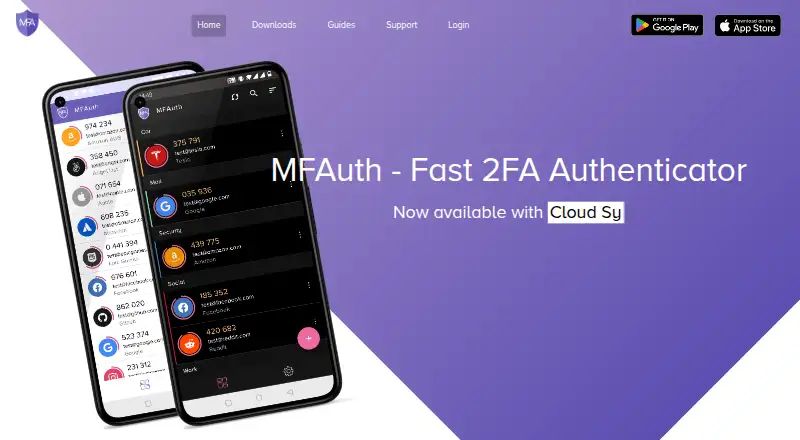
What MFAuth is
MFAuth generates one-time passwords to add a second verification step to online accounts. It creates TOTP codes on the device without an internet connection and also supports HOTP. Accounts can be added by scanning a QR code, selecting an image, or entering a secret key; the app listing says it works with services that support Google Authenticator. MFAuth is available on Android, the web, and as a Chrome extension. Its listing describes Cloud Sync and MFAuth Web as premium features, without giving their price. Backup and restore to its cloud server are encrypted with a password chosen by the user, and the service supports synchronization across devices. The Chrome extension retrieves OTPs from an MFAuth Cloud account and is described as a supplement to the mobile app. Other listed features include fingerprint biometrics, screenshot blocking, account labels and search, customizable icons, and home-screen widgets. The app supports eight languages. The core authenticator and offline codes are included in the free plan at no cost.
Who it suits
MFAuth suits people who want offline one-time passwords and a free core authenticator for online accounts. Its web, Android, and Chrome extension options may suit users seeking access across those platforms.
What it does well
- Generates TOTP codes offline and supports HOTP.
- Accounts can be added by QR code, image, or secret key.
- Encrypted cloud backup and cross-device synchronization are described.
- Free plan includes the core authenticator and offline codes.
What to know first
- Cloud Sync and MFAuth Web are premium features.
- Chrome extension retrieves OTPs from an MFAuth Cloud account.
Plans
| Plan | Billed and limits | Price |
|---|---|---|
| Free plan | Core authenticator is free; offline codes | Free |
| Premium features | Cloud Sync and MFAuth Web are described as premium; exact price not stated | On request |
As mfauth.in lists them, read 11 Oct 2026. The maker's own page has the final word.
Verdict
MFAuth offers offline codes, multiple account-entry methods, and optional cloud features. Check the unspecified premium price if Cloud Sync or MFAuth Web is important to you.
Facts from MFAuth's own pages
- Account setup
- Accounts can be added by scanning a QR code, using an image, or entering the secret key manually. · play.google.com, 11 Oct 2026
- Backup and sync
- MFAuth describes backup and restore to its cloud server, encrypted with a password chosen by the user, and cross-device synchronization. · mfauth.in, 11 Oct 2026
- Browser access
- The app listing says MFAuth Web works in Chrome, Firefox, Safari, and other major browsers. · play.google.com, 11 Oct 2026
- Chrome extension
- The Chrome extension retrieves OTPs from an MFAuth Cloud account and is described as a supplement to the mobile app. · chromewebstore.google.com, 11 Oct 2026
- Code type
- totp and hotp · mfauth.in, 22 Sept 2026
- Data safety
- Google Play reports that the app may share app information and performance data, may collect personal, financial, and app activity data, and encrypts data in transit. · play.google.com, 11 Oct 2026
- Device security
- The app listing describes fingerprint biometrics and an option to block screenshots or other screen capture. · play.google.com, 11 Oct 2026
- Encrypted backup
- Yes · mfauth.in, 22 Sept 2026
- Free plan
- Yes · mfauth.in, 22 Sept 2026
- Languages
- The app listing states that MFAuth supports eight languages. · play.google.com, 11 Oct 2026
- Maker
- Google Play identifies the developer as Swapnil Jindal and lists an address in Rohini, Delhi, India. · play.google.com, 11 Oct 2026
- Multi-device sync
- Yes · mfauth.in, 22 Sept 2026
- Offline codes
- The app generates TOTP codes on the user’s device without an internet connection. · mfauth.in, 11 Oct 2026
- Organization tools
- The app provides labels and search to group and find accounts, plus customizable icons and home-screen widgets. · play.google.com, 11 Oct 2026
- Premium features
- The app listing labels Cloud Sync and the browser version of MFAuth Web as premium features. · play.google.com, 11 Oct 2026
- Published app update
- Google Play lists August 22, 2023 as the app’s update date. · play.google.com, 11 Oct 2026
- Purpose
- MFAuth generates time-based one-time passwords to add a second verification step to online accounts. · mfauth.in, 11 Oct 2026
- Support
- The app listing provides support at [email protected]. · play.google.com, 11 Oct 2026
- Supported algorithms
- The app listing says MFAuth supports HOTP and TOTP and works with services that support Google Authenticator. · play.google.com, 11 Oct 2026
- Supported platforms
- android,web,Chrome extension · mfauth.in, 22 Sept 2026
Where MFAuth stands on Freedom251
- Authenticator apps#32 of 111