Freedom251 › Collaborative Research Writing Tools Software

MeetingScribe
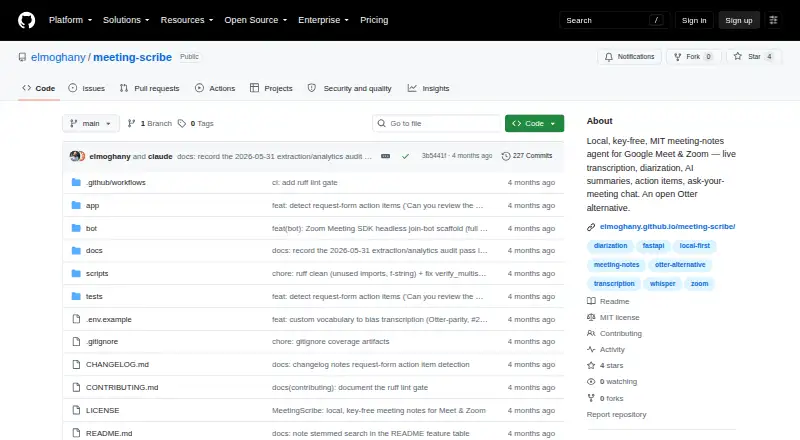
What MeetingScribe is
MeetingScribe captures microphone and system audio during Google Meet or Zoom calls and produces transcripts, summaries, and action items. During a meeting, a small faster-whisper model drafts the transcript locally on the CPU. Speaker diarization uses Resemblyzer by default without an API key; optional pyannote weights require a Hugging Face token. A local quantized language model can generate summaries and decisions, with an extractive fallback that needs no API keys. The app includes editable transcripts and notes, meeting templates, audio playback, highlights, comments, chapters, and talk-time analytics. SQLite FTS5 supports full-text search across past meetings, and users can ask questions across meetings with citations. Notes can be exported as Markdown, plain text, SRT/VTT subtitles, self-contained HTML, or JSON. Webhooks can send notes to Slack, Discord, Notion, or Zapier. Scheduled auto-recording supports Zoom OAuth and calendar feeds supplied as a secret ICS link. The project describes MeetingScribe as local-first, with recordings, notes, and database files kept in a configurable local data directory. It is open source and free.
Who it suits
MeetingScribe suits people who want meeting notes for Google Meet or Zoom on desktop and prefer a local-first setup on hardware they control. It also offers exports, cross-meeting search, and webhook connections for notes.
What it does well
- Drafts live transcripts locally on the CPU.
- Includes an extractive notes fallback without API keys.
- Searches past meetings and supports questions with citations.
- Exports notes in text, subtitle, HTML, and JSON formats.
- Keeps recordings and notes in a configurable local directory.
What to know first
- Live diarization currently labels speakers only as “Me” and “Others”.
- Full diarization runs in the batch pass.
- Optional pyannote weights require a Hugging Face token.
Limits
The software is free under the listed Open source plan at no cost. Live diarization currently labels speakers only as “Me” and “Others”; full diarization runs in the batch pass.
Plans
| Plan | Billed and limits | Price |
|---|---|---|
| Open source | MIT licensed · run locally · Google Meet and Zoom | Free |
As github.com lists them, read 7 Oct 2026. The maker's own page has the final word.
Getting started
- Open the MeetingScribe project website on GitHub.
- Use the Windows or web version for desktop meeting capture.
- Choose Google Meet or Zoom as the meeting platform.
- Configure the local data directory for recordings, notes, and database files.
- Optionally configure Zoom OAuth or a secret ICS calendar feed for scheduled recording.
Verdict
MeetingScribe pairs local transcription and note generation with search, exports, and meeting workflows. Note that live speaker labels are limited; full diarization is performed in the batch pass.
Questions
How much does MeetingScribe cost?
The Open source plan is free and is MIT licensed.
Which meeting platforms does it support?
It captures microphone and system audio during Google Meet or Zoom calls.
Which platforms can I use it on?
The listed platforms are web and Windows, and meeting capture is desktop-based.
Does it create summaries and action items?
Yes. A local quantized language model can create summaries and decisions, with an extractive fallback that works without API keys. It also creates action items.
Where are recordings and notes stored?
The project describes recordings, notes, and database files as staying under a configurable local data directory.
Can it automatically record scheduled meetings?
Scheduled auto-recording supports Zoom OAuth and calendar feeds supplied as a secret ICS link.
Facts from MeetingScribe's own pages
- AI notes
- A local quantized language model can generate summaries and decisions, with an extractive fallback that works without API keys. · github.com, 7 Oct 2026
- Calendar integrations
- No · github.com, 20 Sept 2026
- Cross-meeting search
- SQLite FTS5 provides full-text search across past meetings, and users can ask questions across meetings with citations. · github.com, 7 Oct 2026
- Data handling
- The project describes itself as local-first and says recordings, notes, and database files stay under a configurable local data directory. · github.com, 7 Oct 2026
- Exports
- Meeting notes can be exported as Markdown, plain text, SRT/VTT subtitles, a self-contained HTML page, or JSON. · github.com, 7 Oct 2026
- Free plan
- Yes · github.com, 20 Sept 2026
- Integrations
- A webhook can post notes to Slack, Discord, Notion, or Zapier when a meeting finishes. · github.com, 7 Oct 2026
- Intended users
- The project describes itself as an open-source alternative for people who want meeting notes for Google Meet or Zoom on hardware they control. · github.com, 7 Oct 2026
- Live transcription
- A small faster-whisper model drafts the transcript locally on the CPU while the meeting is in progress. · github.com, 7 Oct 2026
- Meeting capture
- desktop · github.com, 20 Sept 2026
- Meeting features
- It supports editable transcripts and notes, action items, meeting templates, audio playback, highlights, comments, chapters, and talk-time analytics. · github.com, 7 Oct 2026
- Meeting platforms
- Google Meet,Zoom · github.com, 20 Sept 2026
- Notable limitation
- The README says live diarization currently labels speakers only as “Me” and “Others”; full diarization runs in the batch pass. · github.com, 7 Oct 2026
- Purpose
- MeetingScribe captures microphone and system audio during Google Meet or Zoom calls and creates transcripts, summaries, and action items. · github.com, 7 Oct 2026
- Remote processing option
- Batch processing can optionally upload audio to a configured Cornell GPU cluster; if the cluster is unreachable, processing falls back to local CPU. · github.com, 7 Oct 2026
- Scheduling
- Scheduled auto-recording supports Zoom OAuth and calendar feeds supplied as a secret ICS link. · github.com, 7 Oct 2026
- Speaker identification
- Speaker diarization uses key-free Resemblyzer by default, with optional pyannote weights that require a Hugging Face token. · github.com, 7 Oct 2026
- Summaries and action items
- Yes · github.com, 20 Sept 2026
- Transcription
- Yes · github.com, 20 Sept 2026
Where MeetingScribe stands on Freedom251
- Collaborative Research Writing Tools Software#4 of 15
- AI Meeting Assistants#43 of 82
- Container Build Tools#21 of 34