Freedom251 › Minecraft World Map Viewers
mcview
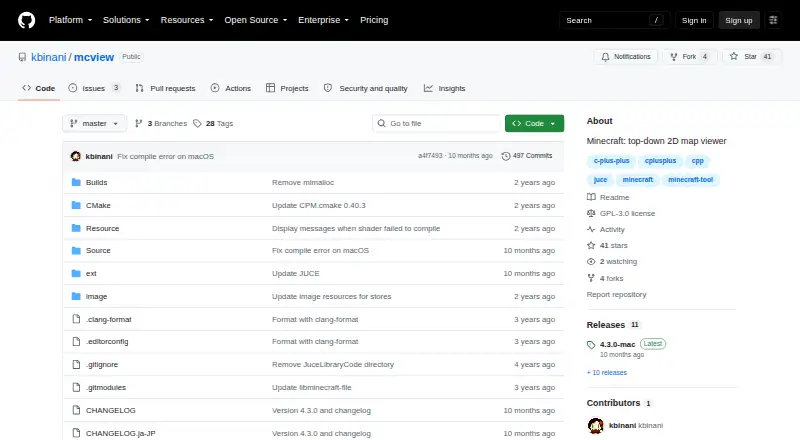
What mcview is
mcview is a map viewer for exploring Minecraft Java and Bedrock worlds in a top-down 2D view. It is available for Windows, macOS, and iOS. The project lists Windows releases and links to the Microsoft Store, as well as Mac releases and an Apple App Store link. Release notes state support for Minecraft 1.21.10 and describe an updated world list in the window. The repository lists the software under the GPLv3 license, and the project is marked free. Its README acknowledges supporting libraries and resources, including JUCE, Google Material Design Icons, colormap-shaders, je2be-core, libminecraft-file, and Android SDK sources. The project pages do not describe third-party service integrations or state a support policy or contact. They also provide no security or compliance details in the project description.
Who it suits
mcview suits Minecraft Java and Bedrock players who want a 2D view of their worlds on Windows, macOS, or iOS. Its listed support for Minecraft 1.21.10 may matter to players using that version.
What it does well
- Top-down 2D map view for Java and Bedrock worlds
- Available on Windows, macOS, and iOS
- Release notes state Minecraft 1.21.10 support
- GPLv3 license; listed as free
What to know first
- Project pages do not state a support policy or contact
- No security or compliance details are provided
Limits
The listed map view mode is 2D. The listed platforms are Windows, macOS, and iOS.
Plans
| Plan | Billed and limits | Price |
|---|---|---|
| mcview | GPLv3 | Free |
As github.com lists them, read 4 Oct 2026. The maker's own page has the final word.
Getting started
- Open the mcview GitHub project page.
- Choose the Windows or Mac release, or use the Microsoft Store or Apple App Store link.
- Install or open mcview on a listed platform.
- Use mcview to view a Minecraft Java or Bedrock world map.
mcview is a top-down 2D map viewer for Minecraft Java and Bedrock worlds. It is best suited to players who want a focused, free desktop-oriented way to inspect worlds rather than a hosted map service. Its appeal is the combination of edition coverage, current Minecraft support, and GPLv3 licensing, although its narrow viewing role will not fit every mapping workflow.
Overview
mcview concentrates on turning Java and Bedrock worlds into a two-dimensional, overhead map. Supporting both editions makes it a practical single option for households or communities that use both Minecraft editions, instead of requiring a separate viewer for each world type. The software is open source and released under GPLv3, so it is aimed at readers comfortable choosing a community-developed tool rather than a commercial product with a formal support package.
The project acknowledges JUCE, Google Material Design Icons, colormap-shaders, je2be-core, libminecraft-file, and Android SDK sources. Those acknowledgements identify important building blocks, but the project does not describe integrations with external services. Its releases are marked with the committer's verified signature, providing a way to verify release provenance; no broader security or compliance claims accompany that information.
Key features
The central feature is a 2D map view for Minecraft Java and Bedrock worlds. That makes mcview appropriate for understanding terrain and world layout from above, but it is not presented as a three-dimensional editor or a server-hosted interactive map. Release notes state support for Minecraft 1.21.10, giving users on that version a clear compatibility point to check against their own worlds.
A renewed world list on the left side of the window is a useful organizational change for anyone managing multiple worlds. It should make switching between available worlds more direct, while keeping the product's scope centered on viewing rather than broader world administration. The project pages do not state a support policy or support contact, so users should expect to rely on the project and its releases rather than a defined help channel.
Pricing
mcview has one plan, mcview, priced at free. It is a GPLv3 open-source offering with no paid tiers, renewal charges, seat fees, trial clock, or published usage quota to compare. That makes the decision simple for individuals who want a free viewer and are willing to use software distributed under this license.
There is no cheaper paid-down tier to trade features for, and no premium plan promising additional capacity or support. Readers who require contractual assistance, service guarantees, or a hosted workflow will need to look beyond this single free plan.
Platforms
The platform data names iOS, macOS, and Windows. The project links to the Microsoft Store and Windows releases, and it also links to the Apple App Store and Mac releases. That gives Windows and Mac users clear distribution routes; iOS is included in the platform coverage, but the project information does not describe its mobile feature set separately. Check the release and Minecraft-version fit for the device you intend to use, particularly if you are moving between desktop and mobile environments.
Who it's for
mcview is a strong fit for Minecraft players who need a straightforward overhead view of Java or Bedrock worlds, especially those on a supported 1.21.10 setup who prefer free, open-source software. It also suits users who keep several worlds and value a refreshed world-selection list.
It is a weaker match for people seeking browser sharing, server-side rendering, extensive publishing controls, or a documented support channel. Those needs call for an alternative with an explicitly web-based or hosted model.
Pros and cons
Pros
- Java and Bedrock coverage: one viewer can address worlds from both major Minecraft editions.
- Clear free licensing: the GPLv3 model avoids subscription and tier decisions.
- Current version reference: release notes state support for Minecraft 1.21.10.
- Signed releases: verified committer signatures help users check release authenticity.
- Renewed world list: the redesigned left-side list is useful for choosing among multiple worlds.
Cons
- Focused scope: mcview is a 2D viewer, not a stated editor, hosted map, or server-management platform.
- Limited service information: no support policy, support contact, security details, or compliance information is described.
- Platform detail varies: Windows and Mac distribution routes are identified, while the iOS entry has no separate feature description.
Alternatives
For a browser-friendly freemium option, choose BedrockMap when one uploaded world, a 1500x1500-block render area, two renders per day, three zoom levels, and public sharing links are acceptable on its free plan.
The Explorer's Friend is the better direction for readers seeking a free MIT-licensed server-side Minecraft map mod or plugin. Choose Bedrock Viz when a GPL-2.0 tool focused on Minecraft Bedrock Edition worlds fits better.
Mapcrafter suits users who can work with Anvil world format and Minecraft 1.6 resource packs. Tectonicus is another free option for readers evaluating a different map generator. Choose mcmap for free GPL-3.0 software with precompiled builds. Pl3xMap is the alternative for an MIT-licensed, Modrinth-distributed option. uNmINeD is a free personal-use alternative for readers who prefer that project.
For a broader comparison of map-viewing tools, see Minecraft World Map Viewers.
Verdict
Choose mcview if you want a no-cost, GPLv3 viewer that covers Minecraft Java and Bedrock worlds in a focused 2D presentation, with stated support for Minecraft 1.21.10 and a refreshed world list. Look elsewhere if you need browser sharing, server-side operation, richer publishing features, or clearly defined support and security commitments.
Verdict
mcview offers a free, GPLv3-licensed way to view Minecraft Java and Bedrock worlds in 2D. Check the listed platform and Minecraft version support against your setup before choosing it.
Questions
How much does mcview cost?
The listed mcview plan is free under GPLv3.
Is mcview open source?
Yes. The project lists the GPLv3 license.
Which platforms does mcview support?
The listed platforms are iOS, macOS, and Windows. The project links to the Microsoft Store and Apple App Store and lists Windows and Mac releases.
Which Minecraft editions can mcview view?
It is a top-down 2D map viewer for Minecraft Java and Bedrock.
Which Minecraft version is supported?
Release notes state support for Minecraft 1.21.10.
What map view mode does mcview provide?
Its listed map view mode is 2D.
Facts from mcview's own pages
- Dependencies and acknowledgements
- The README acknowledges JUCE, Google Material Design Icons, colormap-shaders, je2be-core, libminecraft-file, and Android SDK sources. · github.com, 4 Oct 2026
- Integrations
- The README names supporting libraries and resources but does not describe third-party service integrations. · github.com, 4 Oct 2026
- License
- The repository lists mcview under GPLv3. · github.com, 4 Oct 2026
- Mac availability
- The project links to the Apple App Store and lists Mac releases. · github.com, 4 Oct 2026
- Minecraft version support
- Release notes state support for Minecraft 1.21.10. · github.com, 4 Oct 2026
- Pricing
- The project pages reviewed provide no displayed price. · github.com, 4 Oct 2026
- Purpose
- mcview is a top-down 2D map viewer for Minecraft Java and Bedrock. · github.com, 4 Oct 2026
- Release signing
- The releases page marks release tags as signed with the committer’s verified signature. · github.com, 4 Oct 2026
- Security information
- The repository page shows a Security and quality section but provides no security or compliance details in the project description. · github.com, 4 Oct 2026
- Support
- The project pages reviewed do not state a support policy or support contact. · github.com, 4 Oct 2026
- Windows availability
- The project links to the Microsoft Store and lists Windows releases. · github.com, 4 Oct 2026
- World list
- A release note says the world list on the left side of the window was renewed. · github.com, 4 Oct 2026
Where mcview stands on Freedom251
- Minecraft World Map Viewers#8 of 22