Freedom251 › Disk Diagnostic Software
Macrorit Disk Scanner
What Macrorit Disk Scanner is
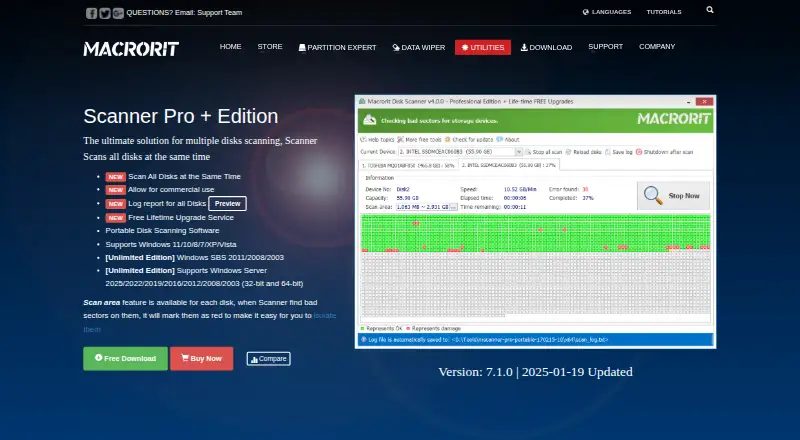
Macrorit Disk Scanner performs surface tests on storage devices to find bad sectors. It can scan an entire disk, a partition, free space or a selected area. Its display marks healthy sectors green and errors red, and results can be saved in a readable scan log. The Free Edition costs nothing and scans a single disk on Windows. Pro + Edition costs $18.95, paid once for one computer and adds simultaneous multi-disk scanning with a report when scans finish. Unlimited Edition costs $99.95, paid once and includes an unlimited company license, Windows Server support and multi-disk scanning. A portable edition can be put on a USB drive to scan offline disks. Supported storage includes HDDs, SSDs, hardware RAID, USB and external drives, flash drives, memory cards and other devices. Listed system requirements include an x86-compatible 500 MHz CPU, 512 MB RAM and 100 MB disk space. Macrorit says it was founded at the end of 2012 and identifies itself with Bada Technology Co., Ltd.
Who it suits
Macrorit Disk Scanner suits Windows users who want to scan storage devices for bad sectors, from one disk to multiple disks depending on edition. The portable edition is also relevant for scanning offline disks from a USB drive.
What it does well
- Free Edition scans one disk.
- Can scan a whole disk or selected areas.
- Readable scan results can be saved.
- Portable edition can scan offline disks from USB.
What to know first
- Free Edition is limited to one disk.
- Pro + costs $18.95, paid once.
- Unlimited costs $99.95, paid once.
- Listed platform is Windows.
Limits
The free Free Edition scans a single disk. Pro + Edition costs $18.95, paid once, and Unlimited Edition costs $99.95, paid once; both include multiple-disk scanning.
Plans
| Plan | Billed and limits | Price |
|---|---|---|
| Free Edition | Scan single disk · Windows | Free |
| Pro + Edition | Per-single computer; lifetime free upgrade service · One license for one computer · Commercial use · Multiple-disk scanning | $18.95, paid once |
| Unlimited Edition | Unlimited license in one company; lifetime free upgrade service · Unlimited company license · Windows Server support · Multiple-disk scanning | $99.95, paid once |
As macrorit.com lists them, read 5 Oct 2026. The maker's own page has the final word.
Getting started
- Visit the Macrorit Disk Scanner website.
- Choose the Free Edition or a paid edition for the intended use.
- Use a Windows computer that meets the listed system requirements.
- Select a disk, partition, free space, or specific area to scan.
- Save the results to a chosen location if you want a scan log.
Verdict
Macrorit Disk Scanner offers single-disk scanning at no cost and multi-disk options in paid editions. Choose an edition based on disk count and whether Windows Server support is needed.
Questions
Is Macrorit Disk Scanner free?
The Free Edition costs nothing and scans one disk. There is no free trial.
What do the paid editions cost?
Pro + Edition costs $18.95, paid once. Unlimited Edition costs $99.95, paid once.
Which platforms does it support?
The listed platform is Windows. Unlimited Edition also lists Windows Server support.
What storage devices can it scan?
Listed support includes HDDs, SSDs, hardware RAID, USB and external drives, flash drives, memory cards, and other storage devices.
Can it scan more than one disk at a time?
Pro + Edition and Unlimited Edition support multiple-disk scanning. The Free Edition scans a single disk.
Does it have third-party integrations?
The product page lists supported storage devices and scan features, but names no third-party integrations.
Facts from Macrorit Disk Scanner's own pages
- Bad-sector display
- The scanner marks healthy sectors green and errors red. · macrorit.com, 5 Oct 2026
- Company
- Macrorit says it was founded at the end of 2012 and identifies itself as being from Bada Technology Co., Ltd. · macrorit.com, 5 Oct 2026
- Founded
- 2012 · macrorit.com, 28 Sept 2026
- Integrations
- The product page lists supported storage devices and scan features but does not name third-party integrations. · macrorit.com, 5 Oct 2026
- Logs
- Scan results can be saved to a specified location, and the product page describes a readable scan log. · macrorit.com, 5 Oct 2026
- Multi-disk scanning
- The Pro + Edition can scan all disks at the same time and produce a report for all disks when scanning finishes. · macrorit.com, 5 Oct 2026
- Portable use
- The portable edition can be placed on a USB drive and used to scan offline disks. · macrorit.com, 5 Oct 2026
- Purpose
- Disk Scanner performs surface tests on hard drives to find bad sectors. · macrorit.com, 5 Oct 2026
- Scan areas
- It can scan a whole disk, a partition, free space, or a selected part of a disk or partition. · macrorit.com, 5 Oct 2026
- Security
- The maker describes the tool as clean and free of spyware, adware, and viruses. · macrorit.com, 5 Oct 2026
- Storage support
- The maker lists HDDs, SSDs, hardware RAID, USB and external drives, flash drives, memory cards, and other storage devices as supported. · macrorit.com, 5 Oct 2026
- Support
- The maker lists Premium Support with the paid editions and provides a technical support email address. · macrorit.com, 5 Oct 2026
- System requirements
- The listed requirements include Windows, an x86-compatible 500 MHz CPU, 512 MB RAM, and 100 MB of disk space. · macrorit.com, 5 Oct 2026
Where Macrorit Disk Scanner stands on Freedom251
- Disk Diagnostic Software#12 of 26