Freedom251 › File Shredder Software
Macrorit Data Wiper
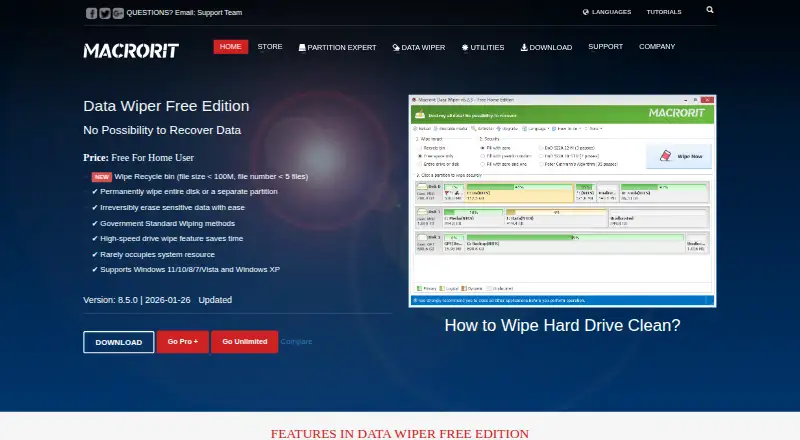
What Macrorit Data Wiper is
Macrorit Data Wiper is a Windows utility that overwrites storage sectors to erase data and prevent recovery. The free edition can wipe non-system disks, data partitions or volumes, external drives, and selected Recycle Bin contents. That Recycle Bin option is limited to files under 100 MB and fewer than five files. The maker lists six wiping methods and says its overwriting process meets US government requirements, including DoD 5220.22-M. Supported file systems include FAT16/32, NTFS, Ext2/3/4, ReFS, Apple HFS+, and others. The free edition supports Windows 11, 10, 8, 7, Vista, and XP. Pro+ adds free-space wiping, system-partition wiping without bootable media, unlimited Recycle Bin wiping, and multiple-disk erasure. It also offers bootable media and lists support for IDE, SCSI, SATA, GPT and uEFI disks, USB flash drives, hardware RAID, and virtual disks in VMware, VirtualBox, and Virtual PC. Pro+ is $29.95, paid once for one computer; Unlimited is $99.95, paid once for multiple computers in one company. Optical discs must be pulverized, not wiped with the software.
Who it suits
Macrorit Data Wiper suits Windows users who need to overwrite non-system drives or data volumes. Pro+ and Unlimited add features for broader wiping needs, including commercial use with Pro+.
What it does well
- Free edition wipes non-system disks and external drives
- Lists six wiping methods
- Supports Windows 11 through XP
- Pro+ adds free-space and multiple-disk wiping
- Pro+ license permits commercial use
What to know first
- Free Recycle Bin wiping has file-count and size limits
- Free edition does not wipe system partitions
- Free-space wiping is a paid feature
- Optical media must be destroyed by pulverizing
Limits
The free edition is for home users and wipes non-system disks. Its Recycle Bin wiping is limited to files under 100 MB and fewer than five files; free-space and system-partition wiping are among the features added by Pro+.
Plans
| Plan | Billed and limits | Price |
|---|---|---|
| Data Wiper Free Edition | Free for home users · recycle-bin wipe limited to files under 100 MB and fewer than 5 files · wipes non-system disks | Free |
| Data Wiper Pro+ Edition | from $29.95 · One license for one computer · home and business user options · lifetime free upgrades | $29.95, paid once |
| Data Wiper Unlimited Edition | from $99.95 · One license for multiple computers in one company · options for 5, 30, or unlimited computers · lifetime free upgrades | $99.95, paid once |
As macrorit.com lists them, read 4 Oct 2026. The maker's own page has the final word.
Getting started
- Visit the Macrorit Data Wiper website.
- Choose the free edition for home use or select a paid edition.
- For Pro+, choose an install package, portable edition, or both, and a 32-bit or 64-bit application version.
- Install or run the application on a supported Windows version.
- Select an eligible disk, partition, volume, external drive, or Recycle Bin contents to wipe.
Verdict
The free edition covers non-system disks and external drives, with strict limits on Recycle Bin wiping. Pro+ and Unlimited add broader capabilities at one-time listed prices.
Questions
Is Macrorit Data Wiper free?
Yes. Data Wiper Free Edition costs nothing and is for home users.
What does the free edition wipe?
It wipes non-system disks, data partitions or volumes, external drives, and eligible Recycle Bin contents. Recycle Bin wiping is limited to files under 100 MB and fewer than five files.
Which Windows versions are supported?
The free edition supports Windows 11, 10, 8, 7, Vista, and XP.
How much do the paid editions cost?
Data Wiper Pro+ Edition costs $29.95, paid once for one computer. Data Wiper Unlimited Edition costs $99.95, paid once for multiple computers in one company, with options for 5, 30, or unlimited computers.
Can I wipe individual files and folders?
No. The listed capabilities include drive wiping, but files and folders are not supported.
Can the software wipe CDs or DVDs?
Macrorit says optical media such as CDs and DVDs must be destroyed by pulverizing rather than wiped with the software.
Facts from Macrorit Data Wiper's own pages
- Bootable media
- Pro+ includes an option to make bootable media. · macrorit.com, 4 Oct 2026
- Commercial use
- Pro+ permits commercial use and charged technical services for clients. · macrorit.com, 4 Oct 2026
- Company
- Macrorit identifies itself as Macrorit from Bada Technology Co., Ltd. and says it was founded at the end of 2012. · macrorit.com, 4 Oct 2026
- Download formats
- The Pro+ page offers an install package, a portable edition, or both, and lists 32-bit and 64-bit application versions. · macrorit.com, 4 Oct 2026
- File systems
- The maker lists support for FAT16/32, NTFS, Ext2/3/4, ReFS, Apple HFS+, and other file systems. · macrorit.com, 4 Oct 2026
- Founded
- 2012 · macrorit.com, 28 Sept 2026
- Free edition features
- The free edition wipes non-system disks, data partitions or volumes, external drives, and qualifying Recycle Bin contents. · macrorit.com, 4 Oct 2026
- Hardware support
- The Pro+ page lists support for IDE, SCSI, SATA, GPT and uEFI disks, USB flash drives, hardware RAID, and virtual disks in VMware, VirtualBox, and Virtual PC. · macrorit.com, 4 Oct 2026
- Paid edition features
- Pro+ adds free-space wiping, system-partition wiping without bootable media, unlimited Recycle Bin wiping, and the ability to erase multiple disks at once. · macrorit.com, 4 Oct 2026
- Purpose
- Macrorit Data Wiper overwrites storage sectors to erase data and prevent recovery. · macrorit.com, 4 Oct 2026
- Security limitation
- The maker says optical media such as CDs and DVDs must be destroyed by pulverizing rather than wiped with the software. · macrorit.com, 4 Oct 2026
- Support and refund
- The maker advertises premium support and a 30-day money-back guarantee for paid editions. · macrorit.com, 4 Oct 2026
- Windows support
- The free edition supports Windows 11, 10, 8, 7, Vista, and XP. · macrorit.com, 4 Oct 2026
- Wiping methods
- The product offers six wiping methods, and the maker says its storage-overwriting process complies with US government requirements including DoD 5220.22-M. · macrorit.com, 4 Oct 2026
Where Macrorit Data Wiper stands on Freedom251
- File Shredder Software#13 of 27