Freedom251 › Secure File Shredding Software
Moo0 File Shredder
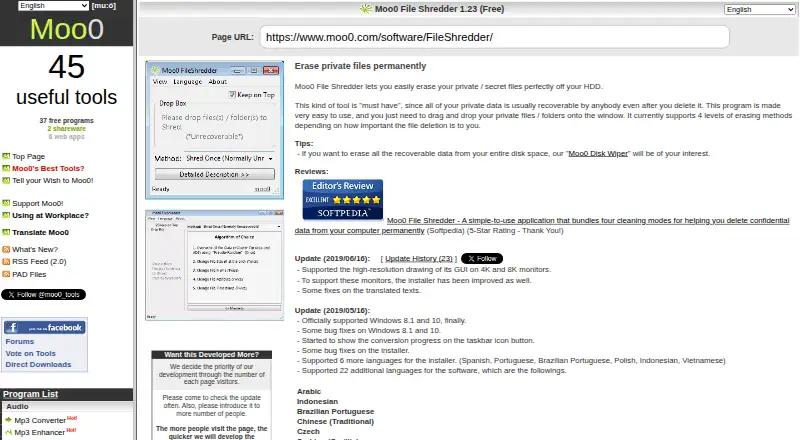
What Moo0 File Shredder is
Moo0 File Shredder is a Windows utility for erasing selected private or secret files and folders from a hard drive to make them unrecoverable. Users drag items onto the program window and choose among four erasing methods. It handles files and folders, but does not wipe free space or erase an entire drive; the maker points people seeking whole-disk erasure to Moo0 Disk Wiper. The product page lists Windows XP, 2003, Vista, 7, 8.1, and 10 as supported. The listed version is 1.23, last updated 2019/06/16, and the maker’s download is 3.59 MB. The page lists many languages, including English, Japanese, and Korean, with two others marked partial. The program is free for non-commercial use. Workplace or internet café use requires a donation, which provides a one-year commercial license for all Moo0 freeware; the commercial-use page suggests a donation of $10 or more per PC. The FAQ says SmartScreen may block startup and recommends unblocking the installer file before installation.
Who it suits
It suits Windows users who want to erase selected files or folders, rather than wipe an entire drive. Commercial workplace or internet café users should note the donation requirement.
What it does well
- Erases files and folders by drag and drop.
- Offers four levels of erasing methods.
- Free for non-commercial use.
- Lists support for several Windows versions.
- Download is listed at 3.59 MB.
What to know first
- Does not wipe free space or entire drives.
- Commercial use requires a donation.
- Last listed update was 2019/06/16.
- SmartScreen may prevent startup.
Limits
The free plan is for non-commercial use only. Workplace or internet café use requires a donation; the suggested donation is $10 or more per PC and grants a one-year commercial license for all Moo0 freeware. The program does not wipe free space or an entire drive.
Plans
| Plan | Billed and limits | Price |
|---|---|---|
| Free | Non-commercial use only | Free |
As moo0.com lists them, read 7 Oct 2026. The maker's own page has the final word.
Getting started
- Visit https://www.moo0.com/software/FileShredder/ and download the program from the maker’s server.
- Install the program on a supported Windows operating system.
- If Windows SmartScreen prevents startup, unblock the installer file before installation.
- Drag the files or folders to erase onto the program window.
- Choose one of the four erasing methods.
Verdict
Moo0 File Shredder focuses on selected files and folders, with four erasing methods and a simple drag-and-drop workflow. Check the listed Windows support and commercial-use terms before installing.
Questions
Is Moo0 File Shredder free?
Yes, it is free for non-commercial use. Workplace or internet café use requires a donation.
What does the commercial-use donation cover?
The maker suggests $10 or more per PC. The donation grants a one-year commercial license for all Moo0 freeware.
Which Windows versions are supported?
The product page lists Windows XP, 2003, Vista, 7, 8.1, and 10.
Can it erase a whole drive or free space?
No. It erases files and folders, but does not wipe free space or an entire drive. The maker points users to Moo0 Disk Wiper for recoverable data across a whole disk.
How do I erase files?
Drag files or folders onto the program window and choose from four levels of erasing methods.
What version and download size are listed?
The listed version is 1.23, last updated 2019/06/16. The maker’s server download is listed at 3.59 MB.
Facts from Moo0 File Shredder's own pages
- Commercial donation
- The commercial-use page suggests a donation of $10 or more multiplied by the number of PCs. · moo0.com, 7 Oct 2026
- Commercial use
- The product is free for non-commercial use; workplace or internet café use requires a donation, which grants a one-year commercial license for all Moo0 freeware. · moo0.com, 7 Oct 2026
- Disk wiping
- The maker points users who want to erase recoverable data across an entire disk to Moo0 Disk Wiper. · moo0.com, 7 Oct 2026
- Download size
- The download from the maker’s server is listed as 3.59 MB. · moo0.com, 7 Oct 2026
- Erasing methods
- The program supports four levels of erasing methods. · moo0.com, 7 Oct 2026
- Feedback support
- The maker invites users to submit feedback and says it currently understands English, Japanese, and Korean. · moo0.com, 7 Oct 2026
- How to use
- Users can erase files or folders by dragging and dropping them onto the program window. · moo0.com, 7 Oct 2026
- Installation note
- The FAQ says Windows SmartScreen may prevent the program from starting and suggests unblocking the installer file before installation. · moo0.com, 7 Oct 2026
- Languages
- The product page lists support for numerous languages, including English, Japanese, and Korean, with two other languages marked partial. · moo0.com, 7 Oct 2026
- Operating systems
- The product page lists Windows XP, 2003, Vista, 7, 8.1, and 10 as supported operating systems. · moo0.com, 7 Oct 2026
- Purpose
- Moo0 File Shredder erases private or secret files from a hard drive to make them unrecoverable. · moo0.com, 7 Oct 2026
- Version and update
- The listed version is 1.23, last updated 2019/06/16. · moo0.com, 7 Oct 2026
Where Moo0 File Shredder stands on Freedom251
- Secure File Shredding Software#10 of 26
- File Shredder Software#14 of 27