Freedom251 › Task Automation Software
MacroDroid
What MacroDroid is
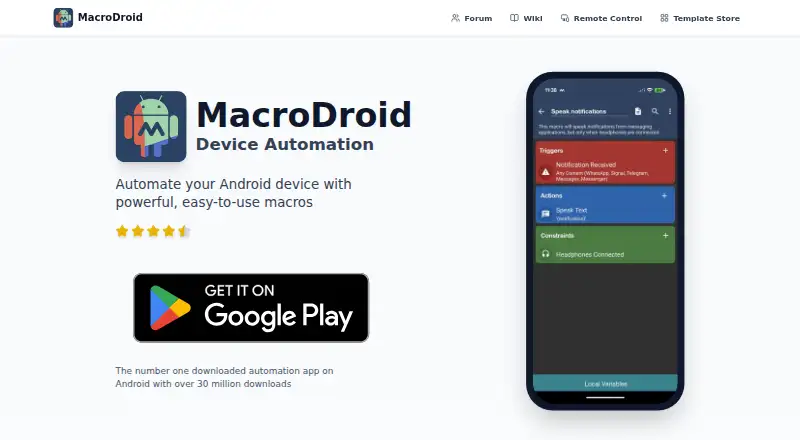
MacroDroid automates tasks on Android by combining triggers, actions, and optional constraints. Its library includes over 350 built-in triggers, actions, and constraints, and a template store lets users browse macros shared by the community. Beginners can start with templates, while power users can use variables, scripting, logic, loops, and plugins. MacroDroid supports Tasker and Locale plugins, and a Wear OS companion app is available when used with the phone app. Its web Remote Control page lets users manage devices and macros and download or restore backups. Scheduled runs and app triggers are supported. The free version costs nothing, is ad-supported, and permits up to five macros. The Pro plan removes ads and allows unlimited macros, with no subscription listed. MacroDroid says it does not collect or store current location or location history, although location permission supports location and geofence features. Its privacy policy says it logs crash and basic anonymous analytics data; retained user data is limited to template-store profile details and submitted templates.
Who it suits
MacroDroid suits Android users who want to automate routines, from beginners using community templates to power users using scripting, logic, loops, and plugins. The web control page may also suit users who want to manage devices and macros remotely.
What it does well
- Over 350 built-in triggers, actions, and constraints.
- Community macro templates are available in a built-in store.
- Supports Tasker and Locale plugins.
- Web page supports macro management and backup handling.
- Pro allows unlimited macros without a subscription.
What to know first
- Free version is ad-supported.
- Free version allows up to five macros.
- Wear OS companion requires the phone app.
- Location permission is used for location and geofence features.
Limits
The free version is ad-supported and allows up to five macros. Pro removes ads and allows unlimited macros; no subscription is listed.
Plans
| Plan | Billed and limits | Price |
|---|---|---|
| Free version | Ad-supported · up to 5 macros | Free |
| Pro | Removes ads · unlimited macros · no subscription | On request |
As macrodroid.com lists them, read 7 Oct 2026. The maker's own page has the final word.
Getting started
- Visit the MacroDroid website.
- Install the Android app.
- Start with a community macro template or combine triggers, actions, and optional constraints.
- Use the free version with up to five macros, or choose Pro for unlimited macros without a subscription.
- Pair the Wear OS companion with the phone app if you use it.
- Open the web Remote Control page to manage devices or macros and download or restore backups.
Verdict
MacroDroid offers a free way to build Android automations, with templates for starting out and deeper tools for more involved routines. The five-macro limit and ads on the free version are key tradeoffs; Pro removes both constraints listed for that plan.
Questions
What does MacroDroid automate?
It automates tasks on Android devices by combining triggers, actions, and optional constraints.
Is there a free plan?
Yes. The free version costs nothing, is ad-supported, and allows up to five macros.
What does Pro include?
Pro removes ads and allows unlimited macros, with no subscription.
Which platforms are listed?
The listed platforms are Android and web. The Wear OS companion app requires the phone app.
Does MacroDroid support plugins?
Yes. It supports Tasker and Locale plugins.
How can users get help?
The Play listing directs usage questions and feature requests to the community forum. It directs bug reports to the in-app Report a bug option.
Facts from MacroDroid's own pages
- Accessibility
- The Play listing says some features use Android accessibility services optionally and that MacroDroid does not collect or log user data through those services. · play.google.com, 7 Oct 2026
- Analytics
- The privacy policy says MacroDroid logs crash and basic anonymous analytics data to resolve issues and improve the app. · macrodroid.com, 7 Oct 2026
- Automation library
- The product site says it includes over 350 built-in triggers, actions, and constraints. · macrodroid.com, 7 Oct 2026
- Data retention
- The privacy policy says retained user data is limited to template-store profile information and submitted templates, which are deleted when the profile or template is removed. · macrodroid.com, 7 Oct 2026
- Headquarters
- Gillingham, United Kingdom · macrodroid.com, 28 Sept 2026
- Integrations
- The Play listing says MacroDroid supports Tasker and Locale plugins and includes a Wear OS companion app that requires the phone app. · play.google.com, 7 Oct 2026
- Intended users
- The Play listing describes the app for beginners using templates and for power users using variables, scripting, logic, loops, and plugins. · play.google.com, 7 Oct 2026
- Location privacy
- MacroDroid says it does not collect or store current location or location history, while using location permission for location and geofence features. · macrodroid.com, 7 Oct 2026
- Purpose
- MacroDroid automates tasks on Android devices by combining triggers, actions, and optional constraints. · play.google.com, 7 Oct 2026
- Remote control
- The web Remote Control page lets users manage devices and macros and download or restore backups. · remote.macrodroid.com, 7 Oct 2026
- Scale
- The product site states MacroDroid has over 30 million downloads. · macrodroid.com, 7 Oct 2026
- Support
- The Play listing directs users to the community forum for usage questions and feature requests, and to the in-app Report a bug option for bug reports. · play.google.com, 7 Oct 2026
- Templates
- Users can browse community-shared macro templates in the built-in template store. · play.google.com, 7 Oct 2026
Where MacroDroid stands on Freedom251
- Task Automation Software#16 of 35