Freedom251 › Task Automation Software
Automate
by Automate
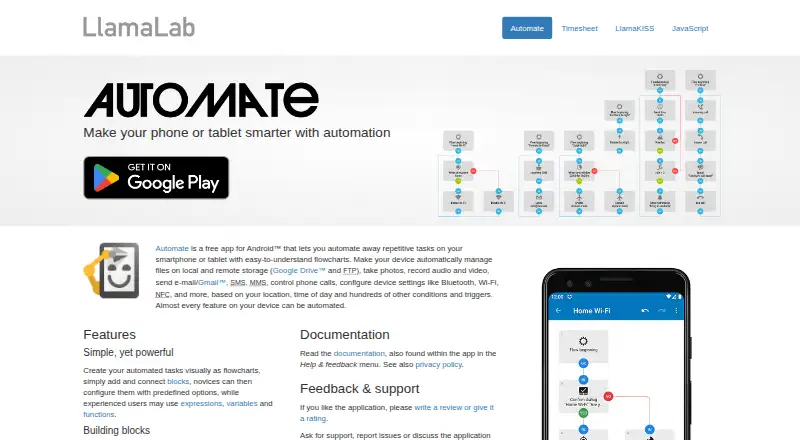
What Automate is
Automate is an Android app for building flowcharts that automate repetitive tasks on smartphones and tablets. Users connect blocks representing actions, conditions, event triggers, loops, and other tasks, then configure them with predefined options, expressions, variables, and functions. The app includes more than 410 building blocks and supports multi-step workflows, conditional logic, and webhook triggers. It can interact with apps that support the Locale or Tasker plug-in API, and it connects to web apps and online services through HTTP. File transfers can use Google Drive, Microsoft OneDrive, FTP, and HTTP. An in-app Community lets users download flows shared by other users. The free edition costs nothing and permits 30 running blocks. Premium is a single in-app purchase associated with the purchasing Google account and devices registered with that account; a Premium upgrade unlocks the 30-running-block limit, but no price is listed for either purchase. Automate is made by Automate, headquartered in Stockholm, Sweden. The maker says flows and settings are stored locally unless users explicitly share them through Community, and that the app shows no ads or gathers usage statistics. Automate is currently available only on Android. Some Android features restricted by Google Play policy require a separate extension app that works only with a legitimate copy of Automate.
Who it suits
Automate suits Android users who want to build visual, multi-step workflows for repetitive phone or tablet tasks. It may also fit users who need HTTP connections, file transfers, or flows shared through its in-app Community.
What it does well
- More than 410 blocks cover actions, conditions, triggers, and loops.
- Supports conditional logic, multi-step flows, and webhooks.
- Connects to Locale- and Tasker-compatible apps.
- Transfers files through Google Drive, OneDrive, FTP, and HTTP.
- Flows and settings stay local unless explicitly shared.
What to know first
- Available only on Android.
- The free edition is limited to 30 running blocks.
- Some restricted features require a separate extension app.
Limits
The free edition costs nothing and allows 30 running blocks.
Plans
| Plan | Billed and limits | Price |
|---|---|---|
| Premium | Single in-app purchase · Owned by the purchasing Google account · Applies to devices registered with that account | On request |
| Free edition | Maximum 30 running blocks · no limit on inactive flows · all features usable | Free |
| Premium upgrade | Single in-app purchase · Unlocks the 30-running-block limit · owned by the purchasing Google account | On request |
As llamalab.com lists them, read 20 Sept 2026. The maker's own page has the final word.
Getting started
- Install Automate on an Android device.
- Start with the free edition, which permits 30 running blocks.
- Connect blocks into a flow and configure them with options, expressions, variables, or functions.
- Use the in-app Community to download shared flows if useful.
- A Premium upgrade unlocks the 30-running-block limit.
Verdict
Choose Automate if you use Android and want to assemble task automation visually from configurable blocks. Look elsewhere if you need an app for another platform.
Questions
Is Automate free?
Yes. Its Free edition costs nothing and allows 30 running blocks.
What does Premium cost?
No price is listed. Premium is a single in-app purchase associated with the purchasing Google account and devices registered with that account.
Which platforms support Automate?
Automate is an Android app and is currently unavailable on other platforms.
Can Automate connect to other apps and services?
It supports apps using the Locale or Tasker plug-in API and can connect to web apps and online services through HTTP, including webhooks.
Does Automate store flows online?
The maker says user-created flows and app settings are stored locally unless explicitly shared through Community.
Does Automate require an extension?
Some Android features restricted by Google Play policy are packaged in a separate extension app, which works only with a legitimate copy of Automate.
Facts from Automate's own pages
- Building blocks
- The app includes more than 410 building blocks for actions, conditions, event triggers, loops and other tasks. · play.google.com, 10 Oct 2026
- Community
- Users can download flows shared by other users through the community available in the app. · llamalab.com, 10 Oct 2026
- Conditional logic
- Yes · llamalab.com, 20 Sept 2026
- Credentials
- Automate uses Android-managed accounts for credentials and does not store Google or Microsoft passwords in flows. · llamalab.com, 10 Oct 2026
- Extension requirement
- Some Android features restricted by Google Play policy are packaged in a separate extension app that works only with a legitimate copy of Automate. · llamalab.com, 10 Oct 2026
- Free plan
- Yes · llamalab.com, 20 Sept 2026
- Headquarters
- Stockholm, Sweden · llamalab.com, 28 Sept 2026
- Integrations
- Automate supports apps with the Locale or Tasker plug-in API and can connect to web apps and online services through HTTP, including webhooks. · llamalab.com, 10 Oct 2026
- Multi-step workflows
- Yes · llamalab.com, 20 Sept 2026
- Permissions
- The app uses Android Accessibility features for UI interaction and Device Administrator permission for failed-login checks and screen lock features. · play.google.com, 10 Oct 2026
- Platform availability
- The FAQ says Automate is an Android app and is currently unavailable on other platforms. · llamalab.com, 10 Oct 2026
- Privacy
- The app says it does not show ads or gather usage statistics, and that user-created flows and app settings are stored locally unless explicitly shared through the Community feature. · llamalab.com, 10 Oct 2026
- Purpose
- Automate is an Android app for automating repetitive smartphone and tablet tasks with flowcharts. · llamalab.com, 10 Oct 2026
- Security
- The maker says online services requiring authorization use HTTPS, and that Google and Microsoft API access occurs directly from the Android device. · llamalab.com, 10 Oct 2026
- Storage integrations
- Automate can transfer files using Google Drive, Microsoft OneDrive, FTP and HTTP. · play.google.com, 10 Oct 2026
- Support
- The maker directs users to Reddit, its Google forum, or [email protected] for support and feedback. · llamalab.com, 10 Oct 2026
- Visual workflows
- Users build flows by connecting blocks and can configure them with predefined options, expressions, variables and functions. · llamalab.com, 10 Oct 2026
- Webhook triggers
- Yes · llamalab.com, 20 Sept 2026
Where Automate stands on Freedom251
- Task Automation Software#14 of 35
- Workflow automation tools#79 of 133