Freedom251 › Load Planning Software
LOP
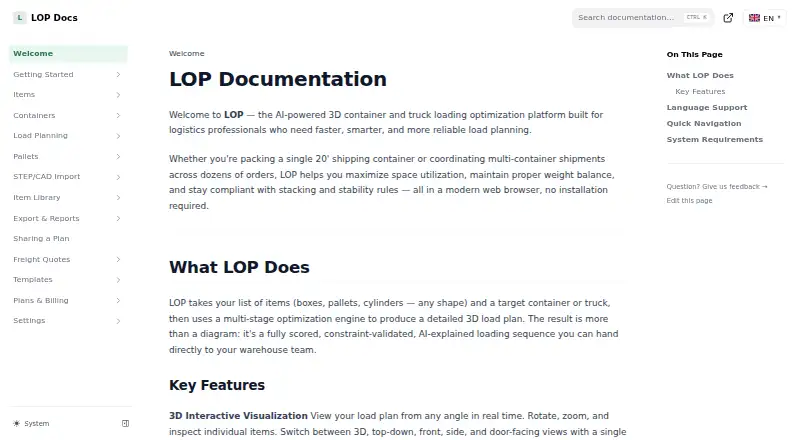
What LOP is
LOP helps logistics teams plan how cargo fits into containers or trucks. It generates scored 3D load plans and can account for item rotation, crush strength, fragile goods, hazardous-material separation, weight constraints, and center of gravity. Users can choose Quick Plan, Smart Plan, or Maximum Fill, then inspect a plan from different angles and make manual edits in the interactive 3D editor. AI analysis explains the plan’s strategy, constraints, physical risks, and potential improvements. Imports include Excel and CSV, SAP IDoc XML, Oracle WMS Cloud CSV, and generic ERP or WMS spreadsheets. Paid plans export PDF reports, Excel workbooks, and CSV packing lists. Business and Enterprise plans add STEP, STL, OBJ, and PLY imports; Business files are limited to 250 MB each. LOP’s permanent free tier costs nothing, with three plans per month, one container and 20 items per plan, one seat, and no exports. The dashboard and account pages work on phones, while the 3D editor is best used on a desktop or laptop.
Who it suits
LOP is aimed at logistics professionals, particularly teams planning machinery and heavy industrial freight. It suits users who need 3D loading plans with cargo constraints and manual editing.
What it does well
- Plans for containers and trucks
- Solver accounts for cargo constraints
- Interactive 3D editing from multiple angles
- AI explains risks and possible improvements
- Imports common spreadsheets and logistics formats
What to know first
- Free tier allows three plans monthly
- Free tier has no exports
- 3D editor is best on desktop or laptop
- Business CAD imports limited to 250 MB per file
Limits
The Free tier allows three plans per month, one container and 20 items per plan, and one seat. It does not include exports.
Plans
| Plan | Billed and limits | Price |
|---|---|---|
| Free | Free tier; permanent · 3 plans/month · 1 container/plan · 20 items/plan · 1 seat · no exports | Free |
| Business | Monthly or annual; monthly base fee plus monthly per-seat fee; 1 seat included, up to 25 · Unlimited plans, items, and containers · Unlimited AI subject to fair use · STEP/CAD imports up to 250 MB/file | On request |
| Professional | Monthly base fee plus monthly per-seat fee; 1 seat included, up to 5 · Unlimited plans · 5 containers/plan · 200 items/plan · 150 AI requests per user/month · STEP/CAD import not included | On request |
| Enterprise | Custom quote · Custom seats · API · SSO · SLA · on-premise deployment option subject to agreement | On request |
As docs.lop.tools lists them, read 2 Oct 2026. The maker's own page has the final word.
Getting started
- Open https://docs.lop.tools/.
- Sign in with Google, Microsoft, or email.
- Choose the Free tier or review Professional, Business, and Enterprise plans.
- Import a spreadsheet or supported ERP/WMS file to work with cargo data.
- Use the 3D editor on a desktop or laptop to review and edit a plan.
LOP is built for logistics professionals planning container and truck loads, especially machinery and heavy industrial freight. It suits teams balancing space use with handling constraints; the free tier can support limited planning, but paid plans are required to export results.
Overview
LOP produces scored 3D load plans and supports delivery sequencing, weight constraints and mixed fleets alongside container and truck loading. Its emphasis on physical constraints makes it more relevant to demanding freight than to basic packing tasks. Planners can inspect a generated arrangement and edit it, but the desktop-oriented editor may be a poor fit for work done entirely on phones.
Key features
Constraint-aware planning
Quick Plan, Smart Plan and Maximum Fill give planners different solver modes. The solver handles rotation, crush strength, fragile-item rules, hazardous-material separation and center of gravity. This breadth is useful when a load must meet several physical requirements; for simple loads, it may be more capability than needed.
3D review and AI analysis
The interactive editor shows the plan from multiple angles and allows manual edits. AI analysis explains a plan's strategy, constraints, physical risks and possible improvements, adding a review layer beyond the arrangement itself. LOP says its dashboard and account pages work on phones, but recommends a desktop or laptop for the 3D editor.
Imports and exports
LOP imports Excel and CSV files, SAP IDoc XML, Oracle WMS Cloud CSV and generic ERP/WMS spreadsheets. That range can help teams bring existing cargo data into planning. Paid plans export PDF reports, Excel workbooks and CSV packing lists; the free tier has no exports, so it is unsuitable when plans must be shared as files.
CAD and support
Business and Enterprise support STEP, STL, OBJ and PLY imports. Business sets a 250 MB per-file limit, while Enterprise adds a dedicated support channel under its SLA. Professional email support responds within two business days; Business priority email responds within four business hours. Enterprise customers can discuss retention requirements, but custom automated erasure is not provided.
Pricing
LOP has a permanent free tier and no free trial. Business and Professional are billed monthly or annually, with a monthly base fee plus a monthly per-seat fee; their prices are custom pricing. Enterprise is custom pricing by quote.
- Free — free: Three plans per month, one container per plan, 20 items per plan and one seat. There are no exports. It is a narrow evaluation tier, not a practical option for teams needing regular planning or deliverable files.
- Professional — custom pricing: One seat is included, with up to five seats. Plans are unlimited, but each plan is limited to five containers and 200 items; AI analysis is capped at 150 requests per user per month, and STEP/CAD import is excluded. It fits smaller teams with moderate loads that do not need CAD imports.
- Business — custom pricing: One seat is included, with up to 25 seats. Plans, items and containers are unlimited, as is AI use subject to fair use; STEP/CAD imports are supported up to 250 MB per file. It is the stronger fit for larger or heavier-freight workflows that would outgrow Professional's per-plan caps.
- Enterprise — custom pricing: Custom seats, API access, SSO, an SLA and an on-premise deployment option subject to agreement. It is aimed at organizations that need these enterprise controls or deployment terms.
Account sign-in supports Google, Microsoft or email; SSO/SAML is an Enterprise feature. The choice between Professional and Business turns on capacity, seat count and CAD needs, since neither has a published price here to establish a cost advantage.
Platforms
LOP is available on Android, iOS and the web. Mobile access covers the dashboard, plans, libraries, settings, pricing and account pages, while detailed 3D editing is best suited to a desktop or laptop.
Who it's for
LOP is best suited to logistics professionals planning machinery or heavy industrial freight, particularly where loads must account for fragility, crush strength, hazardous-material separation or center of gravity. It is less compelling for casual packing or phone-first editing. Teams that need routine exports, more than three monthly plans, or more than one container per plan will need a paid tier.
Pros and cons
- Pros: Multiple solver modes account for a broad set of physical constraints, which is valuable for complex loads.
- Pros: Excel, CSV and named ERP/WMS import formats give teams several ways to bring cargo data into planning.
- Pros: The 3D editor, manual edits and AI analysis support plan review as well as generation.
- Cons: The free tier permits only three plans monthly, one container and 20 items per plan, and provides no exports.
- Cons: Professional caps containers, items and AI requests and excludes CAD imports, limiting headroom for growing or CAD-heavy operations.
- Cons: Pricing for all paid tiers is custom pricing, making plan costs difficult to compare from the published tiers alone.
Alternatives
CargoLoader3D is worth considering when a free mobile option with manual placement, item load order, priority groups and detailed reporting is a better match; its free plan allows seven default spaces and five cargo items.
Goodloading may suit teams seeking a free plan with a trial or Linux and macOS support, though its Freemium tier excludes palletization, oval loads and axle loads.
ALPHA LOADING is an alternative to compare for its education licence and web platform.
LoadingMCP is worth comparing if a browser-based 3D planner with a compliance verdict and no login or card on its free plan is the priority.
LoadOptimizer.ai may fit teams seeking priced AI optimization plans: Standard is €39.99 a month and Pro is €99.99 a month, with REST API access in Pro.
MAXCUBE is another option to compare for a free daily computation allowance of one, with up to one container, 2,000 cargo items and three SKU types.
PalletPlan may suit teams wanting a self-hosted or web planner, with PNG export and one saved plan on its free tier; its annual Team plan has a three-seat minimum.
Stow8 is worth considering when its free tier's 15 optimizations per 30 days, 10 containers per plan, OOG and flat rack support, and PDF export with a footer align better with the job.
Browse more options in Load Planning Software.
Verdict
LOP is a strong fit for logistics teams planning complex container or truck loads, particularly heavy industrial freight that calls for constraint-aware solving and plan review. Its varied imports and analysis tools reinforce that use case. Look elsewhere if you need free exports, a phone-first 3D editor, or transparent paid-tier pricing before committing.
Verdict
LOP combines constrained 3D load planning with tools to review and edit a plan. The free tier has defined monthly and per-plan limits, while exports require a paid plan.
Questions
Is LOP free?
Yes. Its permanent Free tier costs nothing.
What does the Free tier include?
It allows three plans per month, one container and 20 items per plan, and one seat. Exports are not included.
Which platforms does LOP support?
LOP lists Android, iOS, and web. Its dashboard and account pages work on phones, while the 3D editor is best used on a desktop or laptop.
What can LOP import?
It supports Excel and CSV, SAP IDoc XML, Oracle WMS Cloud CSV, and generic ERP or WMS spreadsheets. Business and Enterprise also support STEP, STL, OBJ, and PLY imports.
Can LOP export load plans?
Paid plans can export PDF reports, Excel workbooks, and CSV packing lists.
Does LOP offer API access?
API access is listed as a capability, and Enterprise includes API access.
Facts from LOP's own pages
- AI analysis
- AI analysis explains a solved plan's strategy, constraints, physical risks, and possible improvements. · docs.lop.tools, 2 Oct 2026
- CAD
- Business and Enterprise support STEP, STL, OBJ, and PLY imports, with a 250 MB per-file limit stated for Business. · docs.lop.tools, 2 Oct 2026
- Data retention
- Enterprise customers can discuss data-retention requirements, but custom automated erasure is not currently provided. · docs.lop.tools, 2 Oct 2026
- Exports
- Paid plans can export load plans as PDF reports, Excel workbooks, and CSV packing lists. · docs.lop.tools, 2 Oct 2026
- Imports
- LOP supports Excel and CSV imports, SAP IDoc XML, Oracle WMS Cloud CSV, and generic ERP/WMS spreadsheets. · docs.lop.tools, 2 Oct 2026
- Intended users
- LOP describes its audience as logistics professionals and says it is built particularly for machinery and heavy industrial freight planning. · lop.tools, 2 Oct 2026
- Mobile availability
- LOP says its dashboard, plans, libraries, settings, pricing, and account pages work on phones, while the 3D editor is best used on a desktop or laptop. · docs.lop.tools, 2 Oct 2026
- Optimization
- Its solver offers Quick Plan, Smart Plan, and Maximum Fill modes and handles item rotation, crush strength, fragile-item, hazardous-material separation, and center-of-gravity constraints. · docs.lop.tools, 2 Oct 2026
- Product
- LOP creates scored, constraint-validated 3D load plans for cargo packed into containers or trucks. · docs.lop.tools, 2 Oct 2026
- Security and identity
- The pricing page lists SSO/SAML for Enterprise, and account sign-in supports Google, Microsoft, or email. · lop.tools, 2 Oct 2026
- Support
- Professional email support responds within two business days, Business priority email within four business hours, and Enterprise has a dedicated support channel under its SLA. · docs.lop.tools, 2 Oct 2026
- Visualization
- The interactive 3D editor supports real-time viewing from multiple angles and manual editing. · docs.lop.tools, 2 Oct 2026
Where LOP stands on Freedom251
- Load Planning Software#7 of 29