Freedom251 › Load Planning Software
MAXCUBE
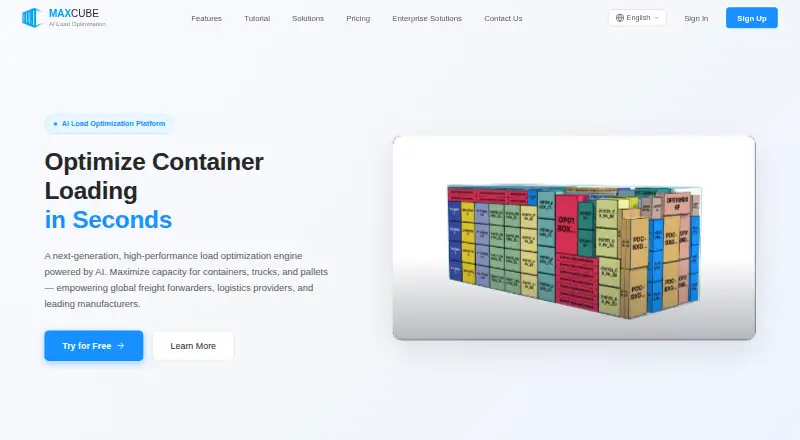
What MAXCUBE is
MAXCUBE is a browser-based tool for planning how cargo fits into containers, trucks, and pallets. Freight forwarders, logistics providers, and manufacturers can enter cargo details or import them from Excel, set containers and loading rules, then generate a plan with a 3D view and PDF guide. Its engine supports mixed cargo, grouping, stacking and support limits, item orientations, and loading priorities; the maker says it can produce plans for 10,000+ items in seconds. MAXCUBE offers container and truck loading, weight constraints, mixed fleet support, and API access. A guided demo is available without registration, and browser use needs no installation. The free Basic plan allows one computation per day, one container, up to 2,000 cargo items, and three SKU types. Flex Pack costs $8 per 20 computations, valid for 60 days; Professional is $25/month and Premium is $66/month. Enterprise pricing is custom. Plans do not replace on-site safety or compliance checks.
Who it suits
MAXCUBE suits freight, logistics, manufacturing, export shipping, warehousing, and transportation teams planning cargo loads. Enterprise users evaluating connections with ERP, WMS, TMS, OMS, or custom systems can assess API integration, with scope dependent on the system environment and API capabilities.
What it does well
- Imports cargo data from Excel.
- Generates 3D load plans and PDF guides.
- Supports mixed cargo and loading priorities.
- Guided demo available without registration.
- Free plan includes one daily computation.
What to know first
- Basic allows only one container.
- Basic is limited to 2,000 cargo items.
- Plans do not replace safety or compliance checks.
- Integration scope depends on system and API capabilities.
Limits
Basic provides one packing computation per day, up to one container, 2,000 cargo items, and three SKU types. Flex Pack provides 20 computations and is valid for 60 days. The plans do not replace on-site safety, packaging, lashing, weight distribution, or regulatory reviews.
Plans
| Plan | Billed and limits | Price |
|---|---|---|
| Basic | Free to start · Core 3D computations · standard pallet/carton loading · 1 computation/day after trial · 1 container · 2,000 items · 3 SKU types | Free |
| Professional | $300/year with annual billing · 500 computations/month · complex multi-SKU loading · advanced strategy, stacking and orientation constraints · shareable 3D plans | $25 a month |
| Premium | $790/year with annual billing · 1,500 computations/month · Professional features · lower per-computation cost · priority technical support | $66 a month |
| Flex Pack | $8 / 20 computations · 20 computations · full Professional features per computation · valid 60 days · no auto-renewal | $8, paid once |
| Enterprise | Custom Pricing · Custom quotas/features · API and ERP/WMS integration · enterprise invoicing · dedicated support and consulting | On request |
As max-cube.com lists them, read 15 Oct 2026. The maker's own page has the final word.
Getting started
- Open the guided demo without registration, or visit the MAXCUBE website.
- Use the browser version without installing software.
- Enter cargo details or import cargo data from Excel.
- Configure containers and loading rules.
- Generate a load plan and review its 3D visualization or PDF guide.
- Choose Basic, Flex Pack, Professional, Premium, or Enterprise according to the listed plan limits.
Verdict
MAXCUBE combines cargo entry, loading rules, and visual plans in a browser workflow, with a free plan and paid computation options. Users still need separate on-site safety, packaging, lashing, weight-distribution, and regulatory reviews.
Questions
Is MAXCUBE free?
Yes. The Basic plan costs nothing and includes one packing computation per day, one container, up to 2,000 cargo items, and three SKU types.
What do the paid plans cost?
Flex Pack costs $8 per 20 computations and is valid for 60 days. Professional costs $25/month, or $300/year with annual billing; Premium costs $66/month, or $790/year with annual billing. Enterprise pricing is custom.
Which platforms does MAXCUBE support?
The listed platforms are API and web. The maker says it can be used directly in a browser without installation.
Can MAXCUBE connect to business systems?
Enterprise API integration can be evaluated for ERP, WMS, TMS, OMS, or custom systems. The integration scope depends on the system environment and API capabilities.
Does MAXCUBE replace on-site load safety checks?
No. Its plans do not replace on-site safety review, packaging checks, lashing, weight distribution checks, or regulatory compliance review.
Facts from MAXCUBE's own pages
- 3D output
- Each completed job produces a 3D visualization of the proposed packing arrangement. · max-cube.com, 15 Oct 2026
- AI strategy library
- Its built-in strategy library is described as learning from historical orders and expert loading practices. · max-cube.com, 15 Oct 2026
- Algorithm
- The product describes a Spatial Perception Simulation algorithm for large mixed-cargo searches. · max-cube.com, 15 Oct 2026
- API availability
- API access is excluded from standard plans and assessed as part of Enterprise integration. · max-cube.com, 15 Oct 2026
- API scope
- The enterprise page says API projects require agreement on fields, call quotas, error handling and result write-back. · max-cube.com, 15 Oct 2026
- Basic quota
- After the Pro trial, the free account retains one packing computation per day. · max-cube.com, 15 Oct 2026
- Browser access
- The maker says no installation is needed and the product can be used directly in a browser. · max-cube.com, 4 Oct 2026
- Cargo types
- Examples supported by the site include pallets, crates, cartons and rolls. · max-cube.com, 15 Oct 2026
- Case-study boundary
- The solutions knowledge base says some high-utilization plans still leave cargo unplaced because remaining spaces can be fragmented or incompatible with constraints. · max-cube.com, 15 Oct 2026
- Company headquarters
- Twins Technology lists a Shenzhen Bao'an research center and a Shenzhen Futian business center. · twins-tech.com, 15 Oct 2026
- Company product ecosystem
- Twins Technology presents MAXCUBE alongside quotation, container-allocation, routing, dispatch, simulation and fleet-management systems. · twins-tech.com, 15 Oct 2026
- Company support
- The associated company advertises technical support seven days a week, 24 hours a day, for MAXCUBE inquiries. · twins-tech.com, 15 Oct 2026
- Constraint handling
- The engine supports grouping, stacking or support limits, orientation rules and loading priorities. · max-cube.com, 15 Oct 2026
- Container setup
- Users select container or truck models and configure loading and stability rules. · max-cube.com, 15 Oct 2026
- Core workflow
- Users enter or import cargo data from Excel, configure containers and loading rules, then generate a load plan with 3D visualization and PDF guide export. · max-cube.com, 4 Oct 2026
- Data import
- Users can enter cargo manually or import Excel data containing dimensions, weight, quantity and cargo type. · max-cube.com, 15 Oct 2026
- Data policy
- The privacy policy says MAXCUBE does not sell loading business data or publicly show specific cargo lists or plans without authorization. · max-cube.com, 15 Oct 2026
- Data retention
- The privacy policy says load records may be retained only for certain quantities or periods based on plan, quota, or platform rules. · max-cube.com, 4 Oct 2026
- Demo
- The guided demo can be tried without registration. · max-cube.com, 4 Oct 2026
- Documentation depth
- The public site provides tutorials, solution case studies, FAQs and legal pages, but no public API reference or SDK documentation was identified. · max-cube.com, 15 Oct 2026
- Enterprise integrations
- Enterprise customers can have MAXCUBE evaluated for ERP, WMS, TMS, OMS or custom-system integration. · max-cube.com, 15 Oct 2026
- Enterprise onboarding
- Enterprise services include sample-data evaluation, rule review, remote demonstrations, training and post-launch issue tracking. · max-cube.com, 15 Oct 2026
- Enterprise support
- Enterprise services include sample data evaluation, rule review, remote demos, usage training, and post-launch issue tracking. · max-cube.com, 4 Oct 2026
- Example result
- A published 20GP example loaded 164 of 180 items, with 89.79% volume utilization and 19.22% weight utilization. · max-cube.com, 15 Oct 2026
Where MAXCUBE stands on Freedom251
- Load Planning Software#10 of 29