Freedom251 › Load Planning Software
LoadingMCP
What LoadingMCP is
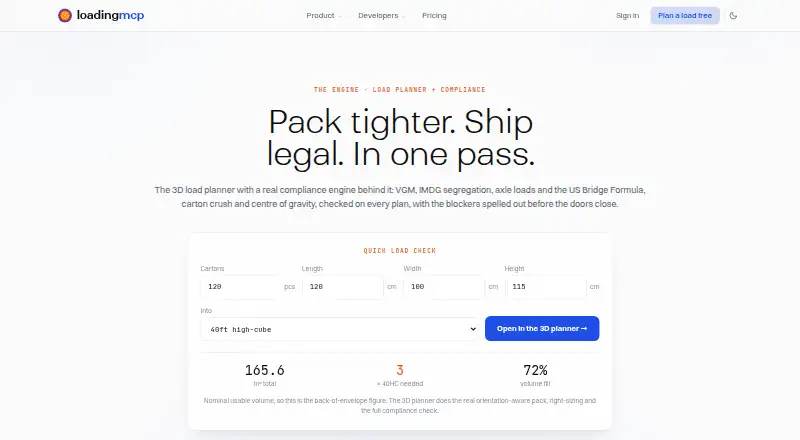
LoadingMCP plans container and truck loads in 3D, selects equipment, applies cargo orientation and stacking rules, and checks plans against shipping considerations. Its compliance checks cover CTU packing, IMDG 7.2.4 segregation, SOLAS VGM, McKee carton crush, axle loads, and the US Federal Bridge Formula. Packing lists can be pasted from Excel or uploaded as CSV, with columns mapped for planning. The planner calculates centre of gravity and eccentricity and can rearrange cargo toward a target balance. It can produce a cargo-securing list with dunnage, airbags, and blocking, as well as a numbered stuffing work order; plans export to PDF, Excel, or JSON. The hosted MCP server connects with Claude, Cursor, and Windsurf, and a REST API can be used from a TMS. The free browser planner needs no login or card. Starter and Business prices are quoted to volume. Real loads through the REST API or MCP production optimizer require a Business plan and API key. Compliance verdicts are decision support, not legal certificates.
Who it suits
LoadingMCP suits freight desks and teams handing loading plans to floor staff or integrated systems. It may also suit users who need 3D truck or container planning and compliance checks, while recognizing that the verdict is not a legal certificate.
What it does well
- Free browser planner requires no login or card.
- Plans both container and truck loads in 3D.
- Imports pasted Excel or uploaded CSV packing lists.
- Exports plans as PDF, Excel, or JSON.
- Can calculate and adjust load balance.
What to know first
- Paid plan prices are quoted to volume.
- Real API and MCP production loads require Business and an API key.
- Compliance verdicts are not legal certificates.
Limits
The Free plan provides the 3D planner and compliance verdict in the browser. Production loads through the REST API or MCP optimizer require Business and an API key.
Plans
| Plan | Billed and limits | Price |
|---|---|---|
| Free | Full 3D planner and compliance verdict in browser · no login or card | Free |
| Starter | Plans quoted to your volume · Saved projects · full load history · packing-list import · higher limits than Free | On request |
| Business | Plans quoted to your volume · REST API and MCP access · team seats · higher volume | On request |
As loadingmcp.com lists them, read 3 Oct 2026. The maker's own page has the final word.
Getting started
- Open https://www.loadingmcp.com/.
- Use the Free plan in the browser without a login or card.
- Paste a packing list from Excel or upload a CSV and map its columns.
- Choose equipment and plan the load using orientation and stacking rules.
- For saved projects or load history, choose Starter; for production REST API or MCP access, choose Business and an API key.
LoadingMCP is a web and API load-planning system for containers and trucks. It suits freight desks and operations teams that need to pass structured loading instructions to floor staff or connected software. The combination of 3D packing, balance calculations, securing guidance, and compliance checks makes it a serious operational tool, provided production integrations are covered by the right plan.
Overview
LoadingMCP plans mixed-fleet loads in 3D, selects appropriately sized equipment, and applies orientation and stacking rules while packing cargo. It handles both container and truck loading and accounts for weight constraints, making it more than a simple space-filling visualizer.
Its compliance output covers CTU packing, IMDG 7.2.4 segregation, SOLAS VGM, McKee carton crush, axle loads, and the US Federal Bridge Formula. That breadth is valuable when a plan must satisfy several transport checks at once. The compliance verdict is decision support rather than a legal certificate, however, and the shipper of record remains responsible for the declaration.
Key features
Packing lists can be pasted from Excel or uploaded as CSV files, with column mapping before planning. Once a load is arranged, LoadingMCP can create a numbered stuffing work order and export the plan as PDF, Excel, or JSON. Those formats suit printed instructions, spreadsheet handoffs, and system-to-system processing.
The planner computes centre of gravity and eccentricity and can rearrange cargo toward a target balance. Its securing output covers dunnage, airbags, and blocking against FMCSA and EN 12195. Together, these tools address weight distribution and restraint work that space-only planners leave to manual processes.
The hosted MCP server connects with Claude, Cursor, and Windsurf. Its tools include plan_load, suggest_containers, list_equipment, and export_plan; the REST API can connect to a TMS. Real production loads through REST or the MCP production optimizer require Business and an API key, so the integrations are most useful to organizations prepared for that tier.
Cargo dimensions and weights are used to compute and store plans, and deleting a project removes it. The maker says there are no per-plan fees or surprise overage bills; subscriptions run monthly or annually through Stripe.
Pricing
Free
The Free plan costs nothing and provides the full 3D planner and compliance verdict in a browser, with no login or card. It is a practical way to evaluate the planning workflow or handle occasional browser-based work, but it does not provide the saved-project, team, or production API capabilities described for paid tiers.
Starter
Starter uses custom pricing, with plans quoted to your volume. It adds saved projects, full load history, packing-list import, and higher limits than Free. This is the sensible tier for a freight desk that needs repeatable records and larger routine workloads without requiring API or MCP production access.
Business
Business also uses custom volume pricing. It adds REST API and MCP access, team seats, and higher volume. Choose it when plans must flow into a TMS, Claude, Cursor, Windsurf, or another production process; confirm that the quoted package includes the seats and API key access your operation needs.
Platforms
LoadingMCP runs on the web and exposes an API. Browser access covers the Free planner, while REST and hosted MCP connectivity support integrated workflows on Business.
Who it's for
It is a strong fit for freight desks, shippers, and logistics teams that balance cargo, prepare stuffing instructions, and need documented checks before loading. Teams handing work to floor staff benefit from numbered work orders and portable exports; developers and TMS operators benefit from the API and MCP tools. It is less suitable as a standalone legal compliance authority or for organizations unwilling to move to a custom-priced Business plan for production automation.
Pros and cons
Pros
- Broad operational coverage: 3D planning, balance, securing, and multiple transport checks sit in one workflow.
- Useful handoffs: Numbered work orders plus PDF, Excel, and JSON exports support both shop-floor and system use.
- Flexible intake: Excel paste and CSV mapping reduce re-entry from existing packing lists.
- Integration path: MCP tools and a REST API can connect planning to assistants and TMS software.
- Clear billing stance: Monthly or annual Stripe billing has no per-plan fees or surprise overage bills.
Cons
- Production automation is gated: REST and MCP production optimization require Business and an API key.
- Paid costs are custom: Starter and Business have no published price, complicating budget comparisons.
- Compliance is not certification: A shipper still has legal responsibility for declarations and should not treat the verdict as a certificate.
Alternatives
See the broader Load Planning Software directory for category comparisons.
- CargoLoader3D is a better match when Android or iOS access and a lifetime free tier with seven spaces and five cargo items matter more than LoadingMCP's API and compliance breadth.
- Goodloading suits users wanting Linux or macOS support and a free trial, though its Freemium plan excludes palletization, oval loads, and axle loads.
- LOP is appropriate for very small permanent free usage: three plans per month, one container, 20 items, one seat, and no exports.
- ALPHA LOADING is an option for browser-based education or discovery use.
- Kubova fits users who prefer a published 29.00 USD monthly Pro price and a free allowance of 50 packs and 20 PDF reports per month.
- LoadOptimizer.ai is preferable when a published 39.99 EUR Standard or 99.99 EUR Pro price is easier to budget; Standard has no API access.
- Loggy is a browser-only alternative focused on 3D visualization, loading statistics, and LDM calculations.
- MAXCUBE is worth considering when a published 8.00 USD one-time Flex Pack or a free daily computation cap better fits the workload.
Verdict
Choose LoadingMCP if your operation needs one planner for 3D packing, balance, securing, compliance checks, and structured handoffs, especially when a TMS or MCP workflow is part of the roadmap. Look elsewhere if you need publicly posted paid pricing, mobile-first access, or a legally authoritative compliance certificate.
Verdict
LoadingMCP brings load planning, balance calculations, securing lists, and compliance checks together. Treat its verdict as decision support and confirm Business access is available if production API or MCP use is needed.
Questions
Is there a free plan?
Yes. Free costs nothing and includes the full 3D planner and compliance verdict in the browser, without login or card.
How much do the paid plans cost?
Starter and Business pricing is quoted to volume; no fixed price is listed.
Which platforms does LoadingMCP support?
The listed platforms are API and web. The hosted MCP server connects with Claude, Cursor and Windsurf, and the REST API can be used from a TMS.
What does Business add?
Business includes REST API and MCP access, team seats and higher volume. Real loads through the REST API or MCP production optimizer require a Business plan and API key.
Does it provide a legal compliance certificate?
No. Its compliance verdict is decision support, and the shipper of record remains responsible for the declaration.
How is plan data handled?
Cargo dimensions and weights are used to compute and store plans. Deleting a project removes it.
Facts from LoadingMCP's own pages
- Billing and limits
- The maker says there are no per-plan fees or surprise overage bills, and plans are monthly or annual through Stripe. · loadingmcp.com, 3 Oct 2026
- Business API restriction
- Real loads through the REST API or MCP production optimizer require a Business plan and API key. · loadingmcp.com, 3 Oct 2026
- Compliance checks
- Checks include CTU packing, IMDG 7.2.4 segregation, SOLAS VGM, McKee carton crush, axle loads, and the US Federal Bridge Formula. · loadingmcp.com, 3 Oct 2026
- Compliance limitation
- The compliance verdict is decision support rather than a legal certificate, and the shipper of record remains responsible for the declaration. · loadingmcp.com, 3 Oct 2026
- Data handling
- The pricing FAQ says cargo dimensions and weights are used to compute and store plans, and that deleting a project removes it. · loadingmcp.com, 3 Oct 2026
- Equipment selection
- It right-sizes equipment and packs cargo using orientation and stacking rules. · loadingmcp.com, 3 Oct 2026
- Integrations
- The hosted MCP server connects with Claude, Cursor, and Windsurf, and the REST API can be used from a TMS. · loadingmcp.com, 3 Oct 2026
- Intended users
- The maker describes the product as built for freight desks and for teams handing loading work to floor staff or integrated systems. · loadingmcp.com, 3 Oct 2026
- Load balancing
- The planner computes centre of gravity and eccentricity and can rearrange a load toward a target balance. · loadingmcp.com, 3 Oct 2026
- MCP tools
- The MCP server offers plan_load, suggest_containers, list_equipment, and export_plan tools. · loadingmcp.com, 3 Oct 2026
- Packing-list import
- Packing lists can be pasted from Excel or uploaded as CSV, with column mapping for planning. · loadingmcp.com, 3 Oct 2026
- Purpose
- LoadingMCP plans container and truck loads in 3D and checks each plan for shipping compliance. · loadingmcp.com, 3 Oct 2026
- Related products
- LoadingMCP says cargo can feed into SchedulesMCP for sailing information and TrackingMCP for shipment tracking under one login. · loadingmcp.com, 3 Oct 2026
- Securing
- It produces a cargo-securing list, including dunnage, airbags, and blocking, against FMCSA and EN 12195. · loadingmcp.com, 3 Oct 2026
- Work orders and exports
- Plans can produce a numbered stuffing work order and export PDF, Excel, or JSON. · loadingmcp.com, 3 Oct 2026
Where LoadingMCP stands on Freedom251
- Load Planning Software#6 of 29