Freedom251 › Secure Notes Apps
Lockpad
What Lockpad is
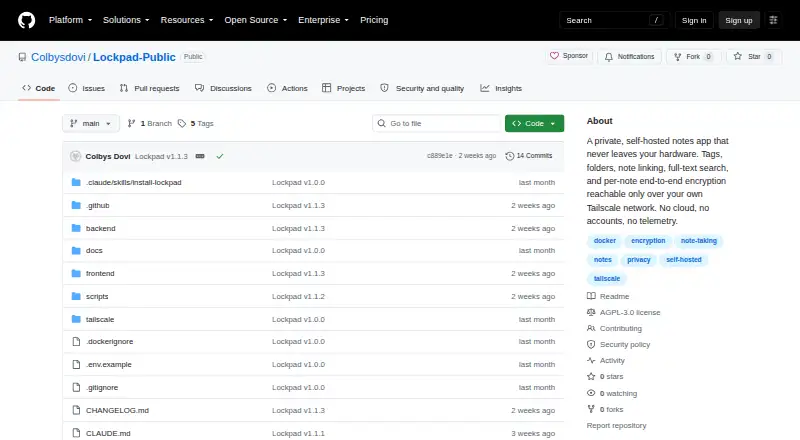
Lockpad is a free, self-hosted notes app that runs as a web app on hardware you own. It requires Docker, with setup instructions for Docker Compose and source builds. Notes can be sorted into folders, tagged, pinned, or linked to one another with backlinks. The rich-text editor supports headings, lists, checklists, code blocks, images, and Markdown shortcuts, while Postgres powers full-text search. Individual notes can be encrypted in the browser using Argon2id and AES-GCM; the key and plaintext stay in the browser tab. Lockpad imports from Google Keep, Standard Notes, HTML, Markdown, and CSV, and exports libraries as JSON or individual notes as Markdown or PDF. Locked notes cannot be exported while locked. The project says the app makes no outbound network requests and has no analytics or telemetry. It is open source under the GNU AGPL-3.0 license. Lockpad is designed for one person, with one password for the installation and no user accounts or real-time collaboration. For private HTTPS access from personal devices, the project recommends Tailscale Serve and warns against port forwarding or Tailscale Funnel.
Who it suits
Lockpad suits a person who wants to host notes on their own hardware and manage them through a web app. It is best suited to someone comfortable with Docker and a single-user setup.
What it does well
- Runs on hardware you own
- Supports folders, tags, backlinks, and pinned notes
- Browser-based encryption for individual notes
- Imports from Google Keep and Standard Notes
What to know first
- Requires Docker for self-hosting
- One password for the whole installation
- No user accounts or real-time collaboration
- Locked notes cannot be exported while locked
Limits
Lockpad is a single-person app with one password for the entire installation and no user accounts or real-time collaboration. Locked notes cannot be exported while locked.
Plans
| Plan | Billed and limits | Price |
|---|---|---|
| Lockpad | Self-hosted · single-person app · AGPL-3.0 | Free |
As github.com lists them, read 9 Oct 2026. The maker's own page has the final word.
Getting started
- Prepare hardware you own for self-hosting.
- Install Docker.
- Follow the Docker Compose or source-build installation instructions.
- For private HTTPS access from personal devices, follow the project’s recommendation to use Tailscale Serve.
Verdict
Lockpad offers a self-hosted, single-person notes setup with organization, search, encryption, and import and export options. Its Docker requirement and lack of user accounts make it a fit for individual use rather than collaborative note-taking.
Questions
How much does Lockpad cost?
Lockpad is free, listed as free.
Which platforms does Lockpad support?
Lockpad runs as a self-hosted web app. Docker is required for deployment.
Is Lockpad open source?
Yes. It is provided under the GNU AGPL-3.0 license.
Can Lockpad import notes from other apps?
It imports from Google Keep and Standard Notes, as well as HTML, Markdown, and CSV.
Does Lockpad support collaboration or multiple accounts?
No. It is designed for one person, with one password per installation, no user accounts, and no real-time collaboration.
Facts from Lockpad's own pages
- Backups
- The backup script retains the last 14 database dumps, and locked notes cannot be exported while locked. · github.com, 9 Oct 2026
- Deployment
- Lockpad requires Docker and runs as a self-hosted web app, with installation instructions for Docker Compose and source builds. · github.com, 9 Oct 2026
- Encryption
- Notes can be encrypted in the browser per note using Argon2id and AES-GCM; the key and plaintext stay in the browser tab. · github.com, 9 Oct 2026
- Free plan
- Yes · github.com, 21 Sept 2026
- Import and export
- It imports from Google Keep, Standard Notes, HTML, Markdown, and CSV, and exports libraries as JSON or individual notes as Markdown or PDF. · github.com, 9 Oct 2026
- Integrations
- The README lists imports from Google Keep and Standard Notes and describes Tailscale for private remote access. · github.com, 9 Oct 2026
- License
- Lockpad is provided under the GNU AGPL-3.0 license. · github.com, 9 Oct 2026
- Limits
- Lockpad is a single-person app with one password for the whole installation and no user accounts. · github.com, 9 Oct 2026
- Organization
- It supports folders, tags, note-to-note links with backlinks, and pinned notes. · github.com, 9 Oct 2026
- Supported platforms
- web · github.com, 21 Sept 2026
- Privacy
- The README says Lockpad makes no outbound network requests and has no analytics or telemetry. · github.com, 9 Oct 2026
- Purpose
- Lockpad is a self-hosted notes app that runs on hardware you own. · github.com, 9 Oct 2026
- Real-time collaboration
- No · github.com, 21 Sept 2026
- Remote access
- The project recommends Tailscale Serve for private HTTPS access from personal devices and warns against port forwarding or Tailscale Funnel. · github.com, 9 Oct 2026
- Search
- Full-text search across notes is powered by Postgres. · github.com, 9 Oct 2026
- Security reporting
- Security vulnerabilities should be reported privately by email or through a private GitHub security advisory, not as a public issue. · github.com, 9 Oct 2026
- Support
- The project states that it has no support contract, uptime commitment, or on-call operator. · github.com, 9 Oct 2026
- Writing
- The editor supports rich text, including headings, lists, checklists, code blocks, images, and Markdown shortcuts. · github.com, 9 Oct 2026
Where Lockpad stands on Freedom251
- Secure Notes Apps#13 of 30
- Note-taking apps#123 of 216