Freedom251 › Reverse Proxy Software
LocalXpose
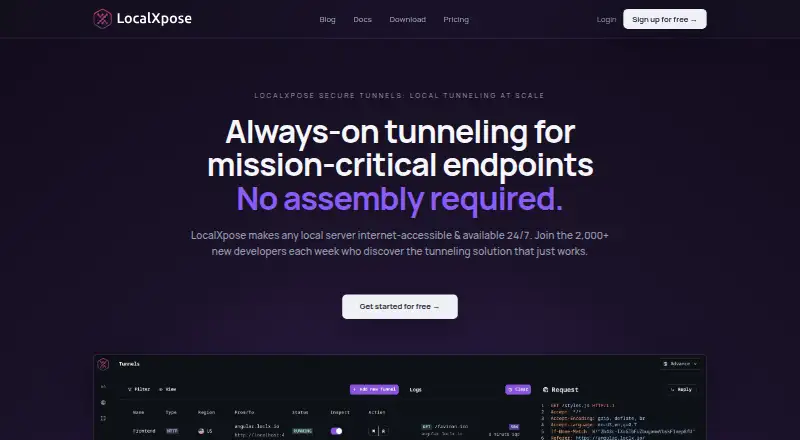
What LocalXpose is
LocalXpose is a reverse proxy that makes services running on a local machine reachable from the public internet through secure tunnels. It supports HTTP and HTTPS, including WebSockets, as well as TCP, TLS, and UDP. Users can work through command-line or graphical interfaces, including a desktop app for sharing previews. All plans include basic and key authentication, rate limiting, IP whitelisting, request and response header editing, and a built-in file server. LocalXpose can log HTTP, TCP, and UDP traffic in real time and inspect, modify, and replay webhook payloads. Custom and wildcard domains are available, with automatic Let's Encrypt certificates for custom domains. The maker says tunnel hosts terminate at its edge with TLS 1.2+ encryption; users can configure scoped access tokens, IP allow lists, and authentication plugins. The free Starter plan allows two active HTTP or HTTPS tunnels, with time limits and an interstitial warning page. PRO costs $8 a month, billed annually at $96 a year, and includes 10 tunnels. It is available for Linux, macOS, Windows, web, and self-hosted environments.
Who it suits
LocalXpose may suit designers, engineers, testers, and operators who need to expose local services. Its free plan is described for personal and light commercial use, while CLI workflows are listed for CI pipelines, Docker containers, and scripts.
What it does well
- Supports HTTP, HTTPS, WebSockets, TCP, TLS, and UDP.
- All plans include authentication, rate limiting, and IP whitelisting.
- Can inspect, modify, and replay webhook payloads.
- Custom domains can use automatic Let's Encrypt certificates.
What to know first
- Free Starter is limited to two active HTTP or HTTPS tunnels.
- Starter includes time limits and an interstitial warning page.
- PRO is billed annually at $96.00 USD.
- Enterprise pricing is custom and not listed.
Limits
Starter allows two active HTTP or HTTPS tunnels and includes time limits and an interstitial warning page. PRO supports 10 tunnels and costs $8/mo, billed annually at $96/yr.
Plans
| Plan | Billed and limits | Price |
|---|---|---|
| Starter | $0 · 2 active HTTP, HTTPS tunnels · SSL/TLS encryption · unique subdomains · time limits · interstitial warning page | Free |
| PRO | $8/mo; billed annually at $96/yr · 10 tunnels · HTTP, HTTPS, TCP, TLS, UDP tunneling · custom subdomains and domains · wildcard tunnels · automatic certificates · 24/7 availability · unlimited bandwidth, subject to acceptable use policy | $8 a month |
| Enterprise | Custom pricing · Admin dashboard · dedicated capacity · fully managed deployments · log retention · premium support · user and token management · volume discounts | On request |
As localxpose.io lists them, read 4 Oct 2026. The maker's own page has the final word.
Getting started
- Visit https://localxpose.io/.
- Choose Starter or PRO based on the number and type of tunnels needed.
- Use the command-line or graphical interface to expose a local service.
- Configure authentication, IP allow lists, or other included traffic controls as needed.
- Use the desktop app to share previews, or use CLI commands in CI pipelines, Docker containers, and scripts.
LocalXpose is a reverse proxy for exposing localhost services to the public internet through secure tunnels. It is best suited to designers, engineers, testers, and operators who need to share or inspect a local service; its broad protocol support is useful, but the free plan’s tunnel and time limits constrain ongoing use.
Overview
LocalXpose covers both quick previews and more involved tunnel workflows. HTTP and HTTPS tunnels support WebSockets, while TCP, TLS, and UDP extend it to services beyond browser-based previews. Users can work from the command line or a graphical interface, including a desktop app for sharing previews.
Security controls include TLS 1.2+ encryption at the tunnel host, scoped access tokens, configurable IP allow lists, and authentication plugins. The maker also says traffic controls are included on all plans: basic and key authentication, rate limiting, IP whitelisting, header editing, and a built-in file server. These controls make the free entry point more capable than its narrow tunnel allowance suggests, though time limits and an interstitial warning page make it less suitable for uninterrupted sharing.
Key features
Traffic inspection and control
LocalXpose can log HTTP, TCP, and UDP traffic in real time, and inspect, modify, and replay webhook payloads. That gives developers and testers a way to examine requests and reproduce webhook behavior, rather than merely forwarding traffic. Rate limiting, authentication, allow lists, and request and response header editing add useful control over exposed services.
Domains and integrations
Custom and wildcard domains, along with automatic Let's Encrypt certificates for custom domains, support more polished or repeatable endpoints. CLI use in CI pipelines, Docker containers, and scripts makes the product relevant to automated workflows as well as manual previews; the maker also offers a GitHub Actions resource.
Pricing
Starter
Starter is free, billed at $0, and includes two active HTTP or HTTPS tunnels, SSL/TLS encryption, and unique subdomains. Time limits and an interstitial warning page are important trade-offs: it fits personal and light commercial sharing, but not a persistent multi-tunnel setup. It does not include the paid plan’s published TCP, TLS, or UDP tunnel allowance.
PRO
PRO costs $8 a month, billed annually at $96/yr. It raises the allowance to 10 tunnels and includes HTTP, HTTPS, TCP, TLS, and UDP tunneling, custom subdomains and domains, wildcard tunnels, automatic certificates, 24/7 availability, and unlimited bandwidth subject to the acceptable use policy. This is the clearer fit for regular development or testing workflows that need several protocols or stable custom endpoints. The annual billing term matters for anyone comparing it with a month-to-month budget.
Enterprise
Enterprise has custom pricing and adds an admin dashboard, dedicated capacity, fully managed deployments, log retention, premium support, user and token management, and volume discounts. Those capabilities suit organizations needing managed operation or administrative controls; the custom price makes it a different purchase decision from the fixed-price PRO plan. Business and enterprise plans also add priority ticketing, 24/7 incident response, and migration assistance.
Platforms
LocalXpose supports Linux, macOS, Windows, web, and self-hosted deployment. The combination of CLI and graphical interfaces gives teams options for scripted use or sharing previews through a desktop app.
Who it's for
Designers can share previews, while engineers and testers can expose local services and inspect or replay webhook traffic. Operators may value the protocol range and traffic controls. Starter is most appropriate for personal or light commercial use with brief HTTP or HTTPS sessions; PRO is a better match when tunnel capacity, protocol choice, custom domains, or availability matter. Organizations that need managed deployments, dedicated capacity, or user and token administration should consider Enterprise.
Pros and cons
- Pro: HTTP, HTTPS, WebSocket, TCP, TLS, and UDP support serve a wider range of local services than web previews alone.
- Pro: Real-time traffic logging and webhook inspection, modification, and replay are useful for debugging and testing.
- Pro: Authentication, rate limiting, IP controls, and header editing are included across plans, not reserved for paid tiers.
- Con: Starter allows only two active HTTP or HTTPS tunnels and imposes time limits and an interstitial warning page.
- Con: PRO's $8 monthly price is billed annually, and unlimited bandwidth remains subject to an acceptable use policy.
Alternatives
Browse reverse proxy software for more options in the category.
- freenginx is a free option for readers seeking a proxy with sources and documentation distributed under a 2-clause BSD-like license.
- ngrok is another freemium tunneling option, with a free plan that includes up to 3 online endpoints and up to 1GB data transfer.
- Pomerium is worth considering for readers whose needs align with its Personal Free allowance of 10 users, 10 routes, 5 policies, and 2 service accounts.
- Envoy Proxy is a free, open-source proxy that can be installed using Docker, macOS Homebrew, or a static binary.
- NGINX offers a free open-source option spanning web serving, reverse proxying, caching, load balancing, and TCP/UDP and mail proxying.
- Roslynator is another free software option.
- Traefik Proxy is a free open-source reverse proxy and ingress controller with service auto-discovery and load balancing.
- BunkerWeb is another free option.
Verdict
LocalXpose is a strong choice for developers and testers who need to expose local services across several protocols and want traffic inspection and controls in the same tool. Choose Starter for occasional, limited HTTP or HTTPS sharing; choose PRO when 10 tunnels, broader protocol support, or custom domains justify annual billing. Look elsewhere if the free plan’s time limits and warning page are a problem, or if you need a different proxy workflow.
Verdict
LocalXpose provides multiple tunnel protocols, traffic controls, and both command-line and graphical interfaces. The free plan has notable tunnel and time limits; PRO raises the tunnel allowance to 10 and is billed annually.
Questions
Is LocalXpose free?
Yes. Starter is free and allows two active HTTP or HTTPS tunnels.
How much does LocalXpose PRO cost?
PRO is $8/mo, billed annually at $96/yr.
Which tunnel protocols does LocalXpose support?
It supports HTTP and HTTPS, including WebSockets, as well as TCP, TLS, and UDP.
Which platforms does LocalXpose support?
Listed platforms are Linux, macOS, self-hosted, web, and Windows.
What security controls are included?
All plans include basic and key authentication, rate limiting, IP whitelisting, request and response header editing, and a built-in file server. Users can also configure scoped access tokens and authentication plugins.
Does LocalXpose offer an enterprise plan?
Yes. Its Enterprise plan has custom pricing and lists an admin dashboard, dedicated capacity, managed deployments, log retention, premium support, user and token management, and volume discounts.
Facts from LocalXpose's own pages
- CLI and GUI
- The product offers command-line and graphical interfaces, including a desktop app for sharing previews. · localxpose.io, 4 Oct 2026
- Domains and certificates
- Features include custom and wildcard domains and automatic Let's Encrypt certificates for custom domains. · localxpose.io, 4 Oct 2026
- Free plan limits
- The Starter plan includes two active HTTP or HTTPS tunnels and has time limits and an interstitial warning page. · localxpose.io, 4 Oct 2026
- Integrations
- The maker describes CLI use in CI pipelines, Docker containers, and scripts, and lists a GitHub Actions resource on its site. · localxpose.io, 4 Oct 2026
- Intended users
- The maker identifies designers, engineers, testers, and operators who need to expose local services as users, and describes personal and light commercial use for the free plan. · localxpose.io, 4 Oct 2026
- Platforms
- The download page lists Windows, macOS, Linux, FreeBSD, and Docker, with direct downloads and package manager options including Chocolatey, Homebrew, Snapcraft, and npm. · localxpose.io, 4 Oct 2026
- Protocols
- It supports HTTP or HTTPS including WebSockets, TCP or TLS, and UDP tunnels. · localxpose.io, 4 Oct 2026
- Purpose
- LocalXpose is a reverse proxy that exposes localhost services to the public internet through secure tunnels. · localxpose.io, 4 Oct 2026
- Security
- The maker says tunnel hosts terminate at its edge with TLS 1.2+ encryption and scoped access tokens; users can configure IP allow lists and authentication plugins. · localxpose.io, 4 Oct 2026
- Support
- The maker says self-serve teams can get help by email, while business and enterprise plans add priority ticketing, 24/7 incident response, and migration assistance. · localxpose.io, 4 Oct 2026
- Traffic controls
- All plans include basic and key authentication, rate limiting, IP whitelisting, request and response header editing, and a built-in file server. · localxpose.io, 4 Oct 2026
- Traffic inspection
- The product can log HTTP, TCP, and UDP traffic in real time and inspect, modify, and replay webhook payloads. · localxpose.io, 4 Oct 2026
Where LocalXpose stands on Freedom251
- Reverse Proxy Software#11 of 33