Freedom251 › Active Learning Tools
LightlyStudio
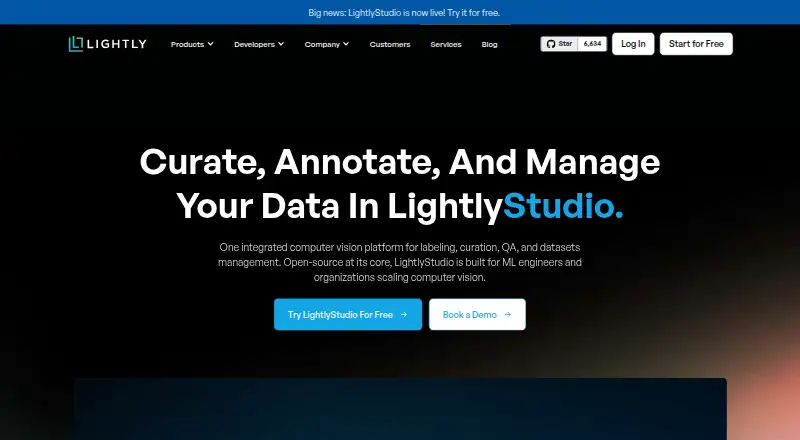
What LightlyStudio is
LightlyStudio is an app for curating, annotating, checking, evaluating, and managing computer-vision datasets. Its free open-source version is distributed under the Apache License 2.0. It computes embeddings and supports metadata filters, text and image similarity search, deduplication, outlier detection, and class balancing. Teams can annotate images and video, use model-assisted labeling plugins, and evaluate models with a confusion matrix and per-sample metrics. It reads media from Amazon S3, Google Cloud Storage, and Azure Blob Storage, and supports annotation formats including COCO, YOLO, Pascal VOC, and YouTube-VIS. Users can export complete datasets or filtered subsets in those formats or CSV. The Python API can index and query datasets, slice samples, add annotations and tags, run sampling, and start the GUI. The local application runs on Windows, Linux, and macOS, supports x86 and ARM processors, and requires Python 3.9 or later. Enterprise adds collaboration, role-based permissions, and managed cloud credentials through hosted or on-premise deployment.
Who it suits
LightlyStudio suits computer-vision practitioners managing datasets who need curation, image or video annotation, model evaluation, or a Python API. Teams needing collaboration and managed credentials can consider its Enterprise options.
What it does well
- Free open-source version uses Apache License 2.0.
- Supports image and video annotation.
- Exports full datasets or filtered subsets.
- Python API can index and query datasets.
- Local app supports Windows, Linux, and macOS.
What to know first
- Open Source plan has no customer support.
- Open Source plan has no team collaboration.
- Local application requires Python 3.9 or later.
Plans
| Plan | Billed and limits | Price |
|---|---|---|
| Open Source | No charge · Students and individuals · pip install · No customer support · No team collaboration | Free |
| On-Premise | Price not listed · Customer infrastructure · All open-source features · Dedicated engineering support · Dataset management · Team collaboration | On request |
| Lightly-Hosted | 14-day free trial; price not listed · Hosted by Lightly · All open-source features · Dataset management · Team collaboration · UI quick start | On request |
As lightly.ai lists them, read 14 Oct 2026. The maker's own page has the final word.
LightlyStudio is a computer-vision workspace for preparing and reviewing image and video data. It suits practitioners who need dataset curation alongside labeling, particularly those comfortable with an open-source workflow or an Enterprise deployment. Its strongest case is breadth across the data lifecycle; teams that need support and collaboration must look beyond the free plan.
Overview
LightlyStudio combines curation, annotation, quality assurance, evaluation, and dataset management in one app. Bringing those stages together can help users move from finding useful samples to labeling them and checking model results without switching tools. The Apache 2.0 open-source version makes that workflow accessible at no cost, while Enterprise adds collaboration and hosted or on-premise deployment. The trade-off is clear: the free version has neither customer support nor team collaboration.
Key features
Curate before labeling
Automatic embeddings power metadata filters, text and image similarity search, deduplication, outlier detection, and class balancing. These tools help focus labeling effort on relevant, unusual, or underrepresented samples rather than treating a dataset as a uniform queue. Lightly reports handling embeddings for more than two million images on a MacBook M1 with 16 GB of memory, a useful scale signal rather than a promise for every dataset or setup.
Annotate and evaluate
Image and video annotation, model-assisted labeling plugins, and review workflows cover core labeling work. Model evaluation includes a confusion matrix and per-sample metrics, giving users ways to examine both aggregate results and individual cases. This combination is useful when teams want to connect dataset work with model assessment; it is more than a labeling-only tool.
Move data in and out
LightlyStudio reads images and videos from Amazon S3, Google Cloud Storage, and Azure Blob Storage. It supports COCO, YOLO, Pascal VOC, and YouTube-VIS annotation formats, and exports full datasets or filtered subsets to those formats or CSV. That makes it practical for workflows that need to target a subset or exchange data in established formats.
Use the Python API or GUI
The Python API can index datasets, query and slice samples, add annotations and tags, run sampling, and start the GUI. The local application runs on Windows, Linux, and macOS, supports x86 and ARM processors, and requires Python 3.9 or later. This gives developers a route to script dataset operations while retaining a graphical workflow for review and annotation.
Pricing
The Open Source plan costs nothing and includes all open-source features under the Apache License 2.0. It is the natural fit for individuals or teams that can manage their own workflow and do not require built-in collaboration or customer support; those omissions are substantial for shared production work.
Lightly-Hosted has custom pricing and is billed with a 14 days free trial. Lightly hosts the service and the plan includes dataset management and team collaboration, making it the more relevant option for teams that want shared work without operating the deployment themselves. On-Premise also has custom pricing and includes dataset management, team collaboration, and dedicated engineering support on customer infrastructure. It can run fully offline and air-gapped, which suits organizations with strict deployment requirements. Lightly states that it is ISO 27001 certified and GDPR compliant, and that raw images and videos are never stored on its servers. In the open-source version, media remains in the user's storage; anonymous usage analytics can be disabled with an environment variable.
Platforms
LightlyStudio supports API, Linux, macOS, self-hosted, web, and Windows. Enterprise is available as a Lightly-hosted service or on-premise; the latter can operate offline and air-gapped.
Who it's for
LightlyStudio is a strong fit for computer-vision users who need to curate and evaluate datasets as well as annotate them, and for developers who want to automate dataset operations through Python. The open-source plan suits users willing to forgo support and collaboration. Teams that need shared projects, managed credentials, or dedicated engineering support should consider Enterprise instead.
Pros and cons
- Pros: Curation, annotation, quality assurance, evaluation, and management share one workspace, reducing the need to split those tasks across separate tools.
- Pros: The free Apache 2.0 version includes the open-source features, with local Windows, Linux, and macOS support across x86 and ARM systems.
- Pros: Cloud storage connections, common annotation formats, and filtered-subset exports support practical data exchange.
- Cons: The Open Source plan has no customer support or team collaboration, limiting its fit for teams that need supported shared work.
- Cons: Both Enterprise plans use custom pricing, so teams must request pricing rather than compare a published rate.
Alternatives
For a free, open-source annotation tool installable with pip, Docker, or Docker Compose, consider Doccano. If a free-to-use, browser-based photo-labeling tool is the priority, MakeSense.ai is another option. Potato may suit users looking for self-hosted open-source software with all features included and no paid tiers or usage limits. For free open-source software deployable on Hugging Face Spaces or personal infrastructure, consider Argilla.
Label Studio is another free-plan option with a free trial. If a hosted computer-vision platform with a stated monthly allowance is preferable, Roboflow offers a Free Tier with 10 credits per month, described as enough to train about 30 models or run 80,000 inferences. Amazon SageMaker Autopilot is a paid option with a free trial and pay-as-you-go pricing for Amazon SageMaker AI. For a labeling option with a free personal-and-small-team community plan, or a free online tier limited to one member, one project, three tasks, and 1 GB, consider CVAT. Browse Data Labeling Software for more options.
Verdict
Choose LightlyStudio if computer-vision work needs curation, annotation, and evaluation together, especially when an open-source workflow or a tailored Enterprise deployment fits. Its main advantage is the breadth of dataset work in one tool; its main drawback is that collaboration and customer support sit outside the free plan, while Enterprise pricing is custom. Teams that need those capabilities without a custom-priced commitment should compare alternatives.
Verdict
LightlyStudio brings dataset curation, annotation, evaluation, and management together, with both GUI and Python API workflows. The open-source plan omits customer support and team collaboration.
Facts from LightlyStudio's own pages
- Annotation
- The product supports classification, object-detection and segmentation annotations that can be edited in the GUI or through Python. · docs.lightly.ai, 14 Oct 2026
- Annotation and evaluation
- It supports image and video annotation, model-assisted labeling plugins, and model evaluation with a confusion matrix and per-sample metrics. · docs.lightly.ai, 29 Sept 2026
- API and SDK
- The Python API can index datasets, query and slice samples, manipulate annotations and tags, run sampling, export data and start the GUI. · docs.lightly.ai, 14 Oct 2026
- CLI
- The command-line package provides quickstart and gui subcommands. · docs.lightly.ai, 14 Oct 2026
- Cloud integrations
- The software can read media from AWS S3, Google Cloud Storage and Azure Blob Storage through optional cloud-storage dependencies. · docs.lightly.ai, 14 Oct 2026
- Cloud limitation
- Cloud storage currently supports raw media folders and COCO imports; other importers still require local files. · docs.lightly.ai, 14 Oct 2026
- Collaboration
- Enterprise collaboration provides Viewer, Labeler, Editor and Admin roles plus centrally managed cloud credentials. · lightly.ai, 14 Oct 2026
- Company founding
- Lightly says it was founded in 2019 from ETH Zurich research. · lightly.ai, 14 Oct 2026
- Company headquarters
- LinkedIn lists Zurich as headquarters and gives a primary Zurich address at Schützengasse 23, 8006 Switzerland. · linkedin.com, 14 Oct 2026
- Company size
- LinkedIn lists Lightly as a privately held software-development company with 11–50 employees. · linkedin.com, 14 Oct 2026
- Compliance claim
- Lightly's LinkedIn profile states that the company is ISO 27001 certified and GDPR compliant. · linkedin.com, 14 Oct 2026
- Curation
- It automatically creates embeddings and supports metadata filtering, text or image similarity search, deduplication, outlier detection, diversity sampling and class balancing. · lightly.ai, 14 Oct 2026
- Deployment
- LightlyStudio Enterprise is offered as a Lightly-hosted service or as an on-premise deployment; the on-premise option can run fully offline and air-gapped. · docs.lightly.ai, 29 Sept 2026
- Documentation depth
- The documentation includes quickstarts, dataset setup, workflows, tutorials, API references, glossary pages and enterprise deployment guidance. · docs.lightly.ai, 14 Oct 2026
- Export
- Users can export full datasets or filtered subsets to COCO, YOLO, Pascal VOC, YouTube-VIS, or CSV. · docs.lightly.ai, 29 Sept 2026
- Export formats
- Exports include CSV, COCO detection and segmentation, YOLO, Pascal VOC, COCO captions and YouTube-VIS video segmentation. · docs.lightly.ai, 14 Oct 2026
- Founded
- 2019 · lightly.ai, 28 Sept 2026
- Funding
- Lightly's About page states that the company has raised $10 million. · lightly.ai, 14 Oct 2026
- Headquarters
- Zurich, Switzerland · lightly.ai, 28 Sept 2026
- Hosted data handling
- Hosted Enterprise reads media from cloud storage and stores metadata in PostgreSQL on Lightly infrastructure. · docs.lightly.ai, 14 Oct 2026
- Independent feature summary
- SourceForge describes active-learning and self-supervised algorithms that combine predictions, embeddings and metadata for data selection, with API automation and cloud-bucket connectivity. · sourceforge.net, 14 Oct 2026
- Integrations
- It reads images and videos from Amazon S3, Google Cloud Storage, and Azure Blob Storage, and supports common annotation formats including COCO, YOLO, Pascal VOC, and YouTube-VIS. · docs.lightly.ai, 29 Sept 2026
- Limit: documentation and UI
- A G2 reviewer asked for more detail in complex-use-case documentation and a more intuitive, polished interface. · g2.com, 14 Oct 2026
- Limit: labeling flexibility
- A G2 reviewer reported that some labeling tools feel rigid for finely differentiated datasets. · g2.com, 14 Oct 2026
Where LightlyStudio stands on Freedom251
- Active Learning Tools#1 of 16
- Data Labeling Software#2 of 24