Freedom251 › Data Labeling Software
Doccano
What Doccano is
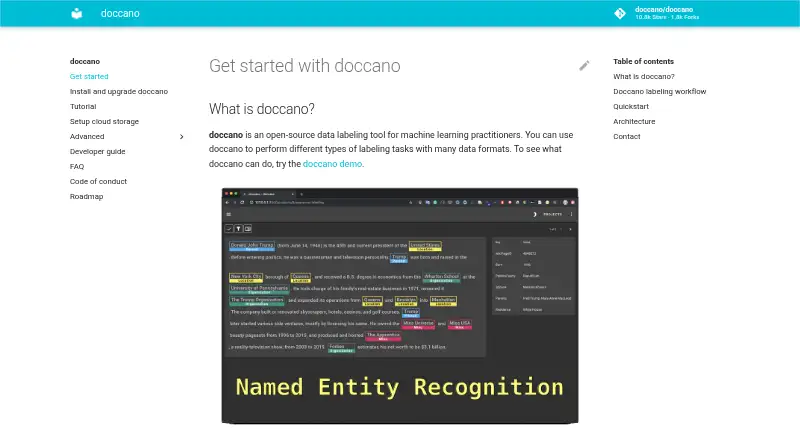
Doccano is a free, open-source data labeling tool for machine-learning practitioners. It supports text classification, sequence labeling, and sequence-to-sequence annotation, with uses such as preparing data for sentiment analysis, named entity recognition, and text summarization. A project workflow can include configuring a project, importing datasets, adding users, annotating examples, and exporting labeled data. Multiple people can collaborate, and REST APIs let scripts connect with the tool for labeling data using machine-learning models. Installation options include pip, Docker, Docker Compose, source, or cloud deployment. The installation guide lists Linux, Windows, and macOS machines running Python 3.8 or later. SQLite 3 is the default database; PostgreSQL configuration is described and MySQL is mentioned as an option. Imported datasets can be stored with Amazon S3 or Google Cloud Storage. Doccano also lists mobile support, emoji support, a dark theme, and multiple languages. Its installation guide warns that upgrading while using SQLite 3 can result in database loss.
Who it suits
It suits machine-learning practitioners who need to create and collaboratively label datasets. It is also relevant to teams that want REST API integration or a self-managed installation.
What it does well
- Free and open source
- Supports three listed text annotation tasks
- REST APIs support script integration
- Offers pip, Docker, and cloud deployment options
What to know first
- Requires Python 3.8 or later on listed operating systems
- SQLite 3 upgrades can result in database loss
Plans
| Plan | Billed and limits | Price |
|---|---|---|
| doccano | Open-source annotation tool; install with pip, Docker, or Docker Compose | Free |
As doccano.github.io lists them, read 3 Oct 2026. The maker's own page has the final word.
Getting started
- Open the Doccano website.
- Choose an installation route: pip, Docker, Docker Compose, source, or cloud deployment.
- For machine installation, use Linux, Windows, or macOS with Python 3.8 or later.
- Configure a project and import a dataset.
- Add users, annotate data, and export labeled datasets.
Doccano is a free, open-source annotation tool for machine-learning practitioners. It is best suited to teams that want to manage their own data-labeling setup and connect it to scripts. Its range of installation and database choices is useful, though SQLite users should take care when upgrading.
Overview
Doccano brings project setup, dataset import, team annotation, and export into one workflow. Its documented text tasks include classification, sequence labeling, and sequence-to-sequence annotation, with applications such as sentiment analysis, named entity recognition, and text summarization. It also lists image and audio/video annotation, model-assisted labeling, and review workflow capabilities.
The project dates to 2018 and is open source. Rather than locking teams into one deployment route, it supports installations on Linux, Windows, and macOS, along with cloud deployment. That flexibility suits practitioners who can make their own infrastructure choices; it may be less appealing to those seeking a managed service with a narrowly defined setup.
For other tools in the category, see Data Labeling Software.
Key features
- End-to-end labeling workflow: Configure a project, import data, add users, annotate records, and export the resulting dataset. This covers the core path from source material to labeled output without requiring separate tools for each step.
- Multiple annotation formats: Text classification, sequence labeling, and sequence-to-sequence annotation serve different text-labeling needs. Image and audio/video annotation are also listed, giving teams broader modality coverage.
- Collaboration and review: Multiple people can work on annotation, and a review workflow is included. These capabilities make Doccano more suitable for shared projects than a strictly individual labeling process.
- Script integration and model assistance: A REST API supports integration with scripts, including labeling data with machine-learning models. The auto-labeling guide demonstrates Amazon Comprehend sentiment analysis and custom REST API configuration, which can help teams incorporate existing services.
- Deployment and storage choices: Install options include pip, Docker, Docker Compose, source, and cloud deployment. Imported datasets can be stored with Amazon S3 or Google Cloud Storage; database options include SQLite 3 by default, PostgreSQL, and MySQL.
- Interface and login options: The project lists multi-language support, mobile support, emoji support, and a dark theme. OAuth guidance covers GitHub and Active Directory social login and provides Okta setup instructions.
The principal operational caution is SQLite: the installation guide warns that upgrading while using SQLite 3 can result in database loss. Teams using the default should account for that risk rather than treating upgrades as routine; PostgreSQL is an alternative described by the guide.
Pricing
Doccano is free: its plan costs nothing and is open-source. The plan includes an annotation tool installable with pip, Docker, or Docker Compose, so teams can use the software without a subscription price. Its trade-off is that the documented deployment options leave teams to choose and manage their own environment and storage rather than relying on a single prescribed setup.
Platforms
Doccano supports API, Linux, macOS, self-hosted, web, and Windows. The installation guide specifies Python 3.8 or later for Linux, Windows, and macOS machines. Teams can install through pip, Docker, or Docker Compose, build from source, or deploy in the cloud; the frontend is a JavaScript web app built with Vue.js and Nuxt.js.
Who it's for
Doccano is a strong fit for machine-learning practitioners and teams preparing labeled datasets who want collaborative annotation, review, and script integration without paying for the software. It is particularly suitable when teams value control over deployment and storage options. Those who prefer not to manage installation or database decisions, or who use SQLite and cannot plan carefully for upgrades, should consider another tool.
Pros and cons
- Pro — No subscription cost: The open-source plan is free, making it suitable for teams that need annotation software without a paid plan.
- Pro — Flexible deployment and storage: Installation routes span local systems, containers, source, and cloud, while S3 and Google Cloud Storage are supported for imported datasets.
- Pro — Shared, scriptable workflows: Collaboration, review, and a REST API support team labeling and integration with scripts or model-assisted processes.
- Con — SQLite upgrade risk: Upgrading with the default SQLite 3 database can lose the database, so users need to plan around upgrades or choose another database option.
- Con — Setup choices require ownership: The variety of installation and database routes gives teams control but also asks them to make and maintain those choices themselves.
Alternatives
- Label Studio is worth considering for readers who want a freemium alternative with a free plan and free trial, across API, Linux, macOS, self-hosted, web, and Windows.
- LightlyStudio may suit readers seeking another free option with a free trial and an open-source version distributed under the Apache License 2.0.
- Potato is an alternative for users who want a free, self-hosted offering with all features included and no usage limits.
- Argilla is another free, open-source option, deployable on Hugging Face Spaces or a user's own infrastructure.
- Roboflow may be a better fit for readers seeking a freemium option with Android and iOS support and a free tier that includes 10 credits monthly.
- CVAT offers a free Community plan for personal use and small teams, as well as a separate free online plan with limits of one member, one project, three tasks, and 1 GB.
- Datasaur is an option for readers who want a free tier capped at one user, 5,000 labels per year, and 100 MB of storage, plus a Growth trial of up to 14 days.
- Labelme is another alternative for readers looking for a tool available on Windows, macOS, and Linux.
Verdict
Choose Doccano if you want free, open-source labeling software with team collaboration, a REST API, and control over installation and storage. Its breadth makes it a practical choice for practitioners building their own annotation workflow. Look elsewhere if you need a more managed setup or cannot accommodate the database caution around SQLite upgrades.
Verdict
Doccano covers collaborative text labeling and offers multiple installation and storage options. Take care with upgrades if using the default SQLite 3 database.
Questions
Is Doccano free?
Yes. The listed plan is free, and the pricing note describes it as open source.
Which annotation types does it support?
The listed capabilities include text, image, and audio/video annotation. Supported text tasks include text classification, sequence labeling, and sequence-to-sequence annotation.
Which platforms can I use for installation?
Installation guidance covers Linux, Windows, and macOS machines running Python 3.8 or later. Doccano also lists API, web, and self-hosted platforms.
Can I connect scripts or labeling services?
Yes. Doccano provides a RESTful API and supports custom REST APIs for auto-labeling. Its guidance also demonstrates Amazon Comprehend Sentiment Analysis.
Which databases and dataset storage services are described?
SQLite 3 is the default database; PostgreSQL configuration is described, and MySQL is mentioned as an option. Amazon S3 and Google Cloud Storage are listed for imported datasets.
What is the upgrade caveat?
The installation guide warns that upgrading while using SQLite 3 can result in database loss.
Facts from Doccano's own pages
- Annotation tasks
- It supports text classification, sequence labeling, and sequence-to-sequence annotation tasks. · github.com, 3 Oct 2026
- API
- Doccano provides a RESTful API, and its documentation says it can be integrated with scripts through REST APIs. · doccano.github.io, 3 Oct 2026
- Cloud storage
- The documentation describes storing imported datasets in Amazon S3 or Google Cloud Storage. · doccano.github.io, 3 Oct 2026
- Collaboration
- Features include collaborative annotation and multi-language support. · github.com, 3 Oct 2026
- Database options
- SQLite 3 is the default database, and the installation guide also describes PostgreSQL and mentions MySQL as an option. · doccano.github.io, 2 Oct 2026
- Data storage
- SQLite 3 is the default database; the installation guide also describes configuring PostgreSQL and other database systems. · doccano.github.io, 3 Oct 2026
- Deployment
- The repository lists one-click deployment options for AWS and Heroku, and the guide supports installation locally or in the cloud. · github.com, 3 Oct 2026
- Founded
- 2018 · doccano.github.io, 28 Sept 2026
- Installation
- Doccano can be installed using pip, Docker, or Docker Compose. · github.com, 3 Oct 2026
- Integrations
- The auto-labeling guide demonstrates Amazon Comprehend Sentiment Analysis and allows users to configure a custom REST API. · doccano.github.io, 3 Oct 2026
- Interface
- The project lists mobile support, emoji support, and a dark theme among its features. · github.com, 3 Oct 2026
- Known upgrade limitation
- The installation guide warns that upgrading the package while using SQLite 3 can lose the database. · doccano.github.io, 3 Oct 2026
- Labeling workflow
- Users can configure a project, import datasets, add users, annotate data, and export labeled datasets. · doccano.github.io, 2 Oct 2026
- Login integrations
- The OAuth guide describes social login via GitHub and Active Directory, and provides Okta setup instructions. · doccano.github.io, 3 Oct 2026
- Operating systems
- The installation guide says doccano can be installed on Linux, Windows, or macOS machines running Python 3.8 or later. · doccano.github.io, 3 Oct 2026
- Project origin
- The repository citation lists the project year as 2018 and names Hiroki Nakayama and four coauthors. · github.com, 3 Oct 2026
- Purpose
- Doccano is an open-source text annotation tool for machine-learning practitioners. · github.com, 3 Oct 2026
- REST API
- Doccano can be integrated with scripts through REST APIs for labeling data with machine learning models. · doccano.github.io, 2 Oct 2026
- Support
- The project directs users to its FAQ and invites them to contact the author for help and feedback. · github.com, 3 Oct 2026
- Supported systems
- The install guide says doccano can be installed on Linux, Windows, or macOS machines running Python 3.8 or later. · doccano.github.io, 2 Oct 2026
- Team collaboration
- The roadmap lists collaboration with multiple people as supported functionality. · doccano.github.io, 2 Oct 2026
- Upgrade limitation
- The installation guide warns that upgrading can lose the database when SQLite3 is used. · doccano.github.io, 2 Oct 2026
- Use cases
- It can create labeled data for sentiment analysis, named entity recognition, and text summarization. · github.com, 3 Oct 2026
- Web interface
- The frontend is a JavaScript web app built with Vue.js and Nuxt.js. · doccano.github.io, 2 Oct 2026
Where Doccano stands on Freedom251
- Data Labeling Software#7 of 24