Freedom251 › Game Remote Play Software
Light is Green
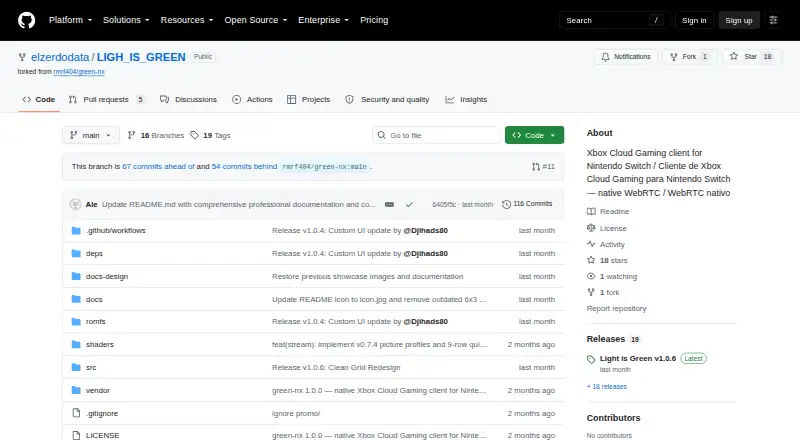
What Light is Green is
Light is Green is a free, open-source Cloud Play and Remote Play client for Nintendo Switch homebrew. It runs account authentication, game catalogue access, streaming, hardware video decoding, graphics, audio, and controller input on the console, without a companion PC. Its library shows cloud-playable games available to the signed-in Microsoft account, including Game Pass, eligible Stream Your Own Game titles, and free-to-play offerings. Streaming uses WebRTC and hardware H.264 decoding, with GPU presentation. Video options include 720p and 1080p, as well as 1080p HQ Windows and an experimental HQ Tizen profile; bitrate and pacing can be customized. An in-stream menu offers picture adjustments, while a HUD displays bitrate, frame rate, packet loss, and WebRTC ping latency. Switch controls can map to Xbox controls, with vibration and rumble support and Xbox Guide access. The client requires a Switch with Atmosphère custom firmware. The README directs users to launch in Title Mode because Applet mode lacks sufficient RAM for hardware decoding. Users must supply their own valid account and subscriptions. The project is non-commercial, for personal use, and distributed under GNU GPL v3.0.
Who it suits
It suits Nintendo Switch homebrew users who want cloud or remote play directly on the console. Users need Atmosphère custom firmware and their own valid account and subscriptions.
What it does well
- Runs streaming and controls natively on the console.
- Supports profiles up to 1080p.
- Offers customizable bitrate and pacing.
- HUD reports video and connection diagnostics.
- Open-source and free for personal use.
What to know first
- Requires a Switch with Atmosphère custom firmware.
- Applet mode lacks RAM for hardware decoding.
- Users must provide their own account and subscriptions.
- 5 GHz Wi-Fi or docked Ethernet is strongly recommended.
Limits
Applet mode lacks sufficient RAM for hardware video decoding, so the README directs users to launch in Title Mode. Users must supply their own valid account and subscriptions.
Getting started
- Download the Light_is_Green-v1.0.6.nro release binary from the project repository.
- Copy the binary to sdmc:/switch/.
- Use a Nintendo Switch running Atmosphère custom firmware.
- Launch the app in Title Mode rather than Applet mode.
- Provide your own valid account and subscriptions.
- Use 5 GHz Wi-Fi or docked Ethernet, as strongly recommended.
Verdict
Light is Green keeps cloud-play functions on the Switch and provides video controls, diagnostics, and controller mapping. Use requires Atmosphère and Title Mode, along with an account and subscriptions supplied by the user.
Questions
Is Light is Green free?
Yes. It is free, open-source, non-commercial and for personal use under GNU GPL v3.0.
Which platform does it support?
It is a Nintendo Switch client and requires Atmosphère custom firmware.
What account or subscription is needed?
Users must provide their own valid account and subscriptions. Its catalogue shows cloud-playable games returned for the signed-in Microsoft account.
What video resolutions are supported?
Profiles include 720p and 1080p, plus 1080p HQ Windows and experimental HQ Tizen.
Does it need a companion PC?
No. Authentication, catalogue, streaming, decoding, graphics, audio and controller input run on the console.
Who maintains the project?
The README identifies elzerdodata as the main developer, project maintainer and lead designer for versions v0.2 through v1.0.6.
Facts from Light is Green's own pages
- Account and subscription limit
- Users must provide their own valid account and subscriptions; the project says it is not affiliated with, endorsed by, or supported by Microsoft or Nintendo. · github.com, 9 Oct 2026
- Account and subscriptions
- Users must provide their own valid account and subscriptions, and the project says it is not affiliated with or supported by Microsoft or Nintendo. · github.com, 9 Oct 2026
- Account storage
- The README says account tokens and cached data are stored in sdmc:/switch/light-is-green/. · github.com, 9 Oct 2026
- Catalogue
- The library shows cloud-playable games returned for the signed-in Microsoft account, including Game Pass, eligible Stream Your Own Game titles and free-to-play offerings. · github.com, 9 Oct 2026
- Console operation
- Authentication, catalogue, WebRTC streaming, hardware H.264 decoding, GPU presentation, audio, and controller input run natively on the console without a companion PC. · github.com, 9 Oct 2026
- Controller features
- It maps Nintendo Switch controls to Xbox controls, supports vibration and rumble, and provides Xbox Guide access. · github.com, 9 Oct 2026
- Controls
- Features include Switch controller mapping, vibration feedback, and Xbox Guide access through L3 + R3 or the touch overlay. · github.com, 9 Oct 2026
- Credential storage
- The README says account tokens and cached data are stored in sdmc:/switch/light-is-green/. · github.com, 9 Oct 2026
- Diagnostics
- An in-stream HUD displays video bitrate, frame rate, packet loss and WebRTC ping latency. · github.com, 9 Oct 2026
- Download format
- The README identifies the release binary as Light_is_Green-v1.0.6.nro and instructs users to copy it to sdmc:/switch/. · github.com, 9 Oct 2026
- License and audience
- The project is open-source, non-commercial and for personal use, and is distributed under the GNU General Public License v3.0. · github.com, 9 Oct 2026
- Licensing and cost
- The project describes itself as open-source and non-commercial for personal use and says it is distributed under GNU GPL v3.0. · github.com, 9 Oct 2026
- Maintainer
- The README identifies elzerdodata as the main developer, project maintainer, and lead designer for versions v0.2 through v1.0.6. · github.com, 9 Oct 2026
- Memory limit
- Applet mode lacks sufficient RAM for hardware video decoding, so the README instructs users to launch in Title Mode. · github.com, 9 Oct 2026
- Memory limitation
- Applet mode lacks sufficient RAM for hardware video decoding, so the README directs users to launch in Title Mode. · github.com, 9 Oct 2026
- Native operation
- Authentication, catalogue, WebRTC streaming, hardware H.264 decoding, GPU presentation, audio and controller input run on the console without a companion PC. · github.com, 9 Oct 2026
- Picture controls
- Its in-stream quick menu offers real-time contrast, saturation, gamma, brightness and temperature adjustments. · github.com, 9 Oct 2026
- Product
- Light is Green is an independently maintained, open-source Cloud Play and Remote Play client for Nintendo Switch homebrew. · github.com, 9 Oct 2026
- Purpose
- Light is Green is an independently maintained, open-source Cloud Play and Remote Play client for Nintendo Switch homebrew. · github.com, 9 Oct 2026
- Quality profiles
- Supported profiles include 720p, 1080p, 1080p HQ Windows and experimental HQ Tizen, with customizable bitrates and pacing. · github.com, 9 Oct 2026
- Release
- The repository’s releases page lists v1.0.6 as the latest release. · github.com, 9 Oct 2026
- Requirements
- The app requires a Nintendo Switch with Atmosphère custom firmware; 5 GHz Wi-Fi or docked Ethernet is strongly recommended. · github.com, 9 Oct 2026
- Security components
- The listed third-party components include libsrtp for SRTP media encryption and mbedTLS for TLS and DTLS cryptography. · github.com, 9 Oct 2026
- Streaming
- The client uses native WebRTC and zero-copy rendering with hardware H.264 decoding via NVDEC and GPU presentation via deko3d. · github.com, 9 Oct 2026
Where Light is Green stands on Freedom251
- Game Remote Play Software#19 of 27