Freedom251 › Lease Accounting Software
LeaseLedger
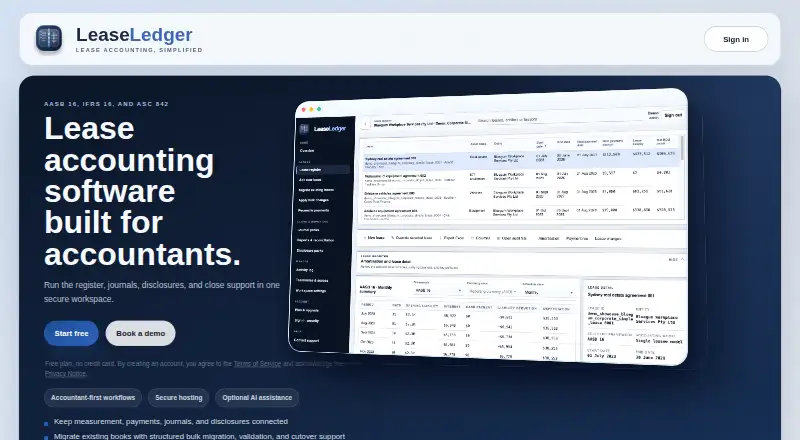
What LeaseLedger is
LeaseLedger is web-based lease accounting software for accountants and finance teams. It produces schedules, journals, reports, and disclosures under AASB 16, IFRS 16, and ASC 842. Its lease register covers new leases, migrations, modifications, and reassessments, with schedules reflecting the effects of lease events. Users can reconcile scheduled payments and capture settlements made outside the schedule. Reporting includes financial-system reconciliations, cash maturity analysis, portfolio roll-ups, and disclosure workpaper previews. Migration workbooks provide pre-import validation, row-level error handling, and a choice of opening balance bases. Optional AI can draft lease details from text or PDF documents; a person needs to review those suggestions before saving or relying on them. The free plan costs nothing and covers up to three leases in one client workspace, with an owner and one teammate, plus five AI-assisted drafts. The Professional plan has higher lease limits tailored to a portfolio, additional users, bulk imports and migration workbooks, consolidation and eliminations, and impairment testing; its price is by discussion. Users retain ownership of their lease data, documents, and outputs, and can export records, schedules, journals, and workbooks. Security features described include scoped access controls, optional software-token MFA, secure cookies, and activity history. Core records and documents are hosted in AWS Sydney, with encryption in transit and at rest. AI requests may be processed outside Australia and retained by the external provider for abuse monitoring for up to 30 days.
Who it suits
LeaseLedger is aimed at accountants and finance teams preparing lease accounting schedules, journals, reports, and disclosures. The free plan can suit an individual or small team working with up to three leases in one client workspace; larger portfolios may consider Professional.
What it does well
- Supports AASB 16, IFRS 16, and ASC 842.
- Tracks lease changes and their schedule impacts.
- Offers migration checks and row-level error handling.
- Exports lease records, schedules, journals, and workbooks.
- Users retain ownership of lease data and outputs.
What to know first
- The free plan is limited to three leases and one client workspace.
- Professional pricing is available by discussion.
- AI requests may be processed outside Australia and retained for up to 30 days.
Limits
The free plan is limited to three leases, one client workspace, the workspace owner plus one teammate, and five AI-assisted drafts. Professional has higher lease limits tailored to the portfolio, but its price is by discussion.
Plans
| Plan | Billed and limits | Price |
|---|---|---|
| Free | up to 3 leases · 1 client workspace · workspace owner plus 1 teammate · 5 AI-assisted drafts · no credit card | Free |
| Professional | higher lease limits · additional users · foreign-currency leases · bulk imports and migration workbooks · dedicated single-tenant AWS available by arrangement · expanded AI allowance · consolidation and eliminations · impairment testing · qualified-accountant support | On request |
As leaseledger.com.au lists them, read 15 Oct 2026. The maker's own page has the final word.
Getting started
- Visit the LeaseLedger website.
- Use the free plan for up to three leases, or contact the maker about Professional.
- Create a client workspace and add the workspace owner and, if needed, one teammate.
- Enter leases or use migration workbook templates.
- Review any AI-drafted lease details before saving or relying on them.
- Export lease records, schedules, journals, or workbooks as needed.
LeaseLedger brings lease schedules, journals and disclosures together for accountants and finance teams. It suits organizations reporting under AASB 16, IFRS 16 or ASC 842, particularly those with a small portfolio to start. Its standout strengths are event-linked schedules and structured migration; the free tier’s three-lease limit sharply narrows its reach.
Overview
LeaseLedger covers more than initial lease calculations: teams can add leases, migrate records, and account for modifications and reassessments with schedule impacts tied to each event. Scheduled payment reconciliation and capture of off-schedule settlements help keep payment activity connected to the accounting workflow.
Reporting includes financial-system reconciliations, cash maturity analysis, portfolio roll-ups and disclosure workpaper previews. Users retain ownership of lease records, documents and outputs, and can export records, schedules, journals and workbooks. Excel journal packs and reconciliation provide ways to move information into finance processes, but the product does not name a third-party accounting integration. Teams that require a direct connection to a particular ledger should confirm that fit before choosing it.
Key features
Migration and accounting workflow
Migration workbooks include pre-import validation, row-level error handling and selectable opening balance bases. Those controls can help teams identify import problems and choose how opening balances are treated, rather than relying on an unvalidated bulk upload. Bulk imports and migration workbooks are part of Professional, however, so the free plan is not the tier for a large-scale migration.
AI drafts and data handling
Optional AI can draft lease details from text or PDFs, but a person must review suggestions before saving or relying on them. AI requests send the selected text or PDF to an external provider, which may process it outside Australia and may retain API inputs and outputs for abuse monitoring for up to 30 days. That trade-off matters for teams handling sensitive lease documents; they can weigh the time-saving option against their data-handling requirements.
Security and hosting
Core workspace records and supporting documents are hosted in AWS Sydney, Australia. Data is encrypted in transit and at rest, while scoped access controls, optional software-token MFA, secure cookies and an audit history for user activity provide additional safeguards. Support is available through a secure in-app request or email; Professional also lists support from a qualified accountant.
Pricing
LeaseLedger uses a freemium model. The Free plan costs nothing and allows up to 3 leases, 1 client workspace, the workspace owner plus 1 teammate, and 5 AI-assisted drafts. It is a practical starting point for a very small portfolio, but the lease cap makes it unsuitable once the register grows beyond three leases.
Professional has custom pricing, billed by arrangement. It offers higher lease limits tailored to the portfolio, additional users, bulk imports and migration workbooks, consolidation and eliminations, and impairment testing. This is the relevant tier for larger portfolios or teams needing those capabilities, but buyers will need a quote to assess the cost. The free plan does not include the listed Professional features.
Platforms
LeaseLedger is available on the web. Its cloud workspace is hosted in AWS Sydney, Australia.
Who it's for
LeaseLedger is best suited to accountants and finance teams that need lease-event accounting, disclosures and migration workflows across AASB 16, IFRS 16 or ASC 842. Smaller teams can use the free plan to manage a handful of leases, while teams needing more capacity, users or Professional features should consider a custom-priced plan. It is less compelling for buyers whose choice depends on a named accounting-system integration or who cannot send selected lease material to an external AI provider.
Pros and cons
- Pros: Supports AASB 16, IFRS 16 and ASC 842, with schedules, journals and disclosure reporting in one product.
- Pros: Migration templates provide pre-import checks, row-level error handling and opening-balance choices.
- Pros: Users can export lease records, schedules, journals and workbooks while retaining ownership of their data and outputs.
- Cons: Free is capped at three leases and one client workspace, limiting its usefulness for growing portfolios.
- Cons: Professional pricing is custom, so teams must obtain a quote to compare costs.
- Cons: Optional AI sends selected content to an external provider, with possible processing outside Australia and retention for up to 30 days.
- Cons: No named third-party accounting integration is described, which may matter to teams expecting a direct ledger connection.
Alternatives
Lease Accounting Software is the broader category directory for comparing lease-accounting options.
Choose 16Leases if its one-user free trial account or broader platform coverage—including self-hosted and desktop options—better fits your setup. Its Premium plan is also described for one user with lease editing and customized payment schedules.
iLeasePro is another web-based freemium option, with Essential at $240 a month for up to 50 contracts and Professional at $480 a month for up to 150 contracts. Those published monthly prices may help buyers who want a stated contract-based tier to compare with LeaseLedger’s custom-priced Professional plan.
LeaseAccounting.app offers a free tier with 2 leases, 3 users and 3 entities, with watermarked exports; its Starter plan is €149 a month. It may suit a team that needs more users or entities on its free tier than LeaseLedger provides, while accepting the lower lease cap and watermarked exports.
Ledgerage is a web and API option whose free plan offers unlimited single-lease calculations, 2 saved leases and 25 API computations per month. Consider it when calculation and API access are the priority rather than LeaseLedger’s broader register, migration and disclosure workflow.
ROU Asset has a free plan with up to 5 leases, an ASC 842 engine, AI extraction, CSV/XLSX export, six reports, a dashboard, alerts and an audit trail. It may suit a small portfolio that needs two more free leases than LeaseLedger allows and is focused on ASC 842.
Infor Public Sector is a paid alternative with pricing by contact.
Planon is a paid alternative with a free trial.
SAP Business One is a paid alternative priced by quote based on business requirements.
Verdict
LeaseLedger is a strong fit for accounting teams that need lease schedules and disclosures across several standards, plus migration and export tools. Its free plan gives small portfolios a way to begin, but three leases is a firm constraint; growing teams will need Professional and a custom quote. Choose it for its connected lease-accounting workflow, and look elsewhere if your decision depends on a named accounting integration or external AI handling does not meet your data requirements.
Verdict
LeaseLedger is a fit for accounting teams that need lease schedules and disclosures under several listed standards, with migration and export tools. The free plan provides a way to work with up to three leases. Look at Professional if you need higher lease limits, additional users, or its listed consolidation, migration, and impairment features.
Questions
Is LeaseLedger free?
Yes. Its Free plan costs nothing and includes up to three leases in one client workspace.
Which accounting standards does it support?
It supports AASB 16, IFRS 16, and ASC 842.
What does the free plan include?
It includes up to three leases, one client workspace, the workspace owner plus one teammate, and five AI-assisted drafts.
What does the Professional plan add?
It lists higher lease limits tailored to the portfolio, additional users, bulk imports and migration workbooks, consolidation and eliminations, and impairment testing.
Can users export their data?
Yes. Lease records, schedules, journals, and workbooks can be exported, and users retain ownership of workspace lease data, documents, and outputs.
How does its optional AI handle lease details?
It can draft details from text or PDFs. A person must review suggestions before saving or relying on them; requests may be processed outside Australia and retained by the external provider for abuse monitoring for up to 30 days.
Facts from LeaseLedger's own pages
- Access controls
- Access can be scoped by client, entity and task with server-side checks before changes are made. · leaseledger.com.au, 15 Oct 2026
- Access security
- The site describes scoped access controls, optional software-token MFA, secure cookies, and audit history for user activity. · leaseledger.com.au, 29 Sept 2026
- AI assistance
- Optional AI can suggest onboarding settings, draft lease data from text or PDFs and prepare lease-change drafts. · leaseledger.com.au, 15 Oct 2026
- AI consent
- Client administrators can enable or disable AI assistance while manual workflows continue when it is off. · leaseledger.com.au, 15 Oct 2026
- AI data handling
- AI requests send user-selected text or PDF to an external provider, which may process it outside Australia and may retain API input and output for abuse monitoring for up to 30 days. · leaseledger.com.au, 29 Sept 2026
- AI review control
- AI output remains a suggestion and must be reviewed by a person before saving or posting. · leaseledger.com.au, 15 Oct 2026
- API and SDKs
- The opened product, terms and privacy pages do not describe a public customer API or SDK. · leaseledger.com.au, 15 Oct 2026
- Audit history
- The platform records import decisions, cutover decisions and user actions. · leaseledger.com.au, 15 Oct 2026
- Authentication
- Users verify email addresses and may enable software-token multi-factor authentication. · leaseledger.com.au, 15 Oct 2026
- Consolidation
- Professional includes consolidation and elimination capabilities. · leaseledger.com.au, 15 Oct 2026
- Cutover choices
- Migration can retain source balances or use system-calculated opening values. · leaseledger.com.au, 15 Oct 2026
- Data location
- The privacy notice identifies AWS Sydney as the hosting location for core workspace records and supporting documents. · leaseledger.com.au, 15 Oct 2026
- Data ownership
- Customers retain ownership of lease data, documents and outputs and can export registers, schedules, journals and workbooks. · leaseledger.com.au, 15 Oct 2026
- Disclosures
- The product provides previews of lease-disclosure workpapers. · leaseledger.com.au, 15 Oct 2026
- Documentation
- The opened public pages provide product, plan, privacy and terms information but no separate developer documentation or changelog. · leaseledger.com.au, 15 Oct 2026
- Encryption and backups
- The site states that databases, file storage, logs and backups are encrypted, with audit logging for sign-ins, exports, postings and lease changes. · leaseledger.com.au, 15 Oct 2026
- Exports and data
- Users retain ownership of workspace lease data, documents, and outputs, and can export lease records, schedules, journals, and workbooks. · leaseledger.com.au, 29 Sept 2026
- Hosting
- Core records and documents are hosted in Amazon Web Services, with regional selection and dedicated single-tenant environments available by arrangement. · leaseledger.com.au, 15 Oct 2026
- Hosting and encryption
- Core workspace records and supporting documents are hosted in AWS Sydney, Australia, and the Privacy Notice says data is encrypted in transit and at rest. · leaseledger.com.au, 29 Sept 2026
- Impairment
- Professional includes impairment testing workflows for right-of-use assets. · leaseledger.com.au, 15 Oct 2026
- Integrations
- The published pages describe financial-system reconciliation and Excel exports but do not name a third-party accounting connector. · leaseledger.com.au, 15 Oct 2026
- Intended users
- The product describes itself as lease accounting software built for accountants and finance teams. · leaseledger.com.au, 29 Sept 2026
- Journal packs
- Users can prepare, review and download Excel journal packs with posting controls. · leaseledger.com.au, 15 Oct 2026
- Lease accounting
- The lease register supports new leases, migrations, modifications, and reassessments, with schedule impacts tied to lease events. · leaseledger.com.au, 29 Sept 2026
Where LeaseLedger stands on Freedom251
- Lease Accounting Software#5 of 56