Freedom251 › Text-to-Speech Software

Kyutai TTS
by Kyutai TTS
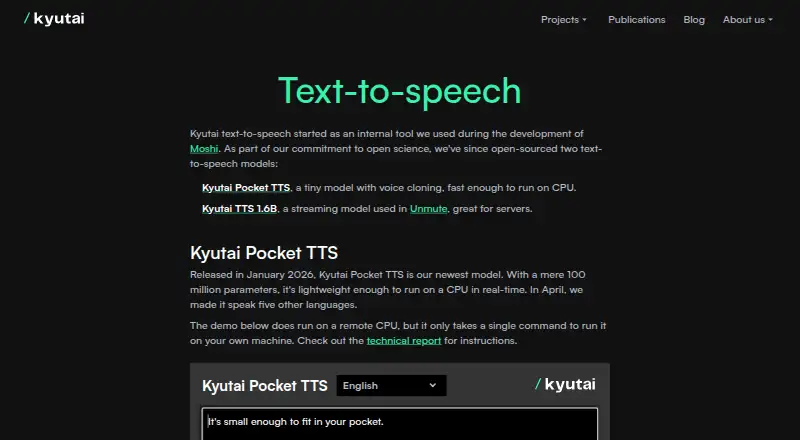
What Kyutai TTS is
Kyutai TTS is a free, open-source text-to-speech offering from Kyutai, an open-science AI research lab based in Paris. It includes two models: Pocket TTS and Kyutai TTS 1.6B. Pocket TTS has 100 million parameters and is designed to generate speech in real time on a CPU. Its listed languages are English, French, German, Portuguese, Italian, Spanish, and Dutch. The model provides Python, command-line, and local HTTP-server interfaces, and a browser demo lets visitors try it without installing software. Kyutai TTS 1.6B can begin generating audio before the full text arrives, a streaming approach intended for low-latency voice assistants. Kyutai says this model is used in Unmute, its interactive real-time speech demo. The offering supports voice cloning and API access, with WAV as its listed export format. Pocket TTS requires Python 3.10 through 3.14 and PyTorch 2.5 or later, though it does not require the GPU version of PyTorch. Its repository reports about 200 milliseconds to the first audio chunk and roughly six times real-time generation on a MacBook Air M4 CPU. The Pocket TTS repository identifies its license as MIT.
Who it suits
Pocket TTS suits developers who want a CPU-oriented speech model with Python, command-line, or local HTTP-server access, as well as people who want to try it in a browser. Kyutai TTS 1.6B is aimed at server and low-latency applications such as voice assistants that need to start speaking before all input text is available.
What it does well
- Free, open-source models, with Pocket TTS under the MIT license.
- Pocket TTS is designed for real-time CPU use.
- Seven languages are listed for Pocket TTS.
- Offers voice cloning, API access, and WAV export.
- Browser demo works without installation.
- TTS 1.6B can stream audio before all text arrives.
What to know first
- Pocket TTS requires Python 3.10–3.14 and PyTorch 2.5 or later.
- Adding pauses with silence in Pocket TTS input text is unsupported.
Plans
| Plan | Billed and limits | Price |
|---|---|---|
| Kyutai Pocket TTS | Open-source model; 100M parameters; runs on CPU; voice cloning; seven listed languages | Free |
| Kyutai TTS 1.6B | Open-source streaming model; designed for servers and low-latency applications | Free |
As kyutai.org lists them, read 12 Oct 2026. The maker's own page has the final word.
Getting started
- Open the Kyutai TTS website and try Pocket TTS in its browser demo without installing anything.
- Choose Pocket TTS or Kyutai TTS 1.6B based on whether you need CPU-oriented generation or streaming for low-latency applications.
- For Pocket TTS, use Python 3.10 through 3.14 and install PyTorch 2.5 or later; the GPU version is not required.
- Use Pocket TTS through its Python API, command-line interface, or local HTTP server.
- Use the API access or platform environment that fits your intended setup.
Verdict
Choose Kyutai TTS if you want free, open-source speech generation, particularly Pocket TTS for CPU use or TTS 1.6B for streaming applications. Look elsewhere if your Pocket TTS workflow depends on creating pauses by inserting silence in the input text.
Questions
How much does Kyutai TTS cost?
Both listed plans are free: Kyutai Pocket TTS and Kyutai TTS 1.6B.
Which languages does Pocket TTS support?
The Pocket TTS repository lists English, French, German, Portuguese, Italian, Spanish, and Dutch.
What platforms are supported?
The listed platforms are API, iOS, Linux, macOS, self-hosted, web, and Windows.
Does Kyutai TTS support voice cloning and API access?
Yes. Voice cloning and API access are listed.
What export format is available?
WAV is the listed export format.
What does Pocket TTS require, and what license does it use?
It supports Python 3.10 through 3.14 and requires PyTorch 2.5 or later, without requiring the GPU version. Its repository identifies the license as MIT.
Facts from Kyutai TTS's own pages
- API access
- Yes · kyutai.org, 20 Sept 2026
- Browser demo
- The maker says visitors can try Pocket TTS in a browser without installing anything. · github.com, 12 Oct 2026
- Export formats
- WAV · kyutai.org, 20 Sept 2026
- Founded
- 2023 · kyutai.org, 28 Sept 2026
- Headquarters
- Paris, France · kyutai.org, 28 Sept 2026
- Integration
- Kyutai says TTS 1.6B is used in Unmute, its interactive real-time speech demo. · kyutai.org, 12 Oct 2026
- Interfaces
- Pocket TTS provides a Python API, command-line interface, and local HTTP server. · github.com, 12 Oct 2026
- Languages
- The Pocket TTS repository lists English, French, German, Portuguese, Italian, Spanish, and Dutch support. · github.com, 12 Oct 2026
- License
- The Pocket TTS GitHub repository identifies its license as MIT. · github.com, 12 Oct 2026
- Limit
- The Pocket TTS repository lists adding silence in the input text to create pauses as unsupported. · github.com, 12 Oct 2026
- Organization
- Kyutai describes itself as an open-science AI research lab based in Paris. · kyutai.org, 12 Oct 2026
- Performance
- The repository reports about 200 ms to the first audio chunk and roughly six times real-time generation on a MacBook Air M4 CPU. · github.com, 12 Oct 2026
- Platforms
- web,macos,ios,api,self_hosted · kyutai.org, 20 Sept 2026
- Pocket TTS
- Pocket TTS is a 100-million-parameter model designed to run in real time on a CPU. · kyutai.org, 12 Oct 2026
- Product
- Kyutai describes TTS as two open-source text-to-speech models: Pocket TTS and Kyutai TTS 1.6B. · kyutai.org, 12 Oct 2026
- Runtime requirements
- Pocket TTS supports Python 3.10 through 3.14 and requires PyTorch 2.5 or later; it does not require the GPU version of PyTorch. · github.com, 12 Oct 2026
- Streaming model
- Kyutai TTS 1.6B can begin generating audio before the full text input is available, a design the maker says suits low-latency voice assistants. · kyutai.org, 12 Oct 2026
- Voice cloning
- Pocket TTS can clone a voice from an audio sample when run locally. · kyutai.org, 12 Oct 2026
Where Kyutai TTS stands on Freedom251
- Text-to-Speech Software#33 of 223
- Text-to-speech tools#39 of 232