Freedom251 › Text-to-speech tools

Kokoro TTS
What Kokoro TTS is
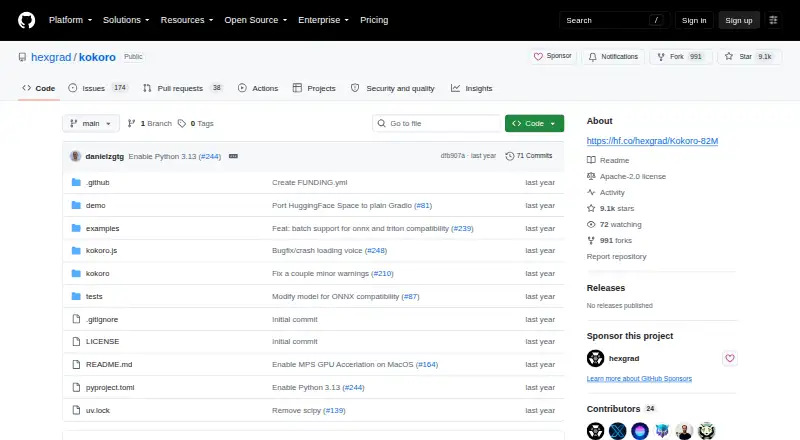
Kokoro TTS is a free, open-weight text-to-speech model with 82 million parameters and support for eight languages. Its Apache-licensed weights are presented for personal projects and production deployment, and commercial use is permitted. The model uses a decoder-only design combining StyleTTS 2 and ISTFTNet. A Python pipeline example lets users select a voice and set speech speed; generated audio is 24 kHz and can be saved as WAV. The kokoro.js library can run the model locally in a browser through Transformers.js, with Node CPU use also documented. It can stream speech as text is added. Python setup uses the kokoro package, soundfile, and espeak-ng, while Misaki handles grapheme-to-phoneme processing. The README includes Windows installation guidance for espeak-ng and Apple Silicon GPU instructions for macOS M1 through M4. Examples point to Google Colab and a Hugging Face demo, and the repository links to a Discord community. The maker describes Kokoro as lighter and more efficient than larger models while delivering comparable quality.
Who it suits
Kokoro suits developers who want an open-weight speech model for personal or commercial projects, including local browser use or Python workflows. It may also suit teams building speech generation with streaming output.
What it does well
- Free model with Apache-licensed weights
- Commercial use is permitted
- Supports eight languages and WAV output
- Browser-local and Node CPU use are documented
What to know first
- Voice cloning is not supported
- Python setup uses several dependencies
Plans
| Plan | Billed and limits | Price |
|---|---|---|
| Kokoro open-weight model | 82 million parameters · Apache-licensed weights | Free |
As github.com lists them, read 5 Oct 2026. The maker's own page has the final word.
Getting started
- Open the Kokoro repository.
- Choose the Python package route or the kokoro.js library.
- For Python, install kokoro, soundfile, and espeak-ng.
- Follow the README's platform guidance for Windows or Apple Silicon macOS if relevant.
- Use the Python pipeline to choose a voice and speech speed, or run kokoro.js in a browser or Node CPU environment.
- Try the linked Google Colab example or Hugging Face demo.
Kokoro TTS is a free, open-weight speech model for developers and technically confident users building speech into their own projects. Its lightweight design and Apache-licensed weights make it a compelling option for local or production use; the trade-off is a setup that assumes comfort with inference tools and audio dependencies.
Overview
Kokoro has 82 million parameters and combines StyleTTS 2 with ISTFTNet in a decoder-only architecture. Its maker positions it as faster and more cost-efficient than larger models while delivering comparable quality, which makes it appealing when deployment efficiency matters. Those claims do not remove the work of installing and operating a model environment.
The Apache-licensed weights can be used in personal and production projects, and commercial use is supported. Kokoro does not clone voices, so projects that need to reproduce a particular speaker should look elsewhere. Its training used permissive or non-copyrighted audio and IPA phoneme labels, drawing on a dataset of a few hundred audio hours.
Key features
- Voice and speed controls: Python examples select a voice and set speech speed in the pipeline, giving developers practical control over generated delivery.
- Local JavaScript inference: kokoro.js runs the model in a browser through Transformers.js and documents CPU use in Node. That expands the integration options beyond Python, though local inference still requires a compatible setup.
- Streaming speech: The JavaScript library supports generating speech as text arrives over time, a useful fit for applications that build output incrementally.
- WAV generation: The Python example produces 24 kHz audio and saves it as WAV. This suits workflows built around that format, but WAV is the only export format specified.
- Developer setup guidance: Python installation uses kokoro, soundfile and espeak-ng, with Misaki handling grapheme-to-phoneme processing. The README also gives Windows guidance for espeak-ng and Apple Silicon GPU acceleration steps for macOS M1 through M4.
- Ways to get started: Google Colab examples, a Hugging Face demo, inference providers and notebooks offer several routes to explore the model. A Discord community gives users and contributors a place to connect.
Pricing
Kokoro open-weight model: free. The free offering includes the 82-million-parameter model and Apache-licensed weights, with no paid tier described. That is a strong fit for projects seeking a zero-price model they can deploy themselves; it leaves infrastructure and setup in the user's hands.
Platforms
Kokoro is associated with API, Linux, macOS, self-hosted, web and Windows use. Python examples, browser-based JavaScript inference and documented Node CPU use support several implementation paths. The Windows espeak-ng guidance and Apple Silicon acceleration instructions make setup more concrete for those environments.
Who it's for
Kokoro suits developers who want an openly licensed model they can run locally, integrate through Python or JavaScript, and use commercially without a model fee. It is especially relevant when browser inference, streaming output or deployment efficiency is a priority. It is a weaker fit for users seeking a managed, turnkey voice service, voice cloning, or export choices beyond WAV.
Pros and cons
- Pro: Apache-licensed weights and commercial use support give personal and production projects room to deploy the model.
- Pro: Python, browser and Node paths, plus JavaScript streaming, provide multiple ways to integrate speech generation.
- Pro: Voice and speed controls, along with 24 kHz WAV output, cover core generation needs in the documented Python workflow.
- Con: Setup involves Python packages, soundfile, espeak-ng and phoneme processing, so it suits users prepared to manage dependencies.
- Con: WAV is the stated export format, limiting fit for projects that require another output format.
- Con: No voice cloning is offered, ruling out workflows built around matching a specific speaker.
Alternatives
Chatterbox TTS is another free, open-source option for Linux, macOS and self-hosted use, with MIT-licensed models for research and development. Choose it when that license and platform mix better match the project.
Fish Audio offers a free tier with 8,000 monthly credits, up to seven minutes of generation and a 500-character cap per generation. It is a better fit for readers who want a hosted freemium service with explicit generation limits.
Speechify has Android and iOS apps alongside desktop and API platforms; its free plan includes 10 voices and speeds up to 1.5x. Choose it when mobile apps and those stated voice and speed options matter more than running an open-weight model.
Typecast offers a free plan with three projects, 3,000 lifetime credits, 1 GB of media storage and 720p video exports. It may suit users whose workflow benefits from those project and video limits.
Cartesia Sonic is a freemium API and web option with 20,000 monthly credits and $1 prepaid agents per month on its free plan. It fits readers comparing a hosted API service with a defined monthly allowance.
Google Cloud Text-to-Speech is a paid service with a free trial and a Standard-voice allowance of 0 to 4 million characters free, then US$0.000004 per character. It is worth considering when character-based hosted service pricing suits the workload.
LOVO AI is a freemium option with a free plan limited to five projects.
Murf AI offers a free plan with 10 projects, 10 minutes of voice generation, one editor and no downloads.
Browse Text-to-Speech Software for more options, or compare AI Voice Generators and Game Voice Generators.
Verdict
Choose Kokoro if you want a free, commercially usable open-weight model and can handle local or developer-oriented setup. Its mix of Python and JavaScript workflows, streaming support and Apache-licensed weights is the clearest reason to pick it. Look elsewhere if you need voice cloning, a managed service, or audio exports beyond WAV.
Verdict
Kokoro offers an openly licensed text-to-speech model with examples for Python and JavaScript use. Its documented workflows include voice and speed selection, WAV output, and streaming speech.
Questions
How much does Kokoro TTS cost?
The open-weight model is listed as free.
Can Kokoro TTS be used commercially?
Yes. Commercial use is permitted, and the model weights are Apache-licensed.
Which languages and audio formats does it support?
Kokoro supports eight languages, and WAV is the listed audio export format.
Can Kokoro TTS clone voices?
No. Voice cloning is listed as unsupported.
Can it run locally?
The kokoro.js library runs the model locally in a browser through Transformers.js. Node CPU use is also documented.
What is needed for the documented Python installation?
The documented installation uses the kokoro package, soundfile, and espeak-ng. Misaki is used for grapheme-to-phoneme processing.
Facts from Kokoro TTS's own pages
- API access
- Yes · github.com, 20 Sept 2026
- Architecture
- The model uses StyleTTS 2 and ISTFTNet and is decoder-only. · huggingface.co, 5 Oct 2026
- Audio output
- The Python example generates audio at 24 kHz and saves it as WAV files. · github.com, 5 Oct 2026
- Commercial use
- Yes · github.com, 20 Sept 2026
- Dependencies
- The documented Python installation uses the kokoro package, soundfile, and espeak-ng; Kokoro uses Misaki for grapheme-to-phoneme processing. · github.com, 5 Oct 2026
- Efficiency
- The maker describes Kokoro as lightweight, faster, and more cost-efficient than larger models while delivering comparable quality. · huggingface.co, 5 Oct 2026
- Export formats
- WAV · github.com, 20 Sept 2026
- Free plan
- Yes · github.com, 20 Sept 2026
- Integrations
- The maker provides examples using Google Colab and points to a Hugging Face demo; the model page also lists inference providers and notebooks. · github.com, 5 Oct 2026
- JavaScript library
- The kokoro.js library runs the model locally in a browser through Transformers.js and also documents Node CPU use. · github.com, 5 Oct 2026
- Languages
- 8 · github.com, 20 Sept 2026
- Languages
- The usage documentation lists American English, British English, Spanish, French, Hindi, Italian, Japanese, Brazilian Portuguese, and Mandarin Chinese. · github.com, 5 Oct 2026
- License
- The model weights are Apache-licensed, and the maker says Kokoro can be deployed in production or personal projects. · huggingface.co, 5 Oct 2026
- Platform guidance
- The README gives Windows installation guidance for espeak-ng and Apple Silicon GPU acceleration instructions for macOS M1 through M4. · github.com, 5 Oct 2026
- Platforms
- web,windows,macos,linux,api,self_hosted · github.com, 20 Sept 2026
- Purpose
- Kokoro is an open-weight text-to-speech model with 82 million parameters. · huggingface.co, 5 Oct 2026
- Streaming
- The JavaScript library documents streaming generated speech as text is added over time. · github.com, 5 Oct 2026
- Support
- The repository links to a Discord community for Kokoro users and contributors. · github.com, 5 Oct 2026
- Training data
- The model card says Kokoro was trained on permissive or non-copyrighted audio data and IPA phoneme labels, with a dataset of a few hundred audio hours. · huggingface.co, 5 Oct 2026
- Voice and speed controls
- The Python example selects a voice and sets speech speed through the pipeline. · github.com, 5 Oct 2026
- Voice cloning
- No · github.com, 20 Sept 2026
Where Kokoro TTS stands on Freedom251
- Text-to-speech tools#30 of 232
- Text-to-Speech Software#32 of 223
- AI Voice Generators#7 of 33
- Game Voice Generators#12 of 45