Freedom251 › UML Modeling Software
kUML
What kUML is
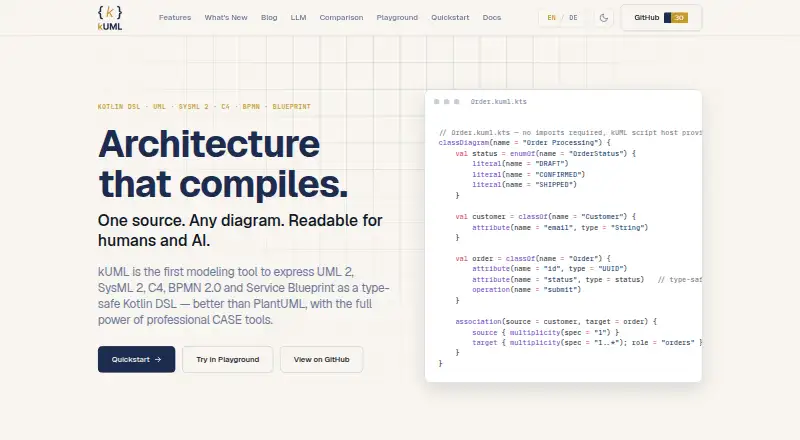
kUML is a modeling tool that expresses UML 2.x, SysML 2, C4, BPMN 2.0, and ERM through a type-safe Kotlin DSL. It supports all 14 UML 2.x diagram types, from class and component diagrams to sequence, timing, and interaction overview diagrams, alongside SysML 2 and C4. The DSL provides compile-time validation and IDE support. Built-in model transformations generate JPA, OpenAPI 3.0 YAML, Kubernetes manifests, and Dockerfiles. kUML also includes an MCP server for agent introspection and a `kuml ai` subcommand for AI-assisted modeling. Integrations include CLI, Gradle, IntelliJ, Obsidian, Asciidoctor, and VS Code. For interoperability, it supports Structurizr DSL round-trip and optional XMI through the `kuml-io-emf` module. The project is Apache 2.0 licensed and free. It runs on Windows, macOS, Linux, and the web; install routes include Homebrew, Chocolatey, MSI, native DEB/RPM/DMG packages, Docker, and Maven Central library modules. A Compose Multiplatform desktop app is distributed as a macOS cask. Its handbook covers installation and use. Rendering Kotlin scripts runs their source code, so the handbook advises using trusted scripts and workspaces.
Who it suits
kUML suits developers and modelers who want to define software models in Kotlin and generate artifacts such as JPA or Kubernetes manifests. It also fits teams working across UML, SysML 2, C4, BPMN 2.0, or ERM, particularly those using its listed IDE and build-tool integrations.
What it does well
- Supports all 14 UML 2.x diagram types, plus SysML 2 and C4.
- Kotlin DSL offers compile-time validation and IDE support.
- Generates JPA, OpenAPI YAML, Kubernetes manifests, and Dockerfiles.
- Integrates with CLI, Gradle, IntelliJ, Obsidian, Asciidoctor, and VS Code.
- Free and licensed under Apache 2.0.
What to know first
- Rendering Kotlin scripts executes their source code.
- XMI interoperability is optional and provided through a separate module.
- The desktop app is distributed as a macOS cask.
Limits
The listed free plan is Apache 2.0 licensed software at no cost. Rendering Kotlin scripts executes their source code; the handbook advises running only trusted scripts or workspaces.
Plans
| Plan | Billed and limits | Price |
|---|---|---|
| Free / open source | Apache 2.0 licensed software; paid plans and feature limits not stated | Free |
As kuml.dev lists them, read 8 Oct 2026. The maker's own page has the final word.
Getting started
- Visit the kUML website and consult the online handbook for installation and usage.
- Choose an available route for your environment: Homebrew, Chocolatey, MSI, a native package, Docker, or Maven Central library modules.
- For the desktop app, use the macOS cask distribution.
- Use the handbook to learn the modeling workflow and available integrations.
kUML is a Kotlin-based modeling environment for teams that want diagrams, specifications, and generated artifacts to live in a software workflow. It is strongest for developers who are comfortable treating models as source code and build inputs. The broad notation coverage and open-source licensing are persuasive, while script execution makes workspace trust an important condition.
Overview
kUML expresses UML 2.x, SysML 2, C4, BPMN 2.0, and ERM through a type-safe Kotlin DSL. It covers all 14 UML 2.x diagram types: class, object, package, component, composite structure, deployment, profile, use case, activity, state machine, sequence, communication, timing, and interaction overview. That range suits projects that move between architecture, behavior, deployment, and data modeling instead of limiting themselves to one diagram style.
The Kotlin approach changes who benefits most. Compile-time validation and IDE support can catch modeling errors in the same kind of feedback loop developers use for application code. Reverse engineering and deployment support extend the workflow beyond drawing. Readers looking for a purely visual editor with no code-oriented model layer may find the approach less natural.
kUML connects to CLI and Gradle workflows, IntelliJ, Obsidian, Asciidoctor, and VS Code. Structurizr DSL round-trip supports exchange with Structurizr-based work, while the optional kuml-io-emf module provides XMI interoperability. An online handbook covers installation, usage, and features, and the Apache 2.0 license permits open-source use.
Key features
Modeling and validation
The DSL spans software and systems notations in one environment. Compile-time checks and IDE assistance are a practical advantage when diagrams are maintained beside Kotlin projects or reviewed as code. The trade-off is that modeling requires comfort with Kotlin syntax and tooling rather than only manipulating diagram shapes.
AI and generated artifacts
An MCP server supports agent introspection, and the kuml ai subcommand enables AI-assisted modeling. Built-in transformations can produce JPA, OpenAPI 3.0 YAML, Kubernetes manifests, and Dockerfiles, making models useful as inputs to implementation and deployment work. These outputs are most valuable when a team wants a repeatable model-to-artifact path; they do not replace the need to review generated assets.
Distribution and security
Installation spans Homebrew on macOS and Linux, Chocolatey and MSI on Windows, native DEB, RPM, and DMG packages, Docker, and Maven Central library modules. A Compose Multiplatform desktop app is distributed as a macOS cask. The MCP authoring server validates scripts with KumlScriptGuard and applies the same sandboxing used by CLI render and validate commands. Even so, rendering Kotlin scripts executes their source code, so only trusted scripts or workspaces should be run.
Pricing
kUML is free and open source under Apache 2.0. The Free / open source plan costs free and includes the software; no paid plans or feature limits are stated. That removes seat or quota budgeting for teams able to operate the project themselves, while commercial support terms are not part of this offering.
Platforms
kUML supports Windows, macOS, Linux, web browsers, APIs, and self-hosted deployments. Package options and Docker support accommodate local, library-based, and hosted setups, with the desktop distribution specifically offered through a macOS cask.
Who it's for
Choose kUML for development teams that want type-safe models in Kotlin, compile-time checking, integrations with editors and build tools, and generation of persistence, API, container, or Kubernetes artifacts. It also fits organizations needing several modeling standards and open-source licensing. A conventional diagramming audience, or a team unwilling to execute model scripts, should look elsewhere.
Pros and cons
Pros
- Wide notation coverage: UML 2.x, SysML 2, C4, BPMN 2.0, and ERM support can consolidate varied modeling work.
- Developer feedback: Kotlin typing, compile-time validation, and IDE integration bring familiar checks to models.
- Useful automation: JPA, OpenAPI, Kubernetes, and Dockerfile transformations connect models to delivery assets.
- Open distribution: Apache 2.0 licensing and packages for major desktop and build environments reduce adoption barriers.
Cons
- Code-first learning curve: The Kotlin DSL favors developers and is less direct than a shape-based editor for occasional diagram authors.
- Execution risk: Rendering evaluates Kotlin source, so untrusted scripts or workspaces are unsafe to run despite sandboxing.
- Operational responsibility: Self-hosted, CLI, library, and container options give flexibility but leave setup choices to the team.
Alternatives
Sparx Enterprise Architect is the better choice when a freemium product with a free trial and a multi-user professional modeling environment is preferred.
ArgoUML suits readers seeking a free, open-source UML tool for Linux, macOS, and Windows with Java 5+ support.
BESSER is another free, open-source option spanning API, desktop, web, and self-hosted use.
BridgePoint fits users who specifically want an Apache 2.0 editor, verifier, and model compilers.
Eclipse Papyrus offers a free open-source modeling environment across desktop, web, and self-hosted platforms.
Horusec is a free Apache 2.0 project with CLI and platform components.
UMLet is preferable for a free UML tool available as stand-alone desktop software, an Eclipse plugin, web app, and VS Code extension.
Violet UML Editor is a completely free, cross-platform UML editor.
See the broader UML Modeling Software category for more options.
Verdict
kUML is a strong recommendation for developer-led teams that want rigorous Kotlin models, broad standards support, and direct generation of implementation and deployment files. Its main reason to choose it is the connection between validated models and everyday build tooling. Look elsewhere if you need a purely visual editor or cannot accept the security responsibility of executing modeling scripts.
Verdict
Choose kUML if you want a Kotlin DSL for modeling and generating code or deployment artifacts across several modeling standards. Its compile-time validation and listed integrations support developer workflows. Use care with scripts and workspaces, since rendering executes Kotlin source code.
Questions
How much does kUML cost?
The listed Free / open source plan costs nothing and is Apache 2.0 licensed.
Which platforms does kUML support?
It supports Windows, macOS, Linux, and web browsers. Installation options also include Docker and Maven Central library modules.
Which modeling standards and diagrams does it support?
It supports all 14 UML 2.x diagram types, as well as SysML 2, C4, BPMN 2.0, and ERM.
What can kUML generate?
Its built-in model transformations generate JPA, OpenAPI 3.0 YAML, Kubernetes manifests, and Dockerfiles.
Does kUML work with other tools?
Listed integrations include CLI, Gradle, IntelliJ, Obsidian, Asciidoctor, and VS Code. It also supports Structurizr DSL round-trip and optional XMI interoperability through `kuml-io-emf`.
What should I know about rendering scripts?
Rendering Kotlin scripts executes their source code. The handbook advises using only scripts or workspaces you trust.
Facts from kUML's own pages
- AI workflows
- It includes an MCP server for agent introspection and a kuml ai subcommand for AI-assisted modeling. · github.com, 8 Oct 2026
- Code generation
- Built-in model transformations generate JPA, OpenAPI 3.0 YAML, Kubernetes manifests, and Dockerfiles. · github.com, 8 Oct 2026
- Desktop app
- The project provides a Compose Multiplatform desktop app distributed as a macOS cask. · github.com, 8 Oct 2026
- Distribution
- Install options include Homebrew for macOS and Linux, Chocolatey and MSI for Windows, native DEB/RPM/DMG packages, Docker, and Maven Central library modules. · github.com, 8 Oct 2026
- Integrations
- The project lists CLI, Gradle, IntelliJ, Obsidian, Asciidoctor, and VS Code integrations. · github.com, 8 Oct 2026
- Interoperability
- kUML supports Structurizr DSL round-trip and optional XMI interoperability through its kuml-io-emf module. · github.com, 8 Oct 2026
- License
- The project is licensed under Apache 2.0. · github.com, 8 Oct 2026
- Modeling
- It supports all 14 UML 2.x diagram types alongside SysML 2 and C4. · github.com, 8 Oct 2026
- Security
- The MCP authoring server validates scripts with KumlScriptGuard before evaluation, using the same sandboxing applied by the CLI render and validate commands. · docs.kuml.dev, 8 Oct 2026
- Support and documentation
- The project links to an online handbook covering installation, usage, and its features. · docs.kuml.dev, 8 Oct 2026
- Trust limitation
- Rendering Kotlin scripts executes their source code, and the handbook advises running only scripts or workspaces the user trusts. · docs.kuml.dev, 8 Oct 2026
- Validation
- Its Kotlin DSL provides compile-time validation and IDE support. · github.com, 8 Oct 2026
- What it does
- kUML expresses UML 2.x, SysML 2, C4, BPMN 2.0 and ERM as a type-safe Kotlin DSL. · github.com, 8 Oct 2026
Where kUML stands on Freedom251
- UML Modeling Software#9 of 26