Freedom251 › UML Modeling Software

Eclipse Papyrus
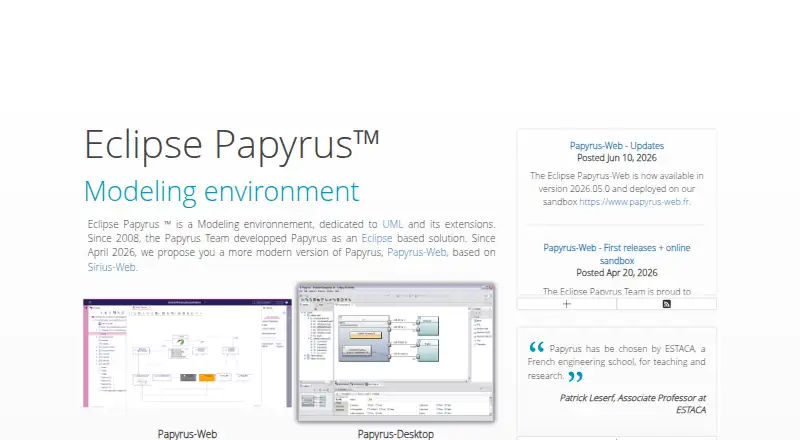
What Eclipse Papyrus is
Eclipse Papyrus is a free modeling environment for UML and its extensions, described by the project as an industrial-grade open source Model-Based Engineering tool for industry and academia. Its listed implemented standards include UML 2.5, SysML 1.6, fUML 1.3, ALF 1.0.1, MARTE 1.1, PSCS 1.1, PSSM 1.0, and ISO/IEC 42010. Users can customize profiles, model explorers, diagram notation and style, properties views, palettes, and creation menus. With Moka, models can run through an animation and simulation framework. Papyrus-Web runs in a browser on a server and lets multiple users work on the same model with changes visible to stakeholders. Desktop downloads are listed for Windows, Linux, and macOS. Papyrus requires a Java 21-compatible JVM and is released under the Eclipse Public License v2.0. Related tools support code generation and reverse engineering in C++, C, Java, and Python, and documentation output for LibreOffice, Word, and PDF.
Who it suits
Papyrus suits modelers who need UML and related standards, customization, or simultaneous browser-based model work. The project describes it as intended for both industry and academia.
What it does well
- Free open source modeling environment
- Supports several UML-related standards
- Web collaboration makes model changes visible
- Related tools support code and document generation
What to know first
- Requires a Java 21-compatible JVM
Plans
| Plan | Billed and limits | Price |
|---|---|---|
| Eclipse Papyrus | Open source modeling environment; no usage limits stated | Free |
As eclipse.dev lists them, read 4 Oct 2026. The maker's own page has the final word.
Getting started
- Visit the Eclipse Papyrus website.
- Choose Papyrus-Desktop for 64-bit Windows, Linux, or Intel or Apple Silicon macOS.
- Install or use a Java 21 compatible JVM.
- For Papyrus-Web, test on a computer with Rancher Desktop or Docker Desktop, or follow its deployment documentation.
- Use the free Eclipse Papyrus plan.
Eclipse Papyrus is a free modeling environment for UML and related engineering work. It is strongest for practitioners and teams that need configurable models across desktop and shared browser workflows. Its breadth is a clear advantage, though desktop use requires a Java 21-compatible JVM.
Overview
Papyrus is aimed at Model-Based Engineering, with the project describing it as suitable for industrial and academic settings. Its implemented standards span UML 2.5, SysML 1.6, fUML 1.3, ALF 1.0.1, MARTE 1.1, PSCS 1.1, PSSM 1.0, and ISO/IEC 42010. That range gives it a place in systems engineering as well as software design; it is more than a conventional class-diagram editor.
Configuration is central to the product. Users can tailor profiles, model explorers, diagram notation and style, properties views, palettes, and creation menus. That control can help teams encode their own modeling conventions, but Papyrus is a better fit for an intentional modeling process than for people who simply want to sketch a diagram with minimal setup.
Key features
Modeling, execution, and extensions
The diagram set covers class, object, package, composite structure, component, deployment, profile, use case, activity, state machine, communication, sequence, timing, interaction overview, block definition, internal block, requirement, and parametric diagrams. With Moka, users can run models through an animation and simulation framework, extending Papyrus beyond diagram authoring.
Related tools add code and documentation workflows: Papyrus Designer supports code generation and reverse engineering in C++, C, Java, and Python, while Papyrus-Model2Doc generates documents for LibreOffice, Word, and PDF. These extensions make the ecosystem more useful to teams that need model outputs in development or documentation processes.
Shared browser modeling
Papyrus-Web runs on a server and lets multiple users work on the same model in a browser, with changes visible to stakeholders. It offers editors for class, composite structure, component, profile, use case, activity, state machine, and communication diagrams. This is a meaningful complement to the desktop application for distributed collaboration, although its diagram coverage is narrower than the full desktop range.
Teams can try self-hosting Papyrus-Web with Rancher Desktop or Docker Desktop, and deployment documentation is provided. That option brings browser access under the team's own hosting setup rather than requiring a hosted service.
Pricing
Papyrus is free and open source. The Eclipse Papyrus plan costs nothing and is described as an open-source modeling environment, with no usage limits stated. That makes it a straightforward option for individuals, academic users, and teams that can operate open-source software without a paid tier.
The project is released under the Eclipse Public License v2.0. No paid plan, seat charge, or trial term is part of the offer described here.
Platforms
Papyrus-Desktop downloads are available for 64-bit Windows and Linux, as well as Intel and Apple Silicon Macs. The desktop download requires a Java 21-compatible JVM, a prerequisite worth checking before adopting it across managed machines. Papyrus-Web runs in a browser and can be self-hosted. The project also lists Linux, macOS, Windows, web, and self-hosted availability.
Who it's for
Papyrus fits modelers who need standards-based engineering diagrams, configurable notation, or model execution, particularly when their work spans UML and systems modeling. Its browser collaboration and self-hosting option also suit teams that want shared model editing without giving up control of deployment.
It is less compelling for casual diagramming or teams unwilling to configure a modeling environment and meet the desktop runtime requirement. Those users may prefer a narrower tool built around simpler diagram creation.
Pros and cons
- Broad standards coverage: UML, SysML, and several related standards support work beyond conventional software diagrams.
- Extensive customization: Teams can adapt multiple parts of the modeling environment to their conventions.
- Model execution and companion tools: Moka, Papyrus Designer, and Papyrus-Model2Doc extend the workflow into simulation, code, and documentation.
- Browser collaboration with self-hosting: Multiple users can work on a shared model, while teams can deploy Papyrus-Web themselves.
- Desktop runtime prerequisite: Desktop installations need a Java 21-compatible JVM, adding a requirement to deployment planning.
- Setup favors deliberate modeling: The customization depth is useful for established practices but less suited to quick, informal diagramming.
Alternatives
Sparx Enterprise Architect is worth considering for readers seeking a freemium UML modeling environment with multi-user projects and code engineering. ArgoUML is another free option for users who want a Java-based UML tool on Linux, macOS, or Windows.
BESSER is a free, open-source alternative with web and self-hosted platform support. BridgePoint may suit users looking for an open-source editor, verifier, and model compilers under Apache 2.0.
Horusec is another free open-source option. kUML is also free and open source, with paid plans and feature limits not stated.
UMLet offers a free open-source UML tool across desktop, web, Eclipse plugin, and VS Code extension formats. Violet UML Editor is a free cross-platform UML editor.
For broader browsing, see UML Modeling Software and Diagram Software.
Verdict
Choose Eclipse Papyrus if you need a free, standards-rich modeling environment with substantial customization and the option of shared, self-hosted browser work. Its main advantage is the reach from formal modeling into execution, code, and documentation extensions. Look elsewhere if your priority is quick diagramming or you cannot accommodate the Java 21-compatible JVM required by the desktop application.
Verdict
Eclipse Papyrus offers desktop and browser-based modeling, customization, and a broad set of listed standards. Users should account for the Java 21-compatible JVM requirement for Papyrus.
Questions
How much does Eclipse Papyrus cost?
The listed Eclipse Papyrus plan is free.
Is Eclipse Papyrus open source?
Yes. Papyrus is released under the Eclipse Public License v2.0.
Which systems can run the desktop app?
Downloads are listed for 64-bit Windows and Linux, as well as macOS for Intel and Apple Silicon. Papyrus requires a Java 21 compatible JVM.
Can several people edit a model together?
Yes. Papyrus-Web runs in a browser on a server and allows multiple users to work on the same model simultaneously, with changes visible to stakeholders.
What diagrams does Papyrus-Web support?
Its editors cover class, composite structure, component, profile, use case, activity, state machine, and communication diagrams.
What resources are available to the community?
The project lists a wiki, discussions, a developer mailing list, issue trackers, Git repositories, and Jenkins.
Facts from Eclipse Papyrus's own pages
- Customization
- Users can customize profiles, model explorers, diagram notation and style, properties views, palettes, and creation menus. · eclipse.dev, 4 Oct 2026
- Desktop systems
- Papyrus-Desktop downloads are listed for 64-bit Windows and Linux, and macOS for Intel and Apple Silicon. · eclipse.dev, 4 Oct 2026
- Extensions
- Listed related tools include Papyrus Designer for code generation and reverse engineering in C++, C, Java, and Python, and Papyrus-Model2Doc for generating documentation for LibreOffice, Word, and PDF. · eclipse.dev, 4 Oct 2026
- Founded
- 2008 · eclipse.dev, 28 Sept 2026
- Intended users
- The project describes Papyrus as an industrial-grade open source Model-Based Engineering tool and calls it industry ready and academia friendly. · eclipse.dev, 4 Oct 2026
- License
- The download page says Papyrus is released under the Eclipse Public License v2.0. · eclipse.dev, 4 Oct 2026
- Model execution
- With Moka, Papyrus can execute models using an animation and simulation framework. · eclipse.dev, 4 Oct 2026
- Purpose
- Eclipse Papyrus is a modeling environment dedicated to UML and its extensions. · eclipse.dev, 4 Oct 2026
- Runtime requirement
- The download page says Papyrus requires a Java 21 compatible JVM. · eclipse.dev, 4 Oct 2026
- Self hosting
- The Papyrus-Web page says users can test it on their computer with Rancher Desktop or Docker Desktop and links to deployment documentation. · eclipse.dev, 4 Oct 2026
- Standards
- The site lists UML 2.5, SysML 1.6, fUML 1.3, ALF 1.0.1, MARTE 1.1, PSCS 1.1, PSSM 1.0, and ISO/IEC 42010 as implemented standards. · eclipse.dev, 4 Oct 2026
- Support and community
- The community page lists a wiki, discussions, developer mailing list, issue trackers, Git repositories, and Jenkins as user and developer resources. · eclipse.dev, 4 Oct 2026
- Web collaboration
- Papyrus-Web runs on a server in a web browser and lets multiple users work simultaneously on the same model with changes visible to all stakeholders. · eclipse.dev, 4 Oct 2026
- Web diagrams
- Papyrus-Web provides editors for class, composite structure, component, profile, use case, activity, state machine, and communication diagrams. · eclipse.dev, 4 Oct 2026
Where Eclipse Papyrus stands on Freedom251
- UML Modeling Software#3 of 26
- Diagram Software#6 of 36