Freedom251 › Kubernetes Cost Management Software

KubeAdapt
What KubeAdapt is
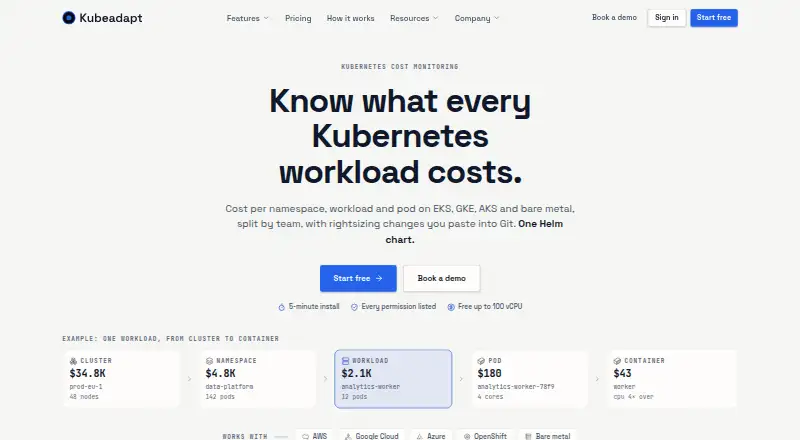
KubeAdapt monitors Kubernetes costs and presents views by cluster, namespace, workload, pod, and team. It supports AWS, Google Cloud, Azure, OpenShift, and bare-metal Kubernetes. Installation uses a Helm chart, and the site says it takes about five minutes. Rightsizing provides per-container CPU and memory recommendations as YAML for GitOps workflows. OOM-aware, bursty-CPU, and replica-aware guardrails inform those recommendations, but KubeAdapt does not apply changes to clusters. Smart Alerting sends budget, cost-spike, and new-workload alerts through Slack, email, or webhooks. Its read-only REST API provides cost, capacity, and resource data and uses Bearer API keys. The agent uses read-only Kubernetes permissions limited to list and watch. KubeAdapt says it does not collect Secrets, ConfigMaps, environment variables, container logs, or network traffic; aggregated payloads are signed in the cluster and sent with TLS 1.3 and mutual TLS. The free plan covers the first 100 vCPU across an account. Paid rates range from 0.60 USD to $1.99 per billable vCPU per month, depending on tier.
Who it suits
It suits teams that need cost visibility and rightsizing guidance across Kubernetes clusters, including teams using GitOps workflows. The free allowance may suit accounts with up to 100 vCPU.
What it does well
- Cost views span clusters, workloads, pods, and teams.
- Supports AWS, Google Cloud, Azure, OpenShift, and bare metal.
- Rightsizing recommendations are provided as YAML.
- Alerts can go to Slack, email, or webhooks.
- Free allowance covers the first 100 vCPU.
What to know first
- Does not apply rightsizing changes to clusters.
- GCP committed and sustained-use discounts are not reflected.
- Network agent requires Linux kernel 5.10 or newer.
- Network agent is priced for AWS; GCP and Azure are unsupported.
Limits
The free plan covers the first 100 vCPU across an account. Startup pricing is $0.60 a month, billed flat per billable vCPU per month, for companies under three years old, with fewer than 30 employees and under $6M raised; standard monthly rates range from $1.99 per billable vCPU at 0–500 billable vCPU to 0.60 USD at 5,000 or more. GCP committed-use and sustained-use discounts are not yet reflected.
Plans
| Plan | Billed and limits | Price |
|---|---|---|
| Free allowance | first 100 vCPU across the account · all features · no credit card · email support | Free |
| Standard tier 4 | per billable vCPU/month after first 100 vCPU · 5,000+ billable vCPU | $0.60 a month |
| Startup pricing | flat per billable vCPU/month after first 100 vCPU · company under 3 years old · fewer than 30 employees · under $6M raised | $0.60 a month |
| Standard tier 3 | per billable vCPU/month after first 100 vCPU · 2,000–5,000 billable vCPU | $0.99 a month |
| Standard tier 2 | per billable vCPU/month after first 100 vCPU · 500–2,000 billable vCPU | $1.49 a month |
| Standard tier 1 | per billable vCPU/month after first 100 vCPU · 0–500 billable vCPU | $1.99 a month |
As kubeadapt.io lists them, read 15 Oct 2026. The maker's own page has the final word.
Getting started
- Open the KubeAdapt website.
- Install the Kubernetes agent using its Helm chart.
- Use the free plan, which covers the first 100 vCPU across an account and requires no credit card.
- For paid usage, select the applicable plan based on company eligibility or billable vCPU volume.
Overview
KubeAdapt is Kubernetes cost monitoring and optimization software for teams running clusters across cloud, on-premises and mixed environments. It is best suited to operators who want granular cost visibility and rightsizing guidance while retaining control over production changes. Its container-level allocation and first-100-vCPU-free allowance make it practical to evaluate, though some cloud pricing and network-intelligence limits matter.
Key features
Cost views span clusters, namespaces, workloads, pods and teams, with container-level allocation and cost forecasting. That helps teams trace a bill from broad environment totals to the workloads driving it. Support for AWS, Google Cloud, Azure, OpenShift and bare-metal Kubernetes is a strong fit for mixed estates. GCP on-demand and Spot or Preemptible prices work without setup, but Committed Use and Sustained Use Discounts are not reflected, which can leave those cost views incomplete.
Rightsizing produces per-container CPU and memory recommendations as YAML, a natural fit for teams reviewing changes through GitOps. OOM-aware, bursty-CPU and replica-aware guardrails inform those recommendations, but KubeAdapt does not apply changes to the cluster. That preserves operator control, at the cost of leaving implementation to the team. Smart Alerting sends budget, cost-spike and new-workload alerts to Slack, email or webhooks. The read-only REST API exposes cost, capacity and resource data using Bearer API keys.
The Kubernetes agent installs through one Helm chart; the site says setup takes about five minutes. Its read-only RBAC uses only list and watch permissions, with no ability to write, create, update or delete. KubeAdapt says it does not collect Secrets, ConfigMaps, environment variables, container logs or network traffic; aggregated payloads are signed in-cluster and sent over TLS 1.3 with mutual TLS. The optional network agent has a narrower fit: it requires Linux kernel 5.10 or newer and is currently priced for AWS, with GCP and Azure not supported yet.
Pricing
KubeAdapt is freemium, offers a free trial, and provides email support on all accounts, including free accounts. The Free allowance costs nothing, covers the first 100 vCPU across the account, requires no credit card and includes all features. This makes it a low-risk way to assess the product, but larger deployments need a paid tier.
Startup pricing is $0.60 a month, billed flat per billable vCPU per month, for companies under three years old, with fewer than 30 employees and under $6M raised. It suits qualifying early-stage teams; the company criteria exclude otherwise similarly sized organizations.
Standard pricing is billed per billable vCPU per month, with the first 100 vCPU free: Standard tier 1 is $1.99 a month for 0–500 billable vCPU; tier 2 is $1.49 a month for 500–2,000; tier 3 is $0.99 a month for 2,000–5,000; and tier 4 is $0.60 a month for 5,000+ billable vCPU. The declining rates favor larger fleets, while smaller paid deployments face the highest listed rate. The free allowance remains useful for each scale, but teams should account for billable capacity beyond it.
Platforms
KubeAdapt supports API, Linux, self-hosted and web platforms. Its Kubernetes coverage spans AWS, Google Cloud, Azure, OpenShift and bare metal, but the optional network agent's kernel and cloud restrictions narrow that specific capability.
Who it's for
KubeAdapt fits Kubernetes teams that need cost attribution below the cluster level, forecast spending and route alerts into existing channels. It is especially appropriate for multi-environment operators who want GitOps-ready recommendations but prefer to approve and apply changes themselves. Teams that need accurate GCP commitment-discount accounting or network intelligence across GCP and Azure should look elsewhere or validate those gaps against their needs.
Pros and cons
- Pros: Cost views down to pods and teams, plus container-level allocation, help pinpoint spend drivers.
- Pros: Recommendations are YAML-based and guarded, while changes remain under operator control.
- Pros: The first 100 vCPU are free with all features and email support, lowering the cost of evaluation.
- Cons: GCP Committed Use and Sustained Use Discounts are not reflected, potentially weakening cost accuracy for committed workloads.
- Cons: The network agent requires Linux kernel 5.10 or newer and is currently priced for AWS only.
- Cons: KubeAdapt provides guidance rather than applying rightsizing changes, so teams must handle rollout themselves.
Alternatives
Consider Kubernetes Cost Management Software to compare the broader category. Atmosly Kubernetes Cost Optimization is a reasonable alternative if a permanently free personal plan capped at one cluster, one cloud account and one seat is enough. Krossboard is another freemium option. PerfectScale offers a free plan up to 200 vCPU per month with unlimited clusters, nodes and pods, which may suit teams below that usage threshold. Klustercost is a free open-source option under GPL-3.0. KubeLedger is free for internal use when self-hosted, but cannot be sold as a managed service. Podledger has a forever-free, self-hosted Community plan for a single cloud with basic cost dashboards and pod-level visibility. IBM Kubecost offers OpenCost monitoring with unlimited clusters and cores, as well as a free Kubecost tier with stated core and spend caps. Flexera One IT Asset Management is a paid alternative with custom pricing.
Verdict
Choose KubeAdapt if your Kubernetes team needs fine-grained cost attribution and guarded, GitOps-ready rightsizing recommendations across varied environments, especially if the first 100 vCPU free covers an initial evaluation. Look elsewhere if GCP commitment discounts must be reflected in cost views, if you need the optional network agent on GCP or Azure, or if rightsizing changes must be applied automatically.
Verdict
KubeAdapt combines multi-environment Kubernetes cost views with guarded, non-automatically-applied rightsizing recommendations. Check the GCP discount and network-agent limits against your requirements before choosing a plan.
Questions
Is KubeAdapt free?
Yes. The free plan costs nothing and covers the first 100 vCPU across an account. It requires no credit card and includes email support.
What do paid plans cost?
Startup pricing is $0.60 a month, billed flat per billable vCPU per month, for qualifying companies. Standard pricing ranges from 1.99 USD to $0.60 a month per billable vCPU, depending on volume; the first 100 vCPU are free.
Which platforms and Kubernetes environments does it support?
Its listed platforms are API, Linux, self-hosted, and web. It supports Kubernetes on AWS, Google Cloud, Azure, OpenShift, and bare metal.
Does KubeAdapt apply rightsizing changes automatically?
No. It provides per-container CPU and memory recommendations as YAML, but does not apply changes to the cluster.
What does the REST API provide?
The read-only REST API provides cost, capacity, and resource data and authenticates with Bearer API keys.
What is limited in its GCP support?
GCP on-demand and Spot or Preemptible pricing work without setup. Committed Use and Sustained Use Discounts are planned and are not yet reflected.
Facts from KubeAdapt's own pages
- Agent architecture update
- A March 2026 vendor release says the rebuilt agent removed Prometheus, OpenCost, node-exporter and kube-state-metrics dependencies, requiring metrics-server instead. · kubeadapt.io, 15 Oct 2026
- Alert integrations
- Smart Alerting sends budget, cost-spike and new-workload alerts to Slack, email or webhooks. · kubeadapt.io, 30 Sept 2026
- Alerts
- Smart Alerting supports budget and cost-spike alerts delivered through Slack, email or webhooks. · kubeadapt.io, 15 Oct 2026
- API
- The REST API provides read-only cost, capacity and resource data and authenticates with Bearer API keys. · kubeadapt.io, 30 Sept 2026
- API rate limit
- The documented default API quota is 100 requests per minute per API key, with HTTP 429 responses when exceeded. · kubeadapt.io, 15 Oct 2026
- Best-practice checks
- Best Practices evaluates Kubernetes configuration and assigns a score for each cluster. · kubeadapt.io, 15 Oct 2026
- Changelog activity
- The changelog lists a public API release on February 25, 2026 and a CLI release on March 14, 2026. · kubeadapt.io, 15 Oct 2026
- CLI
- Kubeadapt CLI can be installed with Homebrew, go install or release archives for macOS, Linux and Windows. · kubeadapt.io, 15 Oct 2026
- Company founding
- Kubeadapt says it was founded in 2025 by engineers and cloud architects with enterprise Kubernetes experience. · kubeadapt.io, 30 Sept 2026
- Company size
- LinkedIn lists Kubeadapt as having 2–10 employees. · linkedin.com, 15 Oct 2026
- Cost views
- Dashboards can show cost by cluster, namespace, workload, pod, node, node group and container, with filtering, grouping, saved dashboards and exports. · kubeadapt.io, 15 Oct 2026
- Data collection
- Kubeadapt says it does not collect Secrets, ConfigMaps, environment variables, container logs or network traffic. · kubeadapt.io, 30 Sept 2026
- Data exclusions
- Kubeadapt says it does not collect Secrets, ConfigMaps, environment variables, container logs or network traffic. · kubeadapt.io, 15 Oct 2026
- Data transport
- Aggregated payloads are signed in the cluster and sent to Kubeadapt over TLS 1.3 with mutual TLS. · kubeadapt.io, 15 Oct 2026
- Documentation depth
- The documentation site reports 71 pages across nine sections covering installation, integrations, configuration, CLI, API reference and troubleshooting. · kubeadapt.io, 15 Oct 2026
- Founded
- LinkedIn lists Kubeadapt as founded in 2025. · linkedin.com, 15 Oct 2026
- GCP integration limit
- GCP on-demand and Spot or Preemptible pricing work without setup, while Committed Use and Sustained Use Discounts are planned and not yet reflected. · kubeadapt.io, 30 Sept 2026
- GCP pricing limitation
- GCP committed-use and sustained-use discounts are not reflected; the documentation says those capabilities are planned. · kubeadapt.io, 15 Oct 2026
- GreenOps
- GreenOps estimates kilograms of carbon dioxide equivalent per workload. · kubeadapt.io, 15 Oct 2026
- Helm chart licence
- The public Kubeadapt Helm chart repository is licensed under Apache License 2.0. · github.com, 15 Oct 2026
- Helm repository status
- The GitHub Helm repository is public, shows 2 stars, 0 forks and 58 commits on the opened page. · github.com, 15 Oct 2026
- Independent company post reach
- Kubeadapt’s LinkedIn page displayed 56 followers when opened. · linkedin.com, 15 Oct 2026
- Installation
- The agent is installed with a Kubeadapt Helm repository and cluster token; the vendor says initial cost data appears within minutes. · kubeadapt.io, 15 Oct 2026
- Kubernetes requirements
- The Helm chart supports Kubernetes 1.24 or newer, Helm 3, and an installed metrics-server. · github.com, 15 Oct 2026