Freedom251 › AI Video-to-Video Tools

Krea Video
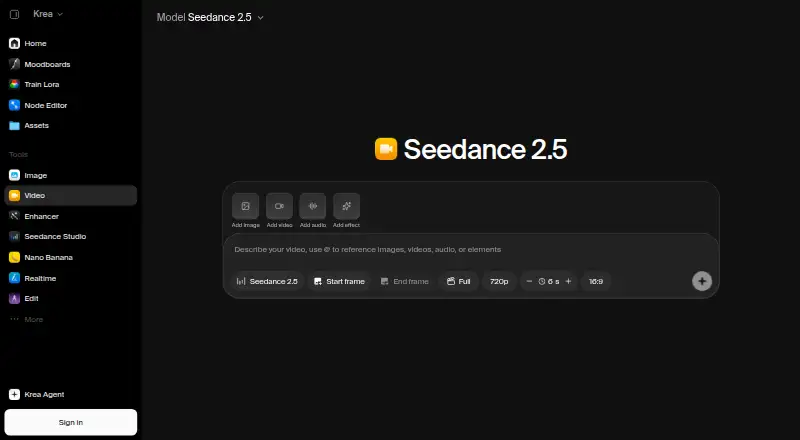
What Krea Video is
Krea Video generates video clips from text prompts or images, including uploaded or generated start frames. Users can set first and last frames to guide how a shot begins, moves, and ends, then extend or merge clips into longer scenes. Supported models can generate synchronized audio such as dialogue, ambient noise, and contextual sound effects. Listed models include Seedance 2.5, Veo 3.1, Kling 3.0, Sora 2, Wan 2.6, Runway Gen-4.5, and MiniMax H3. Model access depends on the plan: Basic has selected models, while Pro provides access to over 20. Krea offers a REST API for text-to-video and image-to-video workflows, plus integrations for After Effects and ChatGPT. Its iOS app supports image and video workflows, with projects syncing across iPhone, iPad, and web. The After Effects plugin is available for macOS and Windows. Krea describes workflows for film and storytelling, marketing and ads, content creation, and product and ecommerce work. Commercial use is limited. The free plan includes 100 units per day, but video concurrency is zero. Basic is listed at $5 a month, with $9 shown alongside the price.
Who it suits
Krea Video suits people working on film and storytelling, marketing and ads, content creation, or product and ecommerce projects. It also offers API workflows for teams building text-to-video or image-to-video integrations.
What it does well
- First and last frames guide shot progression.
- Clips can be extended or merged.
- Supported models generate synchronized audio.
- iOS projects sync with iPad and web.
What to know first
- Free plan has zero video concurrency.
- Commercial use is limited.
- Basic offers selected video models.
- Basic is listed at $5 a month, with $9 also shown.
Limits
The Free plan includes 100 units per day and video concurrency of zero. Basic provides selected video models, 5,000 units per month, and concurrency of two; its plan text shows $5 a month with $9 shown alongside the price.
Plans
| Plan | Billed and limits | Price |
|---|---|---|
| Basic | $9 shown as the other price; page displays $5/month · 5,000 units/month · about 112 Nano Banana 2 generations · about 15 Seedance 2.0 Fast videos · selected Seedance models | $5 a month |
| Pro | $35 shown as the other price; page displays $21/month · 20,000 units/month · about 450 Nano Banana 2 generations · about 65 Seedance 2.5 videos · all models | $21 a month |
| Max | $105 shown as the other price; page displays $63/month · 60,000 units/month · about 1,350 Nano Banana 2 generations · about 197 Seedance 2.5 videos · all models | $63 a month |
| Business | $200 shown as the other price; page displays $160/month · 80,000 units/month · up to 50 seats included · unlimited video concurrency | $160 a month |
| Free | 100 units/day · selected models and features · free tier does not include all Seedance models | Free |
| Enterprise | Custom pricing · Custom seat count · private Node Apps · custom roles and permissions · fine-grained model access controls | On request |
As krea.ai lists them, read 21 Oct 2026. The maker's own page has the final word.
Getting started
- Open https://www.krea.ai/video.
- Choose a plan; the Free plan requires no credit card.
- Use the web or iOS app, or connect through the REST API.
- For After Effects workflows, use the plugin available for macOS and Windows.
- Provide a text prompt or an image to generate a clip.
Verdict
Krea Video offers prompt- and image-based clip generation, frame controls, and clip editing, with model access varying by plan. Check the plan details for usage capacity and commercial-use limits before choosing it.
Questions
Is Krea Video free?
Yes. The Free plan costs nothing, includes 100 units per day, and requires no credit card. Video concurrency is zero.
What do the paid plans cost?
Basic is listed at $5 a month, with $9 shown alongside the price. Pro is $21 a month with $35 shown alongside; Max is $63 a month with $105 shown alongside; Business is $160 a month with $200 shown alongside.
Which platforms are available?
The listed platforms are API, iOS, and web. The iOS app supports image and video workflows, and projects sync between iPhone, iPad, and web.
Can I use it for commercial work?
Commercial use is limited.
Which integrations does Krea Video offer?
Krea lists integrations for After Effects and ChatGPT, plus a REST API for text-to-video and image-to-video workflows. The After Effects plugin is available for macOS and Windows.
What does Business include?
Business includes 80,000 units per month, up to 50 seats, unlimited video concurrency, and priority support with an SLA. Its plan price is $160 a month, with $200 shown alongside.
Facts from Krea Video's own pages
- API access
- Yes · krea.ai, 20 Sept 2026
- Audience
- Krea describes video workflows for film and storytelling, marketing and ads, content creation, and product and ecommerce work. · krea.ai, 7 Oct 2026
- Audio
- Supported video models can generate synchronized audio, including contextual sound effects, ambient noise, and dialogue. · krea.ai, 7 Oct 2026
- Audio generation
- Supported video models can create synchronized sound effects, ambience and dialogue with generated clips. · krea.ai, 21 Oct 2026
- Business data
- Krea's pricing page says Business terms include data protection and no-training clauses for customer content. · krea.ai, 7 Oct 2026
- Business support
- Business and Enterprise plans include priority support with guaranteed response times and service level agreements. · krea.ai, 7 Oct 2026
- Clip editing
- Krea supports extending and merging clips to build longer scenes. · krea.ai, 7 Oct 2026
- Clip extension and merging
- Krea can extend clips from their final frame and generate transitions to merge clips. · krea.ai, 21 Oct 2026
- Cloud hosting
- Krea says its primary application databases use managed AWS infrastructure in the United States. · krea.ai, 21 Oct 2026
- Commercial use
- limited · krea.ai, 20 Sept 2026
- Company size and ownership
- LinkedIn lists Krea as privately held with 11–50 employees. · linkedin.com, 21 Oct 2026
- Creative integrations
- Krea lists integrations for After Effects and ChatGPT, and says its After Effects plugin is available for macOS and Windows. · krea.ai, 7 Oct 2026
- Developer documentation
- The docs describe REST endpoints, asynchronous jobs, webhooks, API keys and billing, an API reference, code examples and an MCP server. · krea.ai, 21 Oct 2026
- Documentation and support
- Krea's documentation has creator guides, developer resources, model API documentation, help and support, and a changelog section. · krea.ai, 21 Oct 2026
- Founded year
- Product Hunt lists Krea as launched in 2023. · producthunt.com, 21 Oct 2026
- Frame control
- Users can set first and last frames to guide how a shot begins, moves, and resolves. · krea.ai, 7 Oct 2026
- Free plan
- Yes · krea.ai, 20 Sept 2026
- Headquarters
- LinkedIn lists Krea's headquarters as San Francisco, California. · linkedin.com, 21 Oct 2026
- Image-to-video
- Users can animate a still image and guide the result with first and last frames. · krea.ai, 21 Oct 2026
- Integrations
- Krea lists plugins for Photoshop, After Effects, Illustrator, Premiere Pro, DaVinci Resolve, Blender and ChatGPT. · krea.ai, 21 Oct 2026
- iOS app
- Krea's iOS app supports image and video workflows, and projects sync between iPhone, iPad, and web. · krea.ai, 7 Oct 2026
- iOS availability
- Krea provides an iOS app for iPhone and iPad that supports image and video workflows and syncs projects with the web workspace. · krea.ai, 21 Oct 2026
- Licence
- Krea Video is a hosted commercial service rather than open-source software; separate licensing is offered for self-hosted Krea models. · krea.ai, 21 Oct 2026
- Limit: billing and cancellation
- Trustpilot's review summary reports complaints about unexpected subscription charges and difficulties cancelling accounts. · trustpilot.com, 21 Oct 2026
Where Krea Video stands on Freedom251
- AI Video-to-Video Tools#3 of 23
- All-in-One AI Video Platforms (multiple models)#4 of 20
- AI Cinematic Video Generators (camera control)#6 of 26
- AI Video Effects Generators#7 of 27
- Image Generator#7 of 26
- AI Filmmaking Tools#7 of 21
- AI Content Creation Platforms#13 of 29
- Emerging AI Software#10 of 22
- AI Art Generators#13 of 28
- Art Generator#14 of 29
- AI Video Generation & Editing Software#16 of 30
- AI Image-to-Image Generators#10 of 18
- AI image generators#76 of 124