Freedom251 › Container Development Environments
Kool
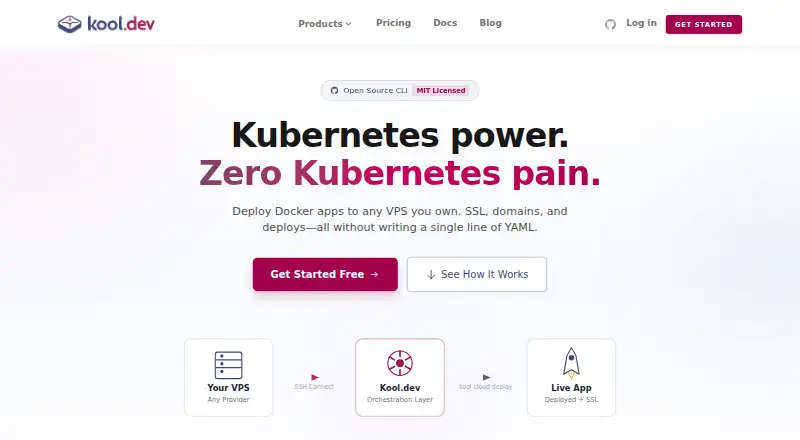
What Kool is
Kool.dev Cloud is a platform-as-a-service for deploying containerized web applications, either through managed hosting or on infrastructure you provide. Developers can deploy with Git pushes, use automatic builds, create preview environments for pull requests, and make zero-downtime deployments. Kool supports Docker Compose compatibility and existing Compose setups. For bring-your-own-cloud deployments, it installs Kubernetes using k0s on a VPS with SSH access. The site names DigitalOcean, Hetzner, AWS, Vultr, OVH, and Linode as providers and says any VPS with SSH can be used. Managed database options are MySQL, PostgreSQL, Redis, MongoDB, and Elasticsearch. Monitoring includes Prometheus and one-click Grafana dashboards. Listed security features include automated hardening, network isolation, secrets management, SSH key authentication, cluster activity logs, and credentials encrypted at rest. The BYOC Free tier costs nothing and is limited to one cluster, one node, one environment, and one app. Managed Cloud Micro costs $5 a month, billed monthly and metered hourly, with 0.125 CPU and 256 MB; custom domains and persistent storage are not included. The company says it is a small, bootstrapped team based in Brazil and built the kool CLI in 2020.
Who it suits
Kool suits developers deploying containerized web apps who want managed hosting or deployment to a VPS they provide. Its Docker Compose support, database options, and framework presets may fit teams working with those tools.
What it does well
- Supports Git push deployments and automatic builds.
- Creates preview environments for pull requests.
- Works with existing Docker Compose setups.
- Lists five managed database engines.
- BYOC supports VPS infrastructure with SSH.
What to know first
- BYOC Free is limited to one app.
- BYOC Free is limited to one node and cluster.
- BYOC Free requires a valid credit card after seven days.
- Managed Cloud Micro excludes custom domains and persistent storage.
Limits
BYOC Free allows one cluster, one node, one environment, and one app; a valid credit card is required after seven days. Managed Cloud Micro costs $5 a month and provides 0.125 CPU and 256 MB; custom domain and persistent storage are excluded. Managed Cloud Small costs $10 a month and provides 0.25 CPU and 512 MB, also without a custom domain or persistent storage.
Plans
| Plan | Billed and limits | Price |
|---|---|---|
| BYOC Free | 1 cluster · 1 node · 1 environment · 1 app · Community support | Free |
| Managed Cloud Small | Billed monthly, metered by usage by the hour · 0.25 CPU · 512 MB · Custom domain and persistent storage not included | $10 a month |
| BYOC Enterprise | Custom billing · Unlimited nodes, clusters, environments, and apps · Custom SLAs · Dedicated support channel · On-premise options | $199 a month |
| Managed Cloud Medium | Billed monthly, metered by usage by the hour · 0.5 CPU · 1 GB | $20 a month |
| Managed Cloud Large | Billed monthly, metered by usage by the hour · 1 CPU · 2 GB | $40 a month |
| BYOC Pro | Billed monthly · Up to 5 nodes · Unlimited environments · Unlimited apps · Priority email support | $49 a month |
| Managed Cloud Micro | Billed monthly, metered by usage by the hour · 0.125 CPU · 256 MB · Custom domain and persistent storage not included | $5 a month |
| Managed Cloud X-Large | Billed monthly, metered by usage by the hour · 2 CPU · 4 GB | $80 a month |
As kool.dev lists them, read 8 Oct 2026. The maker's own page has the final word.
Getting started
- Visit kool.dev and choose managed hosting or bring-your-own-cloud deployment.
- For BYOC, use a VPS with SSH access; the site names DigitalOcean, Hetzner, AWS, Vultr, OVH, and Linode.
- Connect a Git workflow to deploy pushes and create pull request previews.
- Choose a plan; BYOC Free allows one cluster, one node, one environment, and one app.
- Use a listed framework preset or deploy an existing Docker Compose setup.
Kool is a deployment platform for containerized web applications, built for developers who want to keep Docker Compose workflows while choosing where their applications run. It is most compelling when that infrastructure flexibility matters more than generous starter-tier capacity.
Its deployment features cover the journey from code change to production, but its free BYOC tier is limited to a single small deployment, and the lowest managed plans omit custom domains and persistent storage.
Overview
Kool supports Git-push deployments, automatic builds, pull-request preview environments and zero-downtime deployments. Together, those features suit teams that want to review proposed changes in isolated environments and deploy without planned downtime. Docker Compose compatibility also makes it a plausible route for applications that already use Compose, rather than requiring a new deployment format.
For bring-your-own-cloud (BYOC), Kool installs Kubernetes using k0s on a VPS with SSH access. It names DigitalOcean, Hetzner, AWS, Vultr, OVH and Linode, and says any VPS with SSH can be used. That gives infrastructure-conscious teams a broad choice of provider, but the VPS is theirs to supply; those seeking hosting without providing infrastructure should consider the managed plans instead.
Key features
Deployment and operations
Preview environments for each pull request help teams inspect changes before merging, while zero-downtime deployments are useful for services where an interruption is undesirable. Kool lists managed MySQL, PostgreSQL, Redis, MongoDB and Elasticsearch, plus Prometheus monitoring and one-click Grafana dashboards. These cover common application data services and monitoring needs, though the plans do not establish which database or monitoring capacity is included.
Security and integrations
Security features include automated hardening, network isolation, secrets management, SSH-key authentication, cluster activity logs and credentials encrypted at rest. The breadth is useful for teams operating production workloads, but it does not replace checking whether a particular deployment meets its own security requirements. Presets cover Laravel, Next.js, Django-related tooling, WordPress, NestJS, Node.js, Nuxt, Symfony, Express and other frameworks.
Documentation, community Discord and email support are offered across plans; Pro and Team receive priority support. The company says it is a small, bootstrapped team based in Brazil, built the kool CLI in 2020, and is committed to LGPD and GDPR compliance and CCPA compliance when applicable.
Pricing
Kool has a free BYOC tier, a seven-day trial, and paid plans from $5 a month. Managed plans are billed monthly and metered by usage by the hour, so their monthly prices are not a flat-cost guarantee when usage varies.
| Plan | Price | What it includes |
|---|---|---|
| BYOC Free | free | One cluster, one node, one environment and one app; community support |
| Managed Cloud Micro | $5 a month | 0.125 CPU and 256 MB; custom domain and persistent storage not included |
| Managed Cloud Small | $10 a month | 0.25 CPU and 512 MB; custom domain and persistent storage not included |
| Managed Cloud Medium | $20 a month | 0.5 CPU and 1 GB |
| Managed Cloud Large | $40 a month | 1 CPU and 2 GB |
| Managed Cloud X-Large | $80 a month | 2 CPU and 4 GB |
| BYOC Pro | $49 a month | Up to five nodes, unlimited environments and apps, priority email support |
| BYOC Enterprise | $199 a month | Unlimited nodes, clusters, environments and apps; custom SLAs, dedicated support channel and on-premise options |
BYOC Free is best for a small trial deployment, not a growing service: its one-app, one-node cap is restrictive, and a valid credit card is required after seven days. BYOC Pro is a more practical fit for teams managing multiple apps or environments on their own infrastructure. Enterprise adds scale, dedicated support and on-premise options, but is aimed at organizations that need those provisions.
Micro and Small are low-cost ways to start on managed hosting, but their CPU and memory allowances are modest and neither includes a custom domain or persistent storage. Medium, Large and X-Large raise those resource ceilings; choose among them according to workload needs rather than assuming the entry prices cover a complete production setup.
Platforms
Kool is available on the web and supports Linux and macOS desktop environments, with Windows via WSL. It does not offer local Kubernetes, so developers looking specifically for a local Kubernetes workflow should look elsewhere.
Who it's for
Kool fits developers and teams deploying containerized web applications who value Compose compatibility and want either managed hosting or the freedom to select a VPS. It is a weaker fit for someone seeking a generous free production tier, substantial resources at the lowest price, or local Kubernetes support.
Pros and cons
- Pros: Compose compatibility and Git-based deployment give existing containerized projects a direct deployment path.
- Pros: BYOC supports a range of named cloud providers and any VPS with SSH, preserving infrastructure choice.
- Pros: Pull-request previews, zero-downtime deployments, managed database options and monitoring cover important deployment and operations needs.
- Cons: BYOC Free permits only one cluster, node, environment and app, limiting it to a narrow trial or small project.
- Cons: The Micro and Small plans have low resource allocations and exclude custom domains and persistent storage.
- Cons: BYOC requires the customer to provide a VPS, and Kool does not support local Kubernetes.
Alternatives
Docker Desktop is a better match for developers who want a free personal toolkit that includes Docker Desktop, Docker Engine and Kubernetes, Docker Hub, Docker Scout and Docker Debug; its Pro plan is $9 a month.
Devilbox is a free alternative for readers comparing a self-hosted development environment; its pages state no price or usage limits.
Garden is worth considering for teams whose needs center on build minutes, cache hits and cache retention, with an Enterprise tier that includes secrets management, RBAC and self-hosting.
kind is a free, open-source option for developers looking for a tool without paid plans.
Testcontainers Desktop may suit individual developers who need up to 300 minutes of cloud runtime per month; Turbo mode requires a paid account.
Tilt is a free, Apache-2.0-licensed option for developers seeking an open-source alternative.
Tokaido is a free, open-source alternative whose maker says its Docker containers can be forked and modified.
Coasts is a free, local, open-source option for Linux and macOS users who want a tool described without usage limits.
Browse the Container Development Environments category to compare more tools.
Verdict
Choose Kool if you want Compose-compatible deployments and a real choice between managed hosting and infrastructure you provide. Its deployment workflow and broad BYOC provider support are the main reasons to consider it. Look elsewhere if you need a roomy free tier, higher entry-level managed resources with custom domains and persistent storage, or local Kubernetes.
Verdict
Kool offers both managed hosting and a bring-your-own-cloud route, with deployment workflows for containerized applications. The free BYOC tier has tight resource limits, while managed plans are billed monthly and metered by the hour.
Questions
Is there a free plan?
Yes. BYOC Free costs nothing and includes one cluster, one node, one environment, one app, and community support.
Does Kool offer a trial?
Yes. The pricing note lists a 7-day trial. The BYOC Free facts also say a valid credit card is required after seven days.
What is the cheapest paid plan?
Managed Cloud Micro is $5 a month, billed monthly and metered by usage by the hour. It includes 0.125 CPU and 256 MB; custom domain and persistent storage are excluded.
Which platforms are listed?
Linux, macOS, web, and Windows via WSL are listed. Desktop platform information also specifies Linux, macOS, and Windows via WSL.
Which infrastructure providers can I use for BYOC?
The site names DigitalOcean, Hetzner, AWS, Vultr, OVH, and Linode, and says any VPS with SSH can be used.
Who makes Kool?
Kool says it is a small, bootstrapped team based in Brazil and that it built the kool CLI in 2020.
Facts from Kool's own pages
- Cloud providers
- The site names DigitalOcean, Hetzner, AWS, Vultr, OVH, and Linode among supported providers, and says any VPS with SSH can be used. · kool.dev, 8 Oct 2026
- Company background
- The company says it is a small, bootstrapped team based in Brazil and that it built the kool CLI in 2020. · kool.dev, 8 Oct 2026
- Deployment workflow
- The platform supports Git push deployments, automatic builds, preview environments per pull request, and zero-downtime deployments. · kool.dev, 8 Oct 2026
- Docker support
- Kool supports Docker Compose compatibility and deploying existing Docker Compose setups. · kool.dev, 8 Oct 2026
- Founded
- 2020 · kool.dev, 28 Sept 2026
- Headquarters
- Brazil · kool.dev, 28 Sept 2026
- Infrastructure
- For BYOC, Kool installs production-ready Kubernetes using k0s on a VPS with SSH access. · kool.dev, 8 Oct 2026
- Integrations
- The documentation lists presets for Laravel, Next.js, Django-related tooling, WordPress, NestJS, Node.js, Nuxt, Symfony, Express, and other frameworks. · kool.dev, 8 Oct 2026
- Managed databases
- The listed managed database engines are MySQL, PostgreSQL, Redis, MongoDB, and Elasticsearch. · kool.dev, 8 Oct 2026
- Monitoring
- Kool lists Prometheus monitoring and one-click Grafana dashboards. · kool.dev, 8 Oct 2026
- Notable limit
- The BYOC Free tier is limited to one cluster, one node, one environment, and one app; a valid credit card is required after seven days. · kool.dev, 8 Oct 2026
- Privacy and compliance
- Its privacy policy says it is committed to complying with LGPD and GDPR, and with CCPA when applicable. · kool.dev, 8 Oct 2026
- Security
- Listed security features include automated hardening, network isolation, built-in secrets management, SSH key authentication, cluster activity logs, and credentials encrypted at rest. · kool.dev, 8 Oct 2026
- Support
- Kool lists documentation, a community Discord channel, and email support for all plans; Pro and Team receive priority support. · kool.dev, 8 Oct 2026
- What it does
- Kool.dev Cloud is a PaaS for deploying containerized web applications, with managed hosting or deployment to infrastructure you provide. · kool.dev, 8 Oct 2026
Where Kool stands on Freedom251
- Container Development Environments#15 of 40