Freedom251 › Container Build Tools
ko
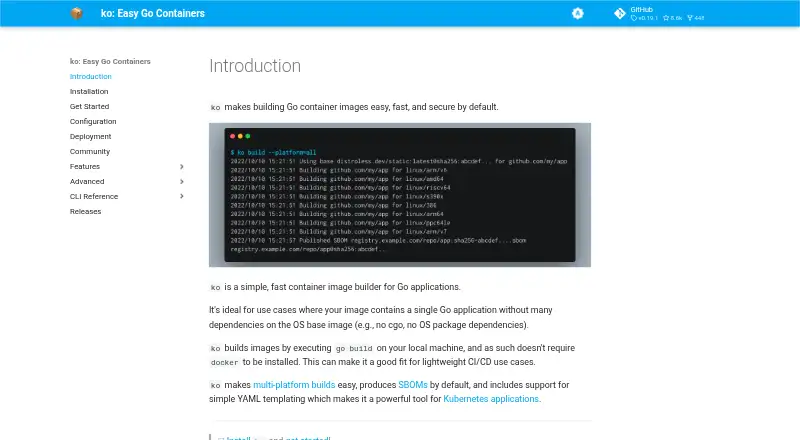
What ko is
ko is a free, open-source builder for container images of Go applications. It runs go build on the local machine, so Docker does not need to be installed. The project identifies single Go applications with few operating-system base-image dependencies as a good fit, such as applications without cgo or OS package requirements. Builds can target platforms supported by the configured base image or selected platforms such as linux/amd64 and linux/arm64. For Kubernetes, ko resolve builds images for ko:// references in YAML and substitutes the resulting image references; ko apply can apply the resolved configuration. ko reuses the standard Go build cache and avoids pushing image blobs already present in a remote registry. It generates and uploads SPDX-format SBOMs by default, with an option to turn generation off. Registry credentials can come from Docker configuration, with built-in environment credential support for Google, Amazon, Azure, and GitHub registries. A Terraform provider supports infrastructure-as-code workflows. ko is available for Linux, macOS, and Windows. It supports Go applications only, defaults to CGO_ENABLED=0, and Windows container image support is experimental and requires a Windows base image.
Who it suits
ko suits developers building Go application images, particularly single applications with few dependencies on the operating-system base image. It also fits Kubernetes workflows that build images from ko:// references in YAML.
What it does well
- Builds images without requiring Docker
- Supports selected multi-platform builds
- Generates SPDX-format SBOMs by default
- Reuses the Go build cache
- Integrates with Kubernetes YAML workflows
What to know first
- Supports Go applications only
- Defaults to CGO_ENABLED=0
- Windows container image support is experimental
Limits
ko supports Go applications only and defaults to CGO_ENABLED=0. OS packages must be available in the configured base image; Windows container image support is experimental.
Plans
| Plan | Billed and limits | Price |
|---|---|---|
| ko | Open source Go container image builder | Free |
As ko.build lists them, read 5 Oct 2026. The maker's own page has the final word.
Getting started
- Visit https://ko.build/.
- Choose an installation route for Linux, macOS, or Windows, such as a GitHub release, package manager, or source installation.
- Configure a base image and registry credentials as needed.
- Build a Go application image with ko.
- For Kubernetes YAML, use ko resolve to replace ko:// references with image references.
ko is a free, open-source image builder for developers shipping Go applications. It is best for services with few operating-system dependencies; teams building other languages or relying on OS packages should look elsewhere.
Its appeal is a focused route from local Go source to registry images, with useful Kubernetes and supply-chain workflows built in. Its narrow language scope and CGO default call for care around the base image.
Overview
ko runs go build on the local machine, so a Docker installation is not required. It reuses the normal Go build cache and avoids pushing image blobs already present in the remote registry, which can make repeated builds more efficient. This direct approach suits Go teams that want to build and publish without managing a Docker-based build setup. It is not a general-purpose container builder: ko supports Go applications only, defaults to CGO_ENABLED=0, and requires any needed OS packages to be present in the configured base image.
Key features
- Multi-platform builds: ko can target platforms supported by the configured base image or selected targets such as linux/amd64 and linux/arm64. That gives teams a way to publish for different deployment architectures. Windows container images require a Windows base image, and support is experimental and tenuous, so Windows workloads should not treat ko as a dependable default.
- SBOM generation: Since v0.9, ko generates and uploads an SPDX-format SBOM for each image by default. This gives teams a build-time software inventory without adding a separate step; use --sbom=none to disable generation.
- Kubernetes workflow: ko resolve builds images for ko:// references in Kubernetes YAML and replaces those references with the resulting image references. ko apply can apply the resolved configuration, making this a natural fit for Go services deployed through Kubernetes manifests.
- Registry authentication: ko can use credentials from Docker configuration and has built-in environment credential support for Google, Amazon, Azure, and GitHub container registries. That covers common registry workflows without requiring Docker to perform the build.
- Terraform and tool integrations: A Terraform provider supports image builds in Infrastructure-as-Code workflows. The project also lists support or integrations in Skaffold, goreleaser, Tekton, Carvel kbld, and Tilt, useful for teams already using those tools.
- Static assets and debugging: ko bundles an application's kodata directory into the image and exposes its path through KO_DATA_PATH. The --debug build flag adds Delve and debug symbols and runs the app in debug mode on port 40000; this is for development, not production.
Pricing
ko is open source and free. The ko plan costs free and is an open-source Go container image builder. There is no separate free-trial period or paid tier to weigh against it; its main trade-off is product scope rather than a plan cap. The free tool includes multi-architecture builds, multiple build-cache backends, and SBOM generation.
Platforms
ko supports Linux, macOS, and Windows as installation platforms, with installation options including GitHub releases, package managers, and source installation. That is distinct from Windows container image support, which is experimental and requires a Windows base image. The installation guide also describes verifying releases with GitHub Artifact attestations and says releases through v0.19.1 used SLSA provenance.
Who it's for
ko is a strong choice for Go developers and platform teams building services with few or no dependencies on operating-system packages, particularly when they publish images to registries and deploy through Kubernetes. Teams can benefit from its local Go build cache, Kubernetes manifest handling, and default SPDX SBOMs. It is a poor fit for non-Go applications, Go services that rely on CGO or system packages without matching base-image support, and production workflows that need dependable Windows image support. The project is a Cloud Native Computing Foundation Sandbox project and offers a bi-weekly community meeting and discussion in the #ko-build channel on Kubernetes Slack.
Pros and cons
- Pro — No Docker requirement: Builds run through local go build, which suits teams that want to build images without installing Docker.
- Pro — Useful build and registry behavior: Reusing Go's normal build cache and skipping image blobs already in the remote registry can reduce redundant work.
- Pro — Kubernetes and SBOM support: Manifest resolution and default SPDX SBOM generation address common deployment and inventory tasks in the same workflow.
- Con — Go only: Teams building images for other languages need a different tool.
- Con — Base-image dependencies matter: The CGO_ENABLED=0 default and need for OS packages in the configured base image can complicate applications that rely on native code or system packages.
- Con — Windows images are experimental: The tenuous support and Windows-base-image requirement make it a risky choice for Windows container workflows.
Alternatives
Compare container build tools if ko's Go-only focus is too narrow. BuildKit is another free, open-source option for readers seeking a container build tool beyond ko's Go-specific scope. Choose Dagger instead if you want a freemium workflow tool with a free Individual plan capped at 1 user, 1,000,000 monthly events, 1 month of run history, and community support, plus a Team plan. Garden is worth considering for a freemium option whose free tier has limited build minutes, cache hits, and cache retention, or whose Enterprise plan offers secrets management, RBAC, and self-hosting.
Tilt is another free, open-source option. AWS CodeBuild may suit teams preferring a paid, usage-based service charged for compute resources according to build duration and selected compute type. Cloud Native Buildpacks Pack is a free CLI and Go library with no paid plans. Jib is a free choice for Java container building. MeetingScribe is a free, locally run app for Google Meet and Zoom.
Verdict
Choose ko if you build Go services with modest OS dependencies and want a free path from local source to registry images, especially in Kubernetes workflows. Its built-in image handling, cache reuse, and SBOM generation make that focused job compelling. Look elsewhere if you need a builder for multiple languages, depend on OS packages that your base image cannot provide, or need reliable Windows container image support.
Verdict
ko streamlines image builds for Go applications and supports Kubernetes-oriented workflows without requiring Docker. Its Go-only scope and default CGO setting make base-image and application dependencies important considerations.
Questions
How much does ko cost?
ko is listed as free and open source, at no cost plan.
Does ko require Docker?
No. ko runs `go build` on the local machine and does not require Docker to be installed.
Which platforms can I install ko on?
Installation options are documented for Linux, macOS, and Windows.
Can ko build images for multiple platforms?
Yes. It can target all platforms supported by the configured base image or selected platforms such as linux/amd64 and linux/arm64.
Does ko generate SBOMs?
Yes. Since v0.9, it generates and uploads an SPDX-format SBOM for each image by default. Generation can be disabled with `--sbom=none`.
Who maintains ko?
ko is a Cloud Native Computing Foundation Sandbox project.
Facts from ko's own pages
- Best fit
- ko is ideal for a single Go application with few or no dependencies on the operating system base image, such as applications without cgo or OS package dependencies. · ko.build, 5 Oct 2026
- Build cache
- ko reuses the normal go build cache and avoids pushing image blobs already present in the remote registry. · ko.build, 5 Oct 2026
- Build method
- ko runs go build on the local machine and does not require Docker to be installed. · ko.build, 5 Oct 2026
- Community support
- The project offers a bi-weekly community meeting and discussion in the #ko-build channel on Kubernetes Slack. · ko.build, 5 Oct 2026
- Debugging
- The --debug build flag adds Delve and debug symbols to the image and runs the app in debug mode on port 40000; the feature is intended for development, not production. · ko.build, 5 Oct 2026
- How it builds
- ko runs go build on the local machine and does not require Docker to be installed. · ko.build, 5 Oct 2026
- Ideal use
- ko is ideal for Go applications without many dependencies on the operating system base image, such as applications that do not use cgo or require OS packages. · ko.build, 5 Oct 2026
- Install platforms
- The installation guide documents Windows, macOS, and Linux installation options, including GitHub releases, package managers, and source installation. · ko.build, 5 Oct 2026
- Integrations
- ko provides a Terraform provider for using image builds in Infrastructure-as-Code workflows. · ko.build, 5 Oct 2026
- Kubernetes
- ko resolve replaces ko:// Go import paths in Kubernetes YAML with built image references, and ko apply can apply the resolved configuration. · ko.build, 5 Oct 2026
- Kubernetes workflow
- ko resolve builds images for ko:// references in Kubernetes YAML and replaces them with the resulting image references. · ko.build, 5 Oct 2026
- Limit
- ko only supports Go applications and works best when applications do not depend on the underlying image; builds use CGO_ENABLED=0 by default. · ko.build, 5 Oct 2026
- Limitations
- ko supports Go applications only, defaults to CGO_ENABLED=0, and requires OS packages to be available in the configured base image. · ko.build, 5 Oct 2026
- Multi-platform builds
- ko can build for all platforms supported by the configured base image or for selected platforms such as linux/amd64 and linux/arm64. · ko.build, 5 Oct 2026
- Project and community
- ko is a Cloud Native Computing Foundation Sandbox project, and its community page lists bi-weekly meetings and a Kubernetes Slack channel. · ko.build, 5 Oct 2026
- Project status
- ko is a Cloud Native Computing Foundation Sandbox project. · ko.build, 5 Oct 2026
- Purpose
- ko is a simple, fast container image builder for Go applications. · ko.build, 5 Oct 2026
- Registry authentication
- ko supports registry credentials from Docker configuration and has built-in environment credential support for Google, Amazon, Azure, and GitHub container registries. · ko.build, 5 Oct 2026
- Release verification
- The installation guide describes verifying releases with GitHub Artifact attestations and says releases through v0.19.1 used SLSA provenance. · ko.build, 5 Oct 2026
- SBOMs
- Since v0.9, ko generates and uploads an SPDX-format SBOM for every image by default; SBOM generation can be disabled with --sbom=none. · ko.build, 5 Oct 2026
- Static assets
- ko bundles contents of an application's kodata directory into its image and exposes the image path through KO_DATA_PATH. · ko.build, 5 Oct 2026
- Tool integrations
- The FAQ lists integrations or support in Skaffold, goreleaser, Tekton, Carvel kbld, and Tilt. · ko.build, 5 Oct 2026
- Windows image support
- Windows container image support is described as new, experimental, and tenuous, and requires configuring a Windows base image. · ko.build, 5 Oct 2026
Where ko stands on Freedom251
- Container Build Tools#14 of 34