Freedom251 › Container Build Tools
KIWI NG
What KIWI NG is
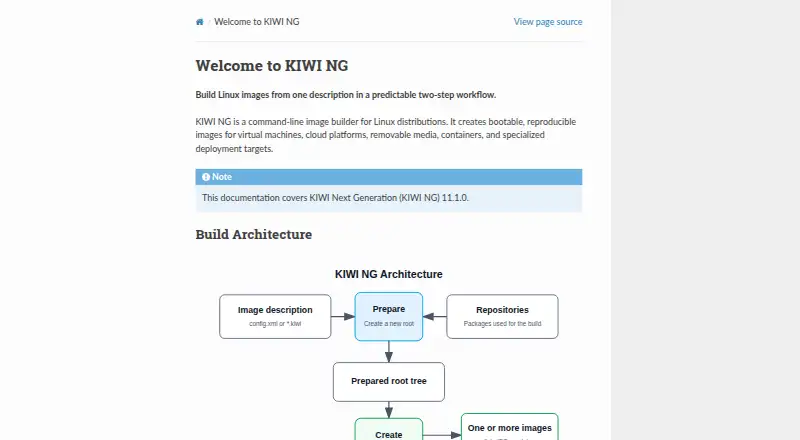
KIWI NG is a command-line image builder for creating bootable Linux images that can be reproduced from versioned descriptions. A description directory can define image metadata, package repositories, packages, users, storage settings, target-system configuration, and the image types to create. KIWI NG prepares a root tree from that description and its repositories, then turns the tree into one or more artifacts. Outputs include disk images, ISO files, and containers for virtual machines, cloud platforms, removable media, and specialized deployments. The project documents Fedora, CentOS Stream, openSUSE, Ubuntu, Debian, and Arch Linux among its supported distributions, with package managers including apk, apt, dnf4, dnf5, microdnf, pacman, and zypper. Overlays, archives, and scripts allow further build customization, and image descriptions can add CA certificates. KIWI NG is daemonless, supports multi-architecture builds, and uses a local cache. It is free and open source under GPL-3.0. Installation is available through a distribution package manager, Open Build Service, or Python's pip. The build host needs a recent Linux distribution, Python 3.9 or newer, Git, and at least 15 GB of recommended free disk space.
Who it suits
KIWI NG suits Linux distribution and appliance builders who want to define image contents and settings in versioned descriptions, then produce multiple artifact types. It is relevant to teams targeting virtual machines, cloud platforms, removable media, containers, or specialized deployments.
What it does well
- Creates disk, ISO, and container artifacts from a prepared root tree.
- Image descriptions define packages, users, repositories, and storage.
- Supports multiple architectures and daemonless builds.
- Customizes builds with overlays, archives, scripts, and CA certificates.
- Free under the GPL-3.0 license.
What to know first
- Requires a recent Linux build host, Python 3.9 or newer, and Git.
- At least 15 GB of free disk space is recommended.
- A build host near the target distribution and major version is recommended.
Limits
The free plan is listed as free. The supplied facts give no free-plan quota or feature cutoff.
Plans
| Plan | Billed and limits | Price |
|---|---|---|
| KIWI NG | Open-source Linux image builder · GPL-3.0 license | Free |
As osinside.github.io lists them, read 7 Oct 2026. The maker's own page has the final word.
Getting started
- Open the KIWI NG website and choose an installation route.
- Install it through a distribution package manager, Open Build Service, or Python's pip.
- Use a recent Linux build host with Python 3.9 or newer, Git, and at least 15 GB of recommended free disk space.
- Create a description directory with a config.xml or .kiwi file defining packages, target configuration, and image types.
- Build the image artifact or artifacts from the description and package repositories.
- Optionally use QEMU to boot and inspect the resulting images.
Verdict
Choose KIWI NG if you need a free, licensed tool for producing reproducible Linux images from descriptions and package repositories. It can create several artifact types and supports multiple architectures. You will need a suitable Linux build host and enough disk space; QEMU is optional for booting and inspecting images.
Questions
Is KIWI NG free?
Yes. Its plan is listed as free, and the source repository identifies a GPL-3.0 license.
Which platforms does it support?
The listed platforms are Linux and self-hosted. Supported distributions include Fedora, CentOS Stream, openSUSE, Ubuntu, Debian, and Arch Linux.
What can KIWI NG build?
It can produce disk images, ISO files, and container artifacts for virtual machines, cloud platforms, removable media, and specialized targets.
How can I install it?
Installation is available through a distribution package manager, Open Build Service, or Python's pip.
Does it integrate with QEMU?
QEMU is an optional virtualization environment for booting and inspecting generated images.
Where can I get support?
The project lists an open kiwi-images mailing list and a Matrix room for contact.
Facts from KIWI NG's own pages
- Build-host constraint
- The documentation recommends using a build host from the same distribution as the target image, near its major version, because builds depend on distribution tools and behavior. · osinside.github.io, 7 Oct 2026
- Build workflow
- It prepares a root tree from an image description and package repositories, then creates one or more image artifacts. · osinside.github.io, 7 Oct 2026
- Community support
- The project provides an open mailing list and a Matrix room for contact. · osinside.github.io, 7 Oct 2026
- Customization
- Builds can be customized with overlays, archives, and scripts. · osinside.github.io, 7 Oct 2026
- Distribution
- The documentation links to source code, GitHub releases, and RPM packages. · osinside.github.io, 7 Oct 2026
- Distribution support
- The documentation lists Fedora, CentOS Stream, openSUSE, Ubuntu, Debian, and Arch Linux among the officially tested and supported distributions. · osinside.github.io, 7 Oct 2026
- Image definitions
- Versioned descriptions can specify image metadata, repositories, packages, users, and storage settings. · osinside.github.io, 7 Oct 2026
- Image descriptions
- A description directory defines packages, target-system configuration, and the image types to create, using config.xml or a .kiwi file. · osinside.github.io, 7 Oct 2026
- Image formats
- A prepared root tree can be turned into disk, ISO, or container artifacts. · osinside.github.io, 7 Oct 2026
- Installation
- KIWI NG can be installed through a distribution package manager, from the Open Build Service, or with Python's pip package manager. · osinside.github.io, 7 Oct 2026
- Integration
- KIWI NG can use QEMU to boot and inspect generated images; QEMU is listed as an optional virtualization environment. · osinside.github.io, 7 Oct 2026
- License
- The source repository identifies the project license as GPL-3.0. · github.com, 7 Oct 2026
- Optional virtualization
- A virtualization environment such as QEMU can optionally be used to boot and inspect resulting images. · osinside.github.io, 7 Oct 2026
- Output formats
- The documentation gives qcow2 virtual machine disks as an example and says one prepared root tree can produce multiple image types. · osinside.github.io, 7 Oct 2026
- Output targets
- It builds images for virtual machines, cloud platforms, removable media, containers, and specialized deployment targets. · osinside.github.io, 7 Oct 2026
- Package managers
- The documented package managers include apk, apt, dnf4, dnf5, microdnf, pacman, and zypper. · osinside.github.io, 7 Oct 2026
- Product
- KIWI NG is a command-line image builder for Linux distributions that creates bootable, reproducible images. · osinside.github.io, 7 Oct 2026
- Purpose
- KIWI NG is a command-line image builder that creates bootable, reproducible Linux images for virtual machines, cloud platforms, removable media, containers, and specialized deployment targets. · osinside.github.io, 7 Oct 2026
- Requirements
- The build host needs a recent Linux distribution, Python 3.9 or newer, Git, and at least 15 GB of recommended free disk space. · osinside.github.io, 7 Oct 2026
- Security configuration
- Image descriptions can import additional CA certificates during a build. · osinside.github.io, 7 Oct 2026
- Source and license
- The maker's GitHub repository identifies KIWI as an OS image and appliance builder and lists a GPL-3.0 license. · github.com, 7 Oct 2026
- Support
- The project lists an open kiwi-images mailing list and a Matrix room for contact. · osinside.github.io, 7 Oct 2026
- Supported build hosts
- The project lists Fedora, CentOS Stream, openSUSE, Ubuntu, Debian, and Arch Linux among its officially tested and supported distributions, with minimum versions specified on the page. · osinside.github.io, 7 Oct 2026
Where KIWI NG stands on Freedom251
- Container Build Tools#18 of 34