Freedom251 › AI Research Assistants
Kimi Deep Research
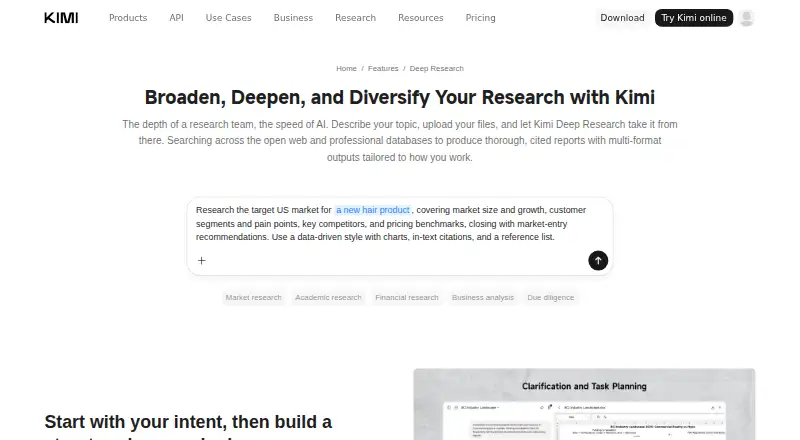
What Kimi Deep Research is
Kimi Deep Research turns a research question into a cited report by clarifying its scope, planning the work, searching sources and synthesizing findings. Searches cover the open web and professional databases, including news, government, academic, corporate, financial and economic sources. Reports can include charts and traceable citations from web research and uploaded materials. Users may ask follow-up questions in the same session, with additional sources added in light of earlier findings. Deliverables include Markdown, PDF, PowerPoint, Word, Excel and interactive HTML. Users can optionally upload background files and review the research agent’s queries and fetched URLs while it works. Listed use cases include finance and investment, academic and market research, consulting, business analysis and due diligence. It is available on Android, iOS, macOS, Windows, web and as an extension. The free plan costs nothing and has a limited monthly allowance; usage is measured by token consumption rather than a fixed query count. The privacy policy says prompts and uploaded files may be processed to provide and improve services, including training and optimizing AI models.
Who it suits
It suits people conducting academic, market or business research who need cited reports and multiple export formats. It may also fit users who want to supply background files and inspect queries and fetched URLs during research.
What it does well
- Searches the open web and professional databases.
- Reports can include charts and traceable citations.
- Supports six named output formats, including interactive HTML.
- Follow-up questions can build on earlier session findings.
- Available across mobile, desktop, web and extension platforms.
What to know first
- Free plan has a limited monthly allowance.
- Usage is measured by token consumption, not query count.
- Prompts and uploaded files may be used to improve models.
- Security measures do not guarantee complete security.
Limits
The free plan has a limited monthly allowance. Usage is counted by token consumption rather than a fixed monthly query count.
Plans
| Plan | Billed and limits | Price |
|---|---|---|
| Free | limited monthly allowance; usage measured by token consumption, not query count | Free |
As kimi.ai lists them, read 2 Oct 2026. The maker's own page has the final word.
Getting started
- Visit the Kimi Deep Research feature page.
- Open Kimi on Android, iOS, macOS, Windows, web, or as an extension.
- Start a research session by clarifying the topic’s scope.
- Optionally upload background files and review the agent’s queries and fetched URLs.
- Choose a supported report format for the deliverable.
Kimi Deep Research is an AI tool for turning a research question into a structured, cited report. It is most useful for people handling academic, financial, market or business questions who need to carry findings into more work. Its broad search and export options are appealing, but the free allowance is limited and its privacy policy allows content to be used to improve models.
Overview
Kimi first clarifies the scope, lays out a plan, searches, then synthesizes findings. It draws on the open web and professional databases spanning news, government, academic, corporate, financial and economic material. That breadth makes it a stronger fit for layered questions than for a quick fact lookup; users should still check that the cited evidence supports each conclusion.
Reports can include charts and traceable citations from web research and uploaded files. Users may upload background materials and review the agent’s queries and fetched URLs as it works. These controls provide useful visibility into the process, but they do not remove the need to assess the report critically.
Key features
Continuing research
Follow-up questions remain in the same session, where Kimi can retrieve further sources while carrying forward earlier context and findings. That makes it suitable for work that develops as a report reveals new questions, rather than a one-off answer.
Reports and exports
Deliverables include Markdown, PDF, PowerPoint, Word, Excel and interactive HTML. The range is practical for moving research into documents, presentations or spreadsheets without being limited to a single report format.
Research controls and privacy
Optional file uploads let users supply background material, and the visible queries and fetched URLs make the search process easier to follow. However, Moonshot AI’s privacy policy says prompts and uploaded files may be processed to provide and improve services, including training and optimizing AI models. It describes reasonable technical and organizational safeguards but does not guarantee complete security, so sensitive material may be a poor fit.
The Kimi Help Center has a Deep Research section covering research, search tips, report generation, downloads and saving.
Pricing
Kimi is freemium, with a free plan at no cost and paid access from $19/mo. The free plan has a limited monthly allowance. Usage is measured by token consumption rather than a fixed number of queries, so a large research task can use more allowance than a small one. This gives occasional users a way to try the feature without a subscription, but the allowance may constrain sustained or extensive research.
The entry’s pricing note gives the paid starting price, but no paid-plan terms or quotas. Readers choosing between plans should weigh the free allowance against their expected research volume rather than assume a particular paid quota.
Platforms
Kimi is available on Android, iOS, macOS, Windows, the web and as an extension. That spread covers mobile and desktop use as well as browser-based access.
Who it's for
The feature is positioned for finance and investment, academic research, market research, consulting, business analysis and due diligence. It suits users who need cited synthesis across multiple kinds of sources, want to extend an inquiry with follow-ups, or need reports in different formats. It is less compelling for simple lookups or work involving sensitive uploads that users do not want processed for service improvement.
Pros and cons
- Pros: Searches both the open web and professional databases across several source categories, supporting research that crosses disciplines or industries.
- Pros: Follow-ups carry forward session context and can bring in more sources, helping users develop an inquiry without starting over.
- Pros: Cited reports, optional file uploads, visible queries and fetched URLs give users multiple ways to trace the work.
- Cons: The free monthly allowance is limited and token-based, making consumption less predictable by project than a query cap.
- Cons: Prompts and uploaded files may be used to improve models, which is a material concern for sensitive research.
Alternatives
For a wider set of choices, browse AI Research Assistants. Perplexity is a reasonable alternative for people who want a free research option with limited daily individual use, or a $20 a month Pro plan. Liner is worth considering for its free Advanced Search and Deep Research access, though its free plan has 0 agent credits per month and one daily file upload up to 25MB. Consensus may fit readers focused on papers, with unlimited free paper searches and three Deep reviews per month. Felo AI Research offers a free Standard plan with 200 bonus credits per day and five professional searches per day. Gab AI Research Assistant offers 250 starting credits on its free plan, along with web search and file analysis. Innogath is an option for users who want basic-depth Deep Research and one concurrent research on a free monthly credit allowance. You.com offers 100 free queries per day with web and news results.
Verdict
Choose Kimi Deep Research if your work benefits from multi-source, cited synthesis, continuing follow-up research and flexible export formats. Its source breadth and report workflow are the strongest reasons to use it; the limited token-based free allowance and model-improvement processing are the main reasons to look elsewhere, especially for heavy use or sensitive files.
Verdict
Kimi Deep Research combines source searching, synthesis and cited reporting, with follow-up research and several export options. The free allowance is limited, and user content may be processed for model improvement.
Questions
Is Kimi Deep Research free?
A free plan is available with a limited monthly allowance. Paid plans are listed from $19/mo.
How is free usage measured?
Usage is limited by token consumption rather than a fixed monthly number of queries.
Which platforms support Kimi Deep Research?
It is available on Android, iOS, macOS, Windows, web, and as an extension.
Can it use uploaded files?
Yes. Users can upload background files, and reports may draw cited sources from uploaded materials as well as web research.
What formats can reports use?
Supported deliverables include Markdown, PDF, PowerPoint, Word, Excel, and interactive HTML.
How does Kimi handle prompts and uploaded files?
The privacy policy says user content, including prompts and uploaded files, may be processed to provide and improve services, including training and optimizing AI models.
Facts from Kimi Deep Research's own pages
- Company
- The company site identifies Moonshot AI and links to Kimi Deep Research, but the opened pages did not state a headquarters or founding date. · moonshot.ai, 2 Oct 2026
- Follow-up research
- Users can ask follow-up questions in the same session, and Kimi retrieves additional sources while building on earlier context and findings. · kimi.ai, 2 Oct 2026
- Output formats
- Supported deliverables include Markdown, PDF, PowerPoint, Word, Excel, and interactive HTML reports. · kimi.ai, 2 Oct 2026
- Platforms
- Kimi is available on the web, Windows, macOS, iOS, and Android, and Kimi Browser Extension is offered as a browser extension. · kimi.ai, 2 Oct 2026
- Privacy and model improvement
- The privacy policy says user content, including prompts and uploaded files, may be processed to provide and improve services, including training and optimizing AI models. · kimi.ai, 2 Oct 2026
- Report contents
- Reports can include relevant charts and cited, traceable sources from web research and uploaded materials. · kimi.ai, 2 Oct 2026
- Research controls
- Users can optionally upload background files and review the research agent’s queries and fetched URLs while it works. · kimi.ai, 2 Oct 2026
- Research use cases
- The feature page highlights finance and investment, academic research, market research, consulting, business analysis, and due diligence. · kimi.ai, 2 Oct 2026
- Research workflow
- Kimi Deep Research clarifies the research scope, creates a plan, searches, and synthesizes findings into a cited report. · kimi.ai, 2 Oct 2026
- Search sources
- It searches the open web and professional databases, including news, government, academic, corporate, financial, and economic sources. · kimi.ai, 2 Oct 2026
- Security
- The privacy policy says Moonshot AI uses reasonable technical and organizational measures to protect personal information, while stating it cannot guarantee security completely. · kimi.ai, 2 Oct 2026
- Support
- The Kimi Help Center has a Deep Research section covering research, search tips, report generation, downloads, and saving. · kimi.ai, 2 Oct 2026
- Usage limit
- Deep Research is limited by token consumption rather than a fixed monthly query count, and the free plan has a limited monthly allowance. · kimi.ai, 2 Oct 2026
Where Kimi Deep Research stands on Freedom251
- AI Research Assistants#10 of 28