Freedom251 › Handwriting Practice Apps

Kanji Dojo
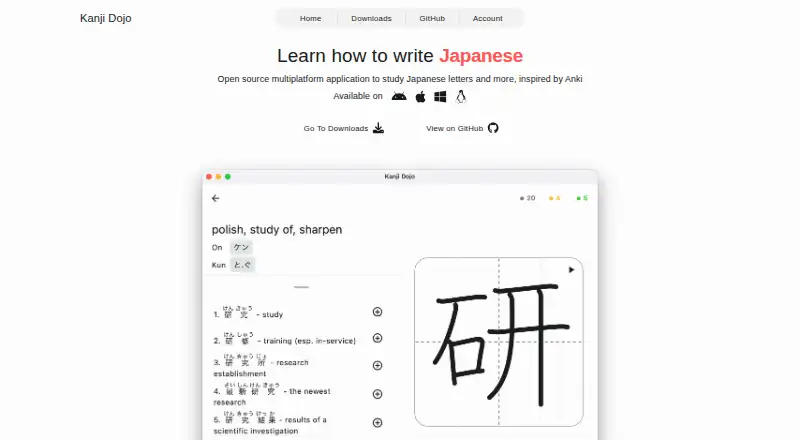
What Kanji Dojo is
Kanji Dojo is an open-source app for practicing Japanese writing and learning characters, meanings, readings, and related vocabulary. It covers hiragana, katakana, and more than 6,000 characters. Study can be organized by JLPT level, school grade, or WaniKani level, including combinations of those paths. Flashcards and spaced repetition support practice, with vocabulary examples, and pen-control exercises are available. A searchable dictionary covers characters and words. After downloading the learning materials, users can continue studying offline. The learning content is free; some extra features are paid to cover backend and development expenses. Kanji Dojo is available on Android, iOS, Linux, macOS, web, and Windows. Its privacy policy describes aggregated usage analytics and crash diagnostics, and says user information is not sold or shared for marketing. Development is community driven, so feature requests may depend on an interested contributor. The linked GitHub repository was archived on August 27, 2026 and is read-only.
Who it suits
It suits learners who want to practice Japanese characters through structured study paths, flashcards, and dictionary lookups. It may also fit learners who need offline study after downloading materials.
What it does well
- Covers hiragana, katakana, and over 6,000 characters
- Study paths include JLPT, school grade, and WaniKani levels
- Spaced repetition, flashcards, and pen-control exercises
- Searchable dictionary and offline study after download
- Free learning content across six listed platforms
What to know first
- Some extra features are paid
- Feature requests depend on community contributor interest
- GitHub repository is archived and read-only
Limits
The learning content is free, but some extra features are paid. Offline study is available after downloading the necessary learning materials.
Plans
| Plan | Billed and limits | Price |
|---|---|---|
| Free | App content is completely free and open source; some extra features are paid | Free |
As kanji-dojo.com lists them, read 30 Sept 2026. The maker's own page has the final word.
Getting started
- Open the Kanji Dojo website.
- Choose a supported platform: Android, iOS, Linux, macOS, web, or Windows.
- Download the learning materials you need for offline study.
- Choose a study path by JLPT level, school grade, or WaniKani level, or combine them.
Overview
Kanji Dojo is a Japanese character-learning app for learners who want to practice writing alongside vocabulary and review. Its broad character coverage and free content make it a strong option for independent study, but its archived, read-only repository is a serious caveat for anyone who expects continuing development.
Key features
- Hiragana, katakana and kanji: The app covers more than 6,000 characters, giving learners a wide range of material in one place.
- Study paths: Organize practice by JLPT level, school grade or WaniKani level, or combine those systems. This can help learners follow a familiar progression rather than build a study list from scratch.
- Writing and review: Pen-control exercises, flashcards and spaced repetition pair handwriting practice with recall. Vocabulary examples help connect characters to related words.
- Dictionary and offline study: A searchable character-and-word dictionary supports lookups, while downloaded learning materials allow study without an internet connection.
- Privacy and support: Firebase Analytics collects aggregated usage information without personal identifiers; Crashlytics collects crash logs and diagnostics. The policy says user information is not shared or sold for marketing. Help and issue reports can go through Discord, in-app feedback, GitHub discussions or issues, or email.
The project is open source under GNU GPL version 3 or later. The repository was archived on August 27, 2026, and is read-only. The maker describes development as community driven, so requested features may not arrive unless a contributor chooses to work on them. That combination makes the app more suitable for learners who can accept its current state than those relying on a stream of updates.
Pricing
Free: free. Learning content is free and open source, with some extra features paid to help cover backend and development expenses. There is no free trial. This is a good fit for learners who want substantial study material without paying for core content, though the free plan does not include every extra feature.
No other plan price is stated; paid extras have custom pricing. Consider the possibility of paid add-ons if you need features beyond the free learning content.
Platforms
Kanji Dojo supports Android, iOS, Linux, macOS, Windows and the web, making it a flexible choice across mobile, desktop and browser study. Offline use requires downloading the necessary materials first.
Who it's for
Choose Kanji Dojo if you want writing practice, structured Japanese character study, spaced review and dictionary lookup in a free, open-source app. It is less suitable if ongoing updates or assured implementation of feature requests are important to your choice: the repository is read-only, and development depends on community interest.
Pros and cons
- Pro: Free learning content covers three Japanese writing systems and more than 6,000 characters, so learners can explore a broad curriculum without paying for core material.
- Pro: Multiple study paths, spaced repetition, vocabulary examples and dictionary search bring several useful study modes together.
- Pro: Downloaded materials can be used offline, and the app supports mobile, desktop and web platforms.
- Con: Some extra features are paid, so the free content does not mean every capability is free.
- Con: The archived, read-only repository and community-dependent development make future updates and feature requests uncertain.
Alternatives
Handwriting Practice Apps is a useful place to compare more options. Choose Handwriting Repeater instead if you want a free Android, iOS or web app with no subscription fees, no account requirement, and no limits on sentences or repetitions. Hanzi Writer is another freemium option for Android, iOS and macOS, with core writing practice free and a Pro monthly plan whose price is displayed in the app.
LetterSchool offers a free app with a limited starter set of letters, shapes and CVC flashcards, plus a free trial; consider it for that introductory material. Writing Wizard has a free download, with remaining letters and custom words requiring an in-app purchase or subscription. iTrace provides a free version with handwriting warm-ups, three letters and one interactive scene, with premium features available as a one-time purchase.
LearnWell Languages is a paid iOS and macOS option with a $6.99 a month plan. Letterpaths is a free Android, iOS and web option; its public repository describes it as a headless TypeScript library for generating handwriting geometry. Chinese Stroke Order Practice is a web-based alternative with a Quarterly Pro plan at $5.90 a month, renewing every three months, and a 1-Year Pro plan.
Verdict
Kanji Dojo is best for independent Japanese learners who want free, broad character content with writing practice, structured review and offline study. Its main draw is the range of learning tools and study paths without a charge for learning content. Look elsewhere if you need dependable ongoing updates: the read-only repository and community-driven development leave the project’s future uncertain.
Verdict
Kanji Dojo combines character practice, vocabulary examples, structured study paths, and dictionary search, with free learning content. The archived read-only repository and community-dependent development are important considerations for those seeking ongoing changes.
Questions
Is Kanji Dojo free?
Its learning content is free. Some extra features are paid to cover backend and development expenses.
Is Kanji Dojo open source?
Yes. The linked GitHub repository lists the GNU GPL version 3 or later license.
Which platforms does it support?
Kanji Dojo is available on Android, iOS, Linux, macOS, web, and Windows.
Can I study offline?
Yes. Download the necessary learning materials first, then you can continue studying offline.
Is the project still being updated?
The GitHub repository page says it was archived on August 27, 2026 and is read-only. The maker describes development and updates as community driven.
How can I get help or report an issue?
You can use Discord, the in-app feedback menu, GitHub discussions or issues, or email.
Facts from Kanji Dojo's own pages
- Data sharing
- The policy says Kanji Dojo does not share or sell user information to third parties for marketing purposes. · kanji-dojo.com, 29 Sept 2026
- Dictionary
- The app includes a searchable dictionary for characters and words. · github.com, 29 Sept 2026
- Feature requests
- The maker says the project is community driven and a requested feature may not be implemented unless a contributor is interested. · kanji-dojo.com, 29 Sept 2026
- Integrations and analytics
- The privacy policy says the app uses Firebase Analytics and Firebase Crashlytics; the repository notes Google Play includes Firebase Analytics and Play services for in-app review. · kanji-dojo.com, 29 Sept 2026
- Integrations and data
- The privacy policy says the app uses Firebase Analytics and Firebase Crashlytics for aggregated usage information and crash diagnostics. · kanji-dojo.com, 30 Sept 2026
- Learning paths
- Learners can study by JLPT level, school grade, or WaniKani level, or mix those paths. · kanji-dojo.com, 30 Sept 2026
- Offline use
- After downloading the necessary learning materials, users can continue studying offline. · kanji-dojo.com, 30 Sept 2026
- Open source
- The maker describes the app as open source; the linked GitHub repository lists the GNU GPL version 3 or later license. · github.com, 30 Sept 2026
- Platforms
- The site lists Windows, Linux, macOS, Android, and iOS; iOS is available as a TestFlight version while the first release is being prepared. · kanji-dojo.com, 30 Sept 2026
- Practice
- The app uses spaced repetition and flashcards, including vocabulary examples. · kanji-dojo.com, 29 Sept 2026
- Pricing
- The learning content is free and open source, while some extra features are paid to cover backend and development expenses. · kanji-dojo.com, 29 Sept 2026
- Privacy
- The privacy policy says Kanji Dojo does not share or sell user information to third parties for marketing purposes. · kanji-dojo.com, 30 Sept 2026
- Project and updates
- The maker describes development and updates as community driven, and says feature requests may not be implemented without an interested contributor. · kanji-dojo.com, 30 Sept 2026
- Project status
- The GitHub repository page states that it was archived on August 27, 2026 and is now read-only. · github.com, 29 Sept 2026
- Purpose
- Kanji Dojo helps learners practice writing Japanese characters and learn their meanings, readings, and related words. · kanji-dojo.com, 30 Sept 2026
- Review and dictionary
- The app uses spaced repetition and includes a searchable dictionary. · kanji-dojo.com, 30 Sept 2026
- Study content
- It supports hiragana, katakana, and kanji, with more than 6,000 characters and additional vocabulary. · kanji-dojo.com, 30 Sept 2026
- Support
- Users can request help or report issues through Discord, the in-app feedback menu, GitHub discussions or issues, or email. · kanji-dojo.com, 30 Sept 2026
Where Kanji Dojo stands on Freedom251
- Handwriting Practice Apps#5 of 27