Freedom251 › Handwriting Practice Apps

Cursive: Learn Cursive
What Cursive: Learn Cursive is
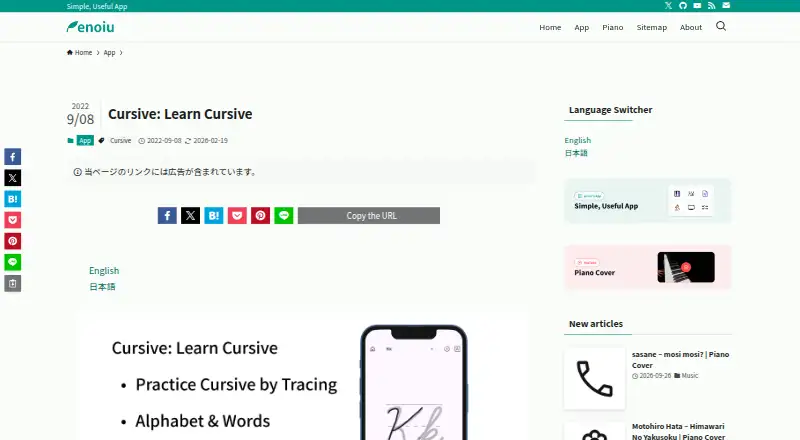
Cursive: Learn Cursive helps users practice handwriting by tracing letters and words, and by creating their own word exercises. It offers uppercase and lowercase letter practice with animated stroke order, plus more than 100 practice words in each of six languages: English, German, Spanish, French, Italian, and Portuguese. Words with accent marks are included. Users can type text to display it in cursive and add, sort, or delete custom words; those custom words are shared across the supported languages. Writing controls include example text size and style, pen or eraser, pen thickness and color, and zoom settings. Dark mode and theme color choices are also available. The app is listed for Android, iOS, and macOS. Android and iOS downloads are free; Google Play notes ads and in-app purchases, while Apple lists in-app purchases. The word search opens in an external browser, and users can change the search button to a share button. Google Play says the app may collect location, app activity, and two other data types; its safety information says data is encrypted in transit and cannot be deleted.
Who it suits
It suits people learning or practicing cursive in any of its six supported languages. Custom words and adjustable writing tools may also help users tailor practice to their needs.
What it does well
- Animated stroke order for uppercase and lowercase letters.
- Practice in six languages.
- More than 100 included words per language.
- Users can create and organize custom words.
- Offers pen, eraser, size, color, and zoom controls.
What to know first
- Google Play notes ads and in-app purchases.
- Apple lists in-app purchases.
- Google Play says collected data cannot be deleted.
Limits
The free plan is listed as free, and the app is free to download. Paid access starts from $2.99; Google Play notes ads and in-app purchases, and Apple lists in-app purchases.
Plans
| Plan | Billed and limits | Price |
|---|---|---|
| Free | Free to download; Google Play listing says contains ads and in-app purchases | Free |
As enoiu.com lists them, read 8 Oct 2026. The maker's own page has the final word.
Getting started
- Visit https://enoiu.com/en/app/cursive/.
- Choose the Android, iOS, or macOS version.
- Download the app; Android and iOS downloads are listed as free.
- Start with letter or word practice, or type text to create custom practice words.
Cursive: Learn Cursive is a cursive handwriting practice app built around tracing letters and words. It suits learners who want guided practice in one of six European languages, especially when they also want to add their own vocabulary. Its focused practice tools are appealing, but ads or in-app purchases and Google Play’s statement that data cannot be deleted are worth weighing.
Overview
The app covers uppercase and lowercase cursive letters, animated stroke order, and word tracing. Its word library contains more than 100 practice words in each supported language: English, German, Spanish, French, Italian, and Portuguese. Accent marks are supported, making the multilingual coverage useful beyond basic English drills.
Custom words extend practice beyond the built-in vocabulary. Users can type text to display it in cursive, then add, sort, or delete words; those words are shared across the app’s cursive languages. That flexibility is practical for personal vocabulary, though it does not create separate custom lists by language.
Key features
Writing controls let learners adjust example text size and style, switch between pen and eraser, change pen thickness and color, and turn zooming on or off. Dark mode and a selectable theme color offer further personalization. These options make the tracing surface adaptable, but the app’s core remains cursive practice rather than a broader handwriting curriculum.
The word search opens in an external browser, and users can change its button to a share button. This is a modest connection to other apps, not an integrated research or sharing workflow.
Pricing
Cursive: Learn Cursive is freemium. The maker lists its Android and iOS downloads as free; Google Play identifies ads and in-app purchases, while Apple lists in-app purchases. The Free plan costs nothing. The pricing note says paid options start at $2.99, but gives no billing term or paid-plan inclusions, so the free download is the clear choice for trying the practice tools while the paid option cannot be matched to a particular need from its price alone.
Platforms
The app supports Android, iOS, and macOS. The maker lists free downloads for Android and iOS; macOS is also a supported platform. It is not aimed at learners seeking a web version or a Windows app.
Who it's for
This is a good fit for children and other beginners who want to trace cursive letters, follow animated stroke order, or practice words in one of six supported languages. Google Play classifies it in Education and rates it for ages 3 and up. The editable word list also suits learners who want to practice their own terms, provided cross-language sharing of custom words works for their routine.
Privacy-conscious users should consider Google Play’s developer-provided disclosures: the app may collect location, app activity, and two other data types; it says no data is shared with third parties and data is encrypted in transit, but also says data cannot be deleted. That deletion limitation may rule it out for some families or learners.
Pros and cons
- Pros: Animated letter strokes pair with uppercase and lowercase tracing, giving learners a visual guide as well as a practice surface.
- Pros: Six languages, accent-mark support, and more than 100 built-in words per language provide meaningful variety for multilingual practice.
- Pros: Custom words and adjustable pen, text, and zoom settings let learners tailor exercises rather than rely only on fixed drills.
- Cons: Google Play says data cannot be deleted, a significant drawback for users who want control over stored data.
- Cons: The free downloads may include ads, and in-app purchases are identified; the paid options’ terms and inclusions are unclear.
- Cons: The custom words are shared across languages, which limits organization for learners building distinct language-specific lists.
Alternatives
For a broader handwriting-app comparison, see Handwriting Practice Apps.
- Kanji Dojo is the alternative to choose for open-source practice across Android, iOS, Linux, macOS, web, and Windows; its maker describes it as open source, and its linked repository lists GPL version 3 or later.
- LetterSchool may suit learners who want a free trial and a structured starter set: its free app includes the first five letters in uppercase and lowercase, five shapes, and three CVC flashcards (nine words).
- Writing Wizard is another option for Android, iOS, or Windows; its free download limits access, with remaining letters and custom words requiring an in-app purchase or subscription.
- Handwriting Repeater is a free choice for sentence repetition: it has no subscription fees or premium tier, requires no account, and sets no limits on sentences or repetitions.
- Hanzi Writer is a related option with core writing practice features in its free plan and a Pro monthly plan that includes unlimited daily practice and AI-generated custom topics.
- iTrace may fit learners seeking handwriting warm-ups and interactive scenes; its free version includes three letters and one scene, with premium features unlocked by a one-time purchase.
- Kitsunewa Writing Practice offers writing practice without signup and runs on Android, iOS, and web; its Pro plan is $4.08 a month, billed $49 yearly.
- Letterpaths is another free handwriting option for Android, iOS, and web.
Verdict
Choose Cursive: Learn Cursive if you want focused cursive tracing with multilingual word practice and the freedom to add your own exercises. Its animated strokes and editable tools give it a clear learning purpose, while the data-deletion limitation and ads or in-app purchases make it a less comfortable pick for privacy-sensitive users or anyone expecting a fully transparent paid plan.
Verdict
Cursive: Learn Cursive pairs guided letter practice with multilingual word lists and custom exercises. Its downloads are free, but listings also note ads or in-app purchases, and Google Play says data cannot be deleted.
Questions
How much does Cursive: Learn Cursive cost?
The pricing model is freemium, with a free plan and paid access from $2.99. The Free plan is listed as free.
Is there a free version?
Yes. Android and iOS downloads are listed as free. Google Play notes ads and in-app purchases, while Apple lists in-app purchases.
Which platforms are supported?
The app is listed for Android, iOS, and macOS.
Which languages can I practice?
Cursive practice is available in English, German, Spanish, French, Italian, and Portuguese.
Who makes the app?
The maker is enoiu, which describes itself as an individual that develops and sells applications.
What does Google Play say about data safety?
Its developer-provided information says no data is shared with third parties and data is encrypted in transit. It also says the app may collect location, app activity, and two other data types, and that data cannot be deleted.
Facts from Cursive: Learn Cursive's own pages
- Audience
- Google Play classifies the app in Education and rates it for ages 3 and up. · play.google.com, 8 Oct 2026
- Custom words
- Users can display typed text in cursive and add, sort, or delete custom words, which are shared across cursive languages. · enoiu.com, 8 Oct 2026
- Headquarters
- Fukuoka, Japan · enoiu.com, 28 Sept 2026
- Integrations
- The app’s word search opens in an external browser, and users can switch the search button to a share button. · enoiu.com, 8 Oct 2026
- Languages
- It supports cursive practice in English, German, Spanish, French, Italian, and Portuguese. · enoiu.com, 8 Oct 2026
- Letter practice
- Users can practice uppercase and lowercase letters and view animated stroke order for each letter. · enoiu.com, 8 Oct 2026
- Maker
- The maker describes enoiu as an individual who develops and sells applications. · enoiu.com, 8 Oct 2026
- Personalization
- The app supports dark mode and lets users change the theme color. · enoiu.com, 8 Oct 2026
- Pricing details
- The maker lists the Android and iOS downloads as free; Google Play identifies ads and in-app purchases, while Apple lists in-app purchases. · enoiu.com, 8 Oct 2026
- Privacy and security
- Google Play’s developer-provided data safety information says no data is shared with third parties, data is encrypted in transit, and data can’t be deleted; it also says the app may collect location, app activity, and two other data types. · play.google.com, 8 Oct 2026
- Purpose
- The app lets users practice cursive by tracing letters and words, and add their own words for practice. · enoiu.com, 8 Oct 2026
- Support
- Google Play lists the support email as [email protected]. · play.google.com, 8 Oct 2026
- Word library
- The app includes over 100 practice words per language and supports words with accent marks. · enoiu.com, 8 Oct 2026
- Writing tools
- Users can change example text size and style, switch between pen and eraser, adjust pen thickness and color, and enable or disable zooming. · enoiu.com, 8 Oct 2026
Where Cursive: Learn Cursive stands on Freedom251
- Handwriting Practice Apps#3 of 27