JSHint
What JSHint is
JSHint is a free, community-driven static analysis tool for JavaScript code. It can flag syntax errors, problems caused by implicit type conversion and leaking variables, helping developers spot potential issues while working on complex programs. The project provides a Node module with a library and command-line program, along with a JavaScript API. Configuration can be supplied through command-line options, a .jshintrc file, package.json or inline source directives. Standalone files are available for browser-like environments and Mozilla Rhino, and releases are published to npm for Node.js. The install page lists integrations for editors and IDEs such as Vim, Emacs, Sublime Text, Atom, TextMate, Visual Studio, VS Code, Brackets, Eclipse, NetBeans and JetBrains IDEs. Listed build integrations include Grunt, Ant, Maven, pre-commit and QUnit. JSHint is licensed under the MIT Expat license. The project cautions that static analysis cannot determine whether a program is correct or fast, or whether it has memory leaks, and recommends combining its checks with unit and functional tests and code reviews.
Who it suits
JSHint suits JavaScript developers who want configurable static checks in their editor, build process or command line. It is intended as one part of a broader review process rather than a substitute for tests and code reviews.
What it does well
- Flags syntax errors and potential code problems.
- Offers command-line, library and JavaScript API use.
- Configuration supports four listed methods.
- Lists integrations for editors, IDEs and build tools.
What to know first
- Cannot determine whether a program is correct or fast.
- Cannot determine whether a program has memory leaks.
- The project recommends using it alongside tests and code reviews.
Plans
| Plan | Billed and limits | Price |
|---|---|---|
| JSHint | Publicly available · no paid plans stated | Free |
As jshint.com lists them, read 11 Oct 2026. The maker's own page has the final word.
Getting started
- Visit https://jshint.com/.
- Choose the Node module and command-line program, JavaScript API, or standalone files for browser-like environments or Mozilla Rhino.
- For Node.js, use a release published to npm.
- Configure checks with command-line options, a .jshintrc file, package.json, or inline source directives.
- Use a listed editor, IDE, or build integration if it matches your workflow.
- Combine JSHint checks with unit and functional tests and code reviews.
JSHint is a configurable static analyzer for JavaScript, best suited to developers who want early warnings woven into an existing coding workflow. Its focused checks and broad integration options are useful, but they cannot replace validation of program behavior.
Overview
JSHint flags syntax errors, implicit type conversion problems, and variables that leak beyond their intended scope. Those checks can catch typos and language gotchas before they become harder to trace, while configuration through command-line options, a .jshintrc file, package.json, or inline directives lets teams adapt warnings to their conventions. The trade-off is that several configuration routes can make consistency important when checks run in different places.
Static analysis has a firm boundary: JSHint cannot determine whether a program is correct or fast, or whether it has memory leaks. The project recommends using it alongside unit and functional tests and code reviews. It is a useful early-warning layer, not a correctness guarantee.
Key features
Fits into existing development workflows
The core is distributed as a Node module with a library and command-line program, and developers can also call JSHint through its JavaScript API. Standalone files support browser-like environments and Mozilla Rhino; releases for Node.js are published to npm. This range makes it suitable for projects that need checks in more than one runtime, though teams should align configuration wherever they invoke it.
Editor and build integrations
Editor and IDE integrations cover Vim, Emacs, Sublime Text, Atom, TextMate, Visual Studio, VS Code, Brackets, Eclipse, NetBeans, and JetBrains IDEs. Build integrations include Grunt, Ant, Maven, pre-commit, and QUnit. That breadth offers several ways to surface issues during editing or automated workflows; it is most valuable when a team selects a consistent route rather than treating integrations as a substitute for shared rules.
JSHint is MIT Expat licensed, and the project directs bug reports and suggestions to GitHub Issues. That community-oriented support route suits users comfortable raising issues publicly, rather than those seeking a paid support plan.
Pricing
JSHint is free and open source, with the JSHint plan priced at $0. There is no paid plan stated, so there is no higher tier to buy for additional capabilities or support. The free offering makes it a straightforward choice for individual developers and teams who want a JavaScript analyzer without a software charge; the project directs support requests to GitHub Issues.
Platforms
JSHint supports API, extension, Linux, macOS, web, and Windows. Its runtime options include Node.js, browser-like environments, and Mozilla Rhino, while editor integrations span desktop IDEs and editors. The mix gives developers flexibility in where checks run, but it does not change the tool's JavaScript focus.
Who it's for
JSHint fits JavaScript developers who want configurable checks for complex programs and a way to catch typos and language pitfalls during development. It is particularly practical for teams already using Node.js, editor or IDE integrations, or build tools such as Grunt, Maven, or pre-commit. It is a weaker fit for anyone expecting static analysis alone to prove correctness, performance, or memory safety; those judgments still call for tests and code review.
Pros and cons
- Pros: Free and MIT Expat licensed, with no paid tier required for the stated functionality.
- Pros: Configurable through four routes, which helps teams fit checks to project conventions.
- Pros: Node module, JavaScript API, standalone files, and a wide selection of editor and build integrations give teams several ways to run checks.
- Cons: It cannot determine program correctness or speed, or identify memory leaks, so its reports need complementary validation.
- Cons: Multiple configuration options and integration points can require coordination to keep checks consistent.
Alternatives
For another free static checker, consider actionlint, which is described as a command-line tool with a browser playground. Biome is another free option, framed as an open-source toolchain for web projects. These alternatives are worth comparing if their stated scope better matches the workflow you want.
If the language or file type is the deciding factor, Cppcheck offers free core static analysis and a paid Project plan with custom pricing; Hadolint is an open-source Dockerfile linter; and PMD is a downloadable static code analyzer. For Python linting, Ruff is an open-source tool from Astral, which builds developer tools for the Python ecosystem.
For shell scripts, ShellCheck provides static analysis for use on the web, in a terminal, or in editors. For Swift, SwiftLint is a free, MIT-licensed linting tool. To browse the broader category, see Linters.
Verdict
Choose JSHint if you want free, configurable JavaScript checks that can slot into Node.js, editors, or build workflows. Its main advantage is that flexibility, paired with checks aimed at common JavaScript mistakes. Look elsewhere if you need analysis to establish correctness, speed, or memory safety: JSHint cannot do that, and the project expects tests and code reviews to complete the picture.
Verdict
JSHint offers configurable checks and integrations across JavaScript development workflows. Its own limits mean developers should pair it with tests and code reviews.
Questions
How much does JSHint cost?
JSHint is free. Its listed plan is free, and no paid plans are stated.
Is JSHint open source?
Yes. JSHint is licensed under the MIT Expat license.
What does JSHint check?
It reports JavaScript issues such as syntax errors, problems from implicit type conversion, and leaking variables.
How can I use JSHint?
The core project includes a library and command-line program distributed as a Node module. It also offers a JavaScript API and standalone files for browser-like environments and Mozilla Rhino.
Which editors and build tools does it integrate with?
The install page lists integrations for editors and IDEs including Vim, Emacs, Sublime Text, Atom, TextMate, Visual Studio, VS Code, Brackets, Eclipse, NetBeans, and JetBrains IDEs. Listed build integrations include Grunt, Ant, Maven, pre-commit, and QUnit.
What can JSHint's analysis establish?
It cannot determine whether a program is correct or fast, or whether it has memory leaks. The project recommends combining its checks with unit and functional tests and code reviews.
Facts from JSHint's own pages
- API
- JSHint can be used as a JavaScript module through its JavaScript API. · jshint.com, 11 Oct 2026
- Audience
- The project says it aims to help JavaScript developers write complex programs while avoiding typos and language gotchas. · jshint.com, 11 Oct 2026
- Build integrations
- Listed workflow integrations include Grunt, Ant/Maven, QUnit, pre-commit, overcommit and JSXHint. · jshint.com, 15 Oct 2026
- CLI input
- The CLI lints files, recursively traverses directories and accepts standard input when the path is '-'. · jshint.com, 15 Oct 2026
- CLI reporters
- Users can provide custom reporters or use the built-in jslint and CheckStyle-compatible reporters. · jshint.com, 15 Oct 2026
- Complexity checks
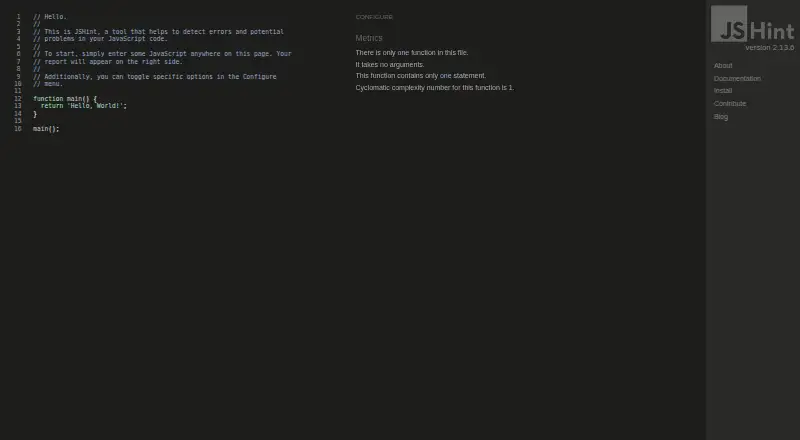
- The web interface includes cyclomatic-complexity reporting. · jshint.com, 15 Oct 2026
- Configuration
- Projects can configure JSHint with a .jshintrc file, package.json jshintConfig or the CLI --config option. · jshint.com, 15 Oct 2026
- Documentation depth
- Official documentation covers installation, CLI usage, API calls, options, configuration directives and custom reporters. · jshint.com, 15 Oct 2026
- Editor integrations
- The project lists integrations for Vim, Emacs, Sublime Text, Atom, TextMate, Visual Studio, VS Code, Brackets, Eclipse, NetBeans, JetBrains, Notepad++ and Gedit. · jshint.com, 15 Oct 2026
- Environment assumptions
- Preset assumptions include browser, Node.js, jQuery, development consoles, ES6, Mozilla extensions and older ES3 environments. · jshint.com, 15 Oct 2026
- Environments
- The project provides standalone files for browser-like environments and Mozilla Rhino, and publishes releases to npm for Node.js. · jshint.com, 11 Oct 2026
- Error detection
- JSHint checks for syntax errors, implicit conversion bugs, leaking variables and other common JavaScript problems. · jshint.com, 15 Oct 2026
- Extensibility
- Custom reporter modules receive structured error data and can print, write or send results elsewhere. · jshint.com, 15 Oct 2026
- GitHub adoption
- The public repository shows about 9,100 stars and 1,600 forks. · github.com, 15 Oct 2026
- HTML extraction
- The CLI can extract JavaScript from HTML files using auto, always or never modes. · jshint.com, 15 Oct 2026
- Independent feature assessment
- JavaSpring describes JSHint as configurable, community-driven, supportive of modern JavaScript and clearer in its error messages than JSLint. · javaspring.net, 15 Oct 2026
- Independent setup complaint
- JavaSpring notes that JSHint requires users to define rules and that overly relaxed settings can permit poor practices. · javaspring.net, 15 Oct 2026
- Inline directives
- Source comments can set jshint, jslint, globals, exported and ignore directives, including function-scoped settings. · jshint.com, 15 Oct 2026
- Installation
- Official installation supports browser-like standalone files, Mozilla Rhino, npm global installation and npm development dependencies. · jshint.com, 15 Oct 2026
- Latest release
- GitHub lists JSHint 2.13.6 as the latest release, dated 2022-11-11, with fixes for const initialization and an error message. · github.com, 15 Oct 2026
- Licence
- JSHint is released under the MIT Expat licence; versions before 2.12.0 had partially non-free JSON-licensed code. · jshint.com, 15 Oct 2026
- License
- JSHint is licensed under the MIT Expat license. · jshint.com, 11 Oct 2026
- Limit: documentation and support
- G2 summaries say some users want more comprehensive documentation and perceive support quality as weaker than alternatives. · g2.com, 15 Oct 2026
- Limit: documentation discoverability
- A practitioner evaluation reports that finding documentation for particular error messages and disabling or customizing rules can be difficult. · code.clinic, 15 Oct 2026
Where JSHint stands on Freedom251
- Linters#3 of 33