actionlint
What actionlint is
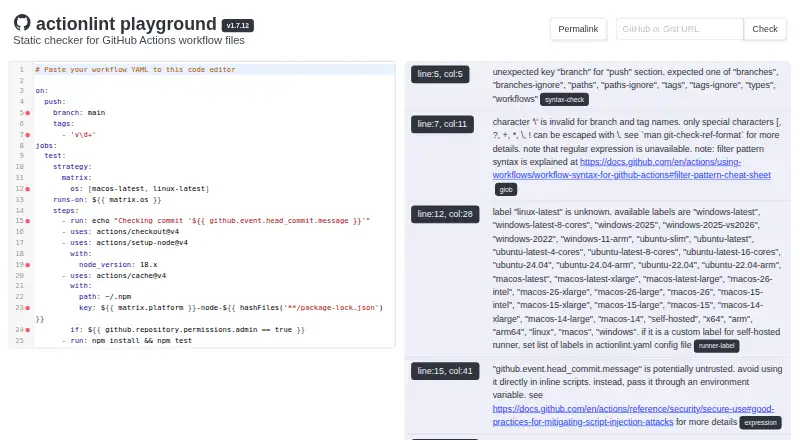
actionlint checks GitHub Actions workflow files for structural, expression, and security problems. It flags unexpected or missing keys, and strongly type-checks `${{ }}` expressions to catch issues such as missing properties or mismatched types. It also validates action inputs and outputs, along with inputs, outputs, and secrets used by reusable workflows and workflow calls. Its security checks identify script-injection risks involving untrusted inputs and hard-coded credentials. For scripts in `run:` steps, actionlint can work with ShellCheck and Pyflakes; those integrations are optional and can be disabled. It is free, open-source software under the MIT license, with command-line and browser-playground options. The project documents installation through prebuilt binaries, Docker, source builds, CI download scripts, and package managers. The browser playground runs through WebAssembly and states that data stays in the browser. Integrations include editors and CI tools, and Go APIs let programs use actionlint directly. Configuration can specify self-hosted runner labels, variables, and file-specific ignore patterns.
Who it suits
It suits teams maintaining GitHub Actions workflows who want syntax, expression, input, and security checks. Developers can also use it through editor and CI integrations or its Go APIs.
What it does well
- Checks workflow syntax and expression types.
- Flags script-injection risks and hard-coded credentials.
- Optional ShellCheck and Pyflakes integrations.
- Browser playground runs through WebAssembly.
- MIT-licensed with command-line and Go APIs.
What to know first
- Checks GitHub Actions workflow files specifically.
- ShellCheck and Pyflakes integrations can be disabled.
Plans
| Plan | Billed and limits | Price |
|---|---|---|
| actionlint | MIT-licensed static checker · command-line tool and browser playground | Free |
As rhysd.github.io lists them, read 11 Oct 2026. The maker's own page has the final word.
Getting started
- Visit the actionlint project website.
- Choose an installation route: prebuilt binary, Docker, source build, CI download script or package manager.
- Run the command-line checker on your GitHub Actions workflow files.
- Alternatively, use the browser playground, which runs through WebAssembly.
- Connect it to an editor or CI tool using one of the documented integrations.
Overview
For maintainers of GitHub Actions workflows, actionlint is a focused static checker that can catch structural and semantic errors before they disrupt automation. It is a strong fit when workflow correctness matters; teams seeking analysis of application code itself will need a different tool.
Key features
Checks cover workflow syntax, including missing and unexpected keys, and the types and properties used in ${{ }} expressions. That makes actionlint useful for spotting mistakes that a basic syntax check can miss. It also validates action inputs and outputs, along with inputs, outputs, and secrets across reusable workflows and workflow calls.
Security checks flag risks such as script injection through untrusted inputs and hard-coded credentials. They add workflow-specific scrutiny, but do not replace security analysis of the rest of a codebase. For scripts in run: steps, integrations with ShellCheck and Pyflakes extend checking beyond the workflow language; both integrations can be disabled when they are not wanted.
Configuration can define self-hosted runner labels, configuration variables, and file-path-based ignore patterns. The project provides Go APIs for embedding its checks in Go programs. Installation choices include prebuilt binaries, Docker, building from source, a CI download script, and package managers, while integrations cover reviewdog, GitHub Problem Matchers, super-linter, pre-commit, editors, and trunk. The browser playground runs through WebAssembly and says it keeps data in the browser, which offers a convenient way to try a workflow without sending it elsewhere.
Pricing
actionlint is free and open source under the MIT license. Its actionlint plan costs nothing and includes the static checker, command-line tool, and browser playground. There is no paid tier to unlock the stated checks, so the trade-off is that this is a focused tool rather than a broader commercial analysis suite.
Platforms
Platforms include Linux, macOS, Windows, self-hosted environments, and the web playground. The documented install routes suit command-line and CI use, while editor and CI integrations let teams fit checks into existing review workflows.
Who it's for
Choose actionlint if you maintain GitHub Actions workflows and want checks for workflow structure, expressions, interfaces, and selected security risks. It is less suitable as a standalone choice for teams whose primary need is linting general-purpose source code or another file format.
Pros and cons
- Pros: Combines syntax, expression, reusable-workflow, and security checks, addressing several classes of workflow mistakes in one focused tool.
- Pros: Multiple installation and integration options support command-line, CI, editor, and browser-playground use.
- Cons: Its scope is GitHub Actions workflows, so it does not serve as a general-purpose code analyzer.
- Cons: ShellCheck and Pyflakes integration is limited to scripts in run: steps, and can be turned off.
Alternatives
For a broader directory of tools in this category, browse Linters.
Pick Biome instead for its open-source toolchain for web projects. Cppcheck offers a free-to-download static analysis core and a Project plan; choose it when that tool is the better fit for your analysis needs. Hadolint is an open-source Dockerfile linter, while JSHint is a publicly available option with no paid plans stated.
PMD is a downloadable static code analyzer under a BSD-style license. Ruff is an open-source, permissively licensed developer tool for the Python ecosystem. For shell-script analysis across web, terminal, and editor use, consider ShellCheck. SwiftLint is an MIT-licensed Swift linting tool.
Verdict
For developers responsible for GitHub Actions, actionlint is a clear choice when the priority is catching workflow-specific errors without adding a software license cost. Its focused checks and flexible integration options are its main strengths. Look elsewhere if you need a linter for application code or a language outside workflow files.
Verdict
actionlint covers workflow structure, expression semantics, reusable workflow interfaces, and selected security risks. Its browser playground, command-line installs, and integrations provide several ways to add those checks to a workflow.
Questions
Is actionlint free?
Yes. It is free and distributed under the MIT license.
What does actionlint check?
It checks GitHub Actions workflow syntax, expressions, action inputs and outputs, reusable workflows, and security risks such as script injection and hard-coded credentials.
Can I use actionlint in a browser?
Yes. Its browser playground runs through WebAssembly and states that it never sends data outside the browser.
How can I install actionlint?
The project documents prebuilt binaries, Docker, building from source, a CI download script and package-manager options.
Does actionlint work with editors and CI tools?
Yes. Documented integrations include several editors and CI tools, including reviewdog, pre-commit and GitHub Problem Matchers.
Can I use actionlint from a Go program?
Yes. The project provides Go APIs for using actionlint from a Go program.
Facts from actionlint's own pages
- Action and workflow validation
- It checks action inputs and outputs, as well as inputs, outputs, and secrets in reusable workflows and workflow calls. · github.com, 11 Oct 2026
- Configuration
- The README says configuration can set self-hosted runner labels, configuration variables, and error ignore patterns by file path. · github.com, 11 Oct 2026
- Developer integrations
- The usage guide describes integrations with reviewdog, GitHub Problem Matchers, super-linter, pre-commit, VS Code, Emacs, Vim and Neovim, Pulsar Edit, Nova, and trunk. · github.com, 11 Oct 2026
- Expression checks
- It strongly type-checks `${{ }}` expressions to catch semantic errors such as missing properties and type mismatches. · github.com, 11 Oct 2026
- Go library
- The project provides Go APIs for using actionlint from a Go program. · github.com, 11 Oct 2026
- Install and run
- The project documents prebuilt binaries, Docker, building from source, a CI download script, and package-manager installation options. · github.com, 11 Oct 2026
- License
- The project is distributed under the MIT license. · github.com, 11 Oct 2026
- Online playground
- The browser playground runs actionlint through WebAssembly and states that it never sends data outside the browser. · github.com, 11 Oct 2026
- Purpose
- actionlint is a static checker for GitHub Actions workflow files. · github.com, 11 Oct 2026
- Security checks
- Its security checks include detecting script injection risks from untrusted inputs and hard-coded credentials. · github.com, 11 Oct 2026
- Shell and Python integrations
- It can integrate ShellCheck and Pyflakes for scripts in `run:` steps; these integrations can be disabled. · github.com, 11 Oct 2026
- Support and feedback
- The README invites bug reports and feedback, including feature requests and ideas for additional checks, through GitHub issues. · github.com, 11 Oct 2026
- Workflow checks
- It checks workflow syntax, including unexpected or missing keys. · github.com, 11 Oct 2026
Where actionlint stands on Freedom251
- Linters#4 of 33