SwiftLint
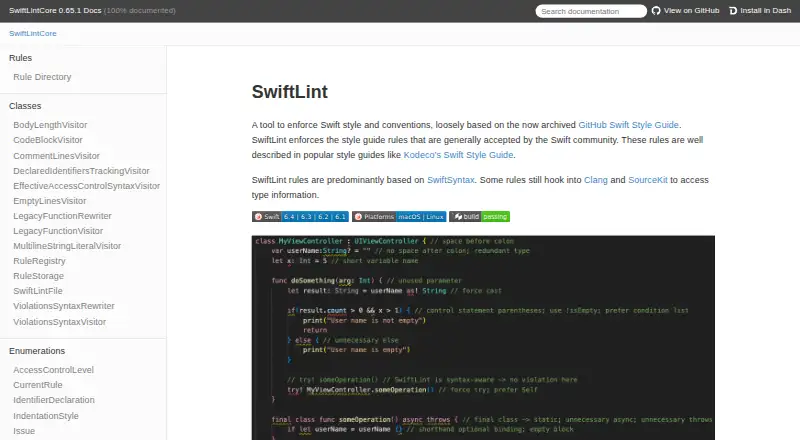
What SwiftLint is
SwiftLint checks Swift source against style rules and conventions generally accepted by the Swift community. It includes more than 200 rules, with opt-in rules disabled until a project enables them. A `.swiftlint.yml` file lets teams set active rules, included and excluded paths, and rule-specific settings. The command-line tool supports linting, analysis, baselines, rule listings and multiple reporters, and it can automatically correct some violations. Corrections overwrite affected files, so the project is intended for valid, compilable Swift code; non-compiling source can produce unexpected results, especially during autocorrection. Integrations include Xcode, Swift Package Manager, pre-commit, Fastlane, Docker, Visual Studio Code and MegaLinter. Installation options include package managers, prebuilt packages and source builds. SwiftLint should run with the same Swift toolchain used to compile the project. It supports macOS, Windows and Linux. The project is MIT licensed, maintained by volunteers, and described by its maintainers as not a commercial product.
Who it suits
SwiftLint suits Swift developers who want configurable style checks in local workflows, editors or CI. It is useful for projects with valid, compilable Swift source.
What it does well
- Includes over 200 built-in rules.
- Rules and paths can be configured per project.
- Can automatically correct certain violations.
- Integrates with Xcode and Swift Package Manager.
- Free and MIT licensed.
What to know first
- Designed for valid, compilable Swift source.
- Analyzer rules are considerably slower than lint rules.
- Autocorrection overwrites affected files.
- Should use the project’s Swift toolchain.
Limits
SwiftLint is free and open source. Its build tool plugin does not directly support configurations outside the package or project directory; analysis rules are considerably slower than lint rules.
Plans
| Plan | Billed and limits | Price |
|---|---|---|
| SwiftLint | Open-source Swift linting tool · MIT licensed | Free |
As realm.github.io lists them, read 10 Oct 2026. The maker's own page has the final word.
Getting started
- Choose an installation route such as Homebrew, CocoaPods, Mint, Bazel, Swift Package Manager, a prebuilt package or a source build.
- Configure rules, included and excluded paths, and rule settings in `.swiftlint.yml`.
- Run SwiftLint with the Swift toolchain used to compile the project.
- Connect it to Xcode, Swift Package Manager, an editor or a documented CI integration.
- Use linting, analysis, baselines, rule listings or reporters as needed.
- Use `--fix` or `--autocorrect` to apply supported corrections, which overwrite affected files.
Verdict
SwiftLint provides configurable Swift style checks across several development and CI integrations. Its source-validity and toolchain requirements matter, particularly when using autocorrection or analyzer rules.
Questions
How much does SwiftLint cost?
SwiftLint is free and open source, under the MIT license.
Which platforms does SwiftLint support?
The listed platforms are Linux, macOS and Windows. The 0.65.1 release lists a universal macOS binary, Windows binaries and installers for AMD64 and ARM64, and AMD64 Linux binaries.
Can SwiftLint fix code automatically?
Yes. It can correct certain violations with `--fix` or `--autocorrect`, overwriting the affected files.
Does SwiftLint work with Xcode and Swift Package Manager?
Yes. It supports Xcode through a build tool plugin or Run Script Build Phase, and Swift Package Manager through command and build tool plugins.
What integrations are documented?
Documented integrations include pre-commit, Fastlane, Docker, Visual Studio Code and MegaLinter, as well as Xcode and Swift Package Manager.
What Swift version does it require?
SwiftLint should run with the same Swift toolchain used to compile the project. Development tests require Swift 6.1 or higher, while Swift Package Manager plugins work down to Swift 5.9.
Facts from SwiftLint's own pages
- Analysis limitation
- SwiftLint is designed to analyze valid, compilable Swift source code, and its analyzer rules are considerably slower than lint rules. · github.com, 9 Oct 2026
- Auto-correction
- SwiftLint can automatically correct certain violations and overwrites the affected files on disk when doing so. · github.com, 9 Oct 2026
- Autocorrection
- SwiftLint can automatically fix correctable violations with `--fix` or `--autocorrect`. · github.com, 10 Oct 2026
- Built-in rules
- SwiftLint includes over 200 rules, and opt-in rules are disabled by default. · github.com, 9 Oct 2026
- CI integrations
- SwiftLint documents a Fastlane action and a Docker image, and says it is embedded in MegaLinter. · github.com, 10 Oct 2026
- Configuration
- File inclusions and exclusions can be configured in a `.swiftlint.yml` configuration file. · github.com, 10 Oct 2026
- Custom rules
- Users can define Swift custom rules, which require building with Bazel, or regex-based custom rules that official builds can run. · github.com, 9 Oct 2026
- Distribution
- The project documents installation through Homebrew, CocoaPods, Mint, Bazel, Swift Package Manager, prebuilt packages, and source builds. · github.com, 9 Oct 2026
- Editor integration
- The documentation describes integration with Visual Studio Code through the `vscode-swiftlint` extension. · github.com, 10 Oct 2026
- Install options
- The documentation lists Homebrew, CocoaPods, Mint, Bazel, a prebuilt package, and building from source as installation options. · realm.github.io, 10 Oct 2026
- Integrations
- Documented integrations include Swift Package Manager and Xcode plugins, pre-commit, Fastlane, Docker, Visual Studio Code, and MegaLinter. · github.com, 9 Oct 2026
- License
- The GitHub repository identifies SwiftLint as MIT licensed. · github.com, 10 Oct 2026
- License and commercial status
- SwiftLint is MIT licensed, maintained by volunteers in their free time, and described by its maintainers as not a commercial product. · github.com, 9 Oct 2026
- Output
- The command line supports linting, analysis, baselines, rule listings, and multiple reporters. · github.com, 10 Oct 2026
- Platform releases
- The 0.65.1 release lists a universal macOS binary, Windows installers and binaries for AMD64 and ARM64, and AMD64 Linux binaries. · github.com, 9 Oct 2026
- Plugin limitation
- The build tool plugin does not directly support configurations located outside the package or project directory. · github.com, 10 Oct 2026
- Purpose
- SwiftLint enforces Swift style and conventions based on rules generally accepted by the Swift community. · realm.github.io, 10 Oct 2026
- Rule engine
- Its rules are predominantly based on SwiftSyntax, with some using Clang and SourceKit to access type information. · realm.github.io, 10 Oct 2026
- Security consideration
- The project warns that bypassing Xcode plugin and macro validation implicitly trusts them and has security implications. · github.com, 9 Oct 2026
- Security note
- The documentation warns that disabling Xcode plugin and macro validation for unattended use bypasses validation dialogs and implicitly trusts all plugins and macros. · realm.github.io, 10 Oct 2026
- Source requirement
- SwiftLint is designed to analyze valid, compilable Swift source code; non-compiling code can produce unexpected results, especially with autocorrection. · realm.github.io, 10 Oct 2026
- Support
- The maintainers ask users to support the project by contributing, reporting issues, and helping the community, and note that volunteer time is limited. · github.com, 9 Oct 2026
- Swift Package Manager
- SwiftLint can run as a Swift Package command plugin or build tool plugin. · realm.github.io, 10 Oct 2026
- Toolchain requirement
- SwiftLint should run with the same Swift toolchain used to compile the project; its development tests require Swift 6.1 or higher, while Swift Package Manager plugins work down to Swift 5.9. · github.com, 9 Oct 2026
Where SwiftLint stands on Freedom251
- Linters#29 of 33