Freedom251 › Contractor Invoicing Software
Invoice Plus
What Invoice Plus is
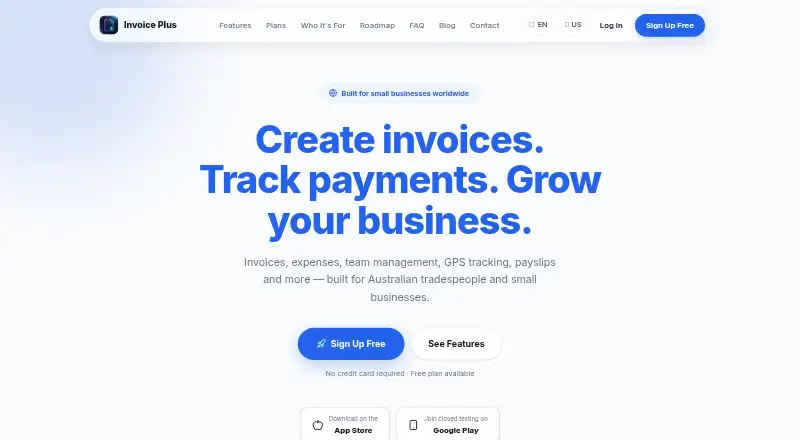
Invoice Plus is a business management app for invoices, expenses, clients, bookings, and staff management. It runs on Android, iOS, and the web, and supports creating and managing invoices with PDF export. The free Basic plan costs nothing and allows 10 invoices per month, basic expense tracking, and offline use in mobile apps. Pro costs A$14.99 a month and includes unlimited invoices, PDF export, cloud sync, reports and analytics, up to five staff, and Xero CSV export. Business costs A$29.99 a month and adds unlimited staff, GPS tracking, a live dashboard, payslips, and push notifications. Estimates and online payments are supported, while on-site payment collection is available on Pro and Business. The maker describes the app as built for Australian tradespeople and small businesses. iOS users can try the Business plan free for seven days on download. Business-plan GPS tracking is collected only during active shifts and requires device location permission. Cloud sync and backup use Supabase; the privacy policy describes TLS encryption for data sent between the app and its servers and database access controls.
Who it suits
Invoice Plus suits Australian tradespeople and small businesses managing invoices, expenses, bookings, clients, and staff. Pro and Business may suit teams that need staff tools, while Basic has a monthly invoice cap.
What it does well
- Free Basic plan includes offline mobile use
- Supports invoice PDF export
- Pro includes Xero CSV export
- Business includes staff scheduling and shift tracking
- iOS users can try Business free for seven days
What to know first
- Basic is limited to 10 invoices per month
- On-site payment collection requires Pro or Business
- GPS tracking requires location permission
- Business-plan GPS collection is limited to active shifts
Limits
Basic allows 10 invoices per month and includes basic expense tracking and offline use in mobile apps. Pro is A$14.99 a month; Business is A$29.99 a month. iOS users can try Business free for seven days on download.
Plans
| Plan | Billed and limits | Price |
|---|---|---|
| Basic | Free · 10 invoices per month · basic expense tracking · offline use in mobile apps | Free |
| Pro | $14.99 AUD/month · Unlimited invoices · PDF export · cloud sync · reports and analytics · up to 5 staff · Xero CSV export | A$14.99 a month |
| Business | $29.99 AUD/month · Everything in Pro · unlimited staff · GPS tracking · live dashboard · payslips · push notifications | A$29.99 a month |
As invoiceplusapp.com lists them, read 4 Oct 2026. The maker's own page has the final word.
Getting started
- Open https://invoiceplusapp.com/.
- Choose Basic, Pro, or Business.
- For iOS, download the app to try Business free for seven days.
- Use the web app or an Android or iOS app.
- For Business GPS tracking, allow device location permission; tracking applies during active shifts.
Invoice Plus is a business-management app for Australian tradespeople and small businesses that need invoicing alongside expenses, clients, bookings, and staff administration. It is strongest for operators wanting one system across mobile and web, while businesses with more than occasional billing will likely need a paid tier.
Overview
Invoice Plus combines invoice and estimate creation with expense, client, booking, and workforce tools. Android, iOS, and web access make it suitable for businesses that move between a desk and job sites. The free tier is genuinely usable for light activity, but its 10-invoice monthly ceiling and mobile-only offline use make it a poor long-term fit for a busier billing operation.
Key features
Invoicing and financial administration
Users can create and manage invoices, prepare estimates, export invoices as PDFs, and track expenses. Basic supplies expense tracking, but PDF export, unlimited invoices, cloud synchronisation, reports, and analytics start with Pro. That split means Basic works for a small side business or occasional contractor; regular invoicing quickly justifies the upgrade.
Staff operations
PIN-based staff access, shift scheduling, and clock-on/off tracking put everyday workforce administration beside billing. Pro supports up to five staff. Business removes the staff limit and adds payslips, push notifications, and a live dashboard, making it the more suitable tier for a growing crew rather than a solo operator.
GPS, payments, and data handling
Business GPS tracking records location only during active shifts and requires device location permission. That narrower collection is appropriate when shift-based job visibility matters, but it is a reason to avoid Business if location monitoring is unnecessary. Pro and Business support on-site payment collection; the service terms mention bank transfer, PayPal, and cryptocurrency. Pro also exports data to Xero in CSV format, a practical bridge for businesses already using Xero workflows.
Cloud sync and backup use Supabase. Data sent between the app and its servers is protected with TLS, while database access uses Row Level Security policies. The maker says it does not sell personal data or use it for advertising or AI-model training.
Pricing
| Plan | Price | What you get |
|---|---|---|
| Basic | free | 10 invoices per month, basic expense tracking, and offline use in mobile apps. |
| Pro | A$14.99 a month | Unlimited invoices, PDF export, cloud sync, reports and analytics, up to five staff, and Xero CSV export. |
| Business | A$29.99 a month | Everything in Pro, unlimited staff, GPS tracking, live dashboard, payslips, and push notifications. |
All paid plans are billed monthly at the stated Australian-dollar prices. iOS users can try Business free for seven days after downloading, giving teams a short window to assess the full staff feature set. Basic has no subscription cost, but the invoice quota is the decisive limitation. Pro is the sensible default for a small business that needs unrestricted billing and up to five staff; Business earns its higher price when unlimited staffing, payroll documents, notifications, dashboard oversight, or shift GPS are central requirements.
Platforms
Invoice Plus runs on Android, iOS, and the web. Offline use is specified for the mobile apps on Basic, while cloud sync is included with Pro and Business.
Who it's for
Choose Invoice Plus if you are an Australian tradesperson or small business seeking invoices, estimates, expenses, bookings, clients, and staff scheduling in one product. Basic suits very low-volume billing. Pro fits established small teams needing unlimited invoices and Xero CSV export. Business is for larger or more operationally managed crews. It is less suitable if you need more than 10 free monthly invoices, do not want a paid subscription for cloud features, or have no use for its staff-focused tools.
Pros and cons
Pros
- Combines invoicing, estimates, expenses, clients, bookings, and staff tools in one app.
- Pro removes the 10-invoice ceiling and adds PDF export, cloud sync, analytics, and Xero CSV export.
- Business supports unlimited staff and adds payslips, notifications, dashboard reporting, and shift-only GPS.
- Android, iOS, and web access cover both field and office work.
- TLS encryption, database Row Level Security, and a no-sale/no-advertising/no-AI-training data policy provide clear privacy commitments.
Cons
- Basic allows only 10 invoices per month, limiting its value for active businesses.
- Cloud sync and backup are paid features, so the free plan is primarily a local mobile option.
- Pro is capped at five staff; larger teams must pay for Business.
- GPS tracking requires location permission, even though collection is restricted to active shifts.
Alternatives
For a wider shortlist, browse Contractor Invoicing Software.
Invoice Ninja is the better choice when you want unlimited invoicing on its free plan, five clients, and a much broader platform range, including desktop, API, and self-hosted options.
Contractor+ suits users prioritising a free CRM with up to 250 leads and clients and up to five estimates or invoices monthly.
Invoice Home is worth considering if a free plan limited by invoice value, rather than invoice count, fits your billing pattern.
Zoho Invoice is a free alternative for Indian businesses needing up to two users, three projects, and 500 invoices annually.
Bookipi fits users who need a low-cost entry plan with up to three invoices and three eSignatures per month.
Estibill is an option for unlimited estimates and invoices with item libraries and payment schedules on its free early-access plan.
Invoicely offers a free plan with five monthly invoices, three saved clients, and PayPal-only payments.
Just Invoice provides a no-account guest generator for unlimited invoice PDFs, with business details and line items re-entered each time.
Verdict
Invoice Plus is a good fit for Australian tradespeople and small businesses that want invoicing tied directly to expenses, bookings, and staff administration. Choose Pro for unlimited billing and a small team; choose Business when workforce controls and shift GPS justify the extra cost. Look elsewhere if your priority is a more generous free invoice allowance or a specialist invoicing tool without paid staff tiers.
Verdict
Invoice Plus combines invoicing and business administration, with a free plan and paid staff-focused tiers. Check Basic’s invoice cap and the conditions for Business GPS tracking when choosing a plan.
Questions
Is there a free plan?
Yes. Basic costs nothing and allows 10 invoices per month, basic expense tracking, and offline use in mobile apps.
What do the paid plans cost?
Pro costs A$14.99 a month. Business costs A$29.99 a month.
Is there a free trial?
Yes. iOS users can try the Business plan free for seven days on download.
Which platforms does Invoice Plus support?
It is available on Android, iOS, and the web.
Does Invoice Plus support on-site payments?
Yes. On-site payment collection is supported on Pro and Business plans. The app’s terms mention bank transfer, PayPal, and cryptocurrency.
Who makes Invoice Plus?
The maker lists [email protected] as its contact email. Its headquarters are in Victoria, Australia.
Facts from Invoice Plus's own pages
- Audience
- The maker describes Invoice Plus as a business management app and its plans page says it is built for Australian tradespeople and small businesses. · invoiceplusapp.com, 4 Oct 2026
- Cloud sync
- Cloud sync and backup use Supabase. · invoiceplusapp.com, 4 Oct 2026
- Data use
- The maker says it does not sell personal data or use it for advertising or AI model training. · invoiceplusapp.com, 4 Oct 2026
- GPS
- Business plan GPS tracking is collected during active shifts only and requires device location permission. · invoiceplusapp.com, 4 Oct 2026
- Headquarters
- Victoria, Australia · invoiceplusapp.com, 28 Sept 2026
- Integration
- Pro includes Xero CSV export. · invoiceplusapp.com, 4 Oct 2026
- Invoicing
- The app supports invoice creation, management, and PDF export. · invoiceplusapp.com, 4 Oct 2026
- Payments
- The app supports on-site payment collection on Pro and Business plans; its terms mention bank transfer, PayPal, and cryptocurrency. · invoiceplusapp.com, 4 Oct 2026
- Product
- Invoice Plus is a business management app for invoices, expenses, clients, bookings, and staff management. · invoiceplusapp.com, 4 Oct 2026
- Security
- The privacy policy says data sent between the app and its servers uses TLS encryption and database access is protected by Row Level Security policies. · invoiceplusapp.com, 4 Oct 2026
- Support
- The maker lists [email protected] as its contact email. · invoiceplusapp.com, 4 Oct 2026
- Team tools
- Team features include PIN-based staff access, shift scheduling, and clock-on/off tracking. · invoiceplusapp.com, 4 Oct 2026
- Trial
- The homepage says iOS users can try the Business plan free for 7 days on download. · invoiceplusapp.com, 4 Oct 2026
Where Invoice Plus stands on Freedom251
- Contractor Invoicing Software#12 of 28