Freedom251 › Financial Literacy Apps

InvestLearning
What InvestLearning is
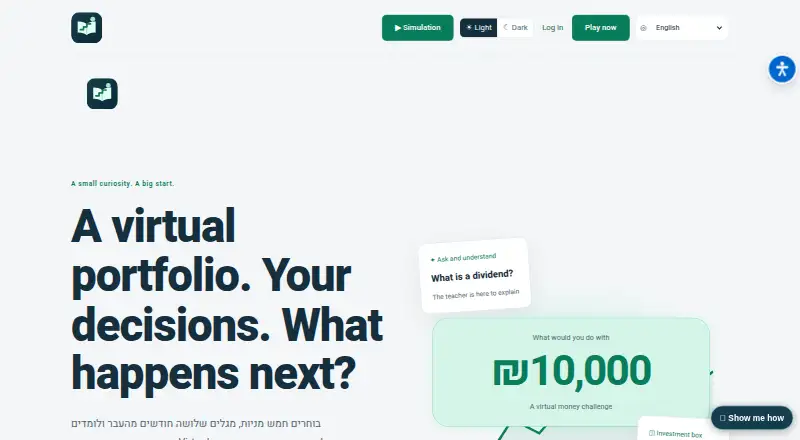
InvestLearning is a web-based financial education and practice site, not a broker or real-money trading service. Its 65 short lessons cover topics from percentages and interest to stocks, funds, and crypto. Learners can tap concepts within a lesson for an AI teacher's explanation, and narration is available on supported devices. An investment simulator provides practice buying and selling with virtual money over historical periods; its results do not predict future returns. The free Money Lab includes calculators for compound growth, leverage, historical growth, tax, VAT, mortgages, and housing budgets. Public guides and tools work without an account, while an account saves progress and answers. The learning path is mainly for ages 13–18 and adult beginners, with younger children learning alongside a parent or teacher. Users under 18 need parental email consent, based on email access and a declaration rather than identity-document verification. Printable worksheets are available for educators. Translations use AI assistance, and complete professional human review in every language is not documented.
Who it suits
InvestLearning suits teenagers, adult beginners, and educators looking for financial lessons and practice tools. Younger children can use it alongside a parent or teacher.
What it does well
- 65 lessons cover foundational and investing topics.
- Free Money Lab includes multiple financial calculators.
- Simulator uses virtual money, not real deposits or withdrawals.
- Public guides and tools work without an account.
- Educators can print worksheets without student accounts.
What to know first
- AI teacher use is limited and depends on service availability.
- Under-18 users require parental email consent.
- Complete professional human review of every translation is not documented.
Limits
The Free plan costs nothing and includes lessons, calculators, the investment simulator and AI teacher. AI teacher usage is limited and depends on service availability.
Plans
| Plan | Billed and limits | Price |
|---|---|---|
| Free | Lessons, calculators, investment simulator and AI teacher; AI teacher has usage limits and depends on service availability | Free |
As investlearning.online lists them, read 2 Oct 2026. The maker's own page has the final word.
Getting started
- Open the InvestLearning website in a web browser.
- Use public guides and tools without creating an account.
- Create an account to save progress and answers.
- If the learner is under 18, arrange parental email consent.
- Use printable worksheets for educator-led sessions.
Verdict
InvestLearning combines lessons, calculators, and historical-period simulation without real-money trading. Learners and educators should note the consent requirement for minors and the stated limits on AI teacher availability and translation review.
Questions
How much does InvestLearning cost?
The Free plan costs nothing.
Can I use InvestLearning without an account?
Yes. Public guides and tools work without an account; an account saves progress and answers.
What platforms does it support?
InvestLearning is available on the web.
Does InvestLearning support real-money investing?
No. Its simulator uses virtual money, with no real-money deposits or withdrawals.
Who operates InvestLearning?
The site identifies M.L. First Class Marketing as its operator.
What consent do learners under 18 need?
They need parental email consent based on email access and a declaration, rather than identity-document verification.
Facts from InvestLearning's own pages
- Account limits
- Public guides and tools work without an account; an account saves progress and answers, and users under 18 require parental email consent. · investlearning.online, 2 Oct 2026
- AI teacher
- Learners can tap a concept for an explanation within a lesson, and narration is available on supported devices. · investlearning.online, 2 Oct 2026
- Audience
- The learning path is primarily for ages 13–18 and adult beginners; younger children can learn alongside a parent or teacher. · investlearning.online, 2 Oct 2026
- Consent detail
- The site says parental consent relies on email access and a declaration, not identity-document verification. · investlearning.online, 2 Oct 2026
- Economic news
- The site describes economic headlines in Hebrew from Israeli sources, with links and concepts for learning. · investlearning.online, 2 Oct 2026
- Educator resources
- Worksheets can be printed without student accounts, and the site suggests a 30–40 minute learning session. · investlearning.online, 2 Oct 2026
- Investment simulator
- The simulator lets learners practise buying and selling with virtual money using historical periods; its results do not predict future returns. · investlearning.online, 2 Oct 2026
- Lessons
- The site lists 65 short lessons covering topics from percentages and interest to stocks, funds and crypto. · investlearning.online, 2 Oct 2026
- Money lab
- The free Money Lab includes tools such as compound growth, leverage, historical growth, tax, VAT, mortgage and housing budget calculators. · investlearning.online, 2 Oct 2026
- No real-money trading
- Simulation funds are virtual, with no real-money deposits or withdrawals. · investlearning.online, 2 Oct 2026
- Operator and support
- The site identifies M.L. First Class Marketing as its operator and lists [email protected] for content, service or problem inquiries. · investlearning.online, 2 Oct 2026
- Purpose
- InvestLearning is a financial education and practice website, not a broker or real-money trading service. · investlearning.online, 2 Oct 2026
- Translation note
- The site says translations use AI assistance and that complete professional human review in every language has not been documented. · investlearning.online, 2 Oct 2026
Where InvestLearning stands on Freedom251
- Financial Literacy Apps#13 of 25